3 Dot Menu Selections for the Income section of the Spending Plan

From time to time, I will click around in Simplifi checking things out. Often, I'll do this when reading some of the discussions in this forum. This morning, the Income section of the Spending Plan was being discussed in one discussion thread and being curious, I clicked on the 3 dot menu at the top of the Spending Plan Income page and found this:
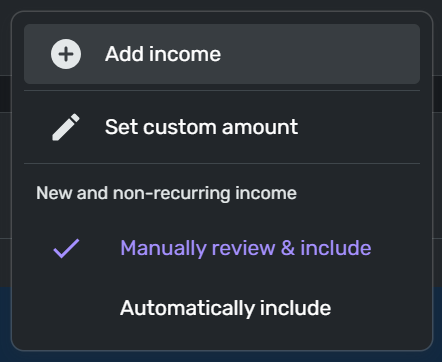
I don't remember the seeing the "New and non-recurring income" selections (not that I have spent much time viewing or reviewing this particular menu).
I didn't spend a lot of time looking for insights into this in the Support pages or do any search in the forum for information on the Manually vs. Automatically choices, but I am wondering how others may use these two selections.
Mine was defaulted to "Automatically include" but I have switched it to "Manually review & include" to see what happens next time I make an unscheduled "income" deposit which happens from time to time, and QS always includes as income when the transaction is downloaded.
Simplifi user since 01/22
”Budget: a mathematical confirmation of your suspicions.” ~A.A. Latimer
Comments
-
@DannyB, a change was made recently to automatically exclude all non-recurring income from the Spending Plan. The "Automatically include" option in the menu will disable this, so all income gets included automatically. The "Manually review & include" means you will have to manually include each transaction, as it will be excluded by default.
I hope this helps shine some light!
-Coach Natalie
1 -
Thanks @Coach Natalie. The one Support Article that I found that did show the selections under the 3-dot menu for Income still shows the old menu selections.
How Do I Set a Custom Income Amount in the Spending Plan? | Quicken Simplifi Help Center
Danny
Simplifi user since 01/22
”Budget: a mathematical confirmation of your suspicions.” ~A.A. Latimer0 -
@DannyB, no problem!
This article was updated with the new design:
I will put in a content request to have the article you linked above updated, so the visuals are accurate!
-Coach Natalie
1 -
In the last line-of-business application I created before I retired completely I followed some simple guidelines in creating the documentation.
— Following what was then a common practice, there was a section in the docs entirely devoted to the menu structure where the function of each option (even if obvious) was described.
— Context menu options were usually described in the section of the docs that dealt with the window, panel, or item that raised such context menu.
— And finally, all menu options (including context menus) had brief tooltip explanations that appeared when you hovered the mouse over the option.
I think Simplifi could benefit from following similar guidelines. I understand that it is time-consuming to create and maintains such docs, but it is helpful to the users… particularly new users.
DryHeat
-Quicken Classic (1990-2020), CountAbout (2021-2024), Simplifi (2025-…)1 -
I received some non-recurring income today and have deposited it into my checking account.
I expect it to clear tonight and tomorrow I will see how QS handles this deposit since I have selected to "Manually review & include" new and non-recurring income.
Danny
Simplifi user since 01/22
”Budget: a mathematical confirmation of your suspicions.” ~A.A. Latimer0

