Watchlist amounts are incorrect (edited)

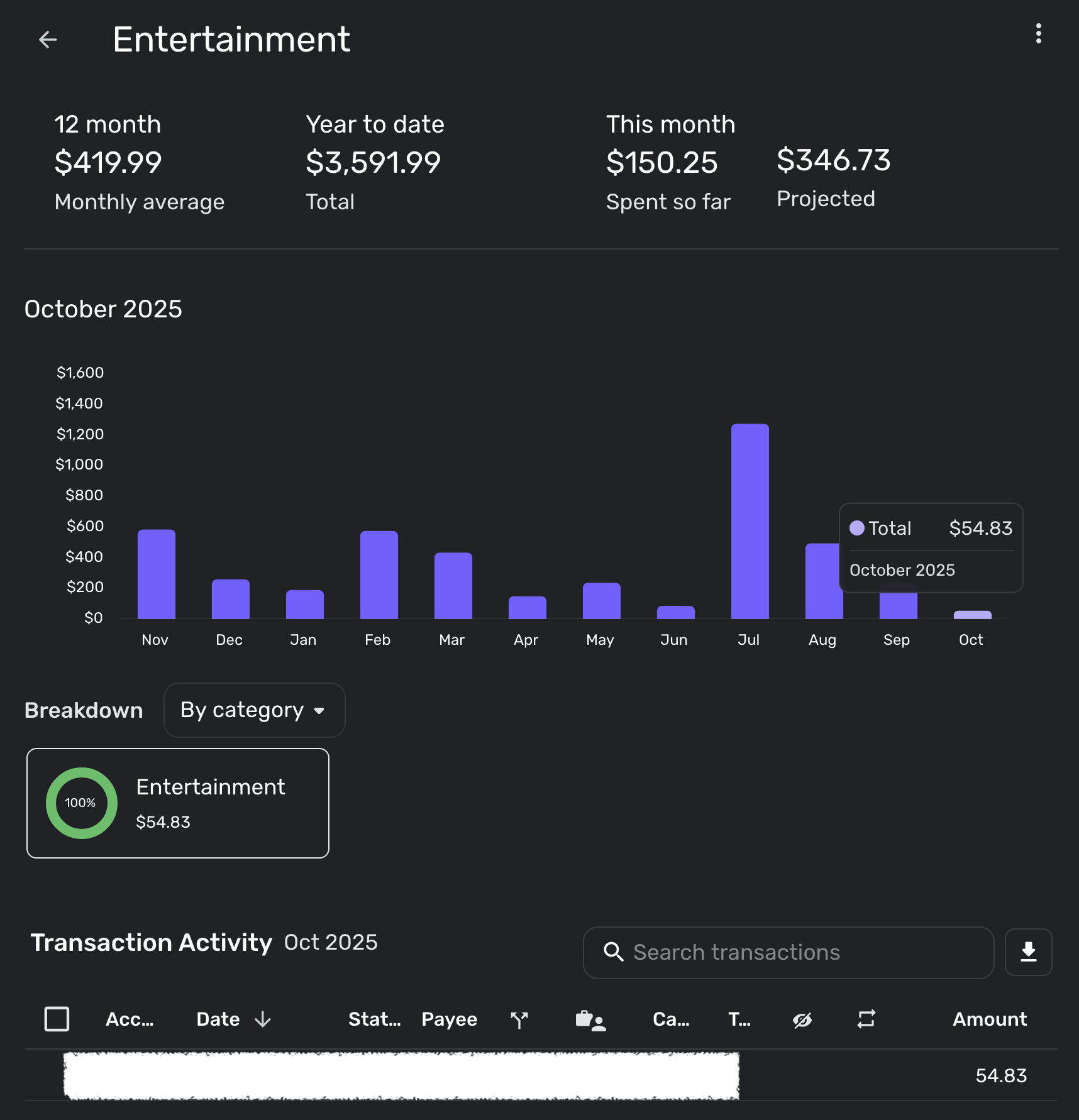
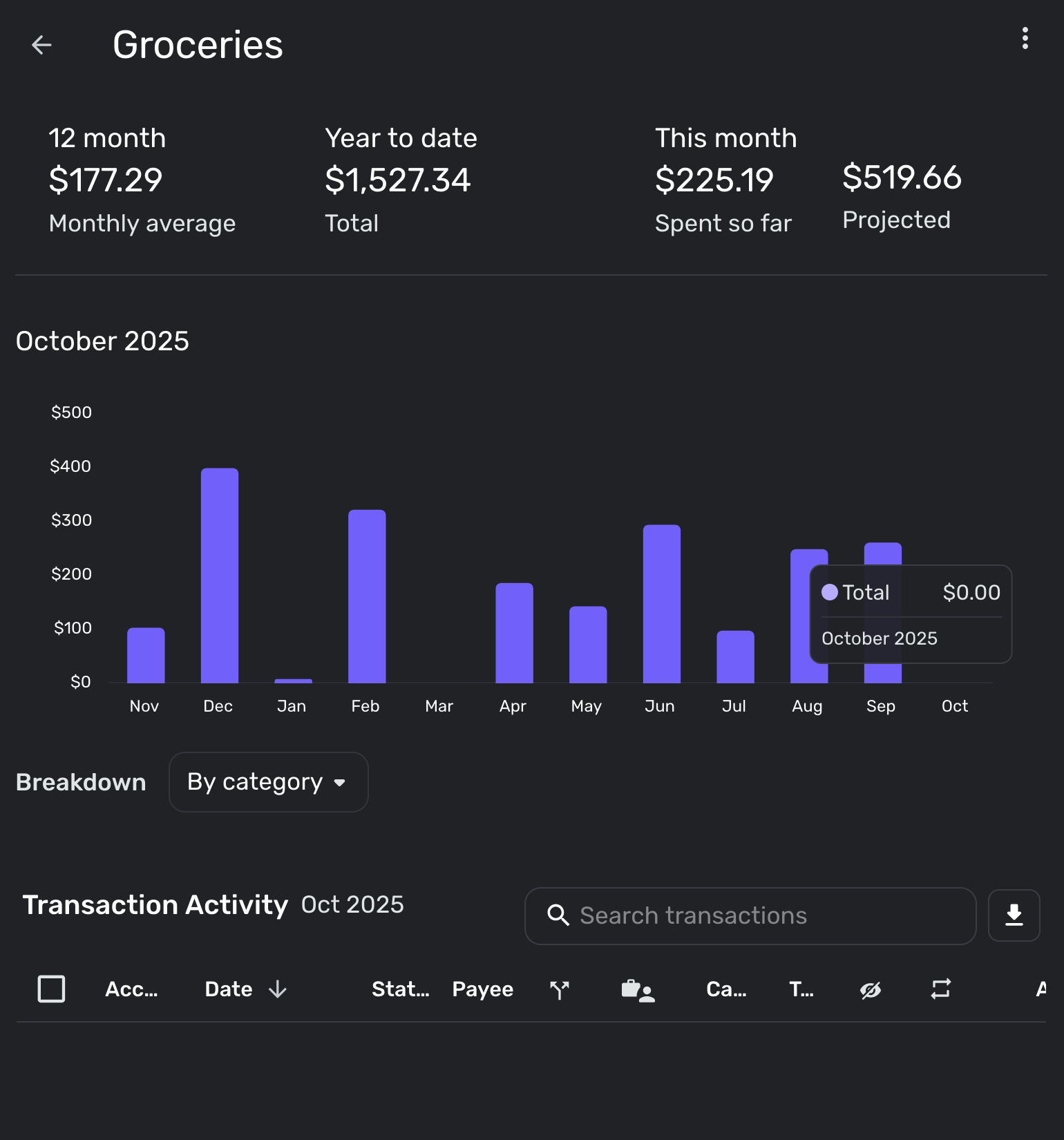
In a number of my watchlists, the number under "Spent so far" for the month is wildly incorrect. This is not due to upcoming spend - I do not have any planned spending in these categories. For instance, in the attached, I have spent $50.83 for entertainment for the month, but the "Spent so far" reads $150.25. In the other example, I have no transactions so far on groceries for the month but "Spent so far" is $225.19
Comments
-
It's not necessarily planned spending, but it might be 'recurring' 'entertainment' expenses, which is essentially already spent (you 'know' you're going to spend recurring charges).
-Rob
—
Rob Wilkens
0 -
I don't know if this applies to your situation, but …
I checked one of my Watchlists and found that the amount "Spent so far" included not only the existing transactions related to the Category but also all of the related upcoming Recurring Reminders for the month.
So, I have spent $720 in the category, upcoming reminders total $1250, and the "Spent so far" shows $1970.
This fits with the way the Spending Plan counts upcoming Reminders against your income to predict how you will end up for the month. But calling it "Spent so far" seems misleading.
DryHeat
-Quicken Classic (1990-2020), CountAbout (2021-2024), Simplifi (2025-…)0 -
Neither of these applies my situation. I don't have any recurring expenses or reminders in these categories/watchlists, nor planned spending in spending plans.
0 -
Hello @sidewalkboots,
Thanks for reaching out! The "This month" amount displayed for Watchlists is calculated by using the transactions that have already occurred during the month, as well as any upcoming Reminders for the month. I know you said you do not have any Reminders for these categories, but I would definitely have you verify to make sure.
We also have a couple of idea posts for this topic that you may be interested in voting for:
-Coach Jon
-Coach Jon
0 -
These are fine but, as I said, and as my screenshots show, I do not have any Reminders for these. This is a bug to be fixed. I am glad to provide additional detail to identify the source of the error.
0 -
Hello @sidewalkboots,
Thanks for the reply. Does creating new watchlists with the same categories show the same "This month" amount? Are only these two watchlists affected by this issue? Let us know!
-Coach Jon
-Coach Jon
0 -
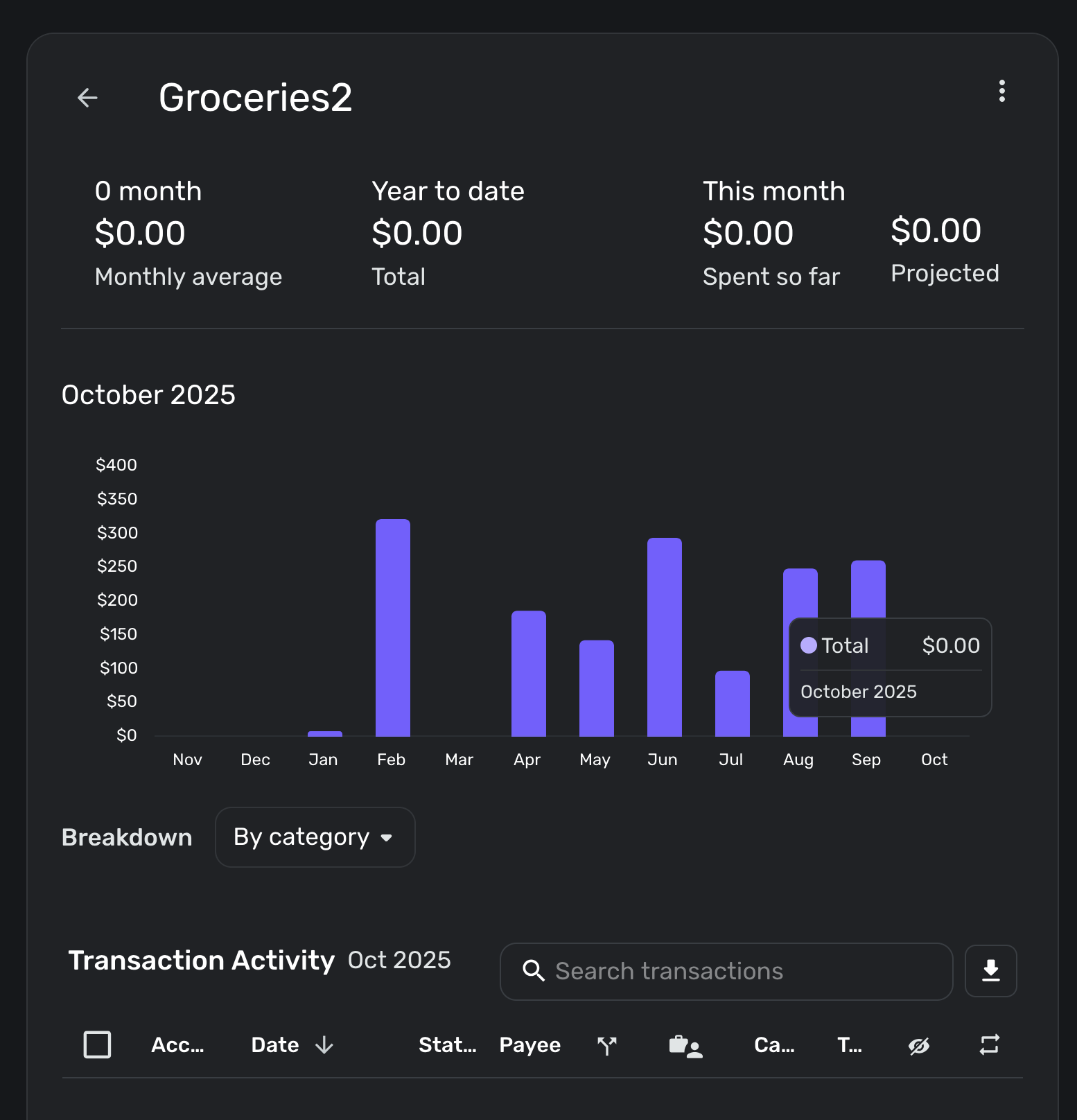
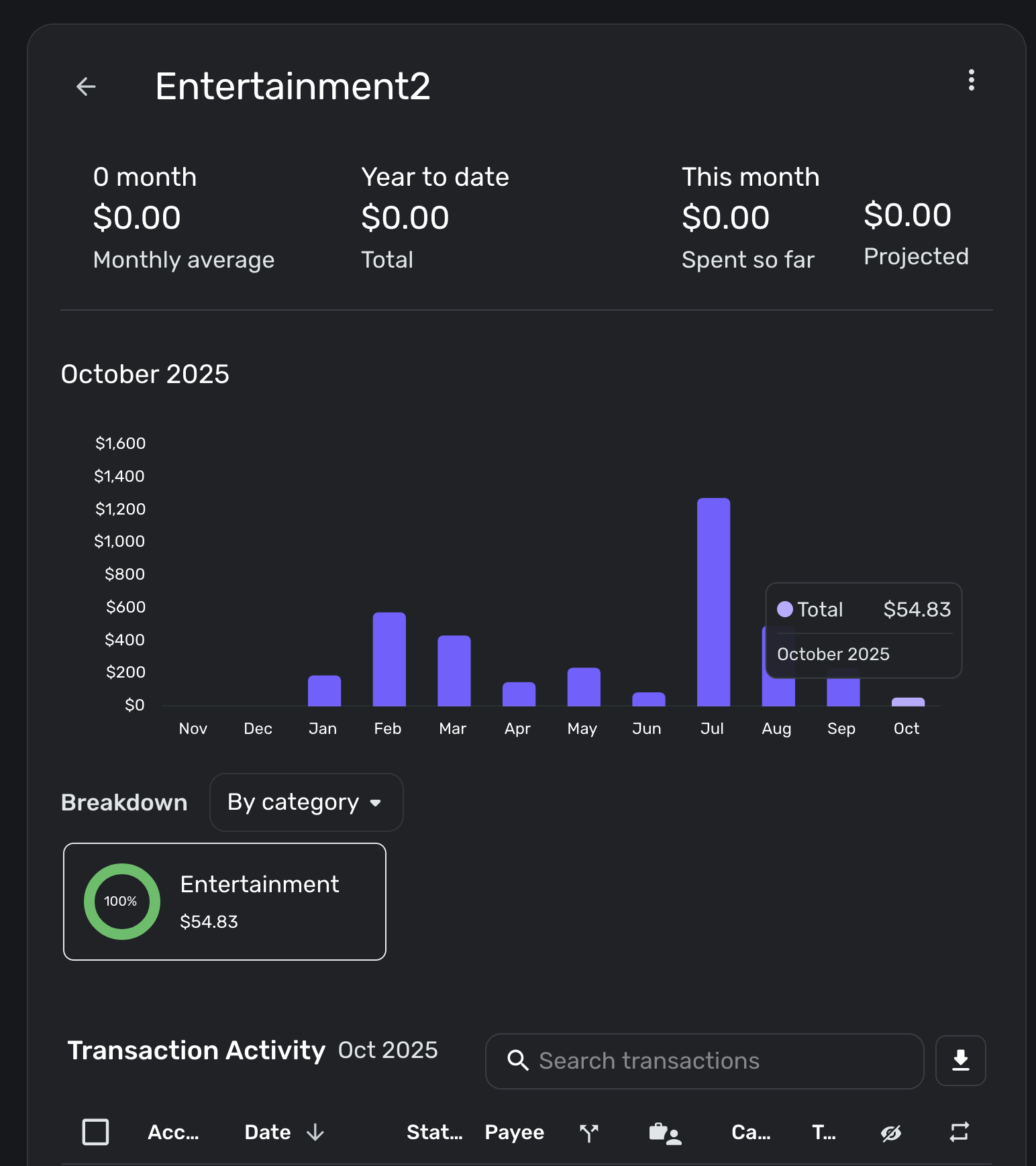
When I create new watchlists with the same categories, they have $0 for all values (montly average, year-to-date, so far this month, projected). This isn't right in either case. Not sure if they will take some time to populate.
These are not the only watchlists affected, but the simplest cases I could display. Almost all of them are off, some being high and some being low. The only accurate ones are a couple that have $0 for $0 spent. In one case this had $0 the previous month as well, in another just one purchase in the previous month.
0 -
Hello @sidewalkboots,
Thank you for the information. Can you provide a screenshot of the newly created watchlist, showing the $0 value, so that we may have a comparison for the original watchlist of that category? Additionally, are these values the same if you log in to Quicken Simplifi in another web browser/incognito mode or the mobile application? I cannot replicate this issue from my side, which is why I ask.
-Coach Jon
-Coach Jon
0 -
Yes, here are screenshots. These values and the ones above are the same when I log in separately in incognito mode, and in both Firefox and Chrome.
 0
0 -
Hello @sidewalkboots,
Thank you. Can you include the Transaction Activity register below the graph in your screenshots? Feel free to DM me personally for privacy reasons if you prefer.
-Coach Jon
-Coach Jon
0 -
Hello @sidewalkboots,
Thank you for the requested information you sent via DM. I can see via the screenshot that the issue is still occurring for you. Can you please provide all of the watchlist categories that are currently affected by this issue? Does this issue also show up in the mobile application? Finally, what operating system, web browser, and their respective versions are you using?
We will also need logs to be submitted:
- Log in to the Quicken Simplifi Web App.
- Select Profile from the left-hand navigation bar.
- With the Profile menu open, hold down the Option key for Mac or the Alt key for Windows, and then click Send Feedback.
- Leave all boxes checked, add a brief description of the issue, and then click Send.
-Coach Jon
-Coach Jon
0 -
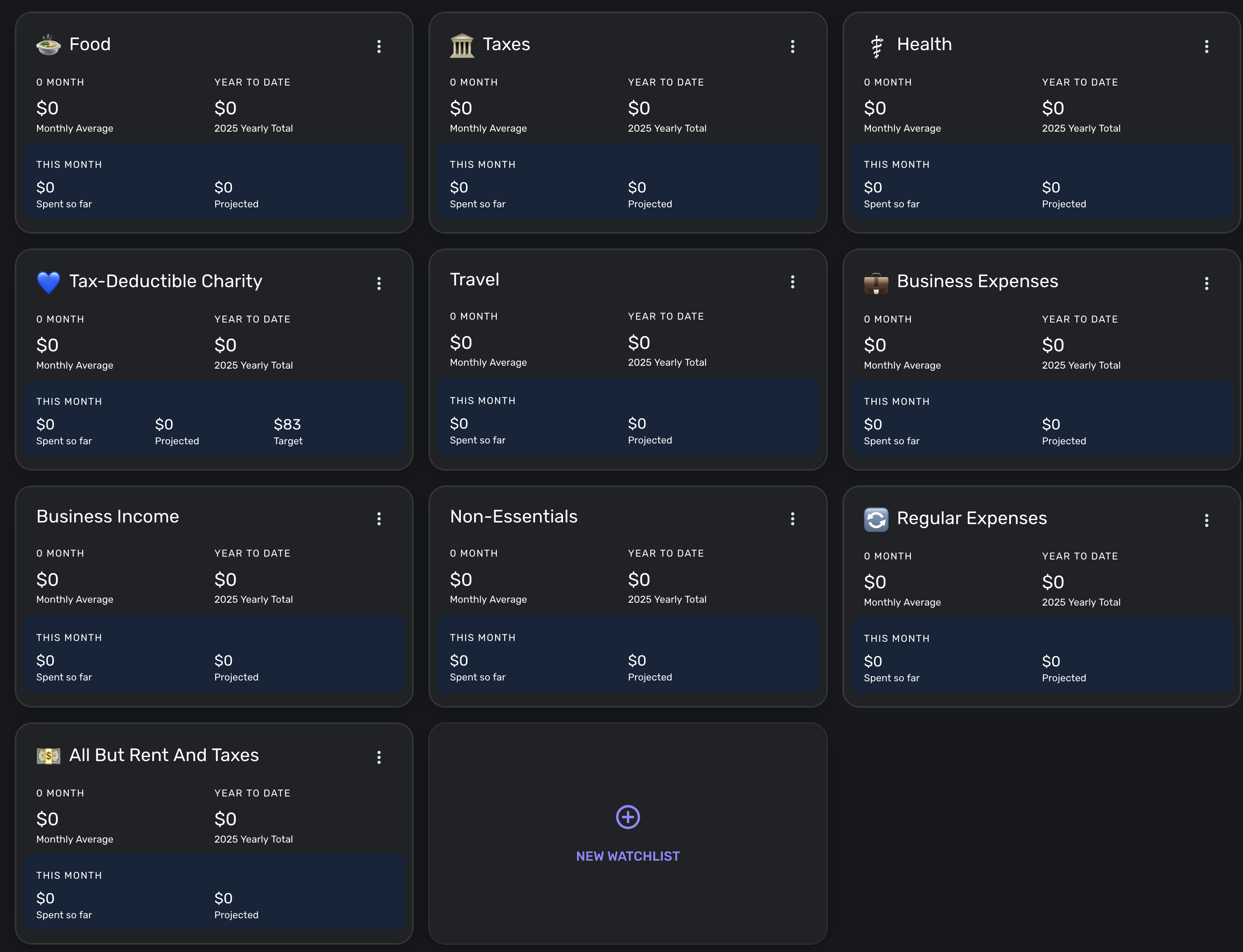
I sent logs with a summary. This currently occurs for all my Watchlists - I deleted and re-created them, and they all read $0. I'm running on Firefox 145.0.2, on macOS 26.1, but this also occurs on the (Android) mobile app or Chrome on macOS.
 0
0 -
Hello @sidewalkboots,
I was able to get this reported to our product team and will be sure to follow up here with any updates going forward!
Thank you for your patience!
-Coach Jon
SIMPL-30887
-Coach Jon
0 -
Hello @sidewalkboots,
I am back with an update from our product team. They have released a fix and would like you to check if you can now create watchlists that have the correct amounts. Let us know!
-Coach Jon
-Coach Jon
1 -
Yes, my existing watchlist numbers updated to the right values, and when I created a new watchlist it was correct, too. Thank you!
2 -


