Unable to go back to prior months in the Spending Plan in new Space (edited)

I am a new customer as of last month. I also created 2 workspaces for myself and my partner.
In my workspace, I was able to get the spending plan to go back historically — unsure how I did this — But I know that I went thru all my income YTD, and linked it to the paycheck series.
We did this in the second workspace as well, but the spending plan does not allow me to go back to prior months.
What am I doing wrong? This app is so confusing to setup! Thank you!
Comments
-
@lynchbro — "I was able to get the spending plan to go back historically"
Are you saying that you are able to page back through the Spending Plan (using the button highlighted below) to view months that are before the month when you first subscribed to Simplifi?

I ask because I subscribed in February and, as you can see from the image below, the "previous month" button for February is greyed out. I cannot page back any farther than the month I first subscribed.

It seems more likely that you went back through the Transaction Activity lists for the relevant accounts and linked your income transactions to the series. Could that be what happened?
DryHeat
-Quicken Classic (1990-2020), CountAbout (2021-2024), Simplifi (2025-…)0 -
Yes, I am able to navigate back in months prior to the subscription start date (September 2025) in one workspace and not the other. And I did the linking of recurring income paychecks for the entire year of 2025 in both spaces.
0 -
In the original workspace, spending plan allows me to go back to October 2024. But any new space created, it only allows as of the month it was created in.
0 -
I am able to navigate back in months prior to the subscription start date (September 2025) in one workspace and not the other.
That's interesting. I wonder if it is working that way for other folks and just not for me. I've seen discussions before saying that Spending Plan only starts the month you subscribe. And it seems to say that in the docs:
"The Spending Plan begins the same month as your Quicken Simplifi subscription start date and is not retroactive."
Can you post an image of your Spending Plan for one of the months before you subscribed? An image like the one below showing a date before subscription might get the attention of one of the coaches and get some more helpful responses. (You can block out personal information like I did.)
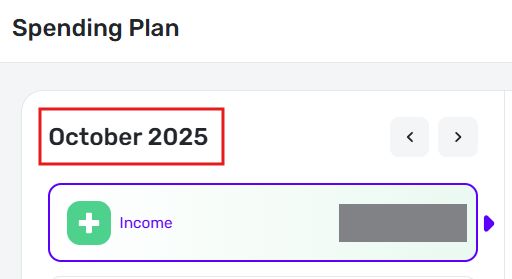
EDIT: If this is something that can be turned on, I'd like to have it. It would be great to be able to go back and apply my Spending Plan setup to last year and see how it would have turned out.
DryHeat
-Quicken Classic (1990-2020), CountAbout (2021-2024), Simplifi (2025-…)0
