Advanced Transaction Rules: Share your feedback here!

With the recent enhancements made to Transaction Rules, we want to hear from you! Let us know what you think, or of any issues you encounter, by commenting below.
Here is the announcement outlining this enhancement:
-Coach Natalie
Comments
-
Love to see this added!
I have two additional component ideas that would make it even better:
Additional IF:
- Date
- On or around a certain day of month, day of week, etc (the Frequency & Occurrence tab when creating a new Recurring Series has all the options one would need)
Additional THEN:
- Link to Recurring Series
- Link to the current upcoming or unpaid reminder within a certain Recurring Series
1 - Date
-
Two more thoughts:
Additional THEN:
- Split Transaction:
- Set Amount (exact or percentage), Category, Tags
Ability to order rules in case you want some rules to be evaluated before others.
0 - Split Transaction:
-
Question regarding the advanced rules. I've configured a rule that just adds a tag to transactions, but I noticed that other rules aren't running, specifically the ones that rename the payee. This is causing the tags to be added, but the payee names aren't being changed. Is there a way to ensure rules continue to be evaluated and aren't stopped after the first match?
0 -
@shamil, thanks for posting!
When looking at the Create Rule form, there are "if" conditions that you can tell Quicken Simplifi to identify in your transactions, as well as "then" conditions that are applied to the transaction. You can set both a Payee and a Tag change within the same Transaction Rule. Have you given this setup a try?
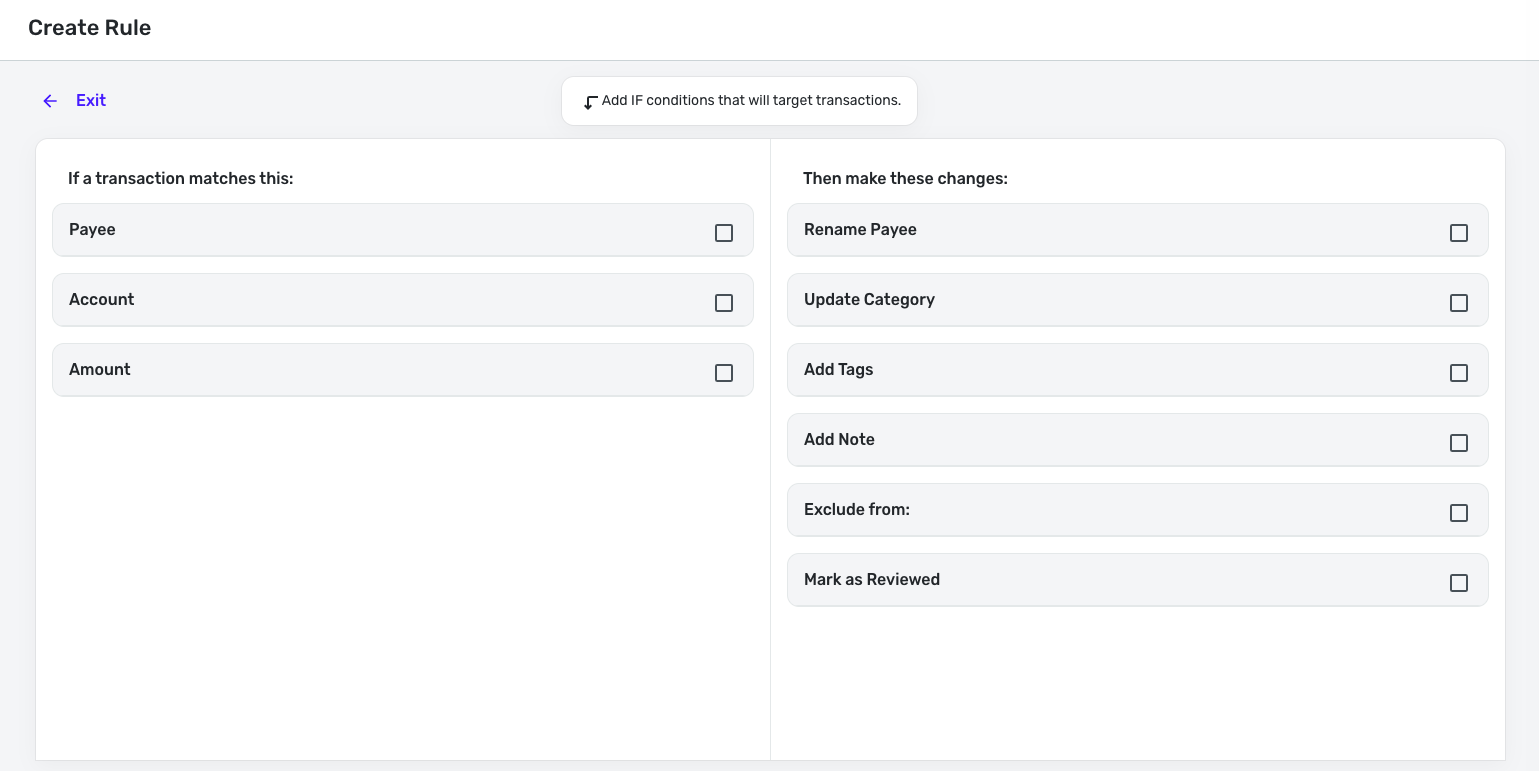
Let us know how things go!
-Coach Natalie
0 -
Created a rule for some Apple Card transactions but Simplifi won’t apply them even though they show in the preview once I hit apply the transactions don’t update.
0 -
@housetr, thanks for letting us know!
So our product team has a clear picture of what you're seeing, please provide screenshots showing the transactions in question and the way you are setting up the associated rule.
-Coach Natalie
0 -
Advanced Transaction Rules are now live to all of Early Access!
-Coach Natalie
0 -
I could really use a "never rename" and "never categorize" option. I have a few payees that when I use Google Pay, Simplifi ignores my rules, and insists on renaming them "Google". I have multiple rules that apply to these transactions that should rename them to the vendor name. I have zero rules that rename any transaction as "Google", but for some reason these transactions are always renamed "Google". Buying gas with Google Pay at Shell stations is a particular one, but there are others as well. So it would be nice to just prevent anything from being renamed just "Google".
0 -
I've set up separate rules. The tag rule is applied more broadly, since it matches more general transactions. The other rules, where I perform actions like renaming the payee, apply to a much narrower scope. This approach reduces repetition and allows me to apply the tag regardless of other transaction rules. However, the system currently stops at the first match, preventing subsequent rules from running. As a result, matched transactions only receive the added tag and miss other actions from other rules.
0 -
@shamil, thanks for the reply!
I think sharing some specific examples with screenshots would help our product team better visualize your setup. For now, however, I have reached out to inquire on whether the system is designed to stop searching for additional rules after applying a rule.
-Coach Natalie
0 -
I set up a couple of new rules yesterday, and today when I went to Walmart to buy gasoline, Simplifi did change payee to Walmart, categorize correctly, put in the tag I wanted and marked the transaction reviewed. Very nice!
But, Walmart as usual pulled a switch. They keep changing what they send to my bank, so the other transaction I had inside the store got marked as gasoline too. Up until today the Gas Station said WM Supercenter Store #2500 and the Neighborhood market that last week was something like Wal Mart Wal-Mart was now the same thing.
LOL. Because it isn't a Super Walmart; there are two of those in town along with 3 neighborhood Walmart markets. All five sell gasoline too. It all depends on what Walmart terminal decides to send. I had to split the inside store stuff anyhow so I just overrode the category and cleared out the tag. I'll leave it alone for now. Besides, next week it will probably say something different.
Simplifi cannot fix what the merchant does. BTW, regular gasoline at Walmart this morning in Tuscaloosa was $2.369 per gallon. I could have saved another nickel using their dumb app. Shell was still $2.559.
Steve
Quicken Simplifi (Safari & iOS) Since 2021
Quicken Classic (MacOS) Since 2009
MS Money (1991-2009) and Dollars & Sense (1987-1991)0 -
Our Wal-Mart Neighborhood market recently renamed to Wal-Mart New York Market. They were originally using our neighborhood market to try to develop AI-Based automatic checkout - they called it "Intelligent Retail Lab" (IRL) and here's an article — this store is like 1/4 mile from my home (easy walking distance)
But about the time the Amazon markets revealed they couldn't really do that (they had foreigners watching the cameras and generating the invoices, not computers), Wal-Mart gave up and tore all that equipment out. I think they're still finishing up cleaning up the store.
I think Wal-Mart's neighborhood markets are still something wal-mart is figuring out what to do with, because they're different than what most people think of with Wal-Mart. Prices are great, though, and decent quality products (I had a wal-mart 'great value' store brand breakfast sandwich this morning after fasting for 12 hours for the blood test this morning).
Simplifi will probably continue to get "evolving" names for the various wal-marts. Also, I didn't have one, but Wal-Mart recently went from a capitalOne store card to some new store card (it was advertised all over the store this past week - I think they call it OnePay or something like that — and changing credit card providers probably also changes the credit card processing services that wal-mart uses, causing these issues.
-Rob
—
Rob Wilkens
0 -
@RobWilk Yes, they are evolving, good prices, and this one is very close to me. I go at 6am and am home by 630 before school traffic or a lot of people out though still many working people are headed to work then.
Walmart has to do everything their way so they get the fees, so no Apple Pay or Google Pay. They have their clunky Walmart Pay. You have to open the app and take a picture at the pump (or self checkout), and then pay through the app. You can use any card you want with Walmart Pay, but One Pay is their latest gambit to counter Amazon with a 5% back if you are a Walmart+ member. No thanks!
They still have their Walmart branded Mastercard, for now. I have avoided this so far and just stick in my debit card.
Edit: Onepay is its own site and uses Mastercard branded cards, a credit card and a debit card, but I think it is owned or at least partly owned by Walmart and very closely tied to it. So you are probably right that Walmart has rebranded its Walmart card.
Steve
Quicken Simplifi (Safari & iOS) Since 2021
Quicken Classic (MacOS) Since 2009
MS Money (1991-2009) and Dollars & Sense (1987-1991)0 -
Hi there @shamil
You are correct that we only apply one rule to a transaction. We can imagine letting you order rules and have more than one apply, but that is a future iteration (and likely after other things in flight).
There might be a way to get your desired changes within the current system but I do understand it's not how you want things to work. Happy to talk about it anytime, just message me. Thanks SO much for trying Rules and sharing your feedback.0 -
@housetr We would love to look into your issue (and fix it) if you can message me the details. Thanks!
0 -
@cdorsi Very interesting suggestion! I can see the benefit. Another thing I've been thinking about is just letting you show the 'statement name' instead of the rationalized name. Would you want this for all your accounts? Would it make sense to just be able to add it as a column in your register? Or would you want to have it as a Setting?
In this screenshot, the 'statement name' is "AMAZON MARK* NJ…." and the rationalized name is "Amazon."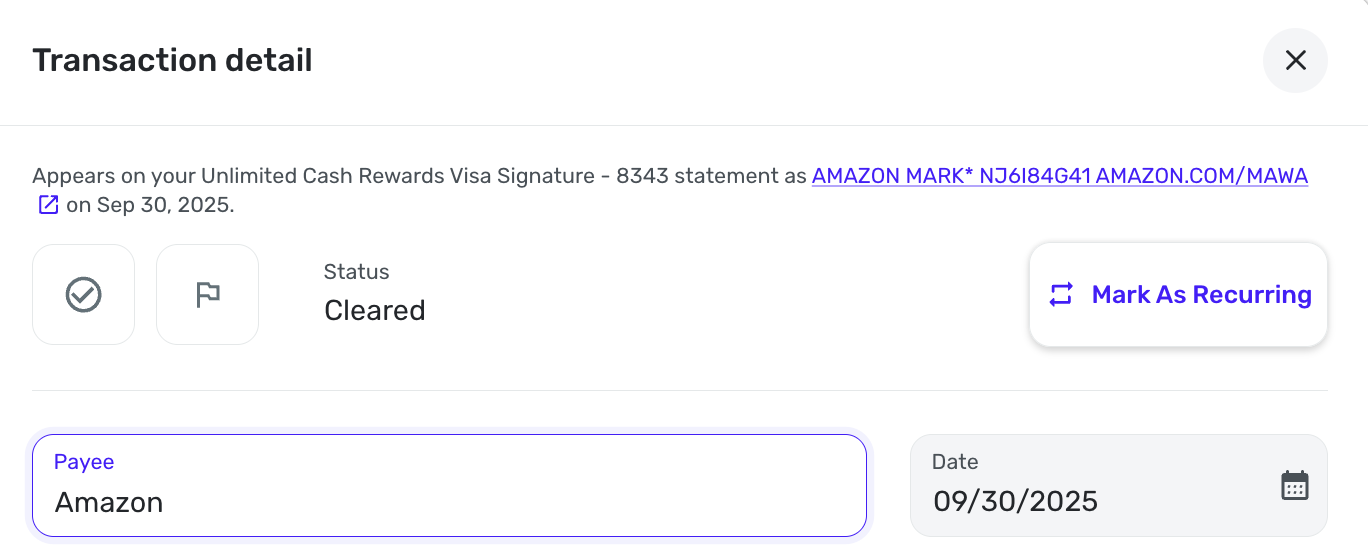
And, you are not the first person to suggest that they'd rather do all their categorization and want everything to start as uncategorized. Is this what you'd want, again as a Setting?0 -
Today was the first day I've logged in with the new feature enabled and I wanted to give it a try. I haven't seen one in action yet, but I did notice that the create rule screen was inconsistently defaulting some of the checkboxes. Here's what I believe I did in this order:
- Clicked +Rule from the Rules settings page to preview what the new options looked like
- Clicked the Exclude From box to view those expanded options
- Cancelled out of the new rule setup menu
- Chose Edit on an existing rule
- The Exclude From box I'd checked in the previous window before cancelling defaulted to checked like instead of defaulting to unchecked/collapsed. I expected this to be collapsed initially when opening an existing rule.
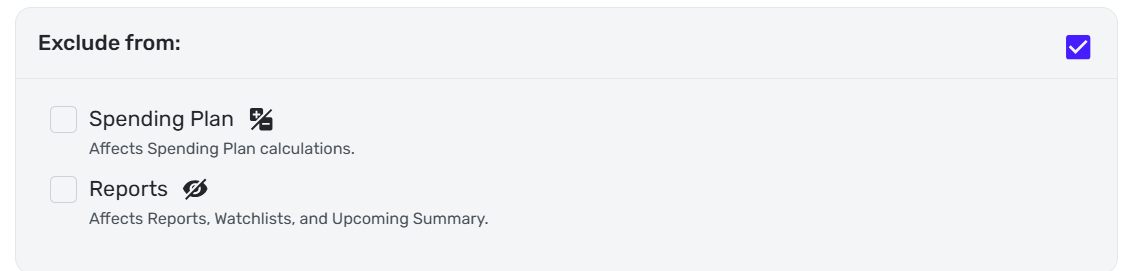
- Added a tag rule to the existing rule
- The Apply to past transactions was unchecked (as desired)
- Created rule
- Edited another existing rule
- Same experience as above up until the Apply to past transactions screen
- This time the Apply to past transactions box was defaulted to checked (NOT desired)
- I cancelled the change for now and will revisit it at a later time
While the Exclude from defaulting as checked was unexpected, there is no unexpected risk. But it seems like the apply to past transactions should default to unchecked and do so consistently to ensure users do not unintentionally change past transactions.
On a related note, I think it would be helpful to know exactly how many transactions (and ideally which transactions) are going to be updated if you select to apply to past transactions. From what I can tell, the preview window only shows you the last handful of matching transactions, which could be misleading or cause user oversight if recent behaviors/usage was different than past behaviors/usage. This could be similar to how you get another confirmation pop up when deleting a category or tag. Without the ability to search or view the original statement descriptions anywhere else in the system, you literally have to use the sample transactions provided and your own memory to decide the best option for each rule creation/change.
Thanks for continuing to improve the system and request user feedback on changes!
1 -
@Jenny T Thanks for the very thoughtful post. I haven't yet gotten an "Apply to Past Transactions" with the box already checked, but I shall be on the look out for it. I got burned by one of those early on (about 3-4 years ago).
In reply to myself with my Walmart purchases at the gas station and those inside the store getting confused, it dawned on me that I could use the amount or account options. My gasoline purchase is usually under $25 and my regular Walmart purchases are OVER $25, so I have applied that.
Also when I order for delivery from Walmart, I use a different card, so I could try that for a third option, and give it a different category though it varies so that I would just rather not bother. Also, since this account I use for delivery doesn't download pending transactions, I usually end up manually entering it so I don't really need a rule.
Steve
Quicken Simplifi (Safari & iOS) Since 2021
Quicken Classic (MacOS) Since 2009
MS Money (1991-2009) and Dollars & Sense (1987-1991)0 -
@Jenny T Thank you SO much for the detailed report.
I've filed a bug for us because I agree that we should not keep your preference across rules. We'll discuss today and it's likely a pretty quick fix.
Thanks all!
1 -
Wait, @Jenny T do you have a minute to show us what's happening? I can't reproduce this and want to fix it since it seems like you can. Thanks! Please DM me if you have time.
0 -
Hello, this works as expected to me. I added a rule with amount and account and it applied properly to existing transactions.
Simplifi User Since Nov 2023
Minter 2014-2023
Questionable Excel before 2014 to present
1 -
Advanced Transaction Rules are now live to all users!
-Coach Natalie
0 -
Hi @Coach Natalie
Here's a specific example: I have rules that rename the payee and set a category. These are simple rules, and I can have multiple of them, as seen in example screenshot 1. Now, I also want to tag transactions based on a completely different match. For instance, all transactions with the last 4 digits of an authorized user's CC should be tagged "Lia" (see screenshot 2).Currently, once one rule is matched (likely the one adding the tag, as it's first in order), the other rules stop running. This means the payee renaming and category setting rules are not applied. As a result, I have to manually fix these, as shown in screenshot 3, where the payee was not renamed, and the category is incorrect ("Gifts" instead of "Convenience Store").
In short, I can't tag transactions without breaking other rules. I hope this is clearer than my previous explanation.


 2
2 -
@shamil, thank you for the detailed explanation!
It looks like it was confirmed by our product team above that Quicken Simplifi will only apply one rule to a transaction —
I'm sure Quicken Kirby would be happy to discuss further with you as well, if you'd like. 🙂
-Coach Natalie
0 -
Example TX Original Statement: 6528-APPLECARE MNTHLY PLAN 888BESTBUY MN
When I select the above TX and choose to "Create Rule", the statement name changes "6528-APPLECARE" to "6528 applecare". This causes the "Contains" keywords to create two keywords. The resulting rule does not match the source transaction. I have to add the correct keyword "6528-APPLECARE". And since the payee matching logic wants the keywords in order and I don't see a way to re-order, I have to delete all of the auto-provided keywords and start over.
Original:

Create Rule:
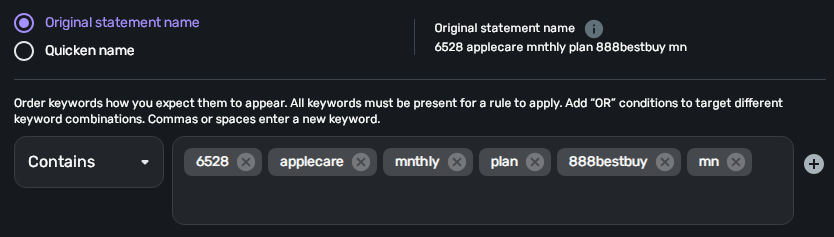 0
0 -
I really like the new changes and look forward to testing them now that they're general release. Thank you.
1 -
Why are payee matches performed based on space-separated exact and ordered keywords rather than substrings? I've found many of my transactions contain noise around the most important keywords, something like:
1234-BUISINESS-888282348 some other words ach
Where 'BUISNESS" is the most likely target of a string match, but now I've got to create alternatives for all of these number variations that can't be reasonably predicted. It would be very helpful to allow a selector to specify the search string should be 'exact' or 'contains'.0 -
I notice that in your image the "Original statement name" is written as "6528 applecare …" without the hyphen, even though the actual name on your statement is written as "6528-APPLECARE …" with the hyphen.
That seems weird.
I wonder which of these two versions of the name the rule is trying to match? In your tests, does the rule match when the hyphen is included but not when it is omitted?
DryHeat
-Quicken Classic (1990-2020), CountAbout (2021-2024), Simplifi (2025-…)0 -
Upon review of my original post, I see how there was some confusion as to what I was reporting. My intention was to point out the hyphen discrepancy.
The rule will match only when the hyphen is present in the keyword, despite what the 'original statement' display shows within the Create Rule dialog. The Create Rule dialog is stripping the hyphen for the automatically generated keywords and for the 'original statement' text, but the actual rule logic is run against the real statement name which includes the hyphen.
Given you can create keywords with hyphens, and the obvious intention of the automatically generated keywords is to match the source transaction, this appears to be a bug.
0 -
@xt741258 Thanks so much for the feedback.
We do have an option with Payees to either match exactly or use contains, additionally you can add additional OR statements. Like this: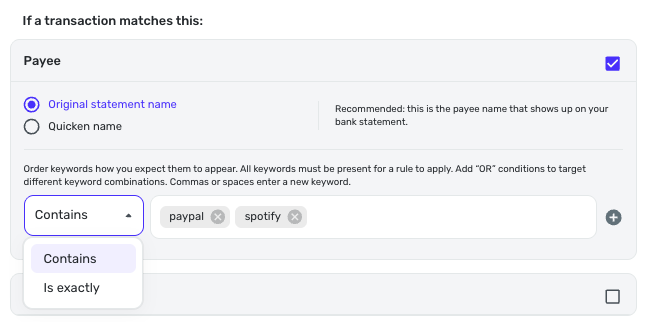
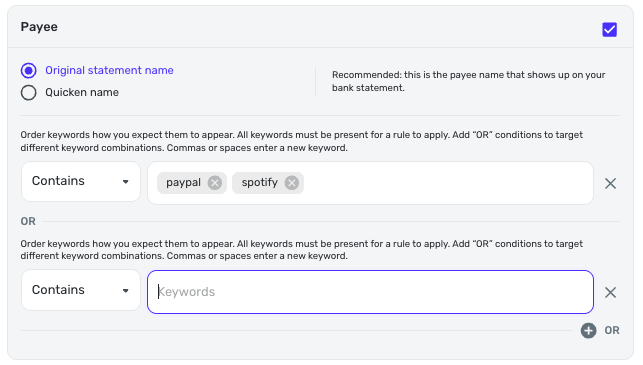
I hope this is what you're looking for. If not, please reach out. I'd love to know how you want to use Rules. Thanks!
0


