Which Payee name does Simplifi use when matching a transaction to a recurring series?

I am seeing repeated problems with with new downloaded transactions failing to match to a recurring series. It would help me figure out what needs changing if I knew more about how the process works.
Specifically, when Simplifi compares the Name of the recurring series to the Payee of the transaction, which Payee name does Simplifi look at?
- The "original statement name" from the downloaded transaction?
- The "Quicken name" that Simplifi automatically substitutes for the original name?
- The "Rename Payee" name that is created by the application of a renaming Rule?
(I'm assuming here that the recurring series Name and the Payee name are part of the matching process. I haven't seen anything that really describes how the matching is done.)
DryHeat
-Quicken Classic (1990-2020), CountAbout (2021-2024), Simplifi (2025-…)
Best Answers
-
@DryHeat, thanks for posting your inquiry to the Community!
I'm not seeing anything from our end that outlines what is used when matching transactions to recurring reminders, and these types of design specs aren't typically made known. I'm guessing that it is a combination of the payee as well as the amount, considering that there are specific Amount Matching settings.
If you are seeing issues with recurring reminders being matched to transactions, I would recommend manually linking them, as Quicken Simplifi is designed to learn over time. Otherwise, you are welcome to post specific examples so we can do some troubleshooting.
I apologize for not having more information!
-Coach Natalie
0 -
@Coach Natalie @SRC54 — I asked about this on a different thread dealing with the Advanced Rules.
Apparently the Recurring Series Name should be like the Payee imposed by the Rule (instead of the original Payee) to help the system match a downloaded transaction to a recurring series.
Here's what Quicken Kirby said:
Having Payee after Rule and Series name be the same helps our system.
While you have options in Series setup (around amounts and dates and connected billers and such) that also influence how things are matched, aligning Payee after Rule applied and Series name is a strong signal to the matching engine.
DryHeat
-Quicken Classic (1990-2020), CountAbout (2021-2024), Simplifi (2025-…)1

Answers
-
I understand the concept that a matching algorithm might be a design spec that should be kept secret.
But here's what this guidance means in practice for someone manually creating or editing a Recurring series:
The Recurring series Name is (probably) used to help match incoming transactions, so you should use a Name like that of the transaction Payee. Of course, that could be any of three different Payees (original, Simplifi, Rule), but we can't tell you which one you should focus on. It's a secret.
That seems a bit odd, so I have to ask… Has anyone ever asked the production team for this information? Or is it just assumed that it's a secret?
(BTW, I have manually linked the failed matches for
34 months to no avail.)DryHeat
-Quicken Classic (1990-2020), CountAbout (2021-2024), Simplifi (2025-…)0 -
@DryHeat, thanks for the reply!
To clarify, I didn’t mean to suggest that this is a design specification that must be kept secret, as I don’t have direct confirmation of that. However, I’m not seeing any documentation on our end that explains how this works, and this type of information typically isn’t something we have access to.
As mentioned earlier, if you’d like to share some specific examples, we’d be happy to help troubleshoot them with you! I’d also still recommend using manual linking, as doing so can help the program learn over time.
-Coach Natalie
0 -
So, maybe it's not a secret. Maybe it's just that no one has ever asked for the information. Food for thought.
Anyway, here's an example of a failed match from the account of someone I assist. The match has failed for the last 4 months. I have manually matched it each month.
First, the most recent Transaction that failed to match. (I manually matched it earlier today.)
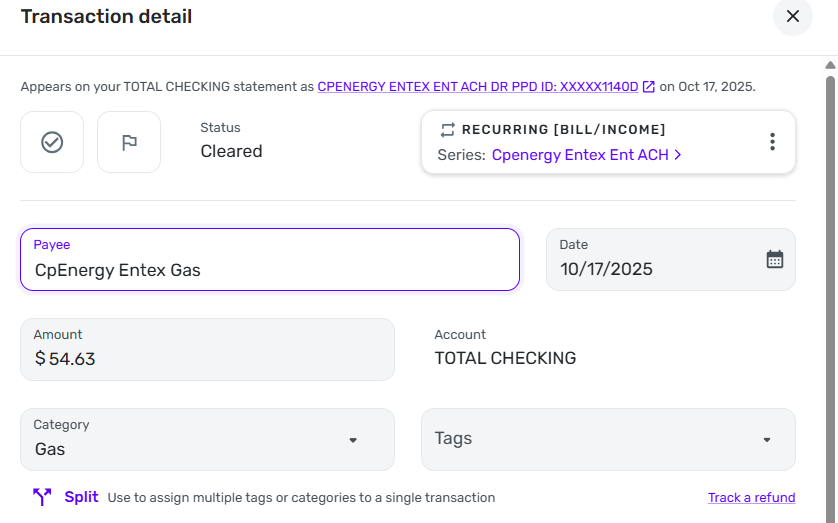
Next, the Rule that modifies the Payee and Category of the Transaction. (The Rule works as expected.)
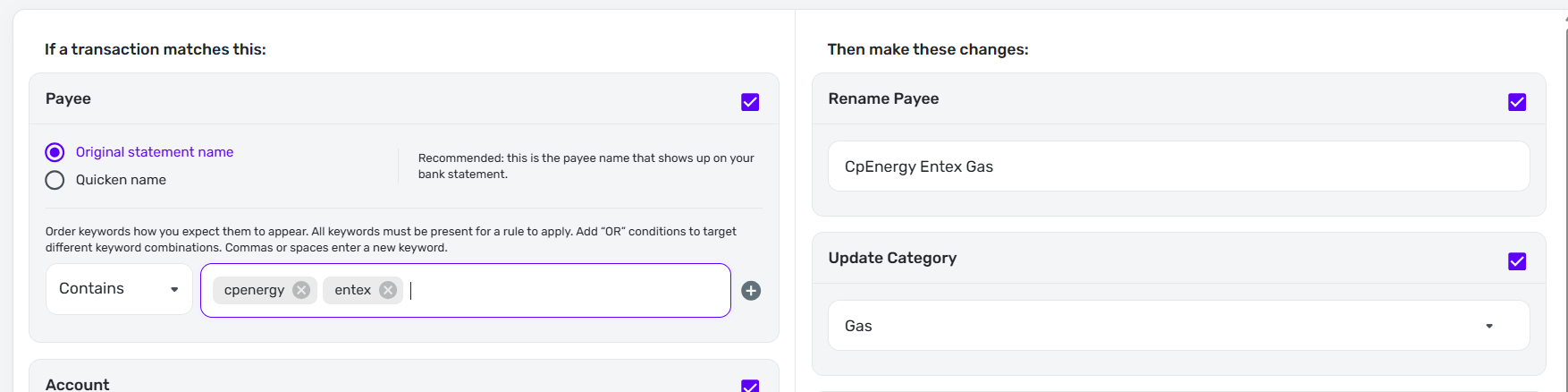
Finally, the Recurring Series that the Transaction should match. Note:
- The first two months the Match Criteria was "Auto Match." It didn't work. Then I changed to "Any Amount" for two months to see if that would help. It didn't.
- On a different set of Transactions that should have matched a different Recurring Series I also tried "Limited Amount." No success.
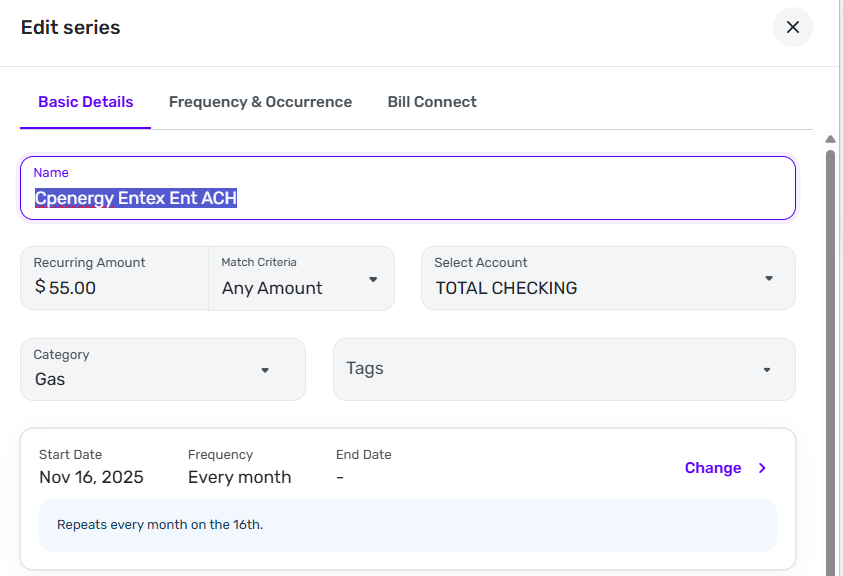
So here's the situation:
- The Series Name is very close to the original transaction name but the match isn't working. An exact match should not be required (the Series Name updates the Transaction Payee, so they can be different).
- If the matching process uses the Quicken name I could get rid of the Rule for a while, see what the Quicken name actually is next month, and try using that for the Series name.
- On the other hand, if the matching process uses the name imposed by the Rule, I could change the Series Name to "CpEnergy Entex Gas" to see if that will match.
But without knowing what the target is, I am looking at a trial-and-error process that could take (and has already taken) quite a while.
DryHeat
-Quicken Classic (1990-2020), CountAbout (2021-2024), Simplifi (2025-…)0 -
Here's one that happened to me Monday. My wife got her usually biweekly fill-up at Shell. I have a rule that looks for the word Shell and categorizes it gasoline. I will probably update it to include the tag for her car. Anyhow, this has worked pretty infallibly as Shell is a unique name. Gasoline is under Planned Spending and so not a recurring bill.
The transaction amount ended up exactly $18 so Simplifi matched it to an $18 Cardiologist Co-Pay that had been expected on Friday (today). This one is a recurring expense. Of course, I unlinked it and changed it back to Shell and recategorized it gasoline. I also tagged it to her car.
It seems that recurring gets priority and the amount being coincidentally the same was the trigger. BTW, the cardiologists have changed the name of their clinic and so I don't have it tied to any downloaded name yet.
And then they called to postpone the appointment until January. We're not sure what's going on with that, but luckily my wife seems to be fine after her surgery 6 years ago, and she just saw her internist who verified the same, so we save the $18. However, she is now on Medicare and in January the deductibles reset. 😀
Steve
Quicken Simplifi (Safari & iOS) Since 2021
Quicken Classic (MacOS) Since 2009
MS Money (1991-2009) and Dollars & Sense (1987-1991)0 -
From your description I can't tell if your "Shell" Rule was ever applied or not. Supposedly, unlinking will revert the prior Payee and Category. When you unlinked, did it automatically become "Shell/Gasoline" or did you have to edit the transaction to those values?
In any event, my situation is not one of "mis-match." It is "no-match."
DryHeat
-Quicken Classic (1990-2020), CountAbout (2021-2024), Simplifi (2025-…)0 -
No, apparently, it wasn't applied. I think Simplifi just saw the $18 amount and pounced.
Unlinking from the recurring changed the name to Shell, but didn't apply the category, so the rule was never applied IMHO.
Anyhow, I have never had much faith in the rules, but am playing with the new options.
I think this was an unlucky occurrence since gasoline fill-ups rarely end up with an even number. I always let the pump stop and that's where I leave it.
Steve
Quicken Simplifi (Safari & iOS) Since 2021
Quicken Classic (MacOS) Since 2009
MS Money (1991-2009) and Dollars & Sense (1987-1991)0 -
@DryHeat, thanks for the reply!
To clarify, has this recurring series ever matched to the transaction properly, or has it never worked since first creating it? I don't think transaction rules would impact the matching of transactions to recurring reminders, even with payee names being changed via rules, but if this recurring series has ever matched properly in the past, I'm wondering if you had transaction rules set up at that time for this particular item, and if it was perhaps before the recent upgrade outlined here.
I agree that the payee in the recurring series is a pretty close match to the payee of the transaction. And it doesn't sound like the amount is causing the issue, since you've tried different Amount Matching options. Just to test things, I would recommend changing the payee of the recurring series to be an exact match to the payee you see for the transactions themselves, or even just to remove the "Ent ACH" part, to see if that fixes things the next time around.
Let us know how things go!
-Coach Natalie
1 -
@Coach Natalie — regarding your questions…
To clarify, has this recurring series ever matched to the transaction properly … ?
It worked for 3 months, then quit.
I don't think transaction rules would impact the matching of transactions to recurring reminders, even with payee names being changed via rules
Ok, then I guess I can ignore the existence of transaction rules as I try to sort this out. That simplifies things.
if this recurring series has ever matched properly in the past, I'm wondering if you had transaction rules set up at that time for this particular item,
I think I did have a rule back then. But if rules don't impact matching why would it matter?
and if it was perhaps before the recent upgrade outlined here.
Most failures were before the rule upgrade; latest was on Oct 16-17. But again, do rules matter?
Just to test things, I would recommend changing the payee of the recurring series to be an exact match to the payee you see for the transactions themselves, or even just to remove the "Ent ACH" part
By "the payee you see…" do you mean the "original statement name," the "Quicken name," or the "Rule name"? The Payee I see on the transaction right now is the "Rule name," but I'm not sure that's what you mean.
Anyway, whichever name I try to match, this involves running two different name tests which have to be 30 days apart. It's too bad there is no quicker way to find out more about how this works.
DryHeat
-Quicken Classic (1990-2020), CountAbout (2021-2024), Simplifi (2025-…)0 -
Unlinking from the recurring changed the name to Shell, but didn't apply the category, so the rule was never applied IMHO.
I'm not sure what to make of this. It is potentially very helpful in figuring out the sequence of events, but I need a bit more information.
—Is "Shell" the original transaction name, the Quicken name, or a name applied by a Rule?
—When you unlinked the name changed to "Shell," but what was the Category?
Thanks. I'm trying to get as much insight into this as I can as it is something of a "black box."
DryHeat
-Quicken Classic (1990-2020), CountAbout (2021-2024), Simplifi (2025-…)0 -
@DryHeat, thanks for the additional information!
It seems there may be some misunderstanding regarding the information I’ve shared in this thread. In my most recent response, I mentioned that I don’t believe Transaction Rules would impact this particular scenario. However, the questions I asked were part of the standard troubleshooting process, which helps us rule out certain factors and narrow down potential causes.
By "the payee you see", I mean in the Payee field of the transaction, as displayed here:

As previously mentioned, you can also try removing the “Ent ACH” portion from the recurring series, in case the system is getting caught on that detail. I understand this process may feel a bit tedious, and I apologize for that. However, we do need to collect as much data as possible and identify potential causes before escalating the issue to our product team. If there is additional information about how the system works that can be shared at that time, I am confident they will let us know.
I hope this helps to clear things up, and we look forward to hearing back from you on how things go.
-Coach Natalie
0 -
However, the questions I asked were part of the standard troubleshooting process,
I get that. That's why I went ahead and answered them even though — if Rules don't impact matching — they seemed a bit irrelevant. Let me know if my answers weren't sufficient.
By "the payee you see", I mean in the Payee field of the transaction, as displayed [in transaction edit form]
Ok. In general, that could be any of the three names (original, Quicken, rule). In this case it is the name applied by a renaming Rule ("CpEnergy Entex Gas"). The original and Quicken names don't include the word "Gas". But I will take your advice about "exact match" and rename the series "CpEnergy Entex Gas."
Of course, I can revise that if more information becomes available in the next 30 days.
DryHeat
-Quicken Classic (1990-2020), CountAbout (2021-2024), Simplifi (2025-…)1 -
Shell is the name applied by the rule, but it didn't get applied in this case as it was superseded by the $18 and Cardiovascular Care recurring.
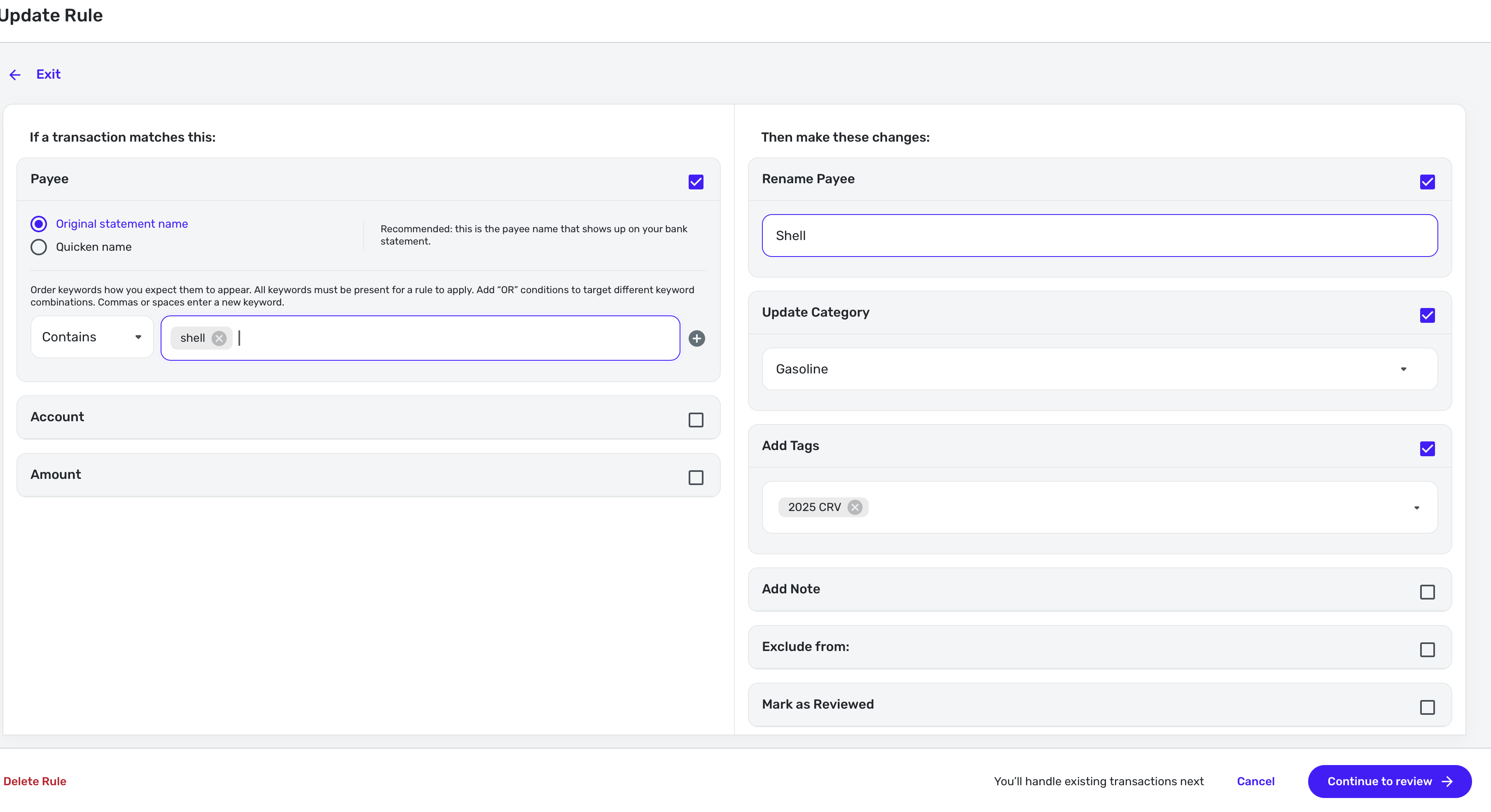
I think once I unlinked the recurring that it went to Shell but category either stayed as clinics or was uncategorized. I fixed it, so am unsure. Here's the transaction now.

Here's the recurring, which I have updated for next January.

This is probably no help. I tend to fix things when they go awry. Hope you get to the bottom of it. You usually do!
Steve
Quicken Simplifi (Safari & iOS) Since 2021
Quicken Classic (MacOS) Since 2009
MS Money (1991-2009) and Dollars & Sense (1987-1991)0 -
Thanks for the info.
It's a little confusing because it sounds like, upon unlinking, the Payee went back to "Shell," but that's not the original statement name. So it's either the Quicken name or the name applied by the rule.
If it's the rule name, then the Category should have gone back to "Gasoline" upon unlinking. So that makes it look like it's the Quicken name that was restored. But I think there was another thread a short time ago where someone mentioned that the Category was not restored on unlinking. Not sure.
This may be a dead end. The name wasn't actually used in your erroneous match, so I'm not sure how much we can figure out based on that.
DryHeat
-Quicken Classic (1990-2020), CountAbout (2021-2024), Simplifi (2025-…)0 -
Yep, I think it went back to Shell because that is what Simplifi learned. When it matched incorrectly the recurring, it overrode Shell with Cardiovascular Care, but when I unlinked it, it defaulted back to Shell, but I don't think it applied the rule so the category was wrong.
Yes, I think it probably isn't helpful but there it is. I will try to collect more info the next time it happens, but it probably won't.
Steve
Quicken Simplifi (Safari & iOS) Since 2021
Quicken Classic (MacOS) Since 2009
MS Money (1991-2009) and Dollars & Sense (1987-1991)0
