Nested categories in Simplifi don't show up correctly in [planned spend]

I have several custom categories set up in Simplifi and in some cases there are a couple layers of nested categories. For example I have a top-level category called sinking funds. Under that I have subcategories for Home Improvement, Holidays, Vehicle Expenses, and Pets. Under Pets I have Pet Food, Grooming, Vet, and Boarding.
In my spending plan, I have a planned monthly amount for Sinking Funds as a whole. If I categorize expenses under one of the first-level subcategories (i.e. Home Improvement or Pets) then they show up under the planned spend as intended. But if I use one of the second-level subcategories (i.e. Vet or Grooming) then the expenses no longer show up in planned spend and instead are listed under other spend.
Comments
-
But if I use one of the second-level subcategories (i.e. Vet or Grooming) then the expenses no longer show up in planned spend and instead are listed under other spend.
That is strange. I just tested this by creating a second-level subcategory (Dining Out | Coffee Shops | Ground Coffee) and assigning that category to a transaction that was previously in Groceries. The "Ground Coffee" transaction is showing up as expected in the transaction list for the "Dining Out" Planned Spend expense series.
To test this, I would first check the category definitions to ensure that Pets is a sub of Sinking Fund and Vet is a sub of Pets. Then check that there is an existing Vet transaction dated in the month you are looking at. If those things are all in place, and you still aren't seeing the transaction in Planned Spend, then there must be some kind of data corruption.
(Note: It is possible to have similarly named categories in different locations on the category tree.)
DryHeat
-Quicken Classic (1990-2020), CountAbout (2021-2024), Simplifi (2025-…)1 -
I verified this morning that the categories are nested properly. They show up correctly both in settings and in the dropdown menus when categorizing transactions.
I played around with several different transactions and the issue is present with all of them.
0 -
Hmm. I decided to test as well.
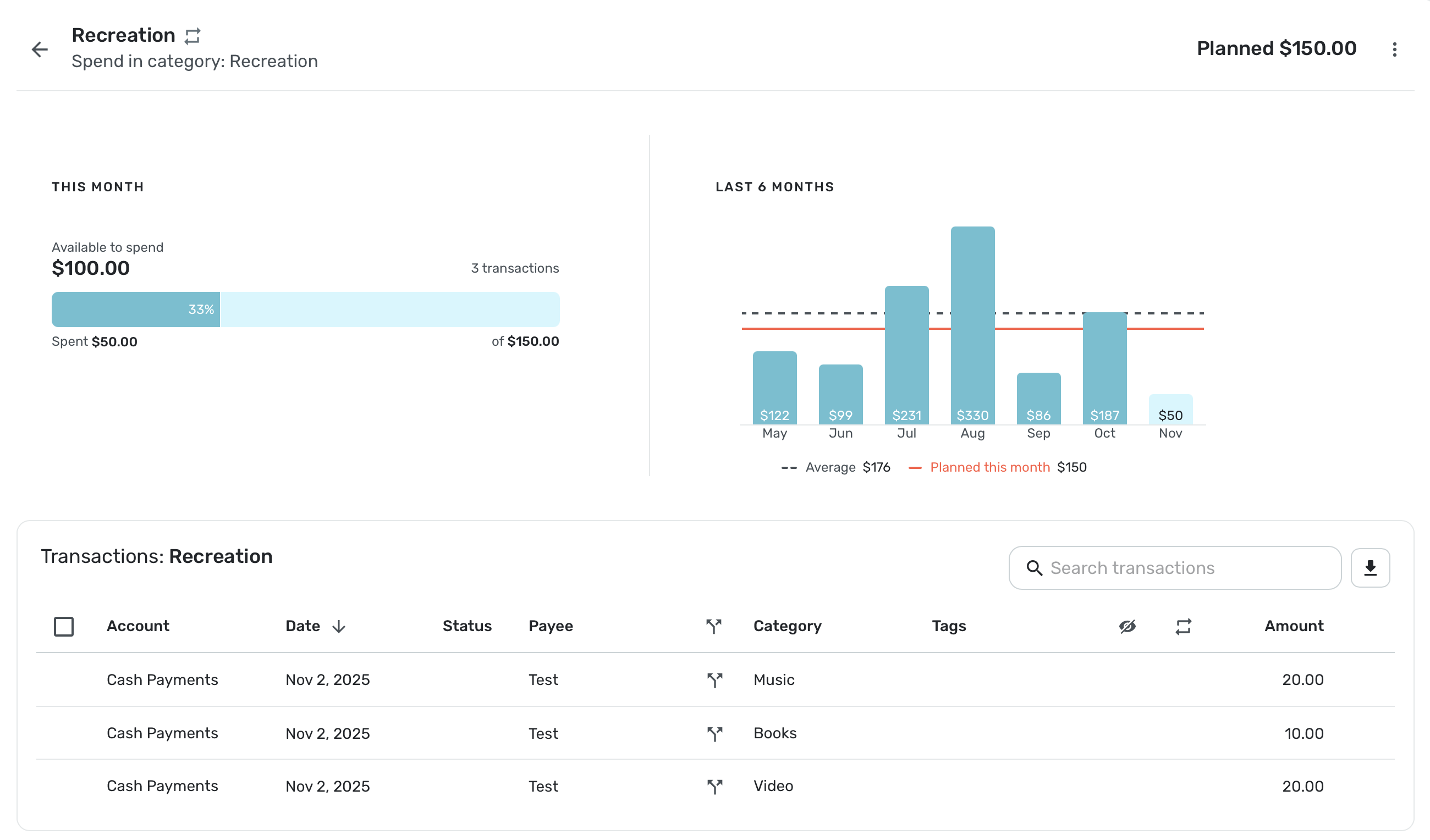
I don't have many second-level subcategories, but I do have 3 under Recreation:Media, one for music, one for books and one for video. I also have a Planned Spending Amount for Recreation, so I tested with a $50 cash transaction, split among the 3.
I went to Spending Plan and the $50 showed up in Recreation as expected.
Just to make sure these transactions you are creating aren't recurring bills, are they? They wouldn't show up in Planned Spending at all. It sounds to me since you are testing transactions, you probably didn't mark them as bills or subscriptions.
If you are sure your subcategories are not working right, I would start by deleting the Planned Spending category for Sinking Funds, and then recreating it. If that doesn't fix it, you might want to try creating new categories for sinking funds and subcategories. You can rename the old categories with something like TBD Sinking Funds, etc. so that you can reuse the same names you already have for the new categories.
I know that sounds scary, but if you create the new categories first, then delete one by one the old categories, Simplifi will ask you where you want to move the transactions and then you can carefully point to your newly created replacement categories.
I am sure Dryheat will have other suggestions as well. Let us know how it goes.
Steve
Quicken Simplifi (Safari & iOS) Since 2021
Quicken Classic (MacOS) Since 2009
MS Money (1991-2009) and Dollars & Sense (1987-1991)0 -
The only other thing I can think of is to do the same test I did — basically create a new second-level category under some other part of your category tree, create a new Expense series that should show that category, and create a test transaction to see what happens.
The reason for doing that would be to find out if your system won't show any second-level categories at all, or if it is something specific to that Expense series and the Sinking Fund set of categories. At least then you would be able to report the extent of the problemm.
DryHeat
-Quicken Classic (1990-2020), CountAbout (2021-2024), Simplifi (2025-…)0 -
I tested your suggestion. I created a 2nd-level category under another top-level branch and that one's working fine. So it's something specifically related to my sinking funds category. I'm going to try what SRC54 suggests and delete that part of the category tree bit by bit and see if it helps.
0 -
[Scratch this post… I suggested something, then tried it and found it made no difference.].
DryHeat
-Quicken Classic (1990-2020), CountAbout (2021-2024), Simplifi (2025-…)0 -
I tried what you suggested, only I started deleting and recreating the categories from the lowest level up. That fixed the problem and it's working as intended now.
I have a guess as to what happened now. I think the 2nd-level categories in my sinking funds branch all happened to be default categories that I reorganized, not ones that I created myself. Not sure why that was causing issues but it seems like deleting them and creating my own categories fixed it and now the transactions are showing up properly in the spending plan.
1 -
I'm glad you got it working. Thanks for letting us know!
Steve
Quicken Simplifi (Safari & iOS) Since 2021
Quicken Classic (MacOS) Since 2009
MS Money (1991-2009) and Dollars & Sense (1987-1991)0

