529 accounts are not shown in the Other Investments part of the Investing Dashboard tile on Mobile

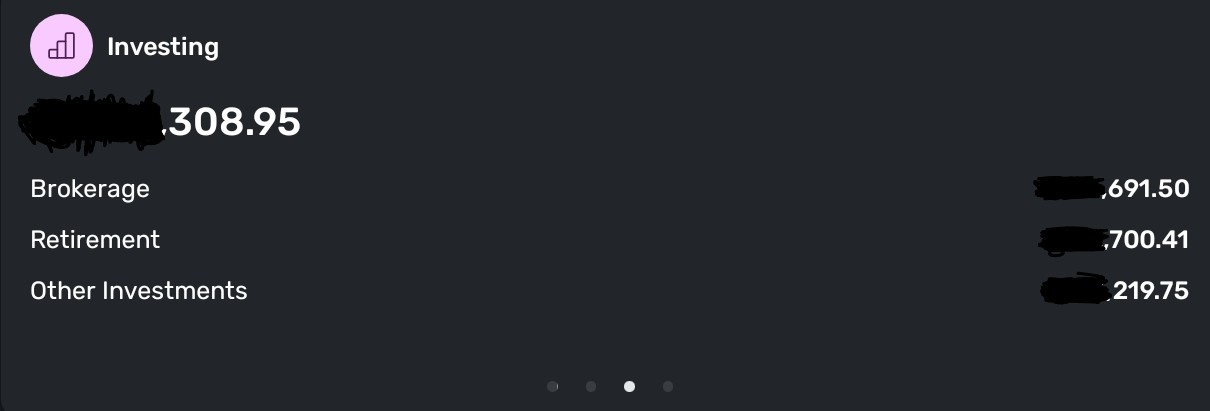
As you can see from the picture, the totals do not add up! This is on android, I have early access enabled!
[edited title to better capture the issue]
Comments
-
Hello @rosachin21k,
Thanks for reaching out! Unfortunately, we cannot verify that the totals are not adding up from your screenshot due to the totals themselves being covered up.
If you want to send me a screenshot of the uncovered totals for privacy purposes via DM, I would then be able to verify what specifically is occurring here.
-Coach Jon
-Coach Jon
0 -
You can tell that the totals don't add up by adding the digits that are not covered up.
The digits shown total 1,611.66,
whoso whatever the digits are in the higher places, the result is going to have to look like $xx,611.66." In other words, the last five digits of the correct total will be 611.66.So the total shown, which ends in 308.95, cannot be incorrect.
DryHeat
-Quicken Classic (1990-2020), CountAbout (2021-2024), Simplifi (2025-…)0 -
Hello @DryHeat,
I can understand that you are inferring this information based on what was provided; however, we cannot do that ourselves here in the community when troubleshooting, and certainly not if we need to pass along this information to our product team for further investigation.
Thanks for the assistance, though!
-Coach Jon
-Coach Jon
0 -
"I can understand that you are inferring this information based on what was provided; however, we cannot do that ourselves here in the community"
Actually, no "inferring" is involved. This is simple arithmatic. I'm pretty sure you could do it yourself.
I pointed it out hoping it would spare @rosachin21k from needing to waive privacy concerns.
DryHeat
-Quicken Classic (1990-2020), CountAbout (2021-2024), Simplifi (2025-…)1 -
Hello @Coach Jon - I have sent you a message with the totals uncovered which show that the totals do not add up.
0 -
Hello @rosachin21k,
Thanks for the information! I can see it is off by about $8,000. If you uninstall and reinstall the mobile application, does the issue here still show up once you reopen the application?
-Coach Jon
-Coach Jon
0 -
Boy am I a bad typist!
I just noticed that in a previous post, I wrote "cannot be incorrect" when I meant "cannot be correct."
Nothing like completely undermining my own point. My fingers are my own worst enemy.😣
DryHeat
-Quicken Classic (1990-2020), CountAbout (2021-2024), Simplifi (2025-…)1 -
@Coach Jon - The issue still persists after uninstalling and reinstalling the application.
0 -
Hello @rosachin21k,
Thank you for the update! Is the issue specific to the dashboard card? Or do the numbers match what your Investment tab shows? If you can provide a screenshot of that as well, it would be helpful. Feel free to DM me once again!
-Coach Jon
-Coach Jon
0 -
@Coach Jon - Just sent you a message. The issue is that the dashboard card does not show my 529 Plan but includes that in the total. I have sent screenshots of the issue. Please let me know if there is anything else I can do.
The 529 Plan sits under "Education" in investments while the Investments Dashboard card only shows Brokerage, Retirement and Other Investments sub sections and leaves the Education sub section out, and so the totals do not add up.0 -
Hello @rosachin21k,
I see what you mean from the screenshot you sent. The balances due in fact match correctly; it is just that the Dashboard card does not include the Education-based investment account. It is good that the issue seems to be purely visual-based at least. Can you try the following step to see if this helps resolve the issue?
From the Menu icon (three lines in the upper left), select Settings and then Customize Dashboard. If you click the eye icon next to Investments to hide it, close and reopen the application, and then go back to show the Investments card again, does it then show the 529 account?
If not, please supply logs so that we may look at getting this issue escalated:
- Log in to the Quicken Simplifi Web App.
- Select Profile from the left-hand navigation bar.
- With the Profile menu open, hold down the Option key for Mac or the Alt key for Windows, and then click Send Feedback.
- Leave all boxes checked, add a brief description of the issue, and then click Send.
-Coach Jon
0 -
@Coach Jon Thanks, What you suggested did not resolve the issue, so, I sent the logs.
0 -
Hello @rosachin21k,
Thanks for that information! We did get this issue escalated to our product team and will be sure to follow up here with any updates going forward, as we receive them!
-Coach Jon
SIMPL-30549
-Coach Jon
1 -
@rosachin21k, a fix for this issue is expected with the 5.46.0 Mobile Release.
Thank you!
-Coach Natalie
1 -
Thank You!
1 -
Hello @rosachin21k,
Now that version 5.46.0 of the Quicken Simplifi Mobile application is released, be sure to let us know if the issue is fixed for you!
Thank you!
-Coach Jon
-Coach Jon
0 -
It is, thank you!
1


