Manually link transfers to each other

Right now it appears that the only way to get both ends of a transfer/credit card payment linked to each other is if Simplifi can detect it. However, it can't always do that. Maybe there can be an option to link such transactions manually.
Comments
-
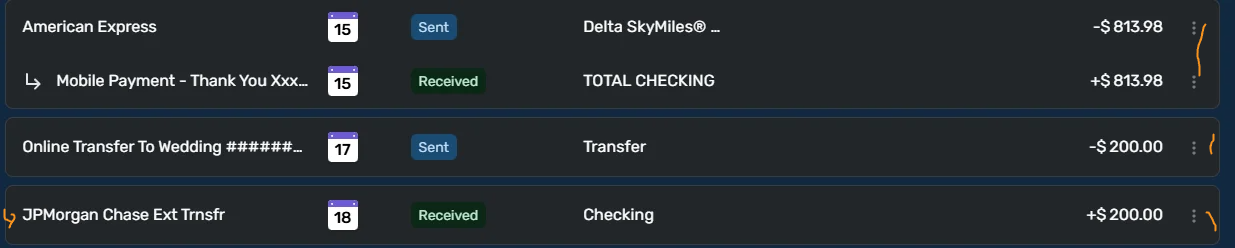
@paradisfm QS has actually matched both sides of this transfer, but to connect them in the Spending Plan you will need to give both sides of the transaction the same date. To manually connect them in the Spending Plan either change "Online…" to the 18th or "JPMorgan…" to the 17th. You can do this by clicking on the 3-dot menu and selecting "Edit transaction" and changing the date in one or another of the transactions. So, in essence, you already can manually match these transactions.
Danny
Simplifi user since 01/22
”Budget: a mathematical confirmation of your suspicions.” ~A.A. Latimer1 -
I sometimes pay my credit card online on a weekend and just use the "credit card payment" as a placeholder. It downloads into my credit card. On Monday or Tuesday when the payment posts in my checking account, it usually matches. If not, I just change it to "transfer" on one or both sides and then QS will match it.
Making the date the same on both sides as Danny points out also has a benefit of keeping the transfers together in the Spending Plan with the arrow pointing to both sides.

Steve
Quicken Simplifi (Safari & iOS) Since 2021
Quicken Classic (MacOS) Since 2009
MS Money (1991-2009) and Dollars & Sense (1987-1991)0 -
When the posted transfer side shows up in Simplifi, you can merge it with the placeholder. There's a merge icon in the top right of the transactions list.
0

