Why are Zelle payments automatically classified as Transfers when they are payments?

I’m running into an ongoing issue with Zelle transactions in Quicken Simplifi. When Zelle payments come in or go out, Simplifi automatically classifies them as Transfers. The problem is that Zelle payments are never internal transfers between my own accounts. They are always payments to or from external parties, whether it’s reimbursing a friend, paying the handyman, contributing to a group expense, or sending money to a charity. Because Simplifi treats these transactions as Transfers, they are excluded from rule-based automation.
This forces users to manually convert every Zelle transaction from Transfer to a category before any rules apply. That makes using Quicken Simplifi far less simple and undermines the automation that Simplifi is supposed to provide. It also creates the illusion that these payments are “off-book,” which has a very real impact when reviewing spending, analyzing habits, or planning monthly budgets.
I contacted Simplifi support and was told:
- This is a known limitation
- There is no global setting to disable automatic transfer detection
- There is no method to force Zelle transactions to be treated as expenses by default
- The only current options are manual edits or payee rules, but those rules only work if the transaction has already been manually reclassified
In other words, the system forces a false assumption, then asks the user to fix it one transaction at a time.
This isn’t an edge-case workflow. Zelle is a standard peer-to-peer payment method used for everyday expenses. Categorizing it as a Transfer blocks the most basic financial visibility.
I discovered an older post discussing this exact issue:
https://community.simplifimoney.com/discussion/8655/zelle-payments-should-not-be-automatically-assigned-as-a-transfer
It has been over a year since that thread, and the behavior appears unchanged. Can the product team clarify whether this is being actively addressed, and whether there is an internal roadmap or experimental setting to resolve it? Even classifying Zelle transactions as Uncategorized by default would be a meaningful improvement compared to treating them as Transfers.
Comments
-
Haven't tried, but have you tried creating one of the new advanced rules to recategorize transactions that have Zelle in the name?
—
Rob Wilkens
0 -
I have a couple of Zelle payments coming up soon, and I will check mine. But I don't remember ever having a problem with them. One reason is that they are recurring payments with exact amounts in my Spending Plan.
Steve
Quicken Simplifi (Safari & iOS) Since 2021
Quicken Classic (MacOS) Since 2009
MS Money (1991-2009) and Dollars & Sense (1987-1991)0 -
I was more frustrated when a Zelle transaction came in from a certain relative, and Simplifi decided to change the name of the Payee to another relative (with the same last name) who also sends Zelle sometimes. I spent a long time trying to trace down the issues that it caused!
It doesn't bother me much if they come in as Transfer, since I anyways look at all transactions and confirm the category etc before marking them as Reviewed.
1 -
Hello @EL1234,
Thanks for reaching out! If they are coming in as a Transfer when downloading transactions from the bank, there is not much we can do, unfortunately. However, as @RobWilk mentioned, creating a transaction rule will allow you to make sure your transactions always come in the way you want them to.
I hope this helps!
-Coach Jon
-Coach Jon
0 -
Thanks for your response. I don't care if they come in as Transfer. I just don't want Simplifi to change WHO the zelle came from! With no indication that it was changed. I spent quite a lot of time trying to figure out why something wasn't reconciling, and it turned out due to a renamed zelle transaction. It came from someone (let's say John Smith) and Simplifi changed it to the name of someone else who also sends me payments via zelle (let's say Rebecca Smith). Very confusing!
0 -
Hello @EL1234,
Thanks for the reply! I am not sure why Quicken Simplifi would have changed the payee name to something completely different in this case; that is certainly strange. If you open the Transaction Details for that transaction, does it show the "Appears on your statement as.." information there? Does it match the Payee name?
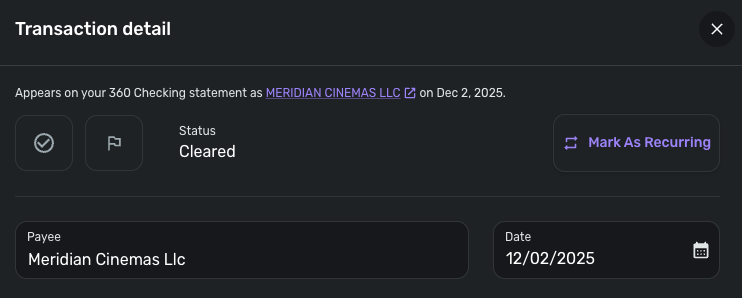
-Coach Jon
-Coach Jon
0 -
The "Appears on your statement as" was correct, and the Payee name was wrong. I fixed the payee name manually.
Thanks!
0 -
@EL1234 I wonder if an automatic rule was made earlier in your transactions that caused this. There was a time (or still?) when if you renamed a transaction it might suggest or make a renaming rule. I would check your existing rules for anything that says 'zelle'.
I use Zelle (receive payments from others) and don't have this problem. It may be that I use Chase which may label the transactions differently, or maybe like i said you might have a rule set up that i do not.
Go to settings→rules and search 'zelle' to see if there are any.
—
Rob Wilkens
2 -
This issued has got to be the MOST frustrating thing Quicken Simplifi does. Because Zelle transactions come in as "Transfers" from my Chase checking account, I cannot write a rule to automatically rename a particular transaction, because Transfers are not subject to rules. Is there any solution for this??
0 -
Hello @Eric D,
Thank you for reaching out! If you can, please go ahead and create a transaction rule for your Zelle transactions to test if the rule can be applied in this way. I know they are categorized as a transfer, which should be exempt from transaction rules, but looking from my side, I can see that transfer categories are selectable during rules creation. Let us know if it works!
-Coach Jon
-Coach Jon
0


