How do I show third level categories transactions in [planned spend]?

I have my Mortgage as a tracked item in my spending plan. The categories are "Home:Mortgage:Mortgage Principle", "…….Mortgage Interest", "….Mortage Escrow". In the spend plan it shows nothing spent each month. It appears to not recognize the third level of category? All my other spend plan items work but they are at the second tier level for categories.
Best Answer
-
I can see why you would think that a Bill would move from Bills to Planned Spend once paid. That makes sense and it could have worked that way.
I think Simplifi does it the way it does so that we have fewer categories we have to track in Planned Spend. If something is already set up as recurring in Bills, we already know its effect on our monthly progress. So we don't have to plan for it again in Planned Spend. To me, it's simpler that way.
BTW, the December payment will show up in Bills if it remains part of a recurring series. If not it will be in Planned Spend (or in Other Spend). You should not account for an expenditure in both Bills and Planned Spend. Doing so will result in double-counting and will throw off the "Left this month" figure.
Also, if it is in the Bills section and you split it into muliple categories it will show up as two separate Bills with a "split" symbol like below. But it will remain in your bank account as one transaction. So be looking for that.

DryHeat
-Quicken Classic (1990-2020), CountAbout (2021-2024), Simplifi (2025-…)0

Answers
-
User @SRC54 had a similar problem with "grandchild" level categories, as described in the thread linked below. He was able to fix it by recreating the categories. I have no idea why that would make a difference, but it did for him.
DryHeat
-Quicken Classic (1990-2020), CountAbout (2021-2024), Simplifi (2025-…)1 -
Yes, my issue was slightly different but I do find that, at least, in my case, categories get corrupted especially when you edit them or add new tiers.
In my case, it was the child category that was messed up but I created new "grandchild" categories just to be safe. You have to create the new child and grandchild categories first, then as you delete the old ones, tell Simplifi to move the transactions to the newly created replacements. Hint: I renamed the categories I was going to delete by adding "Old" to the name so I could use the same names for the new categories.
I suggest you try recreating the faulty categories, and let us know if it works!
Steve
Quicken Simplifi (Safari & iOS) Since 2021
Quicken Classic (MacOS) Since 2009
MS Money (1991-2009) and Dollars & Sense (1987-1991)0 -
I tried renaming the existing category, creating the category again and transferring the data back into the newly created category. No change. Still not displaying. I noticed while doing this that one month my escrow had an extra payment due. That category (Home:Mortgage:Mortgage Escrow) actually showed up. It’s the only one that is not part of a split payment and the only one that is showing.
0 -
You could try creating some test categories and a test transaction like I did in the post below to see if that works for you. If it does, then the problem probably has something to do with the categories. (I think I see more weird issues like that with the built-in categories than with ones that are all custom.)
DryHeat
-Quicken Classic (1990-2020), CountAbout (2021-2024), Simplifi (2025-…)0 -
I’m thinking it maybe something to do with splits or splits AND Grandchild categories together. I’ll do some more testing but it’s sure annoying.
0 -
@PatD If you haven't already done it, I would recreate the entire branch of the categories: Main Category: Subcategory:Grandchild. I would then edit the split using the newly created category group.
Also, have you tried creating a new transaction from scratch and splitting it to see if the corruption is in the transaction. You implied that this has happened in several transactions so this is probably not the problem, but I ask just to make sure.
Good luck!
Steve
Quicken Simplifi (Safari & iOS) Since 2021
Quicken Classic (MacOS) Since 2009
MS Money (1991-2009) and Dollars & Sense (1987-1991)0 -
I’m thinking it maybe something to do with splits or splits AND Grandchild categories together.
The post I linked to shows the test I did, which involved "splits AND Grandchild categories together." Did it not work the same way for you?
DryHeat
-Quicken Classic (1990-2020), CountAbout (2021-2024), Simplifi (2025-…)0 -
I created a new Mortage category and moved it out from under Home so the sub categories were second tier instead of third. That did not help.
I then created a new category called Mortgage Test both as a top level category and as a sub to Mortgage and changed the latest transaction to add that into the split. Did not help.
I then added a brand new transaction with Mortgage Test as the category and $10 in it and that showed up in the Spend Plan correctly. The I changed it from the child category to the parent category (Mortgage) and it still worked correctly and showed the $10.
Finally I took the new transaction and split it into 2 $5 payments in Mortgage Interest and Mortgage Principle and that worked. So I went around in a big circle to exactly what I have in all my Mortgage transactions that do not work.
I went back to the latest in the series of Mortage payments that was not working, I deleted all the splits, assigned the total amount of the bill to the top level Mortage category and it does not show in the Spend Plan? So does it have to do with the way this mortgage transaction is importing from my checking account? I am really confused now and have no idea why this is not working.
0 -
When I create a completely new transaction and split it using the same names and categories in the downloaded transactions everything works fine. SO it is related somehow to the way these are being downloaded from my Schwab Checking account.
0 -
I don't know if anyone has asked, and you have probably already checked this, but are you sure that the transaction you are having trouble with is not marked "Exclude from Spending Plan"?
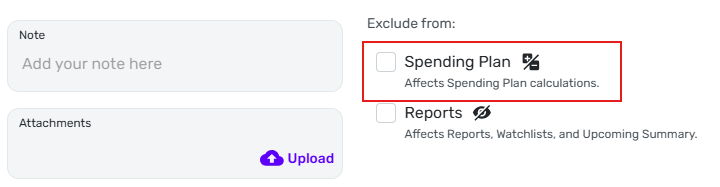
DryHeat
-Quicken Classic (1990-2020), CountAbout (2021-2024), Simplifi (2025-…)0 -
It was the recurring series. As soon as I deleted the series all the transactions that had been in the series showed up in the spend plan correctly. So no more use of series for me…..I'll handle them one at a time as they download.
1 -
Yes - I did make sure that check boxes were clear. Thank you.
1 -
It was the recurring series. As soon as I deleted the series all the transactions that had been in the series showed up in the spend plan correctly.
But that's still pretty strange, because recurring series transactions do show up in Spending Plan. They just show up in Bills instead of in Planned Spend or Other Spend.
When you initially said these transactions weren't showing up in Spending Plan, did you really mean that you checked the whole Spending Plan and they weren't showing up anywherel (and now they are showing up)?
Or were they maybe showing up in the Bills section all along and you just didn't see them because you expected to see them somewhere else? That would be good, because it would mean that everything was working ok and you can still use a recurring series if you want to.
DryHeat
-Quicken Classic (1990-2020), CountAbout (2021-2024), Simplifi (2025-…)0 -
They always showed up in the Bills section correctly, but in the spend plan they never showed up when the payment was made, even though the payment downloaded correctly and I could see them in the transactions registry. The entire year showed I never spent anything on my mortgage. Once I removed the Bill series, then they started showing up in the spend plan, retroactively. Meaning I didn't have to reenter anything they just appears for the entire year. Once I saw that, I added a series of scheduled bills again and now both the bills and the Spend plan correctly show my mortgage bills and payments. I still do not really know what happened nor why they were not showing up but Im happy they seem to be OK now.
0 -
They always showed up in the Bills section correctly, but in the spend plan they never showed up when the payment was made, even though the payment downloaded correctly and I could see them in the transactions registry.
I not sure I understand what you mean by the term "spend plan." The Spending Plan includes separate sections for Income, Bills, Planned Spend, Other Spend and Goals. Are you referring to the entire Spending Plan, or are you referring to a specific section like Planned Spend (or Other Spend)?
I ask because, when an expense is part of a recurring series, it only ever shows up in Bills … it will never show up in Planned Spend (or Other Spend). If it showed up in two places it would be double-counted against your income. Instead, it just gets marked "Paid" in the Bills section.
If that is what was happening, check out this support article:
DryHeat
-Quicken Classic (1990-2020), CountAbout (2021-2024), Simplifi (2025-…)0 -
Yes. I was talking about the “planned spending” not recording the payments/spending. But the series did show in the “bills” section.
It appears I do not understand the way Simplifi tracks these categories. I thought that a bill is only a bill until it’s paid. After payment it becomes an expenditure and should be tracked as spending.
At the moment - I have a Bill series for my mortgage using the top level mortgage category. It shows in the “Bills” line under the Spend Plan.
Then I have a Planned spending item set up as mortgage using the same mortgage Category. Once I know what my interest/principle split is I go back in and split the transaction into the sub categories.
It’s all the same transaction so I don’t think anything is being double counted. I guess on December 31st when my next payment is due I’ll see if the December payment continues to appear in both places or if it goes back to just appearing in the Bill section as paid.
I will need to read the articles you sent again because I’m still not understanding the Simplifi approach.
Thank you for all your time on this.
0
