Does the account-specific Balance Type setting actually do anything?

Hi,
I have some accounts that report a balance with pending transactions already debited; and, other accounts that report a balance preceding pending transactions.
It -appears- in both Simplifi documentation and in the user interface that you can tell Simplifi to interpret balances for individual accounts as with-pending or without-pending. HOWEVER … changing this setting for a given account under the Settings > Accounts screen neither changes its saved setting, nor alters what is actually shown on the home screen.
Unless I am mistaken, it appears that the home screen's displayed balances have to either be all bank-balance or balance-with-pending, and are governed by whatever Balance Type is selected under the options of the Accounts pane.
Am I missing something here? Is there another way to set a Balance Type for each individual account that I'm missing, so that the balances that pull up from different banks can be compared apples-to-apples?
Bob
Comments
-
Hello @bob303727,
Thanks for reaching out! Quicken Simplifi gives you control by offering two options to view your account balance:
- Balance with Pending – shows cleared and pending transactions—both manual (dated today or earlier) and those that were downloaded—in your balance.
- Bank Balance (Default) – shows your exact bank balance, which may or may not include pending transactions (varies from each financial institution).
By navigating to Settings > Accounts and selecting Edit Account for each account you would like to change, you can change the Balance type; however, this will not take effect until the next successful refresh with the bank. So in this case, I would suggest waiting until the next refresh to see if that setting has changed for you.
I hope this information helps!
-Coach Jon
-Coach Jon
0 -
I have always found the descriptions of the Balance Types a bit confusing. I would appreciate it if you (or anyone, really) would either confirm my current understanding (described below) or tell me where I am off base.
Bank Balance (Default) -- Simplifi displays the exact balance it downloads from the bank without making any adjustments to it.
Balance with Pending -- Simplifi takes the balance downloaded from the bank and adds or subtracts any transactions that are currently listed as Pending in the Transaction Activity list (even if the bank has already taken those pending transactions into account).
Neither setting has any effect on what balance is downloaded from the bank. The bank controls that. The settings only control whether Simplifi alters or doesn't alter that balance for display purposes.
Thanks to anyone who can confirm or correct this.
DryHeat
-Quicken Classic (1990-2020), CountAbout (2021-2024), Simplifi (2025-…)0 -
Thanks @Coach Jon. It seems like no matter how many times I try, or how long I wait, that the setting change I make in Settings > Accounts never "sticks" for a given account — even though I switch it to "Balance with Pending", it always reverts back to "Bank Balance (Default)".
Waiting until next sync (or waiting overnight) doesn't have any effect.
Is that a known issue?
0 -
@DryHeat Oh no, not this again. LOL. I spent several frustrating days fiddling with my local bank's settings in Simplifi when it was messing up last spring and counting the pending transactions in its downloaded balances. I finally was able to toggle Bank Balance to Balance with Pending, wait 4 hours and it worked, but the setting will always say the same thing, Bank Balance (Default), etc, which leads to much confusion.
Somewhere on here is my conversation detailing what I went through. And here is one from 2024 on the same theme:
I made a vow never to fool with this setting ever again, but to use the toggle in the Accounts Bar settings!
Steve
Quicken Simplifi (Safari & iOS) Since 2021
Quicken Classic (MacOS) Since 2009
MS Money (1991-2009) and Dollars & Sense (1987-1991)2 -
Do you use Chase? The setting is hardcoded for Chase, I forget why. I spent a LONG time fussing with it until I saw it mentioned somewhere here in the community!
3 -
Yeah… I basically have to now remember to switch to "Balance with pending" for some accounts, and "Bank balance" for others, all within the home screen (the "…" menu). I'm not with Chase but one of my accounts seems "stuck" on "Bank balance" in the Accounts screen no matter what I do. :-(
Seems vastly suboptimal. It'd be nice if Simplifi actually had a per-account setting that wasn't broken?
0 -
Hello everyone,
Thanks for all your contributions to this topic. We want to make sure a bug is actually occurring here, so can we please have specific examples and a timeline for those examples regarding the issue with the balance type setting?
We want to know whether changing the setting in the Accounts List overrides the setting in Settings > Accounts for your accounts, and whether changing the setting in Settings > Accounts actually works for that specific account after waiting for the next refresh. Let us know!
-Coach Jon
-Coach Jon
0 -
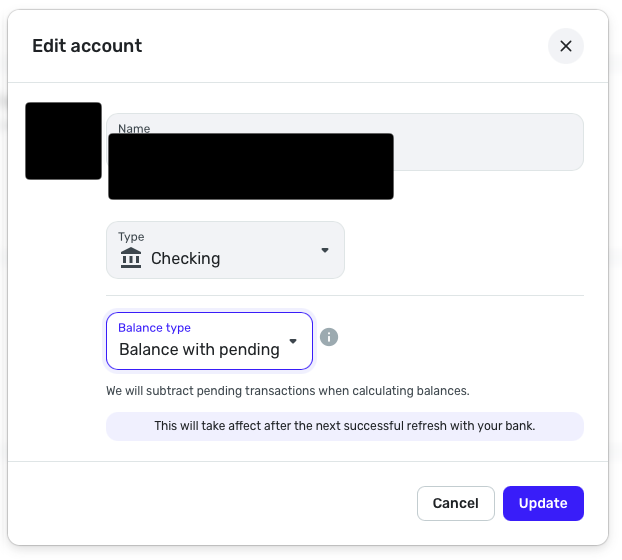
For me, going to Settings > Accounts, clicking the "…" next to an individual account, clicking "Edit Account", then changing the Balance Type for that account seems to do nothing at all.
STEPS TO REPRODUCE:
- Click Settings, then Accounts
- Click "…" next to an individual account
- Click "Edit Account"
- In the dropdown menu for "Balance Type", change it to "Balance with Pending"
- Click Update
- Wait 4 hours, or a day, or whatever, for the next refresh…
EXPECTED BEHAVIOR
- Something should change somewhere for that specific account after the next refresh!
ACTUAL BEHAVIOR
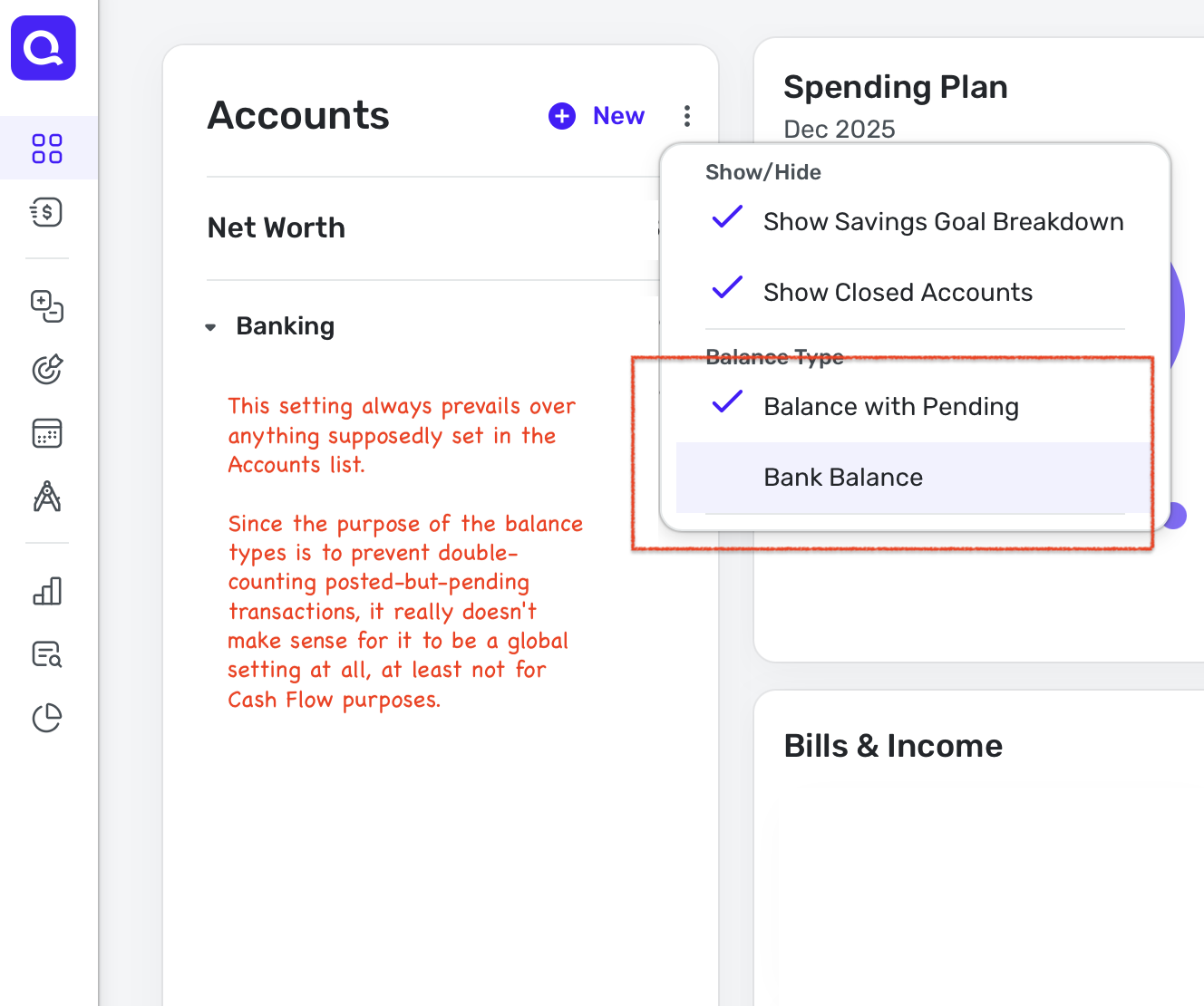
- Global Balance Type setting on the home/transactions screens always prevails. On Transactions pages, the displayed balance type (in the upper-right corner) for each account is always governed by the "global" Balance Type setting in the "…" menu to the right of the label, "Accounts". The account-specific setting that was purportedly changed in Steps 4-5 seems to have no discernable effect anywhere.
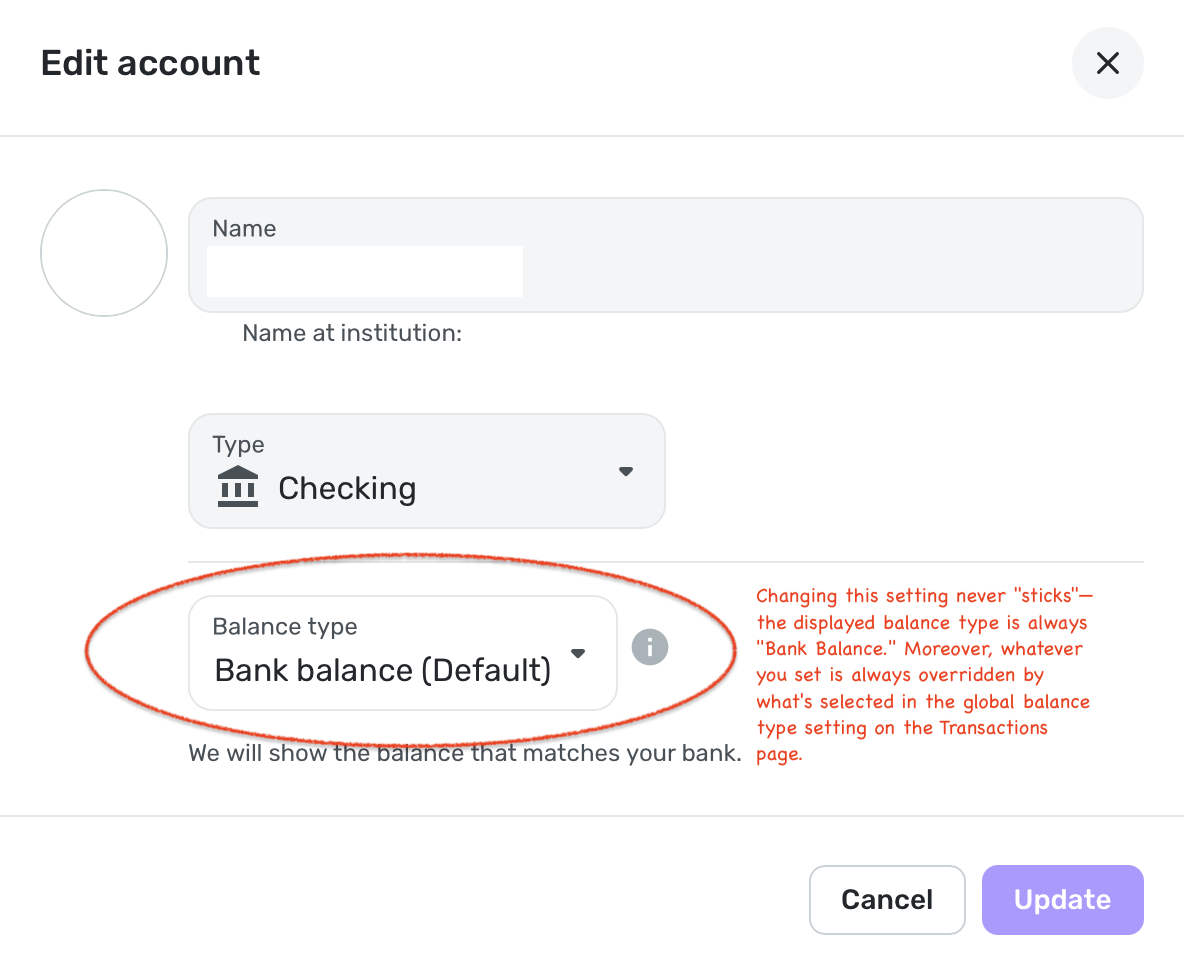
- Changing the account-specific option never appears to "stick." If you then repeat Steps #1-4, the drop-down menu in that settings dialog always remains set to "Bank Balance (default)", and the "Update" button is always grayed out unless you change it to "Balance with Pending." If this settings dialog is to be believed, either the setting never truly changes, or you can only change it in one direction (ever) and its set value is never reflected in the drop-down menu.
- For banks that report balances reflecting unsettled transactions, selecting the global option "Balance with Pending" always results in double-counting of bank-known pending debits, regardless of whether the individual account-specific setting has been changed per Steps 1-5. However, selecting the global option "Bank Balance"—which resolves double-counting—throws off all your cash flows for other accounts.
As it stands, I always have to toggle the global setting depending on which individual account I am looking at in order to get an accurate cash flow. This makes no sense—the whole point of a platform such as Simplifi is to display and manage multiple accounts at once.
It seems like the intention of the setting is to govern how Simplifi reconciles the balance transmitted from the bank with any pending transactions also transmitted from the bank (i.e., does the balance transmitted already reflect said pending transactions?). However, if that is the intention, then it's not clear to me why there is a global option that always seems to override it.
If the desire is for there to be a global option that only affects the balance shown (i.e., to back-calculate a "bank balance" for banks that report "balance with pending"), then (1) this merits clarification in both UI and documentation, and (2) such a global setting should never affect the projected balances in Cash Flow at all. Along those lines, please see this closely-related problem re: Cash Flow's handling of Simplifi-initiated pending transactions that are not yet sync'd to a bank-transmitted transaction.
0 -
Hello @bob303727,
Thank you for the information! To confirm, when you select the Balance Type in Settings > Accounts, nothing actually changes for you regarding the accounts of the Balance Type you are changing, even after waiting until the next refresh? You always have to use the setting available in the Accounts list, correct?
Does switching to another web browser/incognito mode change how this behavior works for you? Can you supply the web browser, operating system, and their respective versions?
We will also need logs to be sent:
- Log in to the Quicken Simplifi Web App.
- Select Profile from the left-hand navigation bar.
- With the Profile menu open, hold down the Option key for Mac or the Alt key for Windows, and then click Send Feedback.
- Leave all boxes checked, add a brief description of the issue, and then click Send.
-Coach Jon
-Coach Jon
0 -
Thanks. This behavior persists across Safari 26.1 (21622.2.11.11.9) and Chrome 142.0.7444.176, on macOS 26.1 (25B78). It also persists in Incognito mode.
Report created - reference id 515723412602858498.
1 -
Hello @bob303727,
Thanks for the requested information. Can you also answer the questions I previously asked, as well, to better help us understand the issue?
To reiterate, when you select the Balance Type in Settings > Accounts, nothing actually changes for you regarding the accounts of the Balance Type you are changing, even after waiting until the next refresh? Do you always have to use the setting available in the Accounts list?
-Coach Jon
-Coach Jon
0 -
Thank you for the information! To confirm, when you select the Balance Type in Settings > Accounts, nothing actually changes for you regarding the accounts of the Balance Type you are changing, even after waiting until the next refresh? You always have to use the setting available in the Accounts list, correct?
Yes — that is correct.
Does switching to another web browser/incognito mode change how this behavior works for you? Can you supply the web browser, operating system, and their respective versions?
No, neither browser switches nor Incognito mode change the behavior. It persists across Safari 26.1 (21622.2.11.11.9) and Chrome 142.0.7444.176, on macOS 26.1 (25B78).
We will also need logs to be sent:
Report created - reference id 515723412602858498.
Thanks!
0 -
Hello @bob303727,
Thank you, once again. Can you please also provide a screenshot showing the balance setting for the account you are trying to change in Settings > Accounts, as well as a screenshot showing the setting within the Accounts List? We are trying to gather as much information about the issue as possible in order to get it reported to our product team.
-Coach Jon
-Coach Jon
0 -
Sure.
 0
0 -
Thank you @bob303727,
With this information, we should be able to get this issue reported to our product team. The last thing we need is the Version and Build of Quicken Simplifi that you are on. This can be found at the bottom of your Dashboard page in Quicken Simplifi.

-Coach Jon
-Coach Jon
0 -
Version: 4.86.1 (36384/49c433ef44/path:packages/core&v142.2.0)
0 -
Hello @bob303727,
Thank you for your patience! We did get this issue reported to our product team and will be sure to provide further updates here going forward.
-Coach Jon
SIMPL-30766
-Coach Jon
1 -
Hello @bob303727,
I am back with an update from our product team! They have implemented a fix for the issue, which should be released with Quicken Simplifi Web Version 4.89.0. Be sure to be on the lookout for when that version rolls around and let us know if the issue is resolved for you at that time!
-Coach Jon
-Coach Jon
2 -
awesome—thank you for your help!!!
3 -
Thanks for doing this Bob. I have the same issue and it drives me crazy. Waiting patiently for v4.89.0
1 -
Hello @bob303727 and everyone!
I am back with an update from our product team. This issue must have been a little harder to tackle than originally anticipated, as they removed the fix version from the ticket. We will continue to keep you updated with any further status updates going forward for this issue.
-Coach Jon
0 -
I just did the update to v4.89.0 and noticed the bank balance type still isn't working when you change an individual account's type. So then I came on here to see if you had written any update and you had, so kudos to you. Not so many kudos to the product team. I have the exact same issue as bob303727 but with Wells Fargo and Truist. Wells Fargo balance type needs to be Balance with Pending. Truist balance type needs to be Bank Balance.
Is there a way to keep me updated on this issue other than checking on this community page?
0 -
Hello @phillauer,
Thanks for reaching out! I would advise selecting the bookmark ribbon in the upper right corner so that you can follow along in this thread here when we post any status updates!
-Coach Jon
0 -
If I set BofA Checking to "Balance with Pending" the pending transactions are not calculated. If I change it to "Bank Balance (Default)" they are calcualted but the the "All Account List" still showes "Balance with Pending". Why is this happening?
0 -
Hello @LukeNM,
Thank you for reaching out. The accounts list on the left lets you choose whether you want to see Balance with Pending or Bank Balance. If it's set to Balance with Pending, that's why you still see that balance in the sidebar.
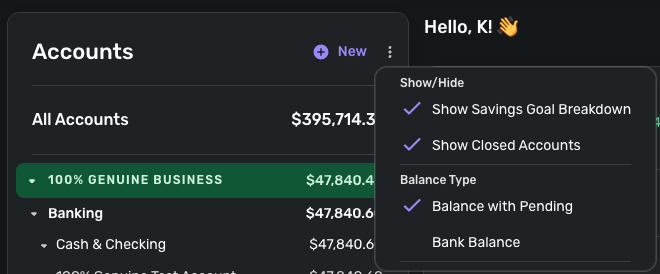
I hope this helps!
-Coach Kristina
0 -
You may have missed the point. If I set the account to Balance with Pending it does not calculate the Pending. If I set the account to Bank Balance the Accounts screen still indicates Balance with Pending and the Pending are calculated against balance on the Accounts Screen. The account is set in conflicting ways, but works as it should.
Jon was working with me on this with both settings set to Balance with Pending which would not calculate, but he asked for too much personal information, so I gave up and had him delete the entire post.
0 -
Part of the confusion about Balance Type comes from the fact that:
- the Accounts list (shown in @Coach Kristina's image above) has just one setting for Balance Type that appears to apply to all accounts in the list, but
- in Settings | Accounts there appears to be an individual setting for each account that sets the Balance Type on an account-by-account basis. (see image below)
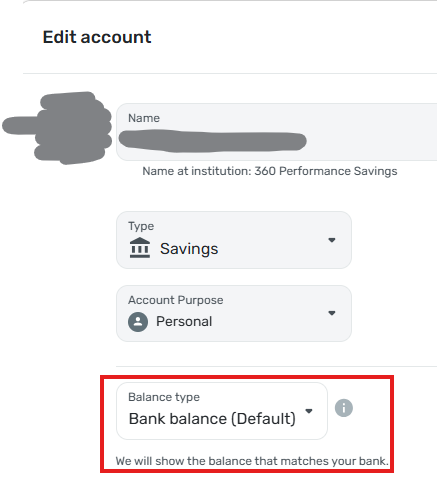
This leads to some confusion. For example, regarding my account shown in the image above,
- the setting for my Account list in general is "Balance with Pending"
- the setting in Settings | Accounts for the individual account is "Bank balance (Default)"
- the setting displayed on the account's transactions page is "Balance with Pending" (see image below)

So it appears that the account is using the general setting (from the Account list) and ignoring the individual setting (from Settings | Accounts). That seems backwards to me. I would have guessed that individual settings would override general settings.
DryHeat
-Quicken Classic (1990-2020), CountAbout (2021-2024), Simplifi (2025-…)1 -
Previously, before the BofA connection change both were set to Balance with Pending. Now the indivudial setting needs to be set to Bank Balance (Default) for pending to calculate. If both are set to Balance with Pending the calculations do not take place. Go figure?
0




