Transaction List Update: Share your feedback here!
Comments
-
@KDC1996, I've been using the new register for some time and haven't noticed the "uh oh" message pop up at all. I would recommend trying from a different browser or in incognito/private mode to see if the issue is perhaps being caused by something in your primary browser. If it works in a different location, you can try clearing the cache/cookies of the Quicken Simplifi site in your primary browser to see if that clears things up for you there.
@RobWilk, I have let Quicken Kirby know that you no longer have the new register. I don't think she's in yet, but I did get it on her radar.
Thanks!
-Coach Natalie
1 -
@KDC1996 thanks so much for this report. I'm filing the issue and will work with the team. Was this happening for you around the time you posted? Thanks so much for using the new register and posting about it. I really appreciate it.
0 -
I just cleared my cache/cookies on Google Chrome, then went on the app and was able to reproduce the issue again. Same "Uh-Oh" message.
I switched over to Microsoft Edge, then tried again. I also received the same "Uh-Oh" message.I was not able to replicate the "Uh-Oh" message a second time after I pressed "Return to Dashboard" when I immediately go back to the transaction screen. If I refresh the page though, I am able to reproduce it. I am able to reproduce it when clicking on the review button for multiple transactions in quick succession.
One thing to note is that I had the filter set to show all transactions (Back to 2019). I just changed it to show only 2025 and with trying for a few minutes, I was not able to replicate the "Uh-Oh" message. I wonder if the update uses additional memory that is not overloading the session and causing something to crash when I have "All transactions" show since that would be a significant amount of transactions.1 -
When the new advanced filtering on multiple criteria shows up for my account, where will this ability be seen?
0 -
When I select transactions in an account register, the "(number selected, total amount)" message no longer shows up at the top of the register as it did before. (On one of my accounts, it did show up once this morning after a significant delay — but now it won't show up at all.)
Here's an example

I have tried showing only 2025 transactions, showing all transactions, selecting 3 or 4 transactions, selecting all transactions. It just doesn't show up anymore.
NOTE: I am using Early Access, ver. 4.87.0. (If this isn't happening for you I can provide more information, but if it is that probably isn't necessary.)
DryHeat
-Quicken Classic (1990-2020), CountAbout (2021-2024), Simplifi (2025-…)1 -
Hi there, @DryHeat,
We are investigating this as it's not consistent and I'll provide an update this morning. Thanks for reporting it.kirby
3 -
Early Access folks, especially @DryHeat, thanks for reporting the selection/totalling issue. We've just updated the web app to fix this. I'd love if you could confirm it's working again for you. Thanks, kirby
0 -
It's working correctly now. $Total/#Selected always appears with no delay.
Version: 4.87.1 (36501/c176885d0b/path:packages/core&v143.4.2)
DryHeat
-Quicken Classic (1990-2020), CountAbout (2021-2024), Simplifi (2025-…)0 -
I'm on web version 4.87.1. Where do I find this new feature:
Advanced Filtering:Filter by multiple parameters at once—including dates, amounts, and operators (e.g.,Amount < 20andDate between 11/16 and 11/18)—to quickly find exactly what you need.
0 -
The examples given don't work for me either, BUT…
Try typing "<20.00" into the Search Transactions box at the top of the register (without the quotes). If your register now shows only transactions that are less than or equal to $20.00, you have the new feature.
You can also use ">12/01/2025" to get dates on or after 12/1/25, or "<12/01/2025"to get dates on or before 12/1/25. I don't know what else works. Just experiment, I guess.
Also, I know these filters look like they should exclude 20.00 and 12/01/2025, but don't. The > functions like >= and the < functions like <=. No idea why it works that way.
DryHeat
-Quicken Classic (1990-2020), CountAbout (2021-2024), Simplifi (2025-…)0 -
@DryHeat The single filter criteria like <20.00 has been there since I started Simplifi in 10/23. From the update that @Coach Natalie mentioned, multiple criteria has been added for Early Access. I don't see it under the Advanced filtering options on v 4.87.1. @Coach Natalie - would you advise where this multiple criteria feature can be found for Early Access or confirm that we are not a part of the group it has been released to yet?
Advanced Filtering:Filter by multiple parameters at once—including dates, amounts, and operators (e.g.,Amount < 20andDate between 11/16 and 11/18)—to quickly find exactly what you need.
1 -
@RickS, the advanced filtering mentioned in the announcement is available via the three dots that pop up when you hover over a column header —
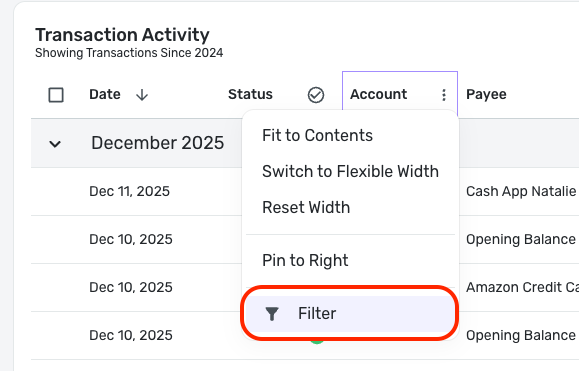
-Coach Natalie
0 -
@Coach Natalie Not getting the three dots when hovering over a transaction column header so must not be in the group for those updates yet, right?
0 -
@RickS, I would presume that is correct, yes. It looks like we are still at just 20% of Early Access release.
@Quicken Kirby can likely enable it for you, though. Is that something you'd be interested in?
-Coach Natalie
0 -
@Quicken Kirby Yes, please enable. Thank you.
1 -
@Quicken Kirby @Coach Natalie Please let me know one way or the other if multiple transaction filters are enabled. Today, I don't see the three dots hovering over any of the transaction column headers. It is okay not to turn it on if there are issues holding up the rollout.
0 -
Hello @RickS,
I've just enabled the new register for your user. Let me know if you have any questions or want me to un-enable it at any point.Thanks so much for your interest.
0 -
@Quicken Kirby Transactions are missing the date column and there is no option in the settings gear to include date column. Looks like it is not ready for prime time.
0 -
@Quicken Kirby I tried resetting the column selections in gear settings back to default and the date column reappeared. I then added additional columns and date column remained in place this time.
1 -
The new register is now live for all Early Access users!
-Coach Natalie
0 -
I have an account that is new, about 2 weeks old. It was working fine until today.
In the transaction activity list, it lists the 'Category' field at the top of the list, but in the rows the category is now displaying the payee. The actual category of the transaction is not listed at all.
If I edit the transaction, everything displays correctly and the category is correct.
If I export to CSV, the category field is incorrectly displaying the payee field in the rows.
None of my other accounts are showing this behavior.
Is there any way to fix this?
0 -
Hello @dont,
Thanks for reaching out! That is definitely a strange issue. I am not sure why the Category field would be completely missing. To better help us understand the issue you are reporting, can you please supply a screenshot of the Transaction Activity register in Quicken Simplifi for this account?
-Coach Jon
-Coach Jon
0 -

[removed screenshot - user request/privacy]
The first screenshot is of a single transaction, but it's showing this behavior across all transactions. The second screenshot is the edit screen for the same transaction, showing the category correctly.
0 -
Hello @dont,
Thank you for the quick reply! I can see from your screenshots that you are using the new register. I went ahead and merged your thread here since the new register is still in Early Access testing. You can tell if you have Early Access enabled by navigating to Settings > General, and scrolling to the bottom there.
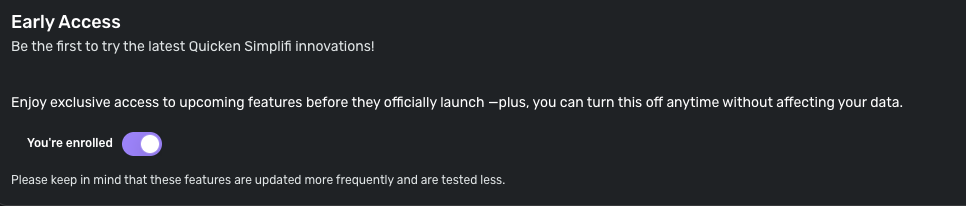
I would see if selecting the gear icon to the right of your register and selecting 'Reset to defaults' works to resolve this issue.
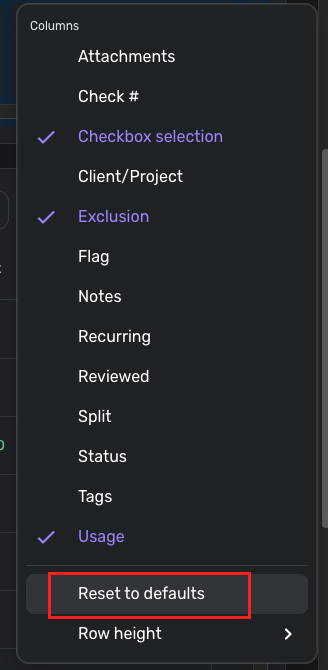
If that still doesn't work, try clearing your cache and cookies, turning Early Access off and back on, and then signing out and signing back into Quicken Simplifi. Let us know how this goes!
-Coach Jon
-Coach Jon
0 -
Turning off early access fixes it. Reset to defaults did not do anything.
I tried turning on early access again, but it reverted back to the problem.
0 -
Hello @dont,
Thanks for the reply! The issue would not be present with Early Access not enabled, since the issue would reside with the new register itself. Can you please verify if the issue is present in another web browser/incognito mode with Early Access enabled?
-Coach Jon
-Coach Jon
0 -

In an incognito window on Chrome with early access not enabled, I see the above which is correct.

In an incognito window on Chrome with early access enabled, I see the above, which is not correct. The payee has been shifted into the Category column.
I see the same exact behavior on Firefox, which I have not used at all for Simplifi.I have not seen this behavior on any of my other accounts.
One thing that I'll note that happened with this account, was that when I originally added the account, it was set to an account type of brokerage. However, I decided about a week later it should be classified by Simplifi as a checking account because the transactions in Simplifi for investment accounts are limited. I set the account to manual, and then reset the connection. When Simplifi found the new account I associated it with the manual account and changed it to checking account. That was at least a week or two ago, and it was working fine until today. I have no idea if that sequence of events has anything to do with the behavior I'm now seeing.
0 -
Hello @dont,
Thank you for the additional information. After researching, I have confirmed that users should not be able to change the account type for their investment accounts that are downloaded into Quicken Simplifi. We have reported this issue to our product team and submitted a bug report to prevent this from occurring in the future.
Additionally, our product team is looking into what to do for users like you who have ended up in this incorrect state for the new register.
-Coach Jon
-Coach Jon
0 -
@Coach Jon I have my Cash Management account set as a savings account. Having it as an. investment account is useless to me, and I was under the impression that Simplifi was going to fix this so all users could use it that way. Cash Management accounts need to be able to use recurring transactions, splits, etc. so crippling them as investment accounts is not what we want.
I've had no problem with it at all except that I have to fix the monthly dividend transactions. So when you say you will prevent this from happening in the future, I am confused. The users should control how they manage their accounts and not Simplifi.
Edit: We were told before that this was locked by the Investment companies, so again I am confused.
Steve
Quicken Simplifi (Safari & iOS) Since 2021
Quicken Classic (MacOS) Since 2009
MS Money (1991-2009) and Dollars & Sense (1987-1991)0




