Robinhood - Savings accounts don't show up (edited)

Robinhood has a new banking product and I have 2 checking (individual and joint) and 2 savings accounts (individual ans joint) with them. When I add Robinhood, I do see the checking accounts but the savings account don’t show up. Can you please fix the code to allow adding savings accounts. FWIW, I tried to add Robinhood in another financial app, and the savings account show up just fine. They use plaid for connection.
Comments
-
This may not be your case, but sometimes it takes a day or two for new accounts to show up.
Steve
Quicken Simplifi (Safari & iOS) Since 2021
Quicken Classic (MacOS) Since 2009
MS Money (1991-2009) and Dollars & Sense (1987-1991)0 -
Yup it has been close to a month tha I signed up for Robinhood banking. Just tried to add it again and it does not show up.
0 -
Yeah, a month is plenty of time. Since you see them in other financial apps, I suggest you make your connected Robinhood accounts manual (Go to Settings:Accounts), and then try adding accounts again to see if it now finds them all.
If it does now find them, you will want to link the checking accounts to your manual accounts. If you already have the new Savings Accounts setup as manual, you will do that for them as well; otherwise, let Simplifi create the new savings accounts (default).
Hint: You may have to visit the bank site and remove the Quicken Connection there if it supports that.
Here's a support article in case you've never linked accounts before:
Hope this helps.
BTW are the checking accounts really investment accounts that accept checks and debit card transactions? Do you have this as an investment account in Simplifi or as a checking? Thanks.
Steve
Quicken Simplifi (Safari & iOS) Since 2021
Quicken Classic (MacOS) Since 2009
MS Money (1991-2009) and Dollars & Sense (1987-1991)0 -
Hello @simplira,
Thanks for reaching out! To clarify, all of your accounts show up except for your Savings accounts, correct? I would follow the advice @SRC54 gave here and try the following steps to see if they help resolve the issue:
- Navigate to the bank's website, sign in, and then remove Quicken's access from the bank's third-party linked apps.
- Make all of the accounts with the bank manual by following the steps here.
- Once you see the account(s) listed in the Manual Accounts section under Settings > Accounts, go back through the Add Account flow to reconnect to the bank.
- If the connection is successful, carefully link the account(s) found to your existing Quicken Simplifi account(s) by following the steps here.
Let us know how this goes!
-Coach Jon
-Coach Jon
1 -
Hi @Coach Jon
I exactly followed the steps you specified and added the accounts again after removing quicken connection from Rbinhood and making the accounts manual. But still the same results. The savings account did not show up. BTW, there is another issue that the checking account transactions do show up but the checking account balance shows as zero, but since there is a separate request opened by another user, I am not bringing it here.
Thanks
0 -
Hello @simplira,
Thank you for clarifying and following those steps. Can you please supply the following information to better assist us?
- Has there been any activity in the account in the last 90 days?
- Is the account considered an external account (i.e., are you redirected to a different website when selecting the account on the bank's website)? If so, what URL are you redirected to?
- Is the account a subtype of a different account?
- Has the bank made any recent changes to its website or sign-in process?
- Are you the owner of the account?
- The name of the account, as it appears on the bank's website.
- If the issue is occurring on an existing Quicken Simplifi account, the name of the account as it appears in Quicken Simplifi.
- A screenshot of the Accounts Summary page from the bank's website that has a wide enough scope to show the full page URL. This is the landing page after signing in, and typically lists all accounts and balances. You will want to take this from a web browser and not a mobile browser, as well as redact any private info such as account numbers.
- A screenshot of the Add Account screen in Quicken Simplifi showing that the account in question is missing at account discovery.
We will also need logs to be sent to us, please!
- Log in to the Quicken Simplifi Web App.
- Select Profile from the left-hand navigation bar.
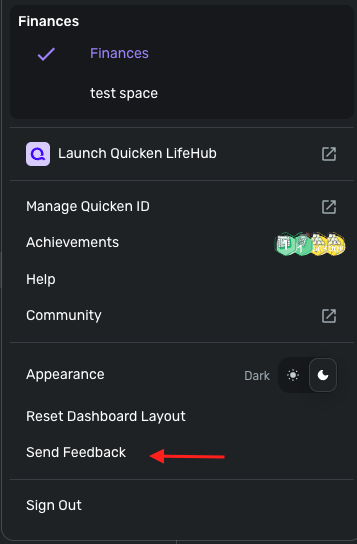
- With the Profile menu open, hold down the Option key for Mac or the Alt key for Windows, and then click Send Feedback.
- Leave all boxes checked, add a brief description of the issue, and then click Send.
-Coach Jon
-Coach Jon
1 -
Sure @Coach Jon,
here are the responses:
- Has there been any activity in the account in the last 90 days?
When I first opened this request there was no transactions in the savings account. I just now added a transaction to the account but it still does not show up. - Is the account considered an external account (i.e., are you redirected to a different website when selecting the account on the bank's website)? If so, what URL are you redirected to?
No, the account is not external. Both checking and savings account show up at same place. - Is the account a subtype of a different account?
No, the account is not a subtype of another account. - Has the bank made any recent changes to its website or sign-in process?
No, I have not noticed any change to sign-in process. - Are you the owner of the account?
Yes, I am the owner of the account - The name of the account, as it appears on the bank's website.
There are 2. Savings and Joint Savings - If the issue is occurring on an existing Quicken Simplifi account, the name of the account as it appears in Quicken Simplifi.
Not sure I follow the question. If you meant was the account previously added and exists in Quicken Simplifi, the answer is no. This is a new account and I was never able to add it to Quicken Simplifi. - A screenshot of the Accounts Summary page from the bank's website that has a wide enough scope to show the full page URL. This is the landing page after signing in, and typically lists all accounts and balances. You will want to take this from a web browser and not a mobile browser, as well as redact any private info such as account numbers.
The banking and credit card products from Robinhood are apps only and are not accessible through website. I am attaching two screenshots from the Mobile app. - A screenshot of the Add Account screen in Quicken Simplifi showing that the account in question is missing at account discovery.
Screenshot attached (third screenshot).
Sending the logs as well separately.
Thanks,


[edited images to reduce size]
1 - Has there been any activity in the account in the last 90 days?
-
Hello @simplira,
Thank you for the requested information! Per your reply, you stated that you did not have any activity in the account except for a transaction you entered today, correct? Is that transaction still in a pending state in Robinhood? I ask because if there has been no activity in the account, this may be causing the account not to show up when connecting. Let us know!
-Coach Jon
-Coach Jon
0 -
it was an instant transfer and is not in pending state. Also FWIW, the other checking account also does not have any transaction but it does show up.
Thanks,
0 -
hi @Coach Jon
Could not figure out a way to send logs. Under profile when I press Alt key, I don’t see a send feedback menu.
Thanks.
0 -
Yup that is exactly what I am doing. I am using a Windows 11 machine but using it in a Virtualbox and I am wondering if that could be the issue. Let me find a real laptop.
Thanks
0 -
Ok was able to send it using the Mac. Report reference id 516839892760645377 sent.
0 -
Hello @simplira,
Thanks for the reply. I was unable to find the logs you sent or an active Quicken Simplifi subscription associated with the email address provided. Is there another email address linked to your Quicken Simplifi subscription that you used to send the logs?
-Coach Jon
-Coach Jon
0 -
yes sorry, I am using a different account for Quicken Simplifi. Sent you a DM with the different email.
0 -
Hello @simplira,
Thanks for the clarification. I did get this issue reported to our product team and will be sure to follow up here when we have further updates!
In the meantime, you can add and track the accounts manually by adding manual transactions, which will keep your records up-to-date. Here are the steps to do so:
Adding the account:
Tracking the account: Managing Transactions in Quicken Simplifi | Quicken Simplifi Help Center
-Coach Jon
CTP-15713
-Coach Jon
0