Transfers are not Bills!

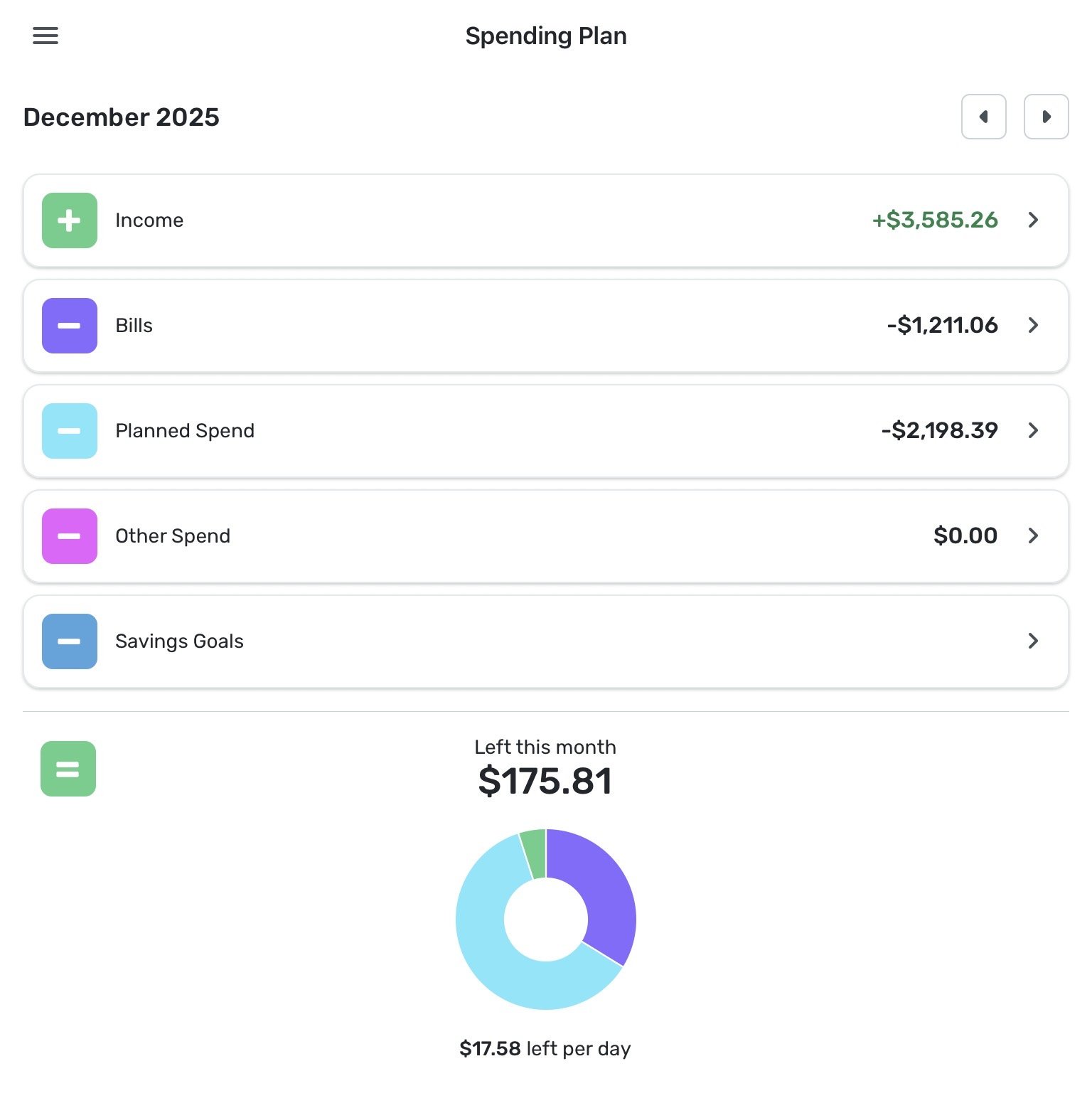
Please move ‘Transfers’ back to the ‘Income’ category or create a new level of hierarchy in the Spending Plan for Transfers. Transfers are not ‘Bills’. Transfers affect how much ‘Income’ is available to spend.
Thanks!
Comments
-
I am having a similar problem with transfer. I am trying to figure out how much money I have transfer to my loan account for payments. However, because all of the payments are transfers it has been impossible to generate a report to know how much money a year i am spending in transfers.
It is crazy, I can't generate a report to see how much money I have transferred from my checking accounts to either loans or CCs as a total payment for those accounts.
1 -
Putting Transfers into its own section gets my vote! However many votes I may submit :)
2 -

I agree that Transfers should be treated separately.
Some time ago I suggested that the Spending Plan layout should look like the image on the right, with a separate Transfers section that could end with with a positive or negative value, depending on what was transfered.
You may want to vote for that suggestion in the thread linked below.
DryHeat
-Quicken Classic (1990-2020), CountAbout (2021-2024), Simplifi (2025-…)1 -
You know this bothered me more when you couldn't sort the bills by type but only by date. Now that I sort them by type, I can see the Regular Bills, Subscriptions and Transfers in that order.
Also I can kind of see the logic in that the Bills section is a Payments section where you either initiate the payment online or by mail, which separate them from the "On the Go" spending you see in the Planned Spending buckets.
Steve
Quicken Simplifi (Safari & iOS) Since 2021
Quicken Classic (MacOS) Since 2009
MS Money (1991-2009) and Dollars & Sense (1987-1991)0 -
Already voted :)
0 -
Also I can kind of see the logic in that the Bills section is a Payments section
I think that is exactly @donnajean's point — Bills are mostly payments and Transfers often aren't.
Sometimes (particularly for retirees) Transfers are better classed as Income. Sometimes Transfers are just moving money around internally. For me personally, it is strange to have a Transfer that I think of as income show up in the Bills section (and not even in a green font!).
Simplifi already treats Transfers differently from regular Transactions, and in the future I hope will treat them even more differently. So it makes sense to put them in a class of their own.
DryHeat
-Quicken Classic (1990-2020), CountAbout (2021-2024), Simplifi (2025-…)1 -
@DryHeat My point was I can see somewhat the logic of putting them in all the same section as transfers often are payments. It's not a perfect solution though, and I don't mind having them in a separate place. But with six votes, it doesn't look like that is going to happen.
I also wanted to point out that you can sort them by type, which helps to keep them straight. I know originally one could not do that and that "by date" was and maybe still is the default.
I don't consider transfers to be either income or expense though. They are half and half and zero out unless you are using a one-sided transfer for a special reason or again for a special reason, you only want to count one side of the transfer. I do that sometimes for various purposes but not very often. So Simplifi is flexible enough to let you do that, which is why I like it.
Steve
Quicken Simplifi (Safari & iOS) Since 2021
Quicken Classic (MacOS) Since 2009
MS Money (1991-2009) and Dollars & Sense (1987-1991)0 -
My transfers are always payments but usually to myself - moving money from one account to another. If it's an expense I would use an expense category. The exception I can remember is when I pulled money out of savings to cover a home project, and I wanted to treat it as income to cover the expenses it was covering.
Here's a crazy idea, maybe if you unexclude the money in, it should be income, and if you unexclude the money out, it should be a bill. And otherwise it's just a Transfer.
That might be too complicated to implement… so I think that a separate Transfers section makes the most sense.
0 -
I don't consider transfers to be either income or expense though. They are half and half and zero out…
For me, the "special reason" for not doing it that way happens every month. Viewing transfers as Income (for Spending Plan purposes) happens when I transfer money from a retirement account to a checking account.
I don't want those transfers to "zero out." For purposes of the Spending Plan, I want them to show up as part of what I have available to spend that month.
I also don't want those "income" transfers to be buried in the Bills section, where they show up as a positive numbers (but in black!) that just reduce the total amount of Bills. Doing it that way makes both my income and my bills look less than they really are and makes the Spending Plan numbers unrealistic.
DryHeat
-Quicken Classic (1990-2020), CountAbout (2021-2024), Simplifi (2025-…)1 -
@DryHeat I definitely understand as I have the same thing with my IRA distributions. For the Spending Plan, they are income as I have to pay tax on it. But it is a transfer of funds from one account to another, which is why I decided to pay my tithe from it. So I make a payment to the church each month and I have to jump through hoops. LOL. I end up with a Gross Distribution canceled out by a Qualified Distribution and I have to then enter a transaction as an expense to the church. Because I did spend money and my account went down.
So I end up with this:
IRA Account: Transaction for $1000 Payee Church that is categorized as Qualified Distribution.
Cash Payment Account: A Split Transaction for +$1000 as Gross Distribution and $-1000 Non-Deductible Donation.In Reports, I end up with a total IRA Distribution of $0 taxable income and a $1000 expense, which is what I want.
If I were going to spend the money as income, I would probably transfer it to my checking account and make an entry for another transaction in my Cash account.
It would be a Gross IRA Distribution of say $5000 and a transfer of $-5000 showing up as a $0.00 transaction. Then you would have your IRA Distribution in your Income Section of your Spending Plan leaving the transfer from the IRA to Checking as a pure transfer.
The whole IRA thing is silliness. It was a great idea to get people to save for their retirement by giving them a tax credit. BUT we should get to spend that money tax free as long as we wait until retirement to spend it. It is as absurd as paying tax on social security. Both should be tax free for middle and lower incomes.
I looked back through my Spending Plans and I see that we had a monthly transfer that counts as expense because my wife transferred money to State Retirement each month. When she retired, they zeroed out her account but she will get an annuity for life (and so will I if she predeceases me. So it was an expense so that is how it shows up although it doesn't show up in reports as an expense. It probably should have. But I am leaving it alone, but it bugs me.
I had one other one sided transfer for "mileage" my wife got in August for a trip reimbursement. I have a particular OCD reason for not wanting to put that down as a negative maintenance expense, which is what it is, so I have it as a transfer and it shows up as a negative expense in the spending plan, just one that doesn't show up in reports. But I think about changing it all the time.
So I understand and think it would be great to mark a transfer as an IRA Distribution income category. And all of this is complicated by the fact that investment and retirement accounts don't allow for recurring transactions or splits, which is why I jump through the hoops above.
Steve
Quicken Simplifi (Safari & iOS) Since 2021
Quicken Classic (MacOS) Since 2009
MS Money (1991-2009) and Dollars & Sense (1987-1991)0 -
@DryHeat, I have upvoted your idea. However, I also think it would be great to have a report in the "Reports" section that shows how much money has been transferred to each account (especially Loans and Credit Cards) each month.
I would like to know how much I have spent on cards/loans each month, including any extra payments I may have made, especially if I have credit cards with balances I carry month to month.
0 -
@EL1234 — "treat transfers where one side is not excluded … as either income or expense"
I can see how that would work. I assume that, as far as Spending Plan goes, a non-excluded "income" side would end up in Income and a non-excluded "expense" side would end up in Planned Spend or Other Spend. (I'm not sure what you intend if neither side is excluded.)
I am interested in other ways to handle this issue, but I don't really understand what you are proposing. Your first scenario, for example, seems like it does not involve a transfer at all.
As for the second scenario... It sounds like there is a $5000 transfer from IRA to Checking (which would reduce the balance in IRA and increase the balance in Checking, which makes sense). But then there is another transaction for another $5000 — what account is it in and what does it do?
Finally, you suggest "marking a transfer as an IRA Distribution income category." I don't know what you mean by that as Transfers don't have normal categories.
DryHeat
-Quicken Classic (1990-2020), CountAbout (2021-2024), Simplifi (2025-…)0 -
I saw your other post about wanting a Transfer report and agree with it. I upvoted the idea post that Coach Jon referred to in his answer to you. I wish more people would vote for that.
In the meantime, I get the information you describe by filtering the full transaction list on transfers, exporting the result to a CSV file, and looking at it in Excel. Not ideal, but at least workable in the meantime.
DryHeat
-Quicken Classic (1990-2020), CountAbout (2021-2024), Simplifi (2025-…)1 -
@DryHeat The second transaction for $5000 is so that you will have an income category to show up in Income for your IRA distribution. You have to create that one. Then your distribution shows up as income.
In the first scenario, there isn't a transfer because it is a payment from my IRA to the church, but it is categorized as a qualified distribution. The second transaction is to counter that with a gross distribution and an expense to donations.
As for the suggestion about marking a transfer as an IRA Distribution, that would solve the problem but would have to be put in my Simplifi. Not sure how it would work but if you are going to mark a transfer as income, you might as well have a category for it.
Steve
Quicken Simplifi (Safari & iOS) Since 2021
Quicken Classic (MacOS) Since 2009
MS Money (1991-2009) and Dollars & Sense (1987-1991)0 -
The second transaction for $5000 is so that you will have an income category to show up in Income
Yeah, I get that. But what account is that transaction in? After all, by following your suggested course of action my checking account will already be up by $5000 from the IRA transfer. Will some other account be up by another $5000 from the second transaction? Won't that make it look like I have an additional $5000 that I don't really have? How does it work?
EDIT: I try to make my transactions in Simplifi mirror transactions that actually occur in the "real" world of electronic banking. So I try to avoid creating transactions that don't have real-world counterparts.
DryHeat
-Quicken Classic (1990-2020), CountAbout (2021-2024), Simplifi (2025-…)0 -
@DryHeat Yep. I use my Cash Payment (or Cash Account) but any payable account would do. I just make another transaction with category IRA Gross Distribution of +5000 which I would counter with a -$5000 transfer (because there isn't any money involved here) so that you will end up with a $5000 income in the Spending Plan. The other transfers get ignored.
Steve
Quicken Simplifi (Safari & iOS) Since 2021
Quicken Classic (MacOS) Since 2009
MS Money (1991-2009) and Dollars & Sense (1987-1991)0 -
I just make another transaction with category IRA Gross Distribution of +5000 which I would counter with a -$5000 transfer
Sorry, I just don't understand this. It sounds like the second transaction adds $5000 to your Cash Account. Is the "counter -$5000 tranfer" a third transaction, in addition to the first two? Also, if it is a transfer out of your Cash Account — which is what it sounds like — where does it transfer the money to? Don't you end up with $5000 extra somewhere in the end?
DryHeat
-Quicken Classic (1990-2020), CountAbout (2021-2024), Simplifi (2025-…)0 -
@DryHeat It's a split transaction for $0.00
+5000 IRA Distribution
-5000 Transfer
You've got to get the income into the Spending Plan somehow. Trust me; it works.
Steve
Quicken Simplifi (Safari & iOS) Since 2021
Quicken Classic (MacOS) Since 2009
MS Money (1991-2009) and Dollars & Sense (1987-1991)0 -
I see, you're marking it as a generic transfer, but you're not really transfering it to any account.
When I do that, the +$5000 shows up in Income in the Spending Plan, but the -$5000 Transfer also shows up under Bills. And if I try to exclude it, it also excludes the income. So I end up with no actual increase in my available funds for the month.
How do you fix it so that the positive income is not completely negated by the negative transfer?
DryHeat
-Quicken Classic (1990-2020), CountAbout (2021-2024), Simplifi (2025-…)0 -
If you're not transferring it to a specific account, why not categorize it as Income or Expense? You could make your own categories for that like "Income from Savings Account" etc.
0 -
@EL1234— "treat transfers where one side is not excluded … as either income or expense"I can see how that would work. I assume that, as far as Spending Plan goes, a non-excluded "income" side would end up in Income and a non-excluded "expense" side would end up in Planned Spend or Other Spend. (I'm not sure what you intend if neither side is excluded.)Yes, something like that. I think that an unexcluded income should be income and an unexcluded expense should be a bill. I'd still want a section for Transfers for those (most of mine) where both sides are excluded from spending plan. Those are neither expense or income since they are just moving my own money from place to place.
2 -
If you're not transferring it to a specific account, why not categorize it as Income or Expense?
I am trying to understand what @SRC54 is doing. As I understand it, he is trying to do is create a zero amount split transaction (which will not affect the account balance) where the positive split does show up in the Spending Plan in the Income section and the negative split does not show up in (or is excluded from) the Spending Plan.
Categorizing the negative split as an expense would not accomplish that. But categorizing it as a generic Transfer doesn't do it either. So I guess I'm still not understanding what he is doing.
EDIT: Regarding your suggestion on how to handle unexcluded transfers:
I think this is a really good idea that might be easier to implement than what I suggested. You should make an idea post if you haven't already done so.
DryHeat
-Quicken Classic (1990-2020), CountAbout (2021-2024), Simplifi (2025-…)0 -
Thanks! I added it to this thread:
Since it basically builds on that idea and I figured they'll get merged anyways :)
0 -
@DryHeat Sorry I got busy. Go to Spending Plan: Income, and make sure that you have the setting to include new income automatically.
I am going to do some testing on my end.
Steve
Quicken Simplifi (Safari & iOS) Since 2021
Quicken Classic (MacOS) Since 2009
MS Money (1991-2009) and Dollars & Sense (1987-1991)0 -
make sure that you have the setting to include new income automatically.
I think you are misunderstanding. As I said in my earlier post: "the +$5000 shows up in Income in the Spending Plan, but the -$5000 Transfer also shows up under Bills."
The result is that the splits cancel each other out and my income is not increased relative to my bills. So it doesn't accomplish anything.
INCOME:

BILLS:

DryHeat
-Quicken Classic (1990-2020), CountAbout (2021-2024), Simplifi (2025-…)0 -
@DryHeat Yes. The problem was that in my case, I wanted them to cancel out; I just did a test run and it has to be different for you.
The first part is the transfer from IRA to Checking. That is a transfer and doesn't count.
Then in the Cash Account, you have to do two transactions:
Transaction 1: Gross Distribution: +$5000 (Make sure it's included in both reports and Spending Plan)
Transaction 2: Transfer: $-5000 (this one is ignored in both).
Edited: Sending you screenshots:


Sorry about this. It is hard to do all this, cook dinner and talk to my hypochondriac friend on phone for 2 hours. 😀
Now you have $5000 income and the transfers are ignored. My fault for trying not to make 3 transactions, but accounting problems sometimes require it.
Steve
Quicken Simplifi (Safari & iOS) Since 2021
Quicken Classic (MacOS) Since 2009
MS Money (1991-2009) and Dollars & Sense (1987-1991)0 -
@DryHeat A simpler way would be to just do a transfer from IRA one sided that is ignored and in your checking account just do an income for IRA:
IRA account: Payment Deposit $5000 transfer (Ignore in Reports and spending plan)
Checking account: $5000 IRA Distribution
Your transaction is really simpler than mine since you don't have to worry about accounting for the donation and offsetting the Gross Distribution with the Qualified One.
Screenshots:


Just make sure you don't link the two when Simplifi asks. LOL
Steve
Quicken Simplifi (Safari & iOS) Since 2021
Quicken Classic (MacOS) Since 2009
MS Money (1991-2009) and Dollars & Sense (1987-1991)0 -
Then in the Cash Account, you have to do two transactions:
Earlier you said, "It's a split transaction for $0.00," and I couldn't get that to work. Now I know why.🤣
Anyway, your method is too roundabout for me to adopt. It requires creating not only the original transfer from retirement savings to checking, but also creating two imaginary transactions in an arbitrary account that represent income (from nowhere) and a transfer (to nowhere).
That's too far removed from reality for me. The money is really moving from one of my accounts to another in a pretty standard transfer. I'd prefer Simplifi let me recognize it in the Income section, using one of the methods @donnajean, @EL1234, or I suggested.
But until that happens it will just have to show up as a positive amount in Bills. Not great, but workable.
DryHeat
-Quicken Classic (1990-2020), CountAbout (2021-2024), Simplifi (2025-…)0 -
@DryHeat LOL I knew you wouldn't like it but it does work. Sorry that I couldn't devote all my time to it earlier. Actually, your situation is much simpler than mine since it only requires two transactions. I have to do more or do the split as I explained it.
The problem is that these accounting programs are not geared to older people. So we have to have workarounds. That is my specialty. And I doubt they will make any changes in transfers any time soon.
The reality is that you have a transfer that is taxable, which is not a usual case. So you have to find a way to make the transfer and to get Simplifi to realize you have income.
I have a payment that is not taxable, but I want to be reminded of how much they are so I can make sure I do my taxes right, so I get the taxes report to show my Gross Distributions offset by the Qualified ones and to show my expenses correctly.
Anyhow, maybe someone will get some good out of this exercise.
Steve
Quicken Simplifi (Safari & iOS) Since 2021
Quicken Classic (MacOS) Since 2009
MS Money (1991-2009) and Dollars & Sense (1987-1991)0

