recurring payment icon is missing on web (edited)

On the mobile app, my recurring transactions have the circular arrow icon beside them. This morning on the website I don't see the icon. Is that just me?
Comments
-
Maybe the recurring column is not visible on the website? You can easily adjust what columns appear in your transactions
1 -
Hello @Jerrod,
Thank you for coming to the Community with this question! If you want to see the Recurring column on the web app, click on the account you want to see it in, then click the gear icon near the upper right.

That will give you a dropdown listing all the possible columns to include/exclude from the account register.
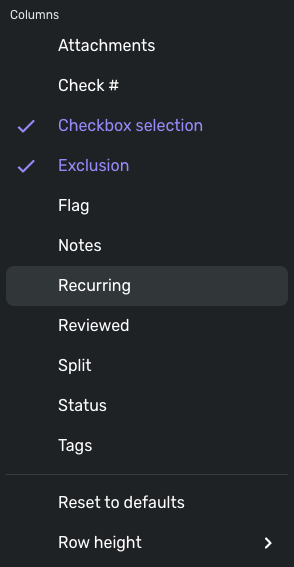
Click on Recurring, so that it turns blue and has the checkmark by it. Once that is done, you will have the column visible in that account register and the icon will show up next to your recurring transactions.
I hope this helps!
-Coach Kristina
0 -
They might have recently moved more users over to the new register which might explain why it changed for them.
—
Rob Wilkens
2 -
Yes, last week it was rolled out to all Early Access users.
1 -
Thanks, all. It was just that the columns were reset and I just needed to change the settings.
1

