Flagstar Bank Not Updating FDP-103/FDP-108 (edited)

My Flagstar Bank account has not updated for a month.
In Simplifi it shows error FDP-103 to enter credentials but when I select that it just gives an error “This financial institution is not available right now!”
Any advise on getting the connection fixed?
Comments
-
Hello @sami,
Thanks for reaching out! From our side, I am not seeing the specific instance from your screenshot available in Quicken Simplifi. I would see if using one of these available instances works to connect your account.
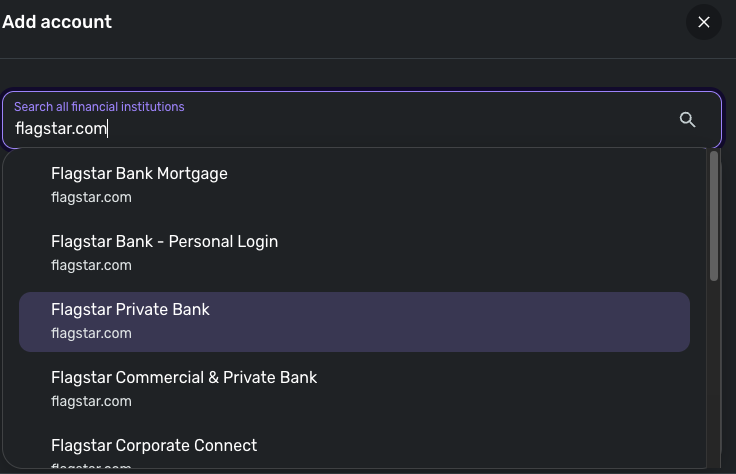
- Make all of the accounts with the bank manual by following the steps here.
- Once you see the account(s) listed in the Manual Accounts section under Settings > Accounts, go back through the Add Account flow to reconnect to the bank.
- If the connection is successful, carefully link the account(s) found to your existing Quicken Simplifi account(s) by following the steps here.
Let us know how this goes!
-Coach Jon
-Coach Jon
0 -
I tried the suggested steps of adding one of the other Flagstar options. It allowed me to enter my username and password and then approve a MFA text message but then in Simplifi it gave me this error:
To connect to your account, you must complete an action at the website for Flagstar Bank - Personal Login.
Care Code: FDP-108
I logged into the Flagstar website and there are no actions I can see to complete. Any ideas on how to get the connection working again?
0 -
Thank you for your reply,
Since you already checked the financial institution website and did not receive any obvious prompts, please try following these steps:
- Signing in to the bank's website through a different browser or incognito.
- DO NOT clear cookies and cache. Instead, sign in to your bank's website through incognito mode, or a different browser, to see if you're prompted with any pop-ups immediately after signing in.
- Are you normally prompted to verify your identity through a security code at the bank's website?
- Sometimes you aren't prompted to complete an MFA when signing in from the same computer, but it may be required when signing in through a different one.
- Did you acknowledge and accept the terms and conditions for third party apps on the bank's website?
- Some banks may require you to accept the terms and conditions for use of third party applications with your banking information.
- Do you need to create or update your security question on the bank's website?
- After you have acknowledged and accepted the terms and conditions for use of third party applications, your bank may require you to create or update your security question. Typically, this security question is used when you're resetting your bank's online password.
Please let me know how it goes!
-Coach Kristina
0 - Signing in to the bank's website through a different browser or incognito.


