Enhanced Reports: Share your feedback here!
Comments
-
I was testing out the Early Access features and notice they (currently) change the appearance and export results from the Reports section. I am specifically interested in exports from the spending view. I like them better than Transaction's exports because they cleanly break out split transactions. Also one critical thing i like of this export is the ability to show the "recurring" flag. This allows you to re=create the spending view split of income bills and everything else. Since bills and subs (recurring) can span many categories you reallpy need the flag.
That said if i enable Early Access the transaction view changes on the spending reports page (fine) but the export is totally different (huge problem).
This is early access so who knows what it will look like in the final update this is my petition to keep the current export format intact.
0 -
@ThatManUKnow, thanks for sharing your feedback with the Community!
I have merged your post with the official feedback thread for the Beta Reports testing so it can be reviewed by our product team.
-Coach Natalie
0 -
@mdleighty, thanks for letting us know about this!
Since what you reported appears to be unique to the Beta Reports, I have merged your post with the official feedback thread for the Beta Report testing. I would consider the inconsistent alignment to be more of a bug than a feature request, and our product team will review this thread to determine what enhancements can be made.
I hope this helps!
-Coach Natalie
0 -
Here is some more information on my previous 3 post about zeros in the income-expense for certain transactions subcategories. I previously added several subcategories to personal income. About 1.5 months ago the rules started recoding Personal Income instead of the subcategory for all the subcategories I had added. Early Access was on but I had not Switched to Try Beta. The Try Beta did not change anything. The subcategories that came by default still work fine. I have not seen this problem in the expense part of the report. I edited the categories to be main categories and waiting to see if the rule works correctly for the next transaction.
0 -
It seems you can't do this kind of report in the Enhanced Reports (see below).
Spending, over time, broken down by month, with or without a filter.
Below is an example of the old report. The new spending tab does not allow you to break down over time.
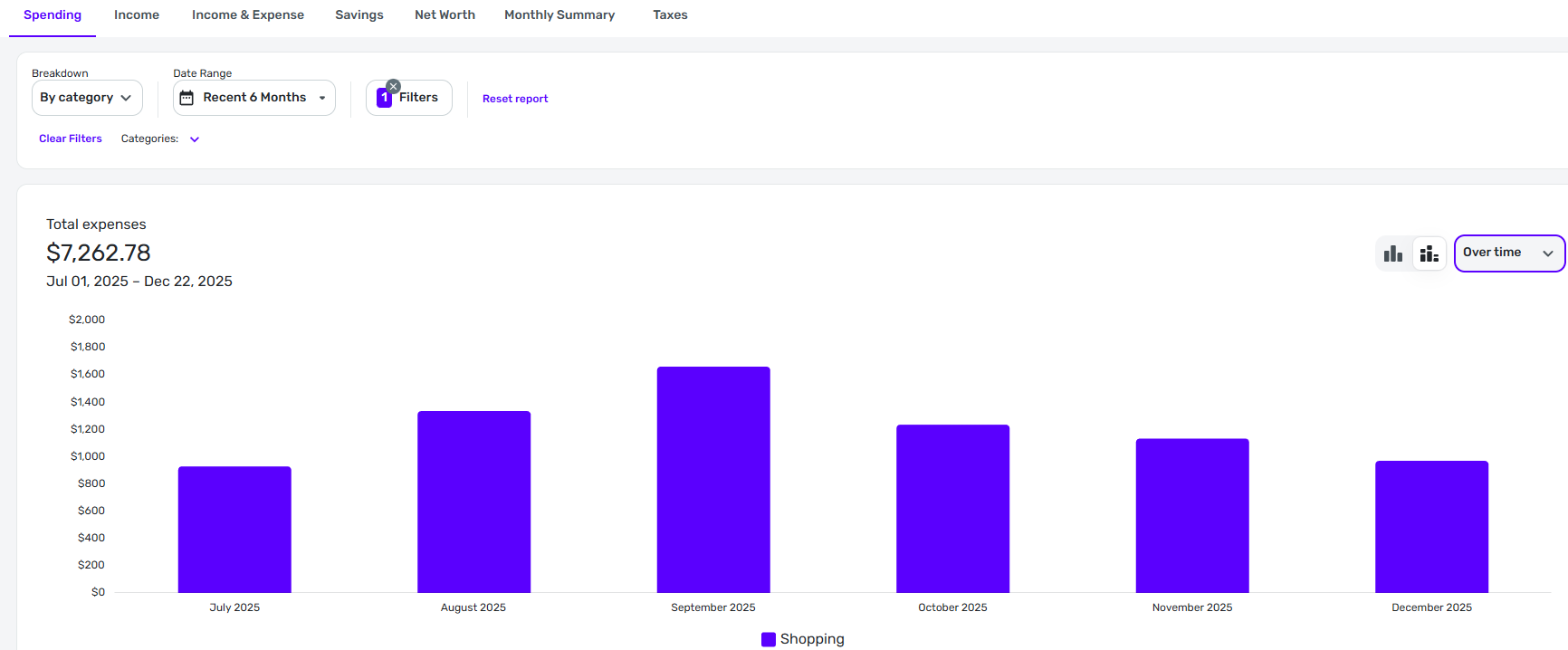
Thanks!
Ron
2 -
I didn't read through the whole thread, so don't know if this was covered already - -
The resizable (shrinking) columns for the entire row worked really well to pull it back..
But now I cannot seem to increase any individual column width…. And the columns are now kind of all bunched up on the left half of my screen
—
Rob Wilkens
0 -
the spending report is lacking the "overtime" option which is the view i use.
1 -
Did not read through everything, but an important thing needs to be here:
The ability to save custom column selections across reports.
In my case, I have a bunch of transactions, for example, marked "Amazon" but seeing the notes field would help remind me what specifically the transaction was about.
The alternatives is for me to put the descriptions in the Payee names, but that makes auto-filling the payee more difficult later.
—
Rob Wilkens
1 -
IMO, in the spending tab, the rows should be collapsed by default. Its too cluttered if you have many nested layers.
1 -
Spending report doesn't allow adding Notes or Tags columns.
For now, I'm turning off Beta as this is a critical feature for my workflow.
I spend more time in the Spending report than I do on the Transactions page. (The Reports page lets me adjust column size so I can actually see all of the Payee and Category columns. It also lets me export every transaction that meets my criteria without having to go down and click the expand button a dozen times.)
0 -
Generally the update in the Beta Reports is good, but we've lost the ability to download raw data. Like in expense reports, you now can download by various categories, but it downloads a formatted report, not the raw data - which makes using the downloaded data almost impossible to manipulate in a spreadsheet. Also, if you download by tags, the categories are missing the parent category (once again, since this seems to always happen with updates). I would hope that before this goes live, that we have some way to download just the data, and not some report.
0 -
- Kindly show a Sangkey style visualization for Income and expenses. It's so intutive and Monarch's killer feature - so easy to copy.
- Reports have <$1 transactions. Lot of cognitive load, with little value - allow hiding along w Decimals.
- Add Investment tab or fold into savings to show increase in brokerage account balanaces → which are not captured in any report except net worth - which includes retirement and assets
- Allow bulk collapse and expand by levels to better navigate table scrolling
- Tax tab - did not make much sense for me, but could be my information.
Recently used it for 2025 analysis and these were the insights.
0 -
This is now fixed. Thanks.
Steve
Quicken Simplifi (Safari & iOS) Since 2021
Quicken Classic (MacOS) Since 2009
Dollars & $ense (DOS) and MS Money (Windows) 1987-20090 -
Inexplicably, after being fixed, the new Expenses Report once gain goes to 2nd Level Expense Categories whereas I prefer it go to top level categories until I drill down.
Note: in the Dashboard Card, it shows top level, but only the first six categories. If I click on the dashboard card to see the rest, it takes me to the Expense Report, whose graph now it is 2nd level categories. This is disconcerting and unexpected. The actual report below is fine.
Steve
Quicken Simplifi (Safari & iOS) Since 2021
Quicken Classic (MacOS) Since 2009
Dollars & $ense (DOS) and MS Money (Windows) 1987-20090 -
in Quicken Simplify Beta Reports I was unable to export the .csv version of the spending report by categories. Kept getting an error message. I was only able to export it in the pdf version.
0 -
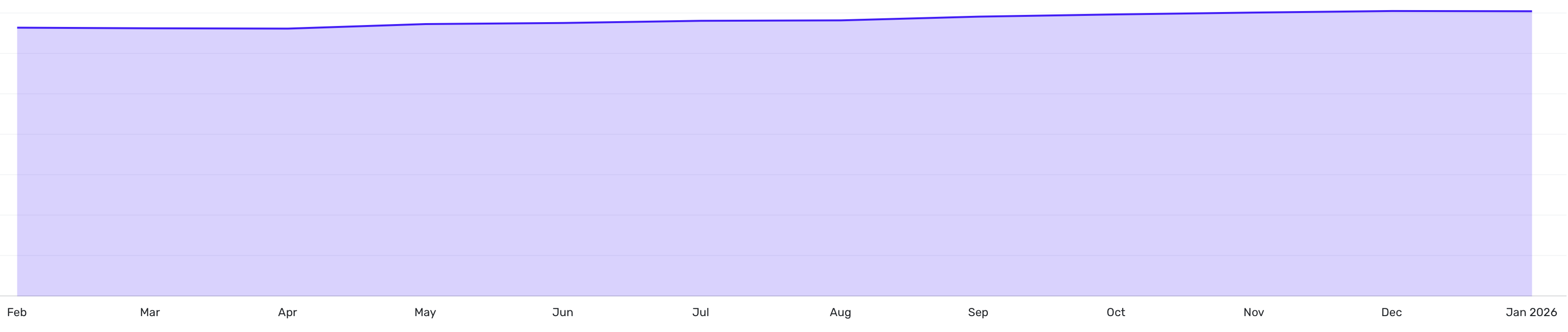
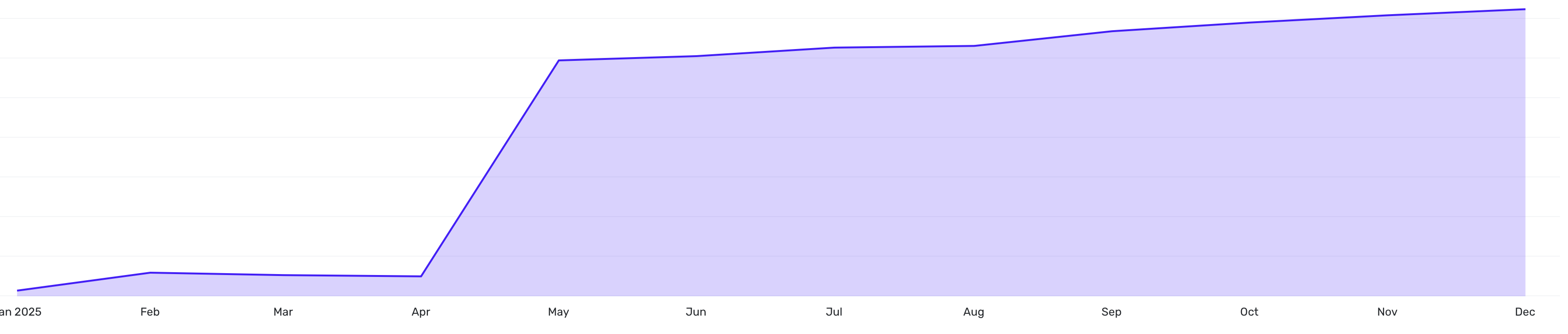
I've not paid much attention to the Net Worth Report before, but since I am playing with the new Net Worth feature, I looked at it more.
It seems to me that the Net Worth Report (Enhanced) ignores historical data is including in the old, non-Enhanced, Net Worth report.
Edit: ItHistorical data is not included in the Net Worth Feature either.
Old Report Graph:
New Report Graph:
New Net Worth Feature:

The Old Report is more accurate for sure.
Steve
Quicken Simplifi (Safari & iOS) Since 2021
Quicken Classic (MacOS) Since 2009
Dollars & $ense (DOS) and MS Money (Windows) 1987-20090 -
When on a report (e.g. the Spending tab) and have transactions filtered, with the old reports there is a select box / select all box so that transactions can be bulk edited (e.g. add tags to all the filtered transactions).
But with the new report I can't figure out any way to do a bulk edit of all the transactions.
I use this feature often so I have to go back to the old reports feature.
1 -
-
I didn't even know that existed so I went to my Classic file to try it out. Thanks.
Steve
Quicken Simplifi (Safari & iOS) Since 2021
Quicken Classic (MacOS) Since 2009
Dollars & $ense (DOS) and MS Money (Windows) 1987-20090 -
Hi @Coach Marcus After a couple of months, I see that the over time report is still missing in the beta reports.
Do you have an approximate ETA of when this will be added via the summary reports you mentioned? Is this still on the road map, or has it been removed or deprioritized?
I want to clarify this now, because removing the overtime report would reduce the overall value of the reporting suite. It’s one of the more useful and frequently referenced reports.1 -
Hello, some quick feedback on the new (beta) reports functionality:
- The new beta .csv export functionality seems to try to flatten category hierarchies into a flatter hierarchy than is actually defined. The beta pdf export functionality seems to retain the category hierarchy as defined. Having the csv version flatten the hierarchy gives a very different representation of category rollups than I wanted when I defined the categories. Why the change?
- The new beta csv export omits category sub-totals. Why the change?
- The new beta csv export introduces a column called "Concept" which is the flattened category hierarchy. Why introduce a "Concept" column that is populated with a flattened category hierarchy? It doesn't really help anything to add new 'concepts' to the notion of categories, which I think is pretty well understood. Why the change?
In both old and new reporting features, the pdf export function is difficult to use because it seems the page layout is fixed. So, if I want a report that gives me a monthly breakdown and an annual total, the report is wide enough I have yet to figure out how to use different page sizes and layouts to get a useful report that does not have columns split inconveniently across multiple pages.
I find the Excel export functionality of the old reporting by far the most useful output mode. Next most useful is the old .csv export, since category hierarchies reflect what I have defined, and category subtotals are included.
MOST IMPORTANTLY: If we end up ONLY with the new beta csv export functionality (again, pdf is not very useful) then it looks like I won't have ANY export mode that gives me a spreadsheet with the category hierarchy I have defined. This would be a huge regression in functionality.
PLEASE DONT remove the existing excel export!!!
1 -
@blaporte, your post has been merged with the official feedback thread for Beta Reports. We appreciate you leaving your feedback!
-Coach Natalie
0 -
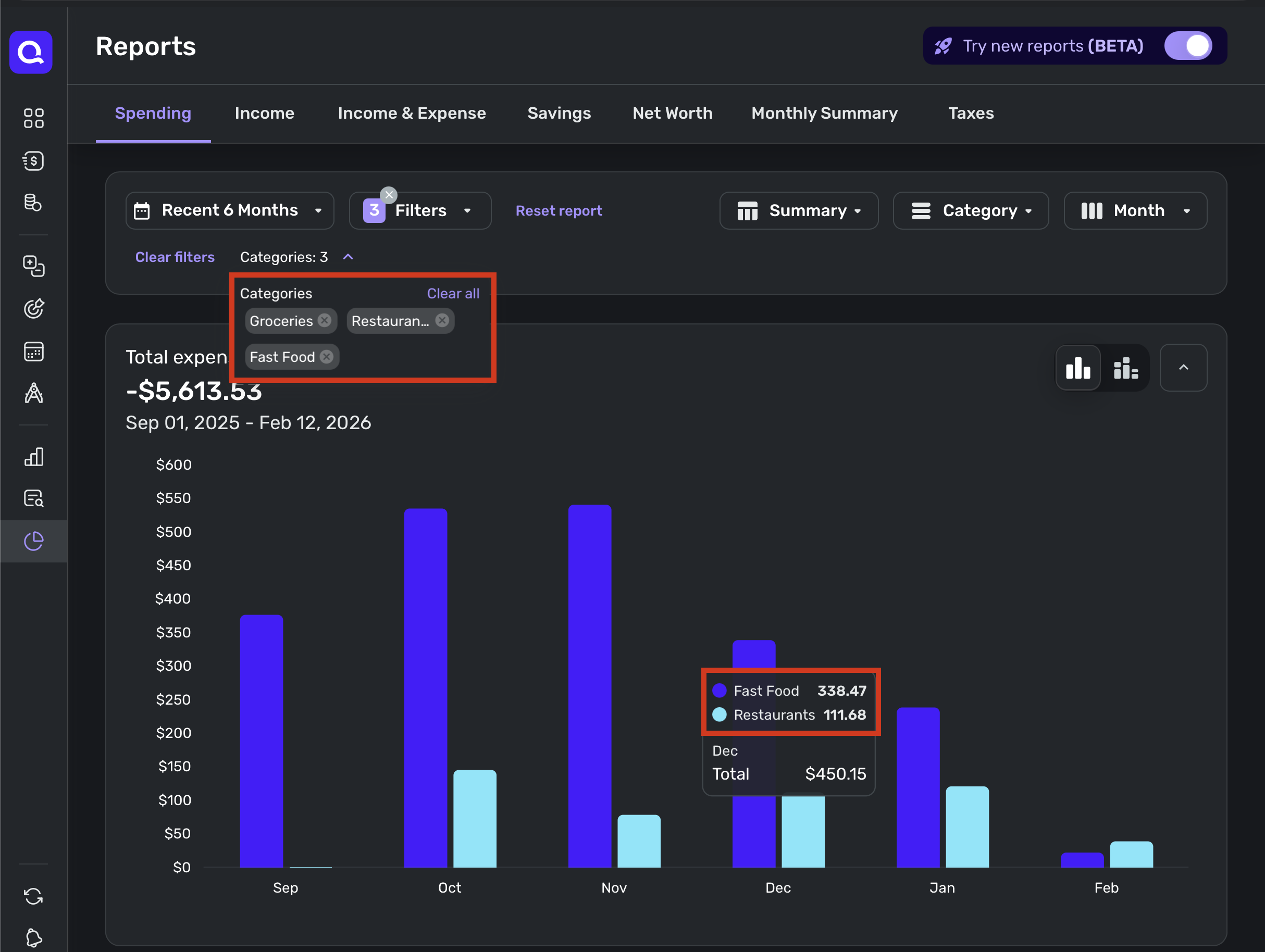
On the Reports page (new reports) > Spending, if you select child categories and top-level categories together, it won't chart the top-level categories.
For example, select Fast Food and Restaurants (under Dining & Drinks), and also the top-level category of Groceries, the chart will only show Fast Food and Restaurants.
 0
0 -
I'm seeing the same thing in QBP using BETA reports. I selected second level categories Fast Food, Restaurants, and also selected Gifts (which is a top level category with no subcategories).
Only Fast Food and Restaurants show up in the bar chart. All three show up in the month by month line items.
In case it matters, sometimes Fast Food and/or Restaurants are more than Gifts, sometimes Gifts is more. So it's not choosing to display just the higher amounts.
DryHeat
-Quicken Classic (1990-2020), CountAbout (2021-2024), Simplifi (2025-…)0 -
@BradleyBenSmith, thanks for letting us know!
I have merged your post into the official Beta Reports feedback thread so our product team can review it as they work on these new reports, which are currently in beta testing.
Much appreciated!
-Coach Natalie
0 -
I am very much not a fan of the current report register format. I do like the extended categories in the spending report on the chart (not just 9 categories) but having 4+ lines per transaction is absurd. It should be one line per transaction, it would be a lot easier to get a quick overview of spending with that. Right now it's like i have to scroll through 3 screens of output to see the 4 transactions i spent money on in the last week. Please try to get it down to one line per transaction.
—
Rob Wilkens
0 -
I went to print out a Spending report, but only really wanted one category. So I went through the report clicking the little minimize arrow to close every category I didn't need. Came across a purchase that belonged in a different category, so I edited it and put it where it belonged. All the little arrows I had closed reopened and I had to go through and close them all again. Big time waster. Tempted to just printout the entire report, but the frugal Scottish heritage in me didn't want to waste the paper and ink.
0 -
Suggestion: Make it easy to provide feedback from the browser and from the phone app. I didn't see anything obvious under Profile or Settings, so asked the AI chat and got wrong information about where to find it. Maybe Community is obvious to you, but don't make me work. Just put an obvious link in Profile or Settings. Take a page from Toyota: I worked for a regional headquarters for them for fifteen years. Toyota is the industry leader it is because it has a simple plan—they want to build vehicles that people want to buy. From that flows their obsession with knowing what people want. Toyota is one giant, global information-gathering machine. And besides doing surveys all the time, they also make it easy for folks to tell them what could be better.
0 -
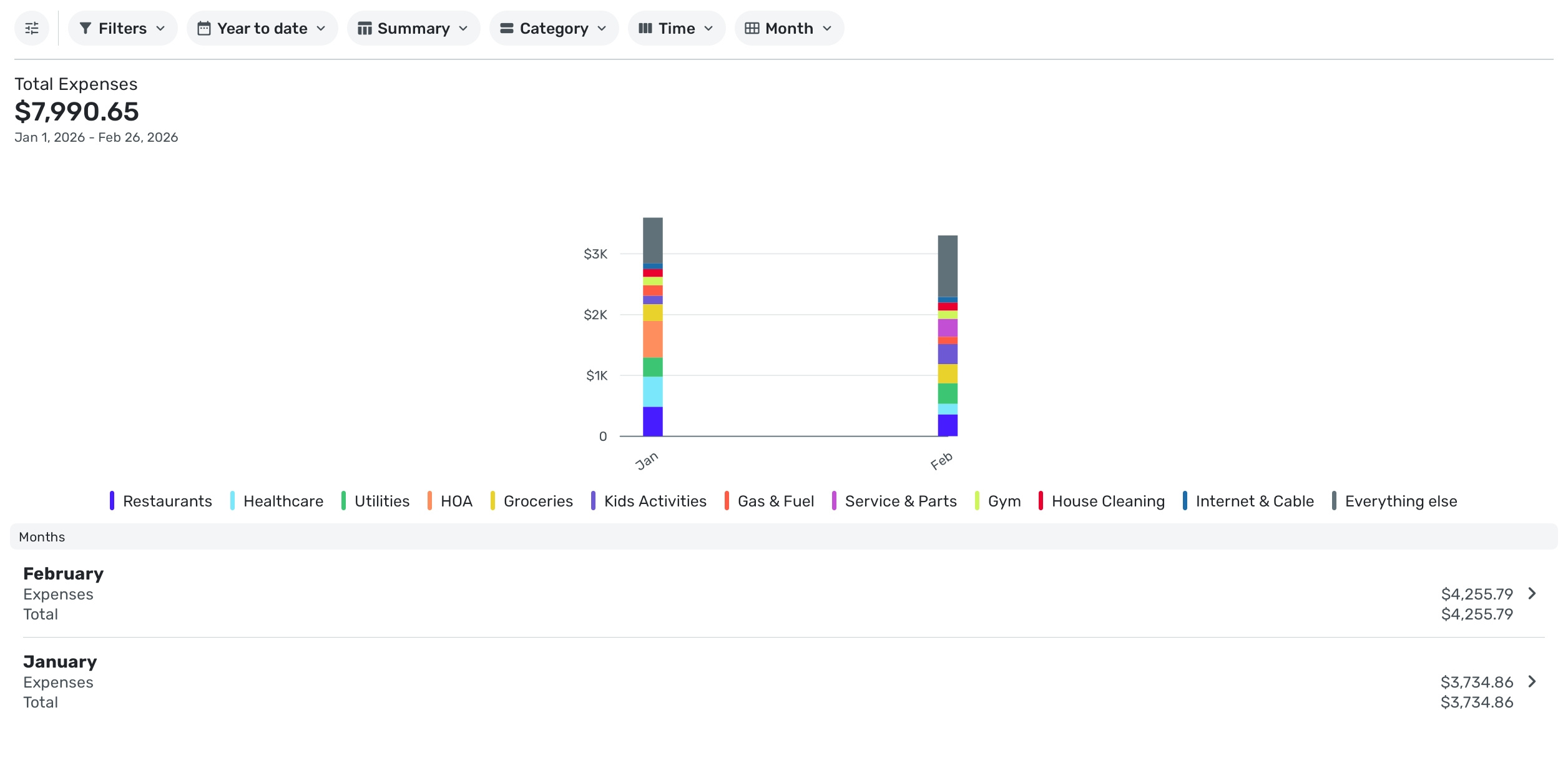
The January bar should be shorter than the February bar. This is Charting 101. Does look great though. So thank you for making these improvements but please do fix the bugs.
 0
0 -
@rosachin21k, your post has been merged with the official feedback thread for the new reports, so it can be viewed by our product team.
Thank you for sharing your experience!
-Coach Natalie
0