Transaction List Update: Share your feedback here!
Comments
-
Natalie,
I confirm that going into my account settings and disabling the "early Access" restored the split information to the download from the transactions page (register I guess you call it). It also put the columns back in the order that they appeared in the register exactly as I have them layed out. This is what I expect from the new download as well. Thx!
-Quicken Desktop 2005-2014
-Mint 2014-2023
-Simplifi in Jan 2024 (fleeing from Credit Kharma)
-Excel forever!!!1 -
The issue with exporting register splits will be fixed with Web Release
4.90.04.91.0. That release will most likely be out by the end of next week. If the fix version changes, we will let everyone know. Otherwise, expect to see a fix at that time!Thanks!
-Coach Natalie
0 -
Awesome! I'm curious if any of my other suggestions will be implemented, can't wait to try it out :)
Thanks @Coach Natalie for keeping us posted!
0 -
Is anyone able to add a date filter for "before" a specified date? Every time I try it crashes. I am able to use "on or before" without issues.
0 -
Now here's another weird thing: When I filter for date "on or before 12/31/2025", I see transactions dated 1/1/2026!
0 -
It seems to work for me using the < and > keys. I have never tried it before tonight.
Steve
Quicken Simplifi (Safari & iOS) Since 2021
Quicken Classic (MacOS) Since 2009
MS Money (1991-2009) and Dollars & Sense (1987-1991)0 -
Does it work if you use the new filter feature by clicking the 3 dots in the column header?
0 -
Pretty darn complicated. I usually search by payee. Thanks for reminding me about the 3 dots as I find the old filter is good enough for me. 😀
BUT If I search for a date before 1/1/2026, it crashes.
Edit: I will say that the amount stuff works pretty well, but when I try limiting by date, it is very hit and mostly miss. I would also say that I would almost never use the date to find a transaction: payee and between a certain amount would work for me.
But this needs to be fixed.
Steve
Quicken Simplifi (Safari & iOS) Since 2021
Quicken Classic (MacOS) Since 2009
MS Money (1991-2009) and Dollars & Sense (1987-1991)0 -
Yes the 3 dot filters are quite clumsy to get to but I hope that they fix it as it affords more flexibility.
FWIW In this situation I wasn't looking for one transaction, I was looking for a total of certain categories for a certain date range.
1 -
The new ability to Show Split Items in a register is a great improvement.
It would be even better if there were some icon or other marker appended to the payee to identify which rows represent splits from a parent transaction. That would show up not only on the screen but would (or could) also be exported to the CVS file.
I realize you can turn on the Split column to get the same information on the screen, but that takes up valuable horizontal space for all transactions. An appended icon would just sit in the Payee space.
It would look something like this (using the copyright symbol as a stand-in for the Split icon):
My Random Split Payee ©
If the column is too narrow for the whole text, it could shorten like this:
My Random Split P…©
DryHeat
-Quicken Classic (1990-2020), CountAbout (2021-2024), Simplifi (2025-…)1 -
Referencing the Show Splits option, I hope the Minters will be happy, but it is disconcerting that the splits are all over the place and not together with their respective payees on the same date.
I went to Publix and Aldi the same day and I get this:
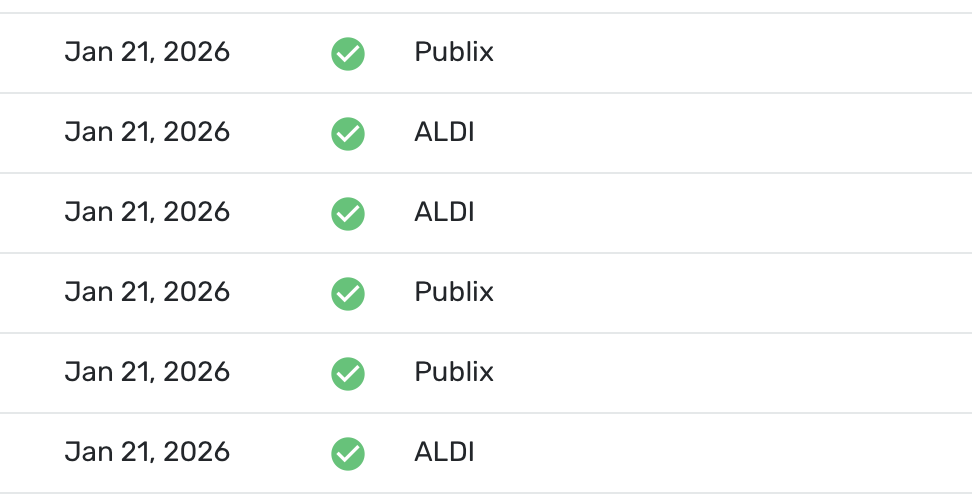
I probably wouldn't use it much anyhow. I can always double click on the split to see it.
But, if they were grouped with their payee and shown by some visual to be connected to the payee as @DryHeat says, I could come to like it.
Steve
Quicken Simplifi (Safari & iOS) Since 2021
Quicken Classic (MacOS) Since 2009
MS Money (1991-2009) and Dollars & Sense (1987-1991)0 -
With Mint it was worse because once you split them there was no way to see which ones came together originally. I think this feature is a great start towards upgrading Splits!
0 -
@EL1234 In Mint, all the splits were together at least, and you could see the Payee as you can here. But they are not all together as I showed in my screenshot. That is just too confusing for me. They need to be together.
But all that said, I prefer the Simplifi way to Mint. I never liked how Mint did things. But you have to admit the price was right! 😀
Steve
Quicken Simplifi (Safari & iOS) Since 2021
Quicken Classic (MacOS) Since 2009
MS Money (1991-2009) and Dollars & Sense (1987-1991)0 -
Truth is that I haven't used mint in years. But back when I did, splitting transactions turned them into completely disjointed and unrelated transactions. It definitely led to confusion. But Simplifi seems to be on the right track. I agree that ideally they should list the splits together as you said, hopefully they'll add it in!
1 -
Yeah. I may be misremembering but they were together, I thought, but each split was a transaction on its own and not tied to the other. I never liked that. I prefer something that shows them with the payee and tied together.
I probably shouldn't even comment as I am fine with the way that it was, but I wouldn't mind if the splits showed up someway under the Payee so that it is cleared they are tied together. You used to be able to do this with Quicken Classic but, at least with the Mac version, you have to click on the transaction to open the splits. Simplifi is similar except if you have more than 3 or so splits you cannot see them unless you hit the edit button, which I never liked.
Steve
Quicken Simplifi (Safari & iOS) Since 2021
Quicken Classic (MacOS) Since 2009
MS Money (1991-2009) and Dollars & Sense (1987-1991)0 -
Thanks everyone for the great feedback. I'm curious whether the 'Show splits' version of the register will become the default for any of you, or if it's just useful for exports.
Also:
1. We are working on making sure your split lines are next to each other.
2. I am interested in introducing a minimal indicator. I agree that this would be useful. This will be after the general release. For now, you'll need to show the split column.
3. And, we will add a date filter (and make sure it works) after we get register into general release.
Thank you all so much for being in our Early Access program and providing your feedback.1 -
Reposting from here:
This seems to be a recent issue that started over the last few days. Searching has gotten painfully slow. It seems that with each letter I type, Simplifi queries the database again, instead of waiting until I stop typing. While this might not be so bad, what's happening now is that only a small fraction of the letters that I type are actually kept in the search box. So if I want to search for a word, I need to type one letter, wait until it shows, press the next letter, etc etc. It's quite annoying.
Is anyone else seeing this behavior? I think it started within the last week or so. I have been using the new register for a lot longer than that.
1 -
@EL1234 It was happening to me too but thought it was just my computer. I tried it just now and it was as you say. I turned off Early Access, and it went back to normal. So that makes it seem that it is the new Register.
When I turned back on the Early Access, it has come back but seems a bit better.
Thanks for reporting this.
Steve
Quicken Simplifi (Safari & iOS) Since 2021
Quicken Classic (MacOS) Since 2009
MS Money (1991-2009) and Dollars & Sense (1987-1991)0 -
I also thought it was just my computer at first! Thanks for confirming :)
0 -
You must be a good typist because I notice if I type slow, it is not much problem so a lot of people on here might not notice. 😀
Steve
Quicken Simplifi (Safari & iOS) Since 2021
Quicken Classic (MacOS) Since 2009
MS Money (1991-2009) and Dollars & Sense (1987-1991)0 -
Right but it only works if I type REALLY slow. I wonder if it's worse for those with longer datasets. Mine goes back to 2019 though I have it set to only show transactions since 2025 at the moment.
1 -
(comment copied from other thread)
Yes, I am also seeing it. I have to type a letter, wait a bit, type another letter, wait a bit, etc. to get the entire search string in. Otherwise the latest letter I type replaces what was in the search box before.
Example: I type "dog" and the search box ends up with only "g" in it.
DryHeat
-Quicken Classic (1990-2020), CountAbout (2021-2024), Simplifi (2025-…)2 -
I did confirm that our product team is aware of the slowness, and they are actively working on enhancements to improve the behavior. No confirmed ETA as of yet, but a fix is coming!
-Coach Natalie
1 -
Thank you!
1 -
I've experienced the crash when using 'on or before' but it usually works on the 2nd attempt :-)
0 -
Definitely takes a few seconds for the first letter but with each subsequent letter it seems to perform better.
0 -
Regarding "Show Split Items" — you can now add Notes to splits in the new register.
The editing form for a split transaction does not provide a way to add notes to individual splits.
BUT… when you "Show Split Items" in the new register and make the Notes column visible, you can add notes to the individual splits directly in the register.
These "split notes" will not show up in the transaction editing form, which has its own Notes field for notes related to the entire transaction. But the "split notes" are saved with the transaction and will show up whenever you "Show Split Items" in the register.
Here's the line in the register for the transaction (with "Show Split Items" turned off):

And here are the two lines for the transaction (with "Show Split Items" turned on):

DryHeat
-Quicken Classic (1990-2020), CountAbout (2021-2024), Simplifi (2025-…)1 -
@DryHeat That's a good point. I think that the note line should be visible in the editing form as that would be the natural place to put in the notes. Having another note line for the whole transaction is something even Classic doesn't have.
Steve
Quicken Simplifi (Safari & iOS) Since 2021
Quicken Classic (MacOS) Since 2009
MS Money (1991-2009) and Dollars & Sense (1987-1991)0 -
What we are seeing now is probably the result of ongoing revisions to the data structure of the splits — making it more like the data structure of full transactions.
My guess is that — in order to make it feasible to show splits on separate lines in the register — they had to give each split all the fields that the transaction register might want to display.
Revision of the edit form to accommodate the splits' additional fields will happen at some point, I think.
DryHeat
-Quicken Classic (1990-2020), CountAbout (2021-2024), Simplifi (2025-…)1



