RoundPoint Mortgage Sync Issue - amount not updating, reset causes $0 balance (edited)

Good Afternoon team! Having an issue with the RoundPoint Mortgage connection where the loan amount is not updating when synced. If I reset the connection, the amount then goes to 0 and if I remove and re-add the account, it pulls the proper number.
Interesting note: When I reset the connection, I do see the proper number but it tries to add a new account versus update the existing. Linking causes the number to drop to 0. Thanks!
Comments
-
Hello @TaWa,
Thank you for reaching out! This certainly sounds like a peculiar issue. Can you share a screen recording showing the behavior when you try to reset the account? This will help us narrow down what may be happening here. You may feel free to DM me this information if you prefer.
Additionally, can you clarify how long you have noticed the balance has stayed the same without updating? Your accounts will automatically refresh when you sign into Quicken Simplifi; however, Quicken Simplifi will only connect with your bank for new transactional and balance data once every 4-6 hours. Has your account gone more than 24 hours without updating previously? Let us know!
-Coach Jon
0 -
Hey @Coach Jon, thanks for the quick response! This has been going on since I got the account to connect from the thread here:
I was giving a few months as I can only "test" once a month due to this being a monthly payment when the account balance should update. I will try and get a recording of this as I currently have a 0 balance after reset and should be able to show there is a balance before linking. Thanks!
0 -
Hello @TaWa,
Thank you for the DM and screen recording! Let's see if the following steps work to resolve the issue you are experiencing. Since this is a bank that uses an OAuth connection type, I am wondering if the user token may have expired. Please try these steps:
- Navigate to the bank's website, sign in, and then remove Quicken's access from the bank's third-party linked apps.
- Make all of the accounts with the bank manual by following the steps here.
- Once you see the account(s) listed in the Manual Accounts section under Settings > Accounts, go back through the Add Account flow to reconnect to the bank.
- If the connection is successful, carefully link the account(s) found to your existing Quicken Simplifi account(s) by following the steps here.
Let us know how this goes!
-Coach Jon
0 -
Hello @Coach Jon I am also having similar issues with Roundpoint. It is constantly asking me to manually reestablish the connection with multifactor authentication (email or SMS code) then once it syncs it is either showing a $0 balance or reflecting the loan balance as a positive number rather than a negative one.
0 -
Hello @taylorbeak,
Thanks for reaching out! I would have you also try the steps I posted previously to see if they work in resolving the issue you are seeing:
- Navigate to the bank's website, sign in, and then remove Quicken's access from the bank's third-party linked apps.
- Make all of the accounts with the bank manual by following the steps here.
- Once you see the account(s) listed in the Manual Accounts section under Settings > Accounts, go back through the Add Account flow to reconnect to the bank.
- If the connection is successful, carefully link the account(s) found to your existing Quicken Simplifi account(s) by following the steps here.
Let us know how that goes!
-Coach Jon
0 -
Hey @Coach Jon, sorry for the delay. I tried to do step 1 but RoundPoint Mortgage does not seem to have an easy way to do that. Looking into it, it looks like it would require me to submit a paper form for third-party link removal? Though I suspect that is more to do with selling my privacy data. Thoughts?
Thanks again for the help on this!
0 -
Hello @TaWa,
I apologize for the confusion. Can you try the steps without the previously mentioned step 1? Let us know how this goes!
- Make all of the accounts with the bank manual by following the steps here.
- Once you see the account(s) listed in the Manual Accounts section under Settings > Accounts, go back through the Add Account flow to reconnect to the bank.
- If the connection is successful, carefully link the account(s) found to your existing Quicken Simplifi account(s) by following the steps here.
-Coach Jon
0 -
Hey @Coach Jon, no worries! Alright, tried making it manual and then relinking the manual account but still got the $0 dollar balance. I went ahead and deleted the account and readded it and now the balance is showing properly but I worry about the auto update when the loan should decrease after the next payment.
Something I did notice (and not sure if this matters) when adding the account, it requires 2FA but does not ask after creating the connection.
0 -
@Coach Jon - I have tried the steps you have provided, but my account still shows a $0 balance. The strange thing is it does show the balance in the new "Net Worth" section, but not under the "Accounts" section.
0 -
Hello @taylorbeak,
Thanks for the reply! Can you provide the following information to better assist us? Feel free to DM this information if you prefer.
- The name of the account in question, as it appears in Quicken Simplifi.
- The name of the account in question, as it appears on the bank's website.
- A fresh screenshot of the balance for the account in Quicken Simplifi.
- A screenshot of the balance displayed on the bank's website for comparison.
- A screenshot of the Accounts Summary page from the bank's website that has a wide enough scope to show the full page URL. This is the landing page after signing in, and typically lists all accounts and balances. You will want to take this from a web browser and not a mobile browser, as well as redact any private info such as account numbers.
We will also need logs to be sent:
- Log in to the Quicken Simplifi Web App.
- Select Profile from the left-hand navigation bar.
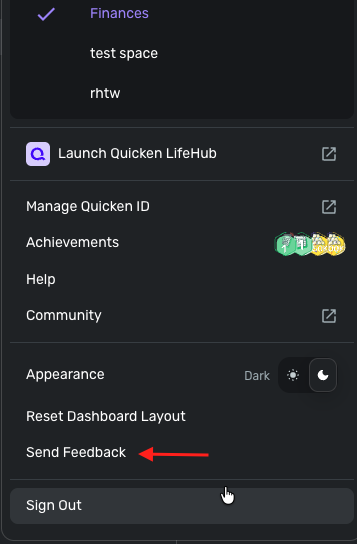
- With the Profile menu open, hold down the Option key for Mac or the Alt key for Windows, and then click Send Feedback.
- Leave all boxes checked, add a brief description of the issue, and then click Send.
-Coach Jon
0 -
Hey @Coach Jon, sorry for the delay but just had an automatic payment go through and the amount not update in Simplifi. Confirmed on the RoundPoint website that the amount on the loan has decreased which is not being reflected in Simplifi.
0 -
Ah apologies, that was to another user but I can follow those steps and get them over today. Thanks!
1 -
@Coach Jon, done! Sent to you in a DM and sent the logs over just now. Thanks for the help on this!
0 -
Hey @Coach Jon, just tested and it still shows the balance as $0 when I reset the connection and/or make the account manual and then link after adding it back. I am pretty confident if I remove the account and then readd it, it will then show the proper balance again but I have not done that in case there are more tests you would like to do first.
Currently showing a $0 balance for the acocunt now.
0 -
Hey @Coach Jon, sure no problem! Sent over your way just now, thanks.
0 -
Hello @TaWa,
Thank you for the information. I did get this reported to my product team and will follow up here with any updates going forward.
In the meantime, you can track the account manually by adding manual transactions, which will keep your records up-to-date. Here are the steps to do so: Managing Transactions in Quicken Simplifi | Quicken Simplifi Help Center
CTP-16216
-Coach Jon
1 -
Sounds good, thanks so much for all your help @Coach Jon!
1 -
Hello @TaWa,
I am back with an update from our product team on this issue. They have implemented a fix and would like you to try the following steps to see if the issue is resolved for you:
- Make all of the accounts with the bank manual by following the steps here.
- Once you see the account(s) listed in the Manual Accounts section under Settings > Accounts, go back through the Add Account flow to reconnect to the bank.
- If the connection is successful, carefully link the account(s) found to your existing Quicken Simplifi account(s) by following the steps here.
Please let us know how this goes!
-Coach Jon
0 -
Hey @Coach Jon, thanks for following up! I just tested again and got a 0 dollar balance unfortunately. Anything I can provide to help with troubleshooting? Thanks!
0 -
Hello @TaWa,
Thanks for the update. Can you please provide updated logs and a new screenshot of the account summary from the bank's website?
- Log in to the Quicken Simplifi Web App.
- Select Profile from the left-hand navigation bar.
- With the Profile menu open, hold down the Option key for Mac or the Alt key for Windows, and then click Send Feedback.
- Leave all boxes checked, add a brief description of the issue, and then click Send.
-Coach Jon
0 -
Sent both over, thanks @Coach Jon!
0 -
Hello @TaWa,
I am back with an update from my product team for this issue! After reaching out to Roundpoint, they came back and were unwilling and unresponsive to implementing the necessary changes to resolve the issue, unfortunately. You will need to contact Roundpoint directly to escalate the issue on their end.
I wish I had better information to share. Thank you!
-Coach Jon
1 -
Thanks for following up @Coach Jon!
1
