Alerus Still Getting FDP-103

Still getting this error even this was marked as resolved. I have tried reconnecting the existing account, adding a new account, and have logged in directly on the Alerus webpage.
Comments
-
Hello @BlurrVT,
Thank you for letting us know you're still seeing this issue. If you haven't already done so since the issue was marked resolved, please follow these troubleshooting steps for FDP-103 errors:
- Enable the “Show Password” option to confirm no typographical errors.
- If you’re using a password manager, try manually typing it in instead, in case the one saved is outdated.
- Please verify that you're able to login directly through the financial institution using the same credentials. Sometimes, too many failed connection attempts can result in the financial institution locking the account.
- Update your credentials – Try temporarily updating your password at the bank's website and then try again to connect in Quicken Simplifi. We recommend NOT using the following special characters: & < > / \.
Please let me know how it goes!
-Coach Kristina
0 - Enable the “Show Password” option to confirm no typographical errors.
-
@BlurrVT, I wanted to follow up here, as, according to this other recent discussion, users can connect their Alerus accounts using the Alliance Benefit Group bank option in Quicken Simplifi:
Let us know if this works for you!
-Coach Natalie
0 -
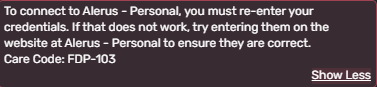
I have verified that the password is being typed in correctly. I have logged in to the Alerus site directly using the same password. I have tried deleting and adding the Alerus account.
I still get this error.
 0
0 -
@BlurrVT, thanks for the reply!
According to your screenshot, you're using the wrong bank option in Quicken Simplifi. The other post I linked above says to use the 'Alliance Benefit Group' bank option.
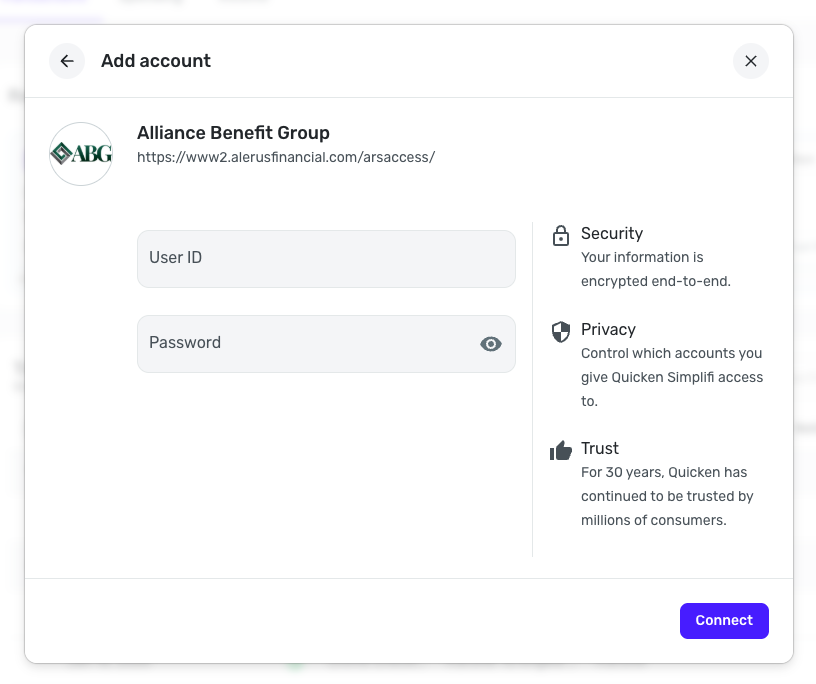
Please give the 'Alliance Benefit Group' bank option a try and let us know how it goes.
-Coach Natalie
0 -
Hi, this got it. I appreciate it!
2

