It's taking at least 2 business days for my bank transactions to show - First National Bank of Omaha

My bank, First National Bank of Omaha (FNBO), is lagging behind for when the transactions show up in Simplifi. It didn't used to have a lag like this but over the past few months, the lag is at least 2 business days, sometimes 3. I also have FNBO Direct and it updates timely as does my Wells Fargo account. Every day I "re-set" my FNBO connection to bring in more transactions but still, there's a 2-3 day lag. Anybody else have this issue and is there something I can do? Thank you!!
Ann
[edited title]
Comments
-
Hello @Ann2020,
Thank you for reaching out! To clarify, can you confirm if this lag occurs when the transactions are pending on the bank's side? Or do they show as cleared on the bank's side and still do not show up for 2-3 days in Quicken Simplifi? I ask because while you may see pending transactions on your bank’s website, they may not have been downloaded into Quicken Simplifi just yet. At your bank’s discretion, pending transactions can appear immediately or take a few days to appear, or may not appear until they're fully cleared. Let us know!
-Coach Jon
1 -
Thank you for responding. The transactions are cleared on the bank's side. They are not pending.
0 -
Hello @Ann2020,
Thank you for the response! I do agree that waiting two or more days for an already cleared transaction to show up in Quicken Simplifi is a little long. Let's see if the following steps work to resolve the issue you are seeing.
- Make all of the accounts with the bank manual by following the steps here.
- Once you see the account(s) listed in the Manual Accounts section under Settings > Accounts, go back through the Add Account flow to reconnect to the bank.
- If the connection is successful, carefully link the account(s) found to your existing Quicken Simplifi account(s) by following the steps here.
Let us know how this goes!
-Coach Jon
0 -
Thank you! I went through the steps this morning and unfortunately, the latest transactions showing in Quicken are still from 3 days ago (from Jan 13th) and posted/cleared items are there from today (Jan 16th). Actually, every day when I go into Quicken Simplifi transactions, my FNBO accounts are even further behind. Every day I do a 're-set connection' on my FNBO accounts which works to pull in more recent transactions but still….. they're 3 days old. It's strange because all of my other accounts appear to update timely.
0 -
Hello @Ann2020,
Thank you for the reply! Can you please provide the following information to better assist us in regard to this issue? Feel free to DM this information if you prefer!
- The name of the account the transactions are missing from, as it appears in Quicken Simplifi.
- The Date, Payee, and Amount of a few example transactions that are currently missing in Quicken Simplifi.
- A screenshot of the example transactions from the bank's website.
- A screenshot of the corresponding register in Quicken Simplifi showing that the transactions are missing.
- Confirm whether the missing transactions are impacting the balance in Quicken Simplifi or not.
- A screenshot of the Accounts Summary page from the bank's website that has a wide enough scope to show the full page URL. This is the landing page after signing in, and typically lists all accounts and balances. You will want to take this from a web browser and not a mobile browser, as well as redact any private info such as account numbers.
We will also need logs to be sent:
- Log in to the Quicken Simplifi Web App.
- Select Profile from the left-hand navigation bar.
- With the Profile menu open, hold down the Option key for Mac or the Alt key for Windows, and then click Send Feedback.
- Leave all boxes checked, add a brief description of the issue, and then click Send.
-Coach Jon
0 -
Thank you Jon! I just sent you a message with the information requested. I appreciate your help! Ann
0 -
Hello @Ann2020,
Thank you for the DM! It looks like the .docx file you sent over may have been corrupted, as I cannot view the contents. Are you able to try sending it again or send the screenshots individually via DM? Additionally, are the only transactions that are missing from yesterday? Do they show as pending on the bank's side? Let us know!
-Coach Jon
0 -
I just sent a few more DM's with screen shots. Thank you!
0 -
Hello @Ann2020,
Thanks for those screenshots! It looks like we will still need some missing information, however:
- A screenshot of the example transactions from the bank's website.
- A screenshot of the Accounts Summary page from the bank's website that has a wide enough scope to show the full page URL. This is the landing page after signing in, and typically lists all accounts and balances. You will want to take this from a web browser and not a mobile browser, as well as redact any private info such as account numbers.
Let us know when that can be sent over!
-Coach Jon
0 -
Thanks Jon - I've sent over these additional screenshots
0 -
Hello @Ann2020,
Thank you! Let's have you try the following. After researching, I noticed that there are multiple instances available for First National Bank of Omaha within Quicken Simplifi. Can you please try connecting your accounts using some of the other instances available to see if your transactions come through faster? Let us know how this goes!
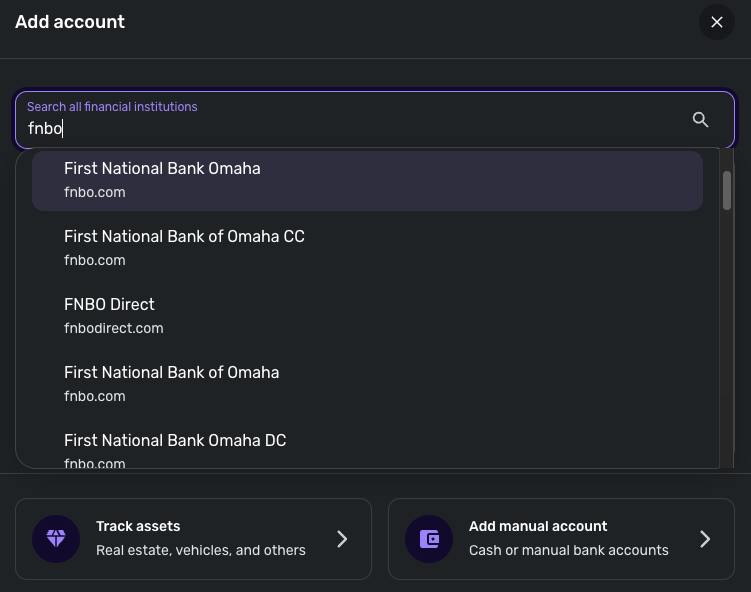
-Coach Jon
0 -
Thanks. FNBO Direct is FNBO's non-brick and mortar bank and I do have an account there also. There's not a lot of activity with this account so I can't say for sure, but I believe it updates timely and doesn't have the same lag that 'regular' FNBO has. I'll try these others and report back.
1 -
Good morning - I tried another FNBO link as you suggested. With that, I didn't get the transactions any more timely…. actually a day or so worse.
As of this morning, when I first got into Simplifi, the FNBO transactions up to (and including) last Thursday 1/22 were there. I did a "Reset Connection" for FNBO (as I have to do every time) and that did bring in Friday 1/23's transactions which is the most timely, and what I would expect, I've seen for a long time!
0 -
Thank you! I appreciate you escalating this. Now today, I'm back to a bit of a lag. I'm getting last Friday's (1/23) transactions but not yesterdays (1/26) which are not pending on the bank side.
Thanks!
1 -
Again, very much appreciated. Just a quick update for today. I just signed into Simplifi and, as usual, had to re-set connection to FNBO but still no current transactions. Most current transactions are still from last Friday (1/23) and no transactions for 1/26 or 1/27 even though transactions from these dates are processed and not pending on the bank side. Thanks!
0 -
Hello @Ann2020,
I am back with an update from our service provider. They would like you to provide the Date, Payee, and Amount of a few more example transactions that are currently missing in Quicken Simplifi. I know you mentioned this issue is still occurring with some recent transactions you noted are missing. If you can provide that information, I will be sure to get this over to them. Feel free to DM this information once again if you prefer!
Thank you!
-Coach Jon
0 -
Hi Jon - I just DM'd you some transactions from the past two days (1/27 and 1/28) which are cleared on the bank side but don't show up as transactions in Simpifi. Thanks!
0 -
Thanks for the update! I just signed into Simplifi and when I initially signed in, FNBO did not update currently. All other accounts did. When I went through the "Reset Connection" steps, the FNBO transactions updated and I can see all non-pending transactions as expected. So… definitely better than it was! As you know, even when I was doing the "Reset Connection" step, FNBO transactions were 3 days behind. So not perfect, but much better! Thanks!
Ann
1
