Summary on the Bills & Income page is wrong (edited)

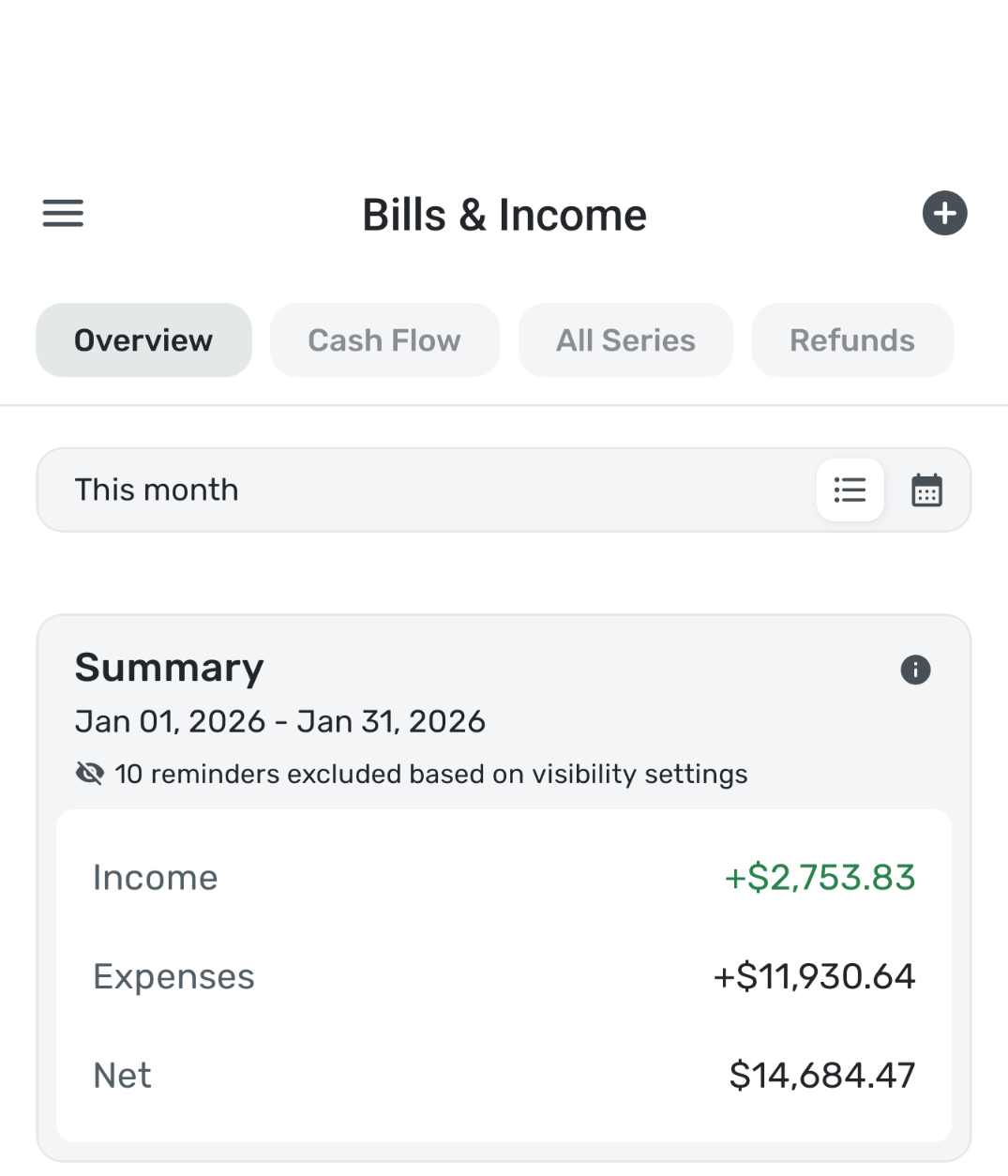
The summary page is wrong. Completely wrong to the point I don't even have to worry about revealing my personal financial information. Not a single number matches.
This was working as of a few days ago, so something changed to break it. My data and recurring setups did not change.
Comments
-
You know I rarely look at the Summary Page of Bills & Income, so I just did. What it shows in both web app and iPhone app is the same. It shows my income about right. I was disconcerted somewhat by the expenses, which seemed a bit low. But adding them up roughly from today through February 15, it was right. My expenses are $3900 between now and February 15.
When I do the current month, it is closer to the Spending Plan but WITHOUT the Planned Spending. I am pretty sure Bills & Income summary doesn't include those but I am double checking.
Edit: Here is a support article. It says it includes all of your reminders. So no planned spending. Could that be why your summary seems wrong?
Steve
Quicken Simplifi (Safari & iOS) Since 2021
Quicken Classic (MacOS) Since 2009
MS Money (1991-2009) and Dollars & Sense (1987-1991)0 -
Mine is definitely wrong. I am on android. Did not look on the web.Why would my expenses be a positive number and the net adds the expenses. And yes I am aware of what it includes but thank you for posting the support article.
0 -
Yes, you said it was right before but not now. It would be helpful for the coaches if you checked the web app to see if it is different. Also, make sure you are using the latest versions of the apps.
If that doesn't change it, then double check that all your income and bill reminders are there and up to date. Looking at your screenshot, it says that 10 reminders are excluded because of visibility settings. Could that be important?
Good luck, and hope you can get it working.
Steve
Quicken Simplifi (Safari & iOS) Since 2021
Quicken Classic (MacOS) Since 2009
MS Money (1991-2009) and Dollars & Sense (1987-1991)1 -
I just checked the web app, it is wrong there too. The 10 reminders are transfers and I have intentionally hid them. For what it is worth I have early access enabled.
0 -
Early Access shouldn't matter but wouldn't hurt to turn it off to see. You can then turn it back on. I wouldn't think Transfers would affect it since they ought to be excluded anyhow, but as I say, this module is one I don't use much. I don't have any transfer reminders.
I hope the coaches or another user will read this, and maybe this discussion will help them see the problem.
Steve
Quicken Simplifi (Safari & iOS) Since 2021
Quicken Classic (MacOS) Since 2009
MS Money (1991-2009) and Dollars & Sense (1987-1991)0 -
Hello @rosachin21k,
Thanks for reaching out! I was also unable to reproduce this issue from my side, as my Summary seems to match exactly. You mentioned that the Summary section in Bills & Income was correct previously. I can see that you are currently filtering by this month from your screenshot. Is it incorrect with the other date ranges as well, or just the 'This Month' setting? Can you show the reminders that are being included in this date range? You're welcome to DM this information to me if you prefer.
-Coach Jon
1 -
@Coach Jon All the months are wrong. I have DM'd you the screenshot. You will see that expenses nowhere near 11k I have in my screenshot posted above. Same for Income.
The app version I am on is 5.47.0 on Android with early access enabled.
0 -
Hello @rosachin21k,
Thank you for the screenshot! I think I see what may be occurring here. I believe some of the Reminders may be being calculated as an Expense vs an Income transaction based on their categories, which could skew the amounts you are seeing. Can you please check your Reminders to see if they may be categorized incorrectly? Let us know!
-Coach Jon
1 -
The reminders were all set up right and working fine for months. I think I know why this is broken for just me. I bank with discover and discover changed their way of connecting. I was asked to update my discover connection yesterday and that broke the recurring series that was set up as income, it was still tagged as income in the series but I had to go and make it a positive number. Anyways, I fixed it by changing it but I shouldn't have had to do that. Like I said multiple times it was working fine for months. The only thing that changed was my discover connection and only the incomes related to discover account were classified wrong.
1 -
Hello @rosachin21k,
Thanks for the reply. I can definitely understand your frustration. Sometimes things like this can happen when dealing with changing connections, unfortunately. I am, however, glad that you were able to correct the issue!
-Coach Jon
1 -
Glad you and @Coach Jon got it figured out!
Steve
Quicken Simplifi (Safari & iOS) Since 2021
Quicken Classic (MacOS) Since 2009
MS Money (1991-2009) and Dollars & Sense (1987-1991)1

