Let category determine what a missing sign (+/-) implies

When data's is entered, a missing sign is usually taken as negative. If there is not an explicit sign, the category should determine the appropriate sign to be used as the default one, depending on whether it is an income or expense category.
—
Rob Wilkens
Comments
-
You know I have been testing this because I thought Simplifi already pretty much does this. I've done some testing and so far it has confirmed my thought. If I use an income category, it defaulted to a positive and if I use an expense category, it defaults to negative*. The final transfer defaulted to what it needed to be, in this case negative, to finish it out. I had one expense category that is always a negative expense (and therefore I have to use the + sign), which is my credit card rewards subcategory. I think of it as spending back and not as income. My gifts category below is for gifts received and is income whereas my presents given is expense.
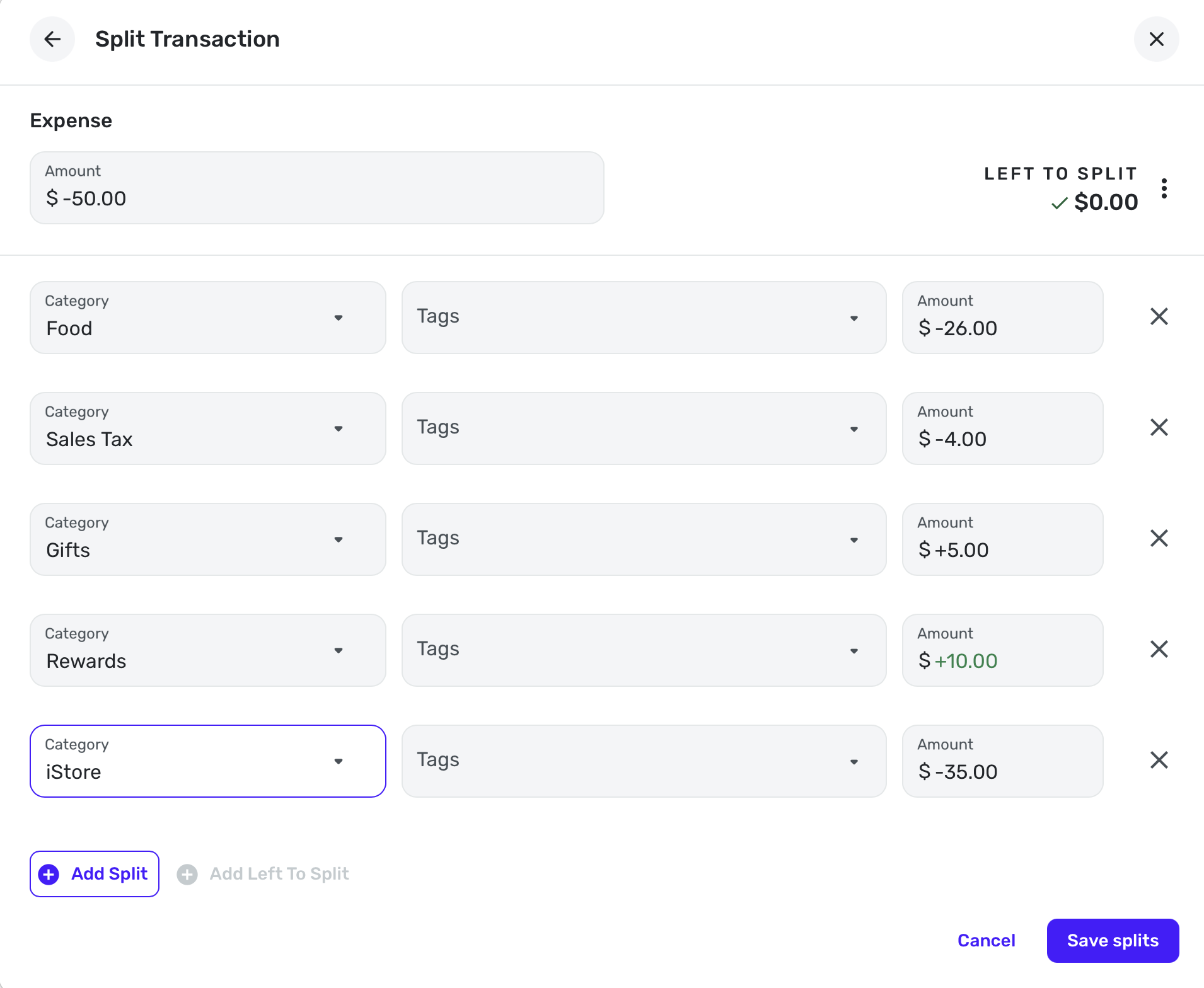
All the signs above were automatic except for the +10, which I always have to specify since it is an expense category. Notice it is in green, I guess, because it is contrary?
However, you must have run into this problem somewhere. The only time I thought there might be a problem is in a split where you have expense left and you choose an income category. I tried to reproduce that but it still defaulted to the + sign for income and - for expense UNLESS I chose Add Left to Split.
Did you run into this problem in the web app or the phone app?
*Actually if I just enter in an amount for the transfer, it will default negative. I used the Left to Split option, which is what I would normally do.
**I just had a thought that you are using QBP although I don't know why it would be different unless it's a bug.
***Also, when entering a split and you just put in an amount and hit split, it will enter a negative number unless you explicitly use a + sign. If you put in an amount and then choose an income category, and then hit the split button, it will use the + sign automatically.
Steve
Quicken Simplifi (Safari & iOS) Since 2021
Quicken Classic (MacOS) Since 2009
MS Money (1991-2009) and Dollars & Sense (1987-1991)1 -
Any mistakes made by the user or the system would be more apparent if positive numbers were always displayed in green and negative numbers always in black.
DryHeat
-Quicken Classic (1990-2020), CountAbout (2021-2024), Simplifi (2025-…)2 -
Hello @RobWilk,
I converted this idea post into a discussion, since Quicken Simplifi already categorizes transactions as either expense or income transactions based on category. Viewing the category list in Settings > Categories & tags should confirm this on your side as well:
-Coach Jon
0 -
my bad, i saw someone seemed to have a negative income and seemed to be complaining about it. Does this default behavior work for recurring series as well!
—
Rob Wilkens
0 -
When I set up a recurring transfer I end up doing the trial-and-error method. I suppose how should Simplifi know what to expect if it's not income or an expense.
0 -
Yes, I read the thread whee he was having some trouble with a recurring income ending up negative. The only time I get this wrong is when I am in a hurry and I enter a number for an income, say $1000 and I hit split and Simplifi defaults to $-1000. So try to remember to do +1000 in those cases. But 90% or more of one's transactions in the register will be an expense.
I hope he got it figured out.
Steve
Quicken Simplifi (Safari & iOS) Since 2021
Quicken Classic (MacOS) Since 2009
MS Money (1991-2009) and Dollars & Sense (1987-1991)0 -
If you are in the register and entering a positive amount, it is best to enter + sign for the number. I do this with credit card payments (if I am in the credit account), refunds and paychecks.
Steve
Quicken Simplifi (Safari & iOS) Since 2021
Quicken Classic (MacOS) Since 2009
MS Money (1991-2009) and Dollars & Sense (1987-1991)0 -
Yup, I try to do that when I remember. Otherwise I double check and then go fix it after :D
0



