Privacy Mode: Share your feedback here!

Give Privacy Mode a try and let us know what you think by adding a comment below!
The announcement for this feature has more details on how it works:
-Coach Natalie
Comments
-
Is it actually active yet? I go to settings, I have already activated early access, there is nothing under general that says privacy mode.
0 -
@kdesq The rollout is gradual; it may be a week or three before you see it. They roll out these features to about 20% at a time to get feedback before going live.
Steve
Quicken Simplifi (Safari & iOS) Since 2021
Quicken Classic (MacOS) Since 2009
MS Money (1991-2009) and Dollars & Sense (1987-1991)1 -
I think it's helpful to have the feature when I want to show somebody how Simplifi works (had this case happen recently but didn't demo it because I didn't want to show my numbers) or when I need to check something in a public environment - e.g., did transaction X happen by looking at text. But of course the new feature is all or nothing. If it's turned on, there's really nothing I can do numbers-wise in Simplifi since everything is hidden. I can look at the text, and I'm trying to imagine a situation where looking at a financnial planning software without numbers is helpful, but except for the above two cases I've encountered, I can't think of anything else. I know users have been asking, for example, to hide some of the big numbers like Net Worth, or perhaps an option to hide account balances, but still show individual transactions amounts in the "register." I think a more granular approach would be more useful day to day. Having said that, don't scrap the current feature, but expand it to allow some tailoring, like hiding net worth and account balances.
P.S. Your screenshot has early access for AI insights. Now, when is that rolling out for testing? 😁
2 -
Thanks for working on this request!
I agree with @jorder
I want to be able to look at accounts and transactions at my discretion, without the huge Net Worth amount at the top left and right of the screen (when looking at all Transactions).
I might also want to toggle account balances on and off but the main thing would be net worth. But hiding transaction amounts makes it hard to do anything… for that price I can just close the app around nosy people.
1 -
I waited a couple of days to see if anyone would say what I thought, and @EL1234 and @jorder have done.
I am not sure that it would make much sense for me to show someone how Simplifi works without their seeing at least transaction and split amounts. I think it's great to hide the net worth and account balances.
But OTOH, none of my friends is much interested in keeping up with finances. I guess they are too rich. They just spend and don't worry about it and have professionals do their taxes, but how they get the stuff together to send to them is a mystery to me.
I even showed my best friend who is a retired bookkeeper, and his response was that he did that for a living and "I don't want to do it anymore". LOL
Steve
Quicken Simplifi (Safari & iOS) Since 2021
Quicken Classic (MacOS) Since 2009
MS Money (1991-2009) and Dollars & Sense (1987-1991)1 -
Privacy Mode is now available to all of Early Access on the Web App!
-Coach Natalie
0 -
I was surprised to see all numbers hidden. I agree with @jorder comments about hiding Net Worth and Account Balances throughout when in Privacy Mode.
However, I like full privacy mode for Report Graphs in order to show someone the flexibility of reporting without seeing summations since dates, categories, account names, and other breakdowns remain visible.
0 -
Agree with everyone here…
I would say the balances and net worth should be 'private', but:
-Transaction Amounts
and
-Reports (with the exception of 'balance' reports like net worth, which might benefit by showing a chart without the actual number lines)
should show real numbers.
-Rob
Edit: Should I make an idea post or just leave the feedback here?
Edit2: My reasoning is that if it were like this, I could still use the app by default in privacy mode. Otherwise, I still have to open the app in public, with a chance that privacy mode (likely) is off by default.
—
Rob Wilkens
0 -
My update: Going to turn it off. Why? It's not very useful to me, and I keep turning it on by mistake when clicking on the All Accounts header in the accounts list next to transactions. Muscle memory has me clicking there when I want to look at transactions for all accounts (coming from just looking at once). The eye icon that turns off all the numbers is hidden right there until you click it and I keep clicking it by mistake and then it takes two more clicks to turn it back off.
I'll keep an eye on any updates in case things change to make this feature useful for me.
Thanks team!
ETA: I went to settings to turn off Privacy Mode but I see that it's already off. It turns out that the toggle in settings is the same as turning it on and off via the eye icon. I was hoping to be able to disable the feature entirely…
0 -
Bill and Income amounts are still shown on the calendar even with Privacy Mode enabled on the Web App.
Steps to reproduce:
- Navigate to Bills and Income
- Ensure the Overview tabs opens
- Hover over a date on the calendar with either a Bill or Income reminder (green or purple dots)
- A small box will appear showing the Bills or Income on the selected date
The name of the reminder as well as the dollar amount are show. There does appear to be an attempt by the developers to redact the dollar values. In some cases the cents are redacted, in other cases nothing is redacted and a tiny black box is displayed directly to the right of the reminder amount.
All in all I like the Privacy Mode feature.
0 -
Privacy Mode is now available in Early Access on the Quicken Simplifi Mobile App, and in Quicken Business & Personal!
-Coach Natalie
0 -
I'm having trouble with Privacy Mode. It was off and when I loaded Simplifi up today and clicked on transactions and all accounts suddenly Privacy Mode came on. When I went to settings it was turned on. This has happened to me twice now.
0 -
I just saw my problem. In the middle of All Accounts there is a privacy mode button. If you happen to click in the middle it switches to privacy mode.
1 -
I missed this post. Know you made many people very happy with this one!
My only feedback:- Add the toggle directly to the dashboard. I could see situations where you want to quickly enter privacy mode and right now it's rather buried under three button clicks. I bet there's some way to tastefully add the toggle to the top of the dashboard without making it overly cluttered.
- Make it so that it doesn't universally turn on privacy mode. If you turn it on on mobile, it shouldn't turn it on on laptop and vice versa.
Other than those two things, looks nice to me.
Chris
Quicken Simplifi user since 2021.
Quicken Desktop user since 2014.
Spreadsheet user since forever.1 -
The privacy mode was great addition. Helps to train my POA daughter to help wife if I cant some day. Just to point out, the spending plan report bar chart shows numbers on bar chart. MZ.
0 -
@MDZ, thanks for posting to the Community.
Your post has been merged with the official feedback thread for Privacy Mode, which is currently in Early Access testing, so it can be reviewed by our product team. We appreciate you sharing your experience!
-Coach Natalie
0 -
Hello folks,
Thanks for using Privacy Mode. Glad it's helping. We would like for more customers to have access to it so we will move out of Early Access soon. This doesn't mean that we're not continuing to evolve it though.
On accessing privacy mode, here are a couple quick ways. With the new navigation in the top bar, you can toggle privacy mode from your profile. Also, when you hover on the Account Bar, you'll see another way to toggle Privacy Mode.
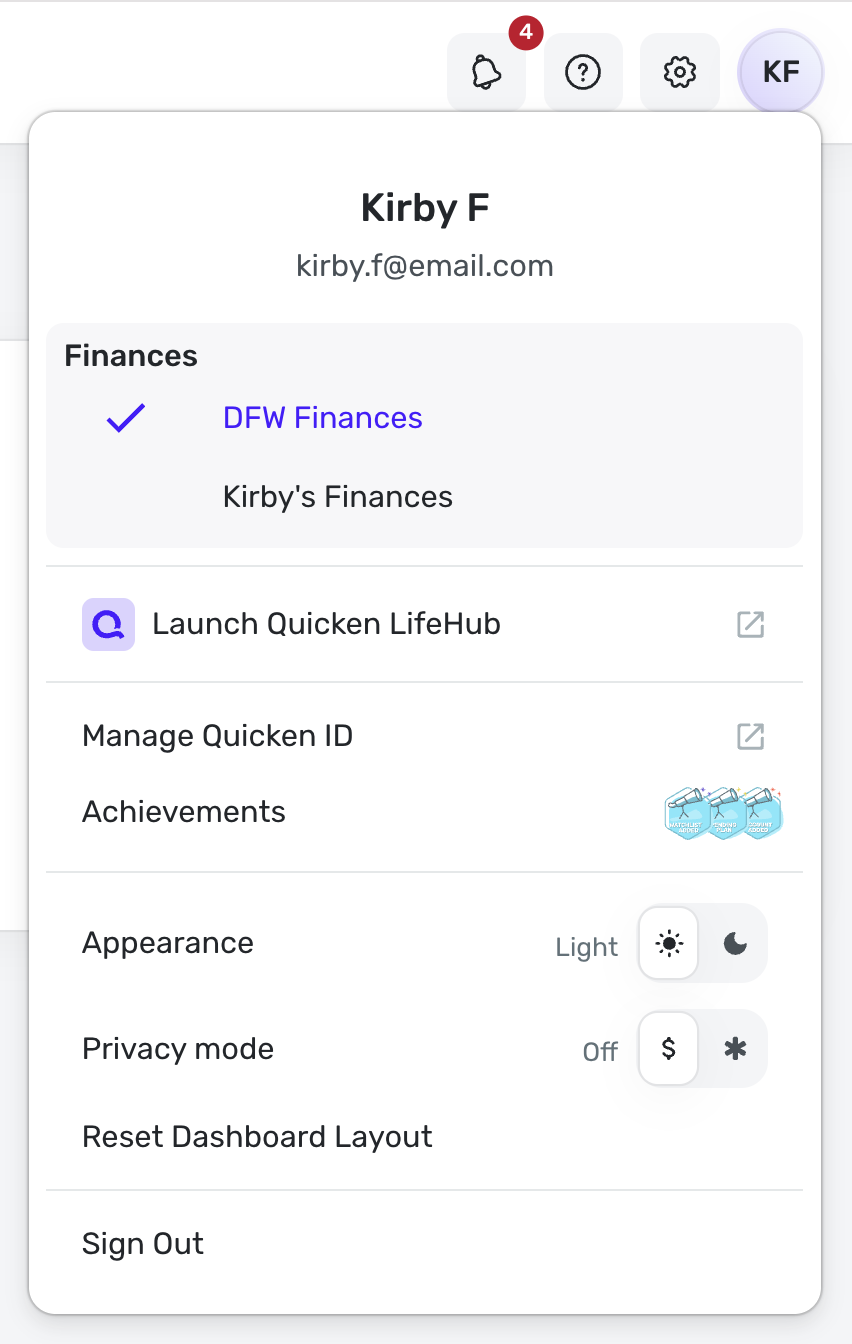
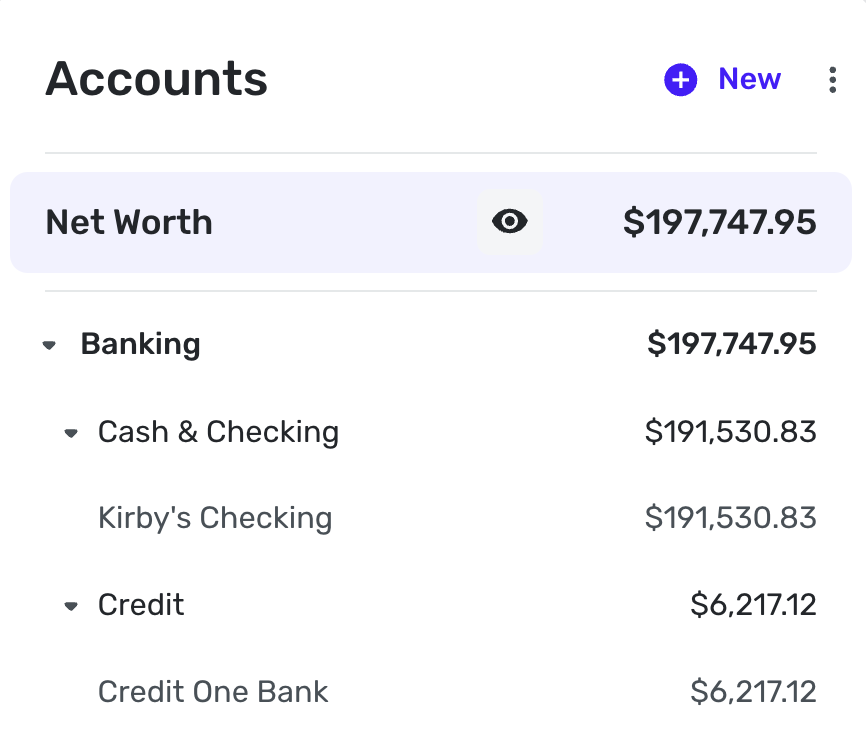
Very test data in the account. :)
And, @roadrunner, want to pm me details or share your issues with our care team so that we can look into the issues you're having, please.0 -
Privacy Mode is now live to ALL users!
-Coach Natalie
0


