Balance adjustments for credit card redemptions

I want to provide feedback on what I think is a defect to an extent but that AI chat said was working as expected. I have a travel rewards credit card where I can apply points I earn to prior travel purchases. These get assigned as "balance adjustments" in Quicken Simplifi. I wanted to automatically recategorize them as travel since they are basically rebates on travel and thus lower my net travel spending. However the AI said it is not allowed to set up a rule to recategorize or rename balance adjustments even if they are downloaded from the credit card company. What is even more confusing is that the preview of the rule shows the pertinent balance adjustment transactions but then the rule just does not work. To me this would be a defect of some kind. That is — if balance adjustments cannot be adjusted by a rule then the preview would not show the balance adjustments. Or possibly it is that the inability to create a rule for balance adjustments is itself a defect. Could the Quicken Simpli team let me know if there are any defects here? To the extent these are not defects I will follow up with a feature request.
Comments
-
Hmm. I do my rebates as rewards, which is an expense category under Fees for me, so I am pretty sure you can recategorize your balance adjustments. Maybe you need to use a new payee. I call mine Chase Rewards or AmEx Rewards depending on the credit card. I could subtract them from anything I buy but since they tend to be all over the place, I just use my Ancillary category for things that cross categories, like fees and rewards.
I only get my rewards about once a week or with AmEx when I cash them in. Looking at my last Chase Rewards deposited into my Checking account, the description just says Chase Credit Card, so that would be hard to create a rule that differentiates between a payment to the card and rewards. I do find that happens some, so I just correct it.
I don't think that your credit card download has anything to do with the category that gets assigned. You can correct them as they come in and Simplifi should learn what you prefer.
Looking at my last AmEx reward, the description reads My Cash Reward s Refund so I just made a rule and assigned it to Ancillary:Rewards. No problem.
But the only time I get an automatic Balance Adjustment is from Zillow or Kelly BB, and even then I change them as I wish.
Steve
Quicken Simplifi (Safari & iOS) Since 2021
Quicken Classic (MacOS) Since 2009
MS Money (1991-2009) and Dollars & Sense (1987-1991)0 -
What is even more confusing is that the preview of the rule shows the pertinent balance adjustment transactions but then the rule just does not work.
Just to confirm what you are seeing, I set up a test rule that looks like this, filtering on the name to catch a single transaction (which I temporarily changed to have category "Balance Adjustment). The rule is supposed to change the category to Restaurants.:

When I reviewed the rule, it had found the one transaction and should have applied the rule to it:
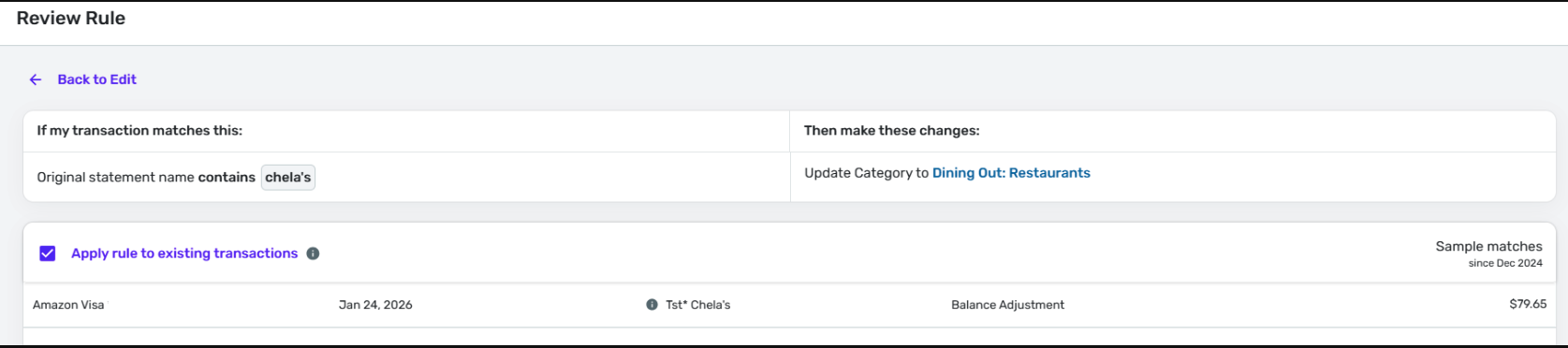
But when I clicked "Update Rule," nothing happened, even thought the interface said:

[Edited - Removed partial account number]
DryHeat
-Quicken Classic (1990-2020), CountAbout (2021-2024), Simplifi (2025-…)1 -
@DryHeat Interesting, and good fast work. I was testing some things too.
I would also like to know what the description says on the bank's download and what triggers Simplifi to assign it as an adjustment.
But regardless, Rules ought to be able to change any category.
Steve
Quicken Simplifi (Safari & iOS) Since 2021
Quicken Classic (MacOS) Since 2009
MS Money (1991-2009) and Dollars & Sense (1987-1991)0 -
@DryHeat. That is what I saw. The software should at least give a warning if this kind of file is not allowed.
@SRC54 The original credit card statement says “CREDIT - TRAVEL REWARD”. Quicken Simplifi lists the payee as “N/A” which I also wanted to update. While I could update each of these manually, I have over 100 of them so that is time consuming.
0 -
Thanks for the update and for answering my question!
@DryHeat is much more the rules guru than I, and he uses QBP so those users really need rules. So I would defer to him. I tend to just correct the 12-15 transactions I get a week, and though I use rules some, I don't have much faith in them.
I should think that you could make a rule using the downloaded name of Travel Reward to change to assign it the travel category. This is what I would try.
Why Simplifi is changing it to balance adjustment is strange. To me, Balance Adjustment is a temporary expedient that the user employs whenever his balance gets off (See the mess on Thursday/Friday) until it rectifies itself or one finds the missing transactions.
It is why I am chagrined to see Zillow and KBB enter balance adjustments; it's really depreciation/appreciation. I personally just change it to transfer until I am ready to update the depreciation myself. All of this is personal preference though.
Rules are so hit and miss. After going a couple of months with Walmart payees getting applied correctly, I got two Wal-marts yesterday with the wrong categories. I already have a rule that Wal-mart is Walmart and is gasoline if less than or equal to $25 and food if more than $25. I just fixed them. No sense bothering with the rule.
With all that said, it looks like you have found a bug or at least an anomaly, and thank you for bring it to the group's attention.
Steve
Quicken Simplifi (Safari & iOS) Since 2021
Quicken Classic (MacOS) Since 2009
MS Money (1991-2009) and Dollars & Sense (1987-1991)0 -
I tried creating a rule based on the downloaded name but that also did not work. Generally rules work for me — this is an exception.
0 -
This is just plain dumb. Apparently, once Simplifi decides it's a balance adjustment, it just won't change it. I hope this gets addressed. I would keep changing it to Travel manually in hopes that Simplifi will learn your preference while we hope this gets fixed.
Steve
Quicken Simplifi (Safari & iOS) Since 2021
Quicken Classic (MacOS) Since 2009
MS Money (1991-2009) and Dollars & Sense (1987-1991)0 -
While I could update each of these manually, I have over 100 of them
If you need to change a bunch of historical transactions, the easiest way is to use the bulk edit feature in one of the transaction views that shows transactions from multiple accounts. Filter the list to what you want and edit them all at once. It's more direct than trying to use a rule.
That won't fix the problem going forward, but it will get the 100 historical transactions off your plate.
DryHeat
-Quicken Classic (1990-2020), CountAbout (2021-2024), Simplifi (2025-…)0

