Stocks from my E*TRADE account don't show up as investments in Simplifi / FDP-141 (edited)

I am able to connect Simplifi to my E*TRADE account. The total balance of the account is accurate, but Simplifi incorrectly shows that I own zero stocks in that account, while my actual E*TRADE account has two stocks. I already reset the connection and re-connected in Simplifi, to no avail.
Comments
-
Hello @vladinator,
Thanks for reaching out! I would see if the following steps work to resolve the issue you are seeing with your missing holdings.
- Make all of the accounts with the bank manual by following the steps here.
- Once you see the account(s) listed in the Manual Accounts section under Settings > Accounts, go back through the Add Account flow to reconnect to the bank.
- If the connection is successful, carefully link the account(s) found to your existing Quicken Simplifi account(s) by following the steps here.
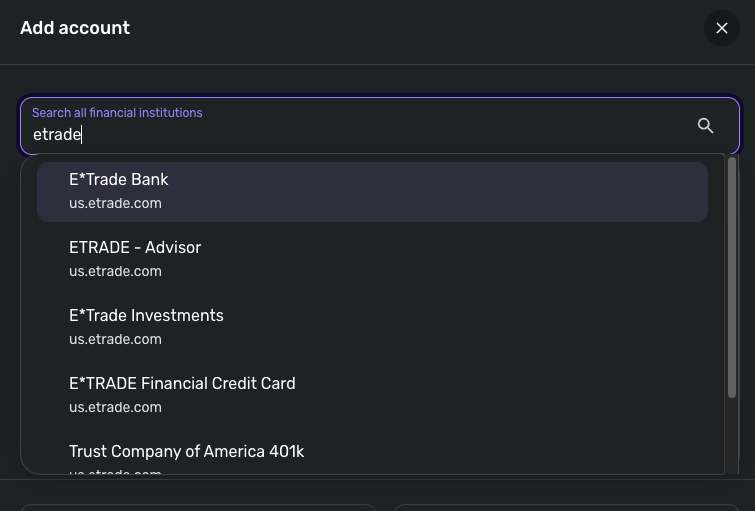
I know we also have multiple instances available for E*TRADE in Quicken Simplifi. If the above steps do not work, you can try connecting to one of these instances instead to see if the holdings come through.
Let us know how this goes!
-Coach Jon
0 -
I made the account manual, re-connected to E*TRADE Investments, then linked to the manual account. Simplifi still showed no holdings in the E*TRADE account. Maybe E*TRADE's data feed for the stock prices is not working, as suggested in other Community posts?
0 -
Hello @vladinator,
Thanks for the reply! Did you try the other instances I suggested in the previous comment? If you have, and the holdings still are not showing up, can you let us know if the balance available in the Portfolio tab of Investments in Quicken Simplifi is correct? Please also provide the following information:
- The name of the account, as it appears in Quicken Simplifi.
- The balance for the account in the Accounts List in Quicken Simplifi (this is the list of all accounts and balances on the left side of the Dashboard on the Quicken Simplifi Web App, or the list of all of your accounts when you select "Accounts" from the Quicken Simplifi Mobile App).
- The balance for the account in the Investments Portfolio in Quicken Simplifi (if you have multiple investment accounts, you'll want to filter the page to just this account).
- The balance for the account as displayed on the bank's website.
- A screenshot of the holdings for the account in Quicken Simplifi (if you have multiple investment accounts, you'll want to filter the page to just this account).
- A screenshot of the holdings on the bank's website for comparison.
- A screenshot of the Accounts Summary page from the bank's website that has a wide enough scope to show the full page URL. This is the landing page after signing in, and typically lists all accounts and balances. You will want to take this from a web browser and not a mobile browser, as well as redact any private info such as account numbers.
We will also need logs to be sent:
- Log in to the Quicken Simplifi Web App.
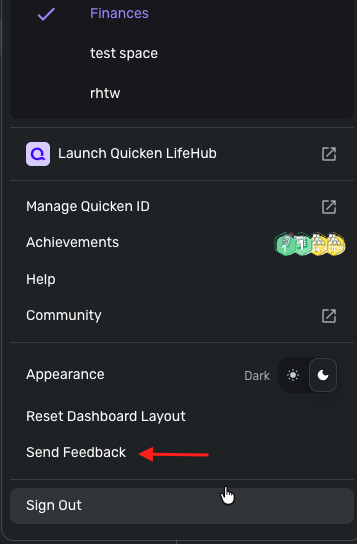
- Select Profile from the left-hand navigation bar.
- With the Profile menu open, hold down the Option key for Mac or the Alt key for Windows, and then click Send Feedback.
- Leave all boxes checked, add a brief description of the issue, and then click Send.
-Coach Jon
0 -
Thanks, I got it to work with the E*TRADE Financial Credit Card institution, oddly enough.
1 -
The E*TRADE FInancial Credit Card link stopped working:
E*TRADE Financial Credit Card returning FDP-141 error — Simplifi
and my stocks still don't show up when I sync my account with E*TRADE Investments.
0 -
Hello @vladinator,
Thanks for the update. Let's have you try the following steps to see if they work in resolving the error you are receiving:
- Make all of the accounts with the bank manual by following the steps here.
- Once you see the account(s) listed in the Manual Accounts section under Settings > Accounts, go back through the Add Account flow to reconnect to the bank.
- If the connection is successful, carefully link the account(s) found to your existing Quicken Simplifi account(s) by following the steps here.
If the issue persists, please provide a screenshot of the error message and logs so we can further investigate. To do that, please follow these steps:
- Log in to the Quicken Simplifi Web App.
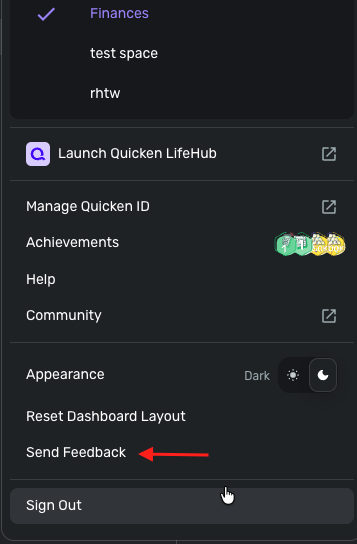
- Select Profile from the left-hand navigation bar.
- With the Profile menu open, hold down the Option key for Mac or the Alt key for Windows, and then click Send Feedback.
- Leave all boxes checked, add a brief description of the issue, and then click Send.
-Coach Jon
0 -
I sent the feedback.
0 -
Hello @vladinator,
Thank you for the information. Did you try the steps I previously sent to see if they resolve the issue? I am not seeing a recent connect attempt for E*Trade Financial Credit Card from my side for you.
May we also have a screenshot of the error code you receive when trying to connect on your end?
-Coach Jon
0 -
I disconnected from E*TRADE Investments then connected to E*TRADE FInancial Credit Card just know. Here was the result.
0 -
Hello @vladinator,
Thank you for the screenshot! I have reported this to our service provider and will follow up once we have a status update!
In the meantime, you can track the account manually by adding manual transactions, which will keep your records up-to-date. Here are the steps to do so: Managing Transactions in Quicken Simplifi | Quicken Simplifi Help Center
If the account is an investment account, the manual tracking steps are a little different:
- Make the account manual so you can add and edit Holdings: How to Make an Account 'Manual' | Quicken Simplifi Help Center
- Add/edit your Holdings to keep accurate records: Tracking Investments in Quicken Simplifi | Quicken Simplifi Help Center and Tracking Investments in Quicken Simplifi | Quicken Simplifi Help Center
EWC-12247103
-Coach Jon
0

