getting field errors when editing existing transaction rules (edited)

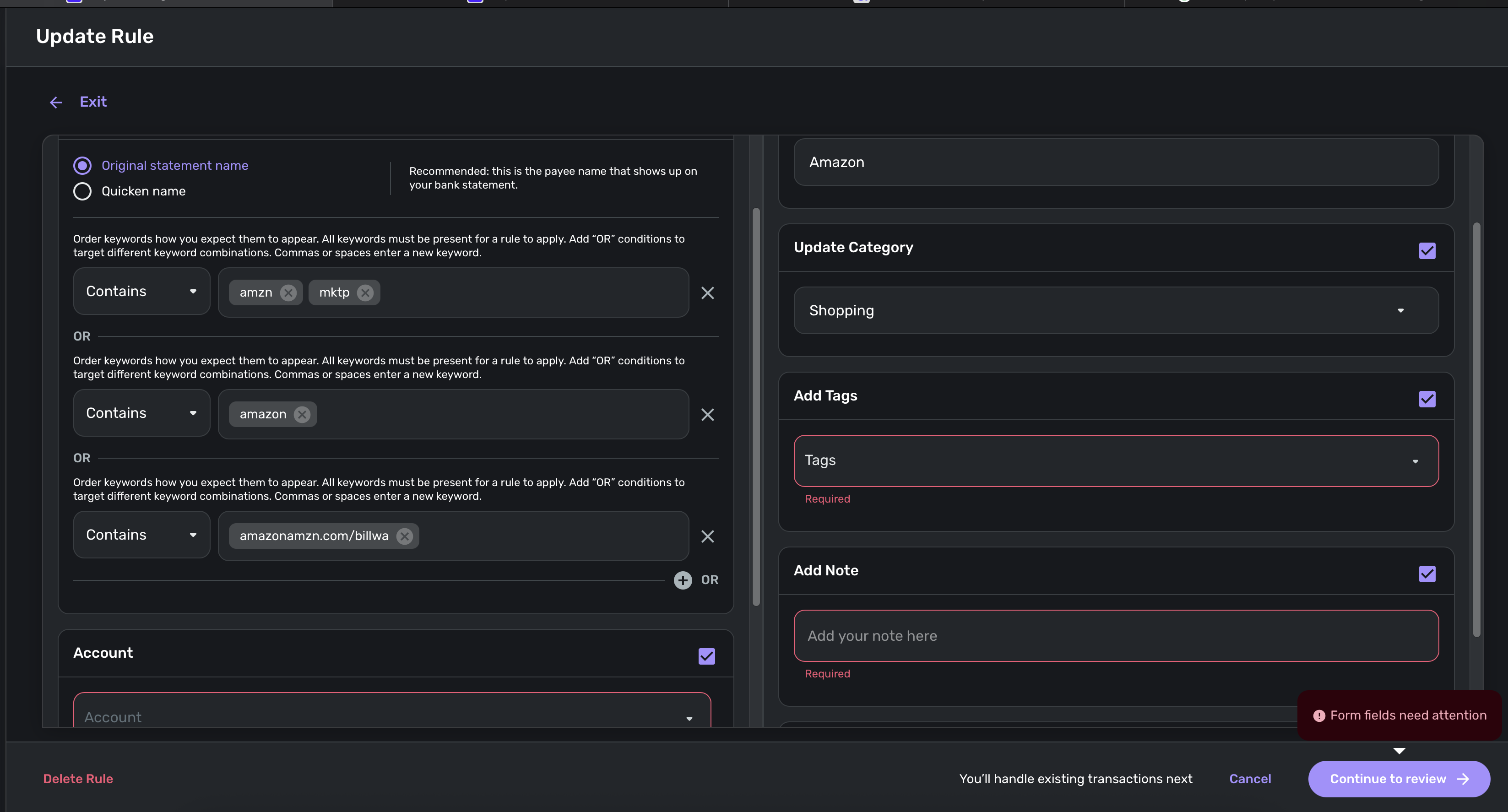
If I go to update my rules (which I often do as the rules will fail much of the time when manually importing csv files so I need to run each one manually), you get inline errors because the new rule options "Add Tag", "Account", "Add Note" are selected by default.
Action: select existing rule, click "continue to review" CTA
Expected: should proceed to the next step
Actual: inline errors are displayed
Comments
-
Hello @Randy1234,
Thank you for letting us know you're encountering this. To clarify, it sounds like you're editing the rules as a way to force them to apply to newly imported transactions. Is that correct?
You mentioned that rules fail often when importing CSV files. Is there any pattern to which transactions rules fail to apply to?
I look forward to your reply!
-Coach Kristina
0 -
It sounds like the actual problem you are reporting is that certain rule options like "Account," "Add Tag", and "Add Note" are selected by default when you try to edit a rule — and they should not be. (The part about importing CSV files is just what caused you to notice this problem.)
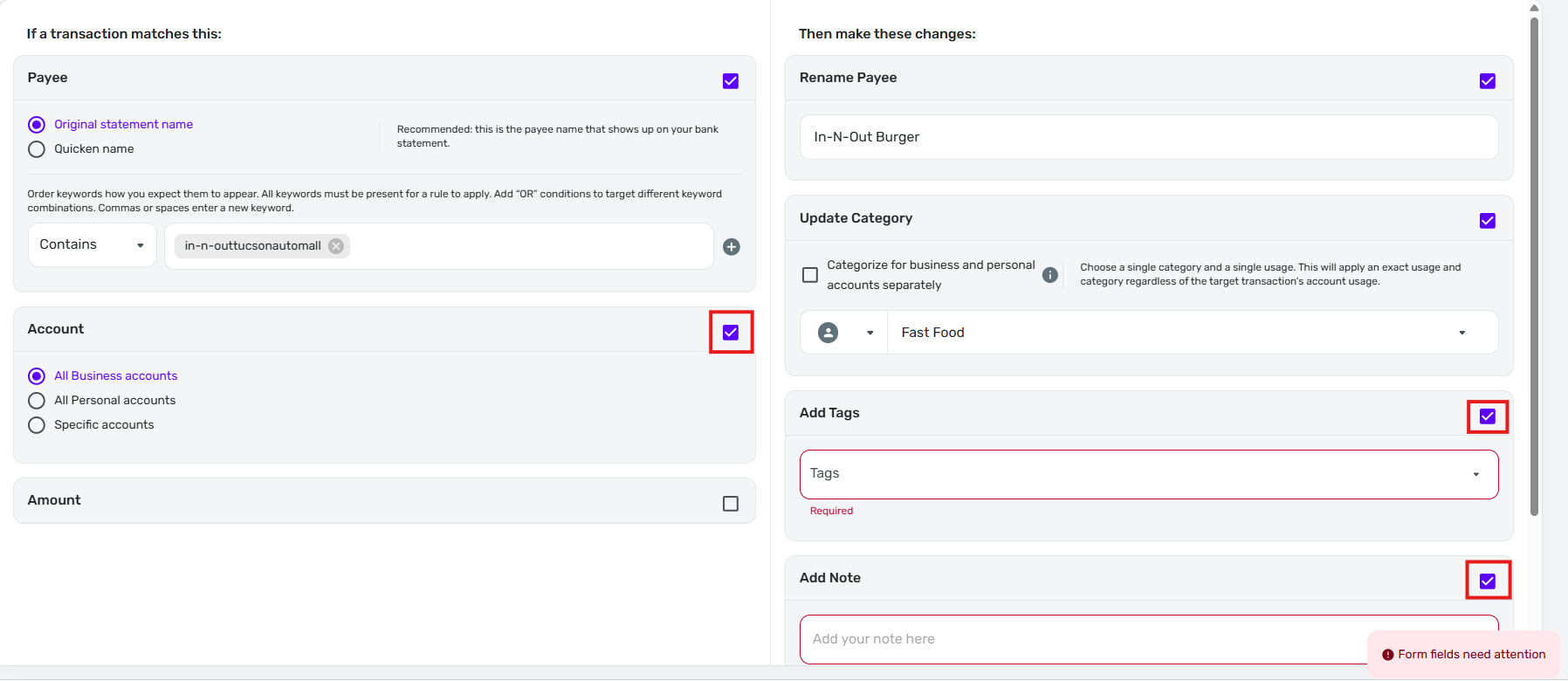
I am seeing pretty much the same thing and I am not importing any transactions from CSV files. I just tried to edit a simple rule that only has one condition (based on original statement name) and two changes (rename and update category).

But when the edit form opened, the "Account" condition was selected and set to "All Business accounts" and the "Add Tags" and "Add Note" changes were also selected.
The important point is that none of these items were active in the rule that I was editing, as you can see from the above rule listing. Choosing to edit the rule caused them to be automatically selected for no apparent reason.
As you mentioned, clicking "Continue to review" brought up the "Form fields need attention" warning because the "Add Tags" and "Add Note" items (which I did not select) did not contain any information.
DryHeat
-Quicken Classic (1990-2020), CountAbout (2021-2024), Simplifi (2025-…)1 -
Hello @DryHeat and @Randy1234,
Thanks for letting us know! Are you able to uncheck any fields that do not apply to the rule you are editing? If you are, does it then allow you to select "Continue to Review" and apply/update the rule?
-Coach Jon
0 -
Are you able to uncheck any fields that do not apply to the rule you are editing?
Yes, I can uncheck the unwanted conditions and changes that are automatically and unexpectedly checked by the system whenever I start to edit an existing rule.
BTW, this does not happen when creating a new rule. When I click on the "add a Rule button," all conditions and changes are unchecked and only become active if I choose to select them. That seems like the correct behavior.
DryHeat
-Quicken Classic (1990-2020), CountAbout (2021-2024), Simplifi (2025-…)2 -
Hello everyone!
I was able to reproduce this issue on my side and have reported it to our product team. I will be sure to follow up here when we have any status updates going forward.
Thank you!
SIMPL-31761/ SIMPL-31538-Coach Jon
2 -
Hello everyone,
Our product team did implement a fix for this issue, which should be released with Quicken Simplifi Web 6.5.0. Be sure to let us know if the issue is resolved for you once that version rolls out!
Thank you!
-Coach Jon
1 -
Hello everyone!
Quicken Simplifi Web 6.5.0 has been released. Be sure to let us know if this issue is still affecting you.
Thank you!
-Coach Jon
2 -
This issue is no longer a problem for me as of Web version 6.5.0. Thanks.
DryHeat
-Quicken Classic (1990-2020), CountAbout (2021-2024), Simplifi (2025-…)1 -
Excellent, thanks for the fix 😊
1


