Last Apple update Jan. 21 2026

What going on with my Apple Account. I have a couple of transactions daily on the Card and each transaction post a small amount to savings. I also have monthly interested posted Jan 31 showing in Wallet. I open Quicken app on my iPhone and iPad daily several times trying to get an update. On the card I have one transaction on Feb 2, 2026 with a date after 2/21/26 where I paid the monthly balance. There is 8 expenditures showing in Wallet are not in Simplifi. The Account balances in Savings and on the Card is off by the amount of none showing transactions.
Comments
-
I haven't had any problems with Apple Card or Apple Savings, and like you I get small reward deposits to Apple Savings, and the interest came in Sunday as normal.
I would go to Settings:Accounts:Apple and reset the connection. If that doesn't fix it, I would make the accounts manual and set them up again. Just be careful to link the Apple accounts correctly to the ones you already have in Simplifi.
Good luck.
Steve
Quicken Simplifi (Safari & iOS) Since 2021
Quicken Classic (MacOS) Since 2009
MS Money (1991-2009) and Dollars & Sense (1987-1991)0 -
Thanks, I reset the account but no Joy, very strange no alerts about not connection and not only will Simplifi show you accounts not updating but Simplifi will tell you if you forget to use you iPhone or iPad which Apple requires to update. Simplifi even loaded one transaction after 1/21/26 for the payment. I am not sure it really reset. I reset and verified but did not ask for Apple ID, just said connected. I hit the re-sync button but it was an instant return which means it did nothing.
1 -
@N4KHQ, please give the following steps a try!
First, switch your connected Apple Wallet accounts to manual mode
If the Apple Wallet accounts are not already set to manual (disconnected), please follow the steps below:
- Click the Menu (three-line icon).
- Select Settings and then Accounts.
- Locate the account you'd like to make "manual" and click the three-dot icon at the end of it.
- Select Make manual.
- Click Confirm.
Second, check third-party access for your Apple Wallet
- Go to the Settings ⚙️ app on your iPhone.
- Tap on Privacy & Security.
- Select Wallet.
- From the Allow Access screen, choose Quicken Simplifi.
- Make sure to toggle on the Allow All Activity option.
Third, re-link your Apple Wallet accounts
- Click the Menu (three-line icon).
- Select Accounts.
- Tap the plus (+) button in the upper right.
- If your Apple Wallet is already shown, you can tap on the image to select it, or you can type it into the Search bar to let Quicken Simplifi find it.
- Allow access, select which accounts you'd like to add to Quicken Simplifi, and then click Continue.
- Select the pencil icon for each account.
- Click the Link to dropdown menu.
- Select the existing account from the list.
- Click Update, and then click Confirm once each account selection is completed
This should get things working for you again. Let us know!
-Coach Natalie
1 -
Coach Natalie, Your the best, Thanks. All I did is check third party access and allow Quicken Simplifi access. I did not make the account manual or have to reconnect. The. problem was caused because I got an iPhone 17 Pro upgrade. I did not connect the upgrade and loss of updates until just now.
2 -
I need more help. When I went to make Apple accounts manual, I saw 2 Apple Savings and 2 Apple Cash accounts, A total of 5 where there should be 3. I did not know which one to make manual so I just allowed access under
Privacy & Securityon the iPhone. That fixed the iPhone but the web app was still not syncing. I waited a couple of hours restarted and then I reset the account on the iPhone and now the accounts are showing double on iPhone and Mac. One account is correct and one account is not syncing for cash and savings. How do I know which account to Delete? Thanks0 -
@N4KHQ, I'd recommend making all of the accounts manual and then reviewing the transaction history to decide which ones to keep. You can edit the names as well to indicate which is which.
- Make all 5 of the accounts manual:
- Rename one of each of the duplicates so they have a unique name (this will allow you to differentiate for the next step):
- Navigate to each of the accounts and review the transaction history so you can determine which were the original accounts (I'm guessing the new duplicates will have less history and/or non-edited transactions, etc.)
- Once you determine which accounts to keep, you can delete the others:
- Go back through the Add Apple Wallet flow to reconnect to Apple Wallet:
- Link the accounts found to your existing Quicken Simplifi accounts:
Let us know how things go!
-Coach Natalie
0 -
I have already messed up big time. I identified the correct account that was syncing by changing name and deleted the one that was not syncing. The on that was syncing only contains data back to Jan 6 2026. Should have scrolled down and checked before deleting none syncing accounts. If I just delete all accounts will Simplifi go back 90 days? That would be better than what I have now.
0 -
@N4KHQ, if I remember correctly from what past users have reported, adding Apple Wallet accounts goes back a couple of years. But yes, you should at least get 90 days. 🤞
-Coach Natalie
0 -
Yes when I first imported I got back to 2023. However something has changed. I got the same records from Jan 6 to present. I did not get the 90 days promised. I called support and he told me 90 days at least. Really did not hurt anything, I'm in the exact same shape as I was before deleting. How did the double account get created. I never added an apple account. If I had made them manual I would not have known which to link to, they had the exact same name. The only thing I ever did was reset the account. There must be a bug when you get a new iPhone. I know for a fact when I updated, Apple's update did not copy the Share with Simplifi preferences to the new iphone.
0 -
@N4KHQ, ahh, with a new phone, there are special steps to follow to prevent duplicate accounts from being created —
This is likely what you experienced. As far as the transaction data, I would say that "90 days at least" is not exactly accurate. While most banks provide a standard of 90-days worth of transactions, I've seen some banks only provide 30 days. Which is what Apple Wallet seems to be doing now. I will inquire with my team on whether something has changed with Apple Wallet, but I can confirm that the transaction history provided is completely dependent on the bank.
I'll post back if I learn anything substantial to share. 🙂
-Coach Natalie
0 -
@N4KHQ, I found out that you can change your settings in the Apple Wallet app to "All Available Activity" (you are likely set to "Limited Time Period" currently) —
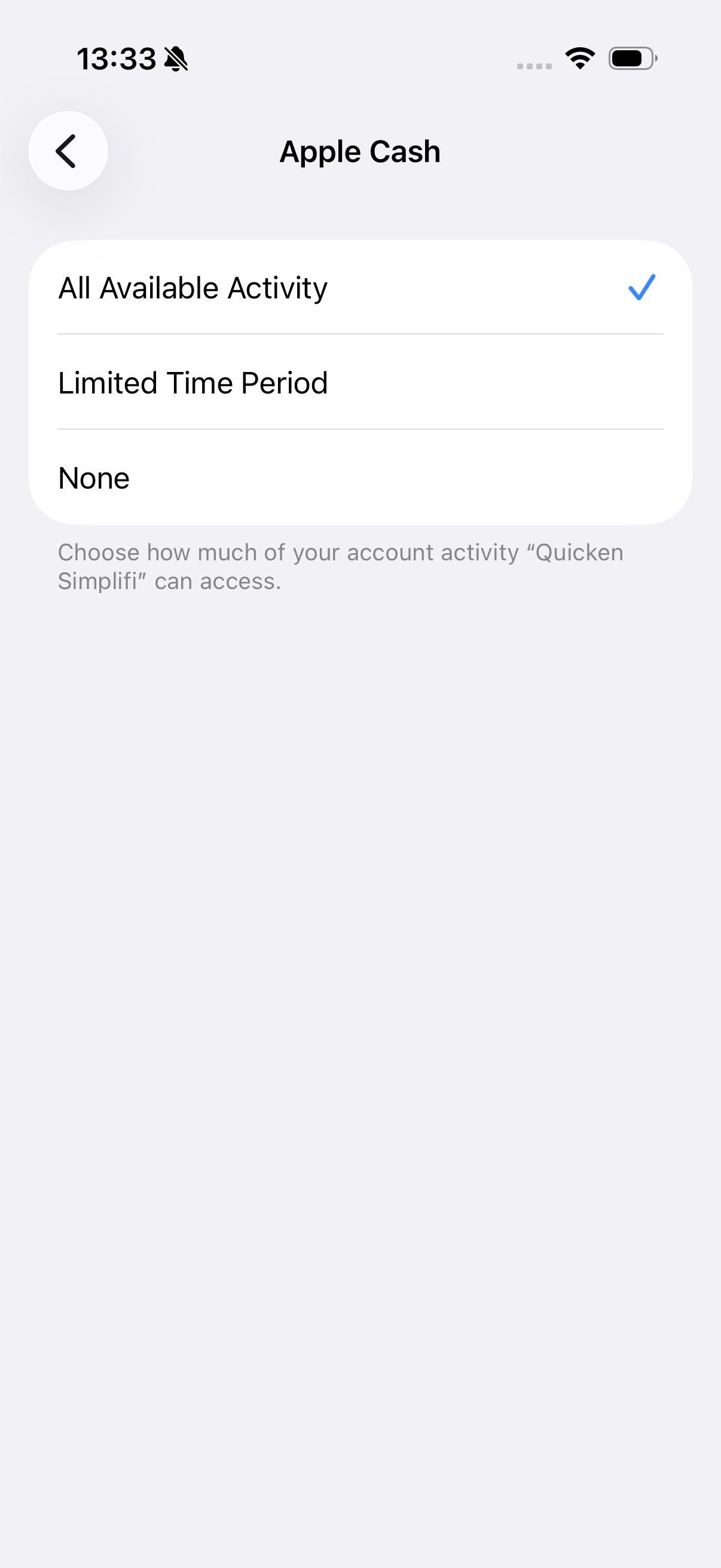
You have to do this for each one of your accounts, and then when you refresh in Quicken Simplifi, the history should fill in.
Let us know if this works for you!
-Coach Natalie
0 -
Natalie, don't know what the pay you but it not enough. I remember setting Savings to All Activity but after you post, I checked again and it was 2/5/2026. The other two accounts were set to All Activity and working correctly. I deleted saving and add it back and I have everything. It almost fixed but I have one more correction. When I transfer money from Checking to Apple Savings, Apple does it immediately and it takes 2 or 3 days to come out of the bank. Simplifi does not pickup it up as a transfer and thinks it is income. I wait until the bank has the withdrawal record and manually make it a transfer. After getting the records back Simplifi is counting the transfer as income. Do you have a link showing the best way to manually fix the transfers, Don't have that many. Thanks again you must have an iPhone and Android too.
0 -
The link you sent said " it's important to properly disconnect your Apple Wallet accounts from your old device before linking them on your new one." You have to disconnecting AppleID, Wallet, everything before you transfer the number and apps to the new phone. I think the article should say: Make the apple accounts manual on the old phone before transferring Simplifi to the new iPhone and check the Simplifi sharing setting on the new iphone. Thanks again I had given up on getting it fixed.
0 -
Nevermind on the transfer link, it is easy just select transfer and it finds the checking. Thanks again you are super smart.
1 -

