Manual Transfer Linking Bug

Mac Tahoe 26.2 and Safari 26.2. When I transfer money from checking to Apple Savings, Simplifi does not recognize the transfer and makes the category Income. I assume this is because Apple shows the deposit immediately and the banks does not show up for a day or two. However, when Simplifi has both transactions and I change the category of Apple savings to Transfer, the dialog showing the from - to for linking does not appear. If I click anywhere on the page the dialog to link appears but some times it is covered by another dialog for editing the transaction depending on where I click. The procedure works great but this is not the excellent user interface I'm a custom to in Simplifi.
Comments
-
Hello @N4KHQ,
Thanks for reaching out! Are you able to provide screenshots or a screen recording showing the behavior from your side as you attempt to change the category? This will help us better understand what specifically is occurring here. I would also see if trying from another web browser/incognito mode works for you. Let us know!
-Coach Jon
0 -
Next time I make a deposit to Apple savings I will screen record if I remember. I will describe it in different terms. If I select Transfer from the list of Transactions Simplifi enters Transfer and nothing happens. The minute I click a record the edit record dialog appears and cover the link showing the bank to link. I have to close the edit to see the linking dialogue. When I click link it converts the records to Transfers records. Probably specific to my browser.
0 -
Hello @N4KHQ,
Thank you for the reply! Yes, if you can provide that screen recording when you can, that would be great and very helpful! Have you tried both the web and mobile applications? Does the issue appear in both? Let us know when you can provide that screen recording! Feel free to DM me the information.
-Coach Jon
0 -
I have not tried anything except Safari. It requires two transactions that Simplifi does not link and records the deposit as income. I think I have seen Simplifi categorize transfers automatically. It never get Apple but I assume it is because the bank does not upload until a day or two later than the apple savings deposit which post instantly for Simplifi syncing. I'm hesitant to change a working transaction for the screen record.
0 -
I changed one to income and changed it back for a screen recording. Don't look like I can attach a mov. How do I get you the screen recording. I probably should have waited longer before clicking but the linking dialogue never comes up until you click, If I did not click a record it might not be covered but it should come up without the having to click
0 -
This is the same behavior I see. Usually, I enter my Apple transactions in Simplifi first and they match up well, but if I download them from Apple first, I have to do a little fixing.
For example, I transfer from Apple Savings to Apple Cash. Savings will say Withdrawal and Cash will say Money Added, but once I edit Apple Savings to transfer to Apple Cash (or any account), Simplifi finds the other side and offers to link them.
I would like clarification on what you mean that the link dialog doesn't show up. It only shows up for me if I type in to the category Transfer to Account Name. And only then if I have the transaction already there. Otherwise, I just hit enter and it adds the transaction. I am also using latest Safari and MacOS.
Steve
Quicken Simplifi (Safari & iOS) Since 2021
Quicken Classic (MacOS) Since 2009
MS Money (1991-2009) and Dollars & Sense (1987-1991)0 -
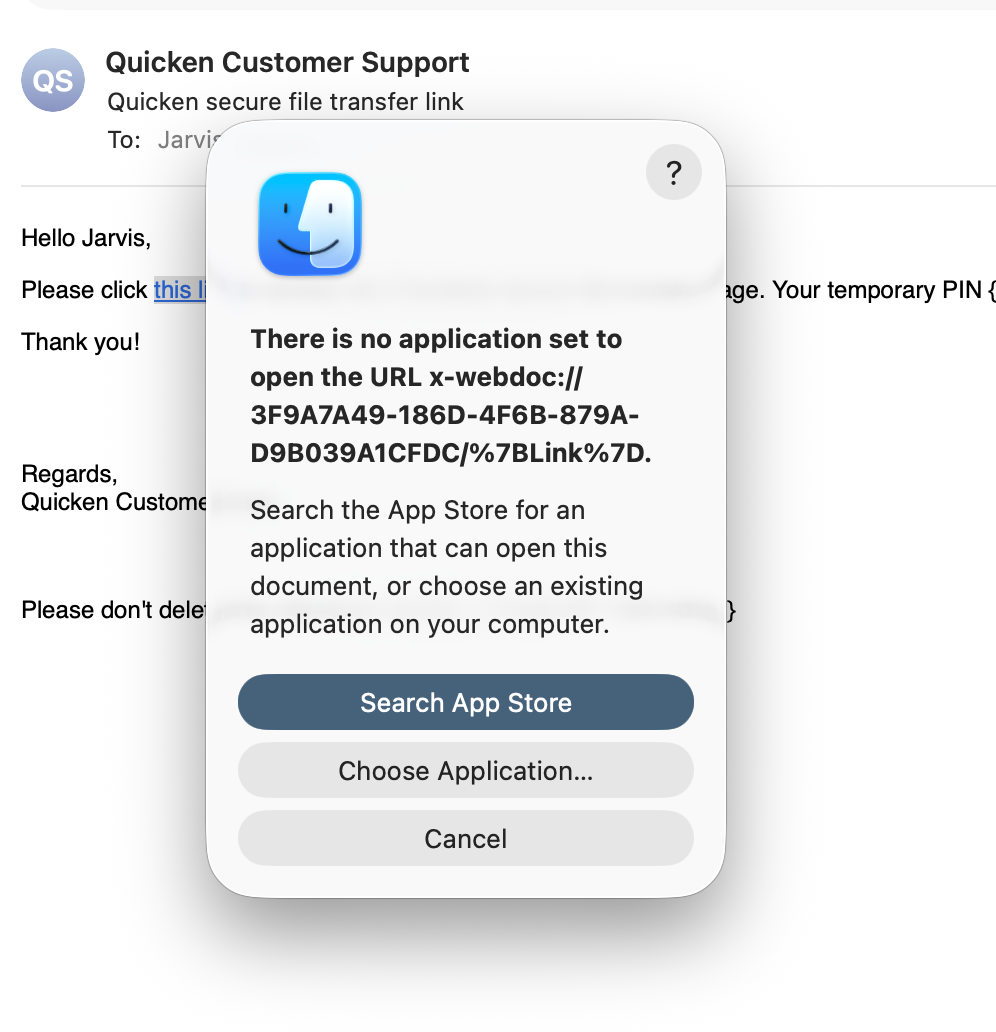
Don't know if I got the File Transfer link after it expired or if it just did not work. If I Click This Link nothing happens. If I copy the link and past Sarafi says can't open the link. If I right click and select open link, I get the message shown below
 0
0 -
Thanks Jon, I still have the first one that did not work. However I do not see the second. I have looked through the inbox and junk box. I have also searched for Quicken.
0 -
Thanks Jon, I got it at 5:03 PM but it just list the first. I even tried clicking the link on Win 11, edge copy and pasting the link does not work either. I have pasted part of the email below. It does not look correct to me no Pin or ExpirationTime. The first one was this way.
to access the Trendzact secure file transfer page. Your temporary PIN {PIN} will allow access to the site and the link expires in {ExpirationTime}.
Thank you!
0 -
Zip worked,
Below is the link associated with click here that doesn't work
x-webdoc://800EB8EE-4166-4760-AEAD-8854DB34C884/%7BLink%7D
0 -
It does not bring up the dialog ever, I select the bank the bank the money comes and it puts the bank in as the category but does not create a transfer.
0 -
Hello @N4KHQ,
To clarify, selecting the bank account under the Transfer category when editing the transactions does not do anything at all until you select a different row or white space within Quicken Simplifi, correct? Does using a different web browser work when trying?
-Coach Jon
0 -
No, selecting the bank account to the right of Transfer category enters the Bank in category field just like you changed a normal category. However it does not bring up the link dialog for making to create a transfer.
0 -
I have not, doesn't matter if Chrome or Edge work I'm not changing. It not a big deal once you learn how to make it work but it sure does slow down the learning curve on transfers
0 -
I will try the next time I get a transaction transfer I need to manually link. Probably around the 16th
1

