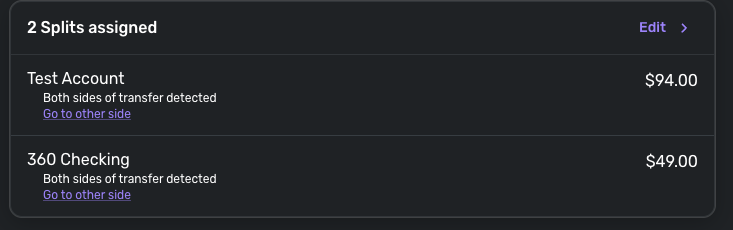
Splits with multiple transfers no longer show "Go to the other side" for all transfers

I am 99% sure this used to work properly and is a new bug.
If you have a split transaction which includes multiple transfers, it used to show the "Go to the other side" link for all of the transfer rows.
Now, it only shows for the first one. Or sometimes the second one. And I even see some old transactions which don't show for any!
This makes it more difficult to debug when splits and transfers get weird. And in general seems like a UX downgrade. I hope you guys can fix this! Thanks!
Comments
-
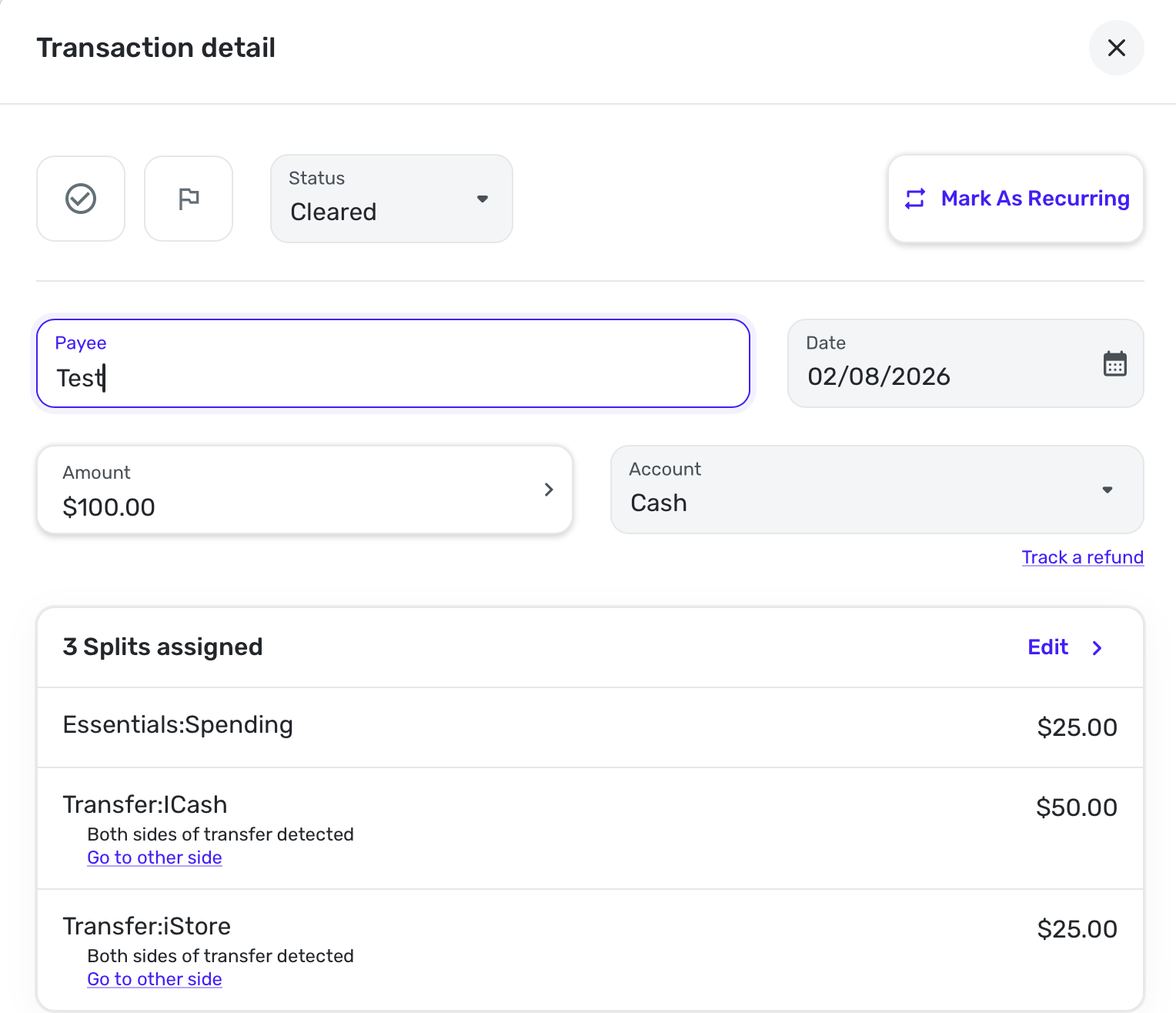
I don't do transfer splits very often, but I did a test where I had a 3-way split from Cash. I split some to Apple Cash and some to Apple Store and the rest to my spending category.
When I go to Cash and edit the transaction there, I see everything.
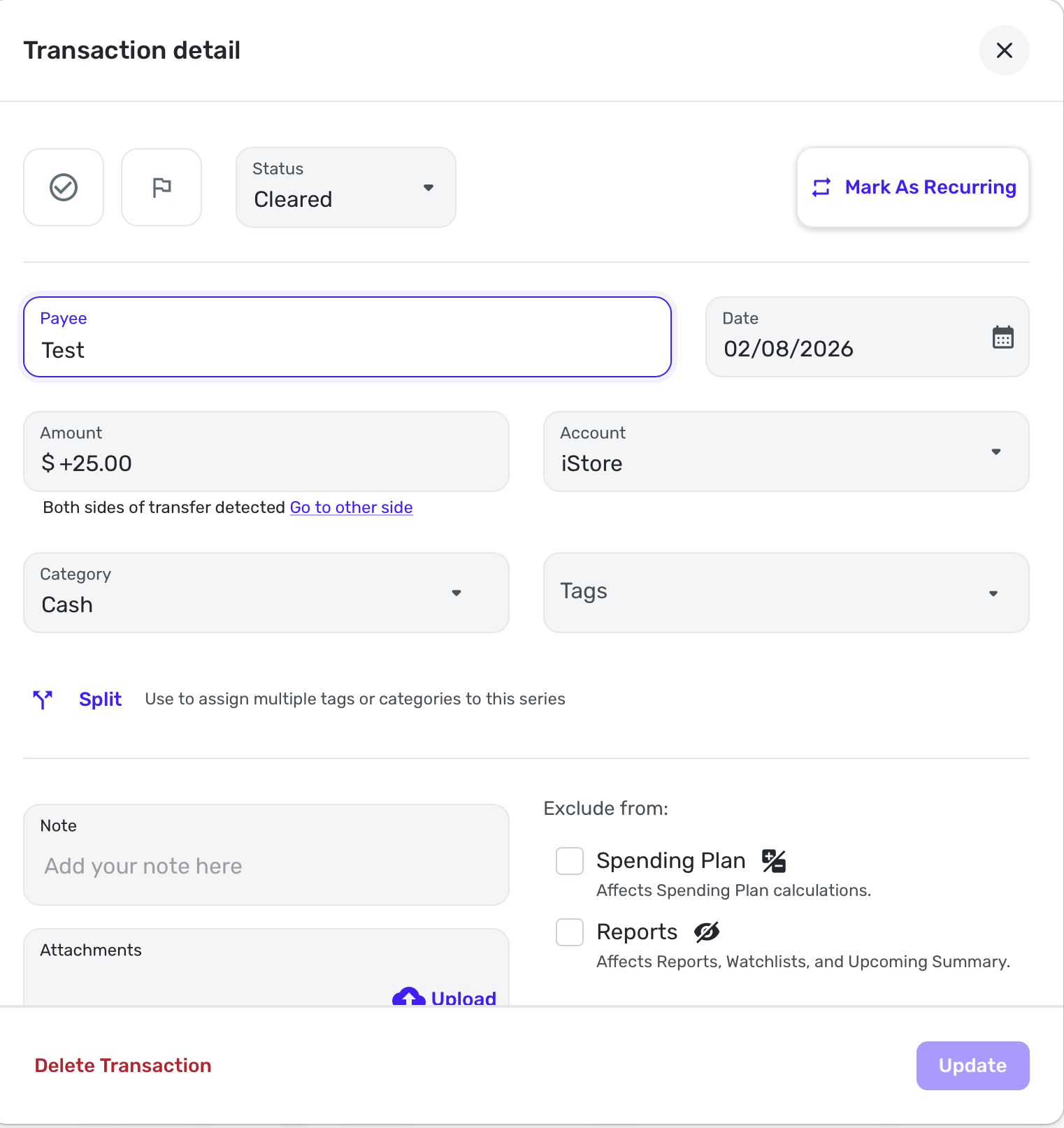
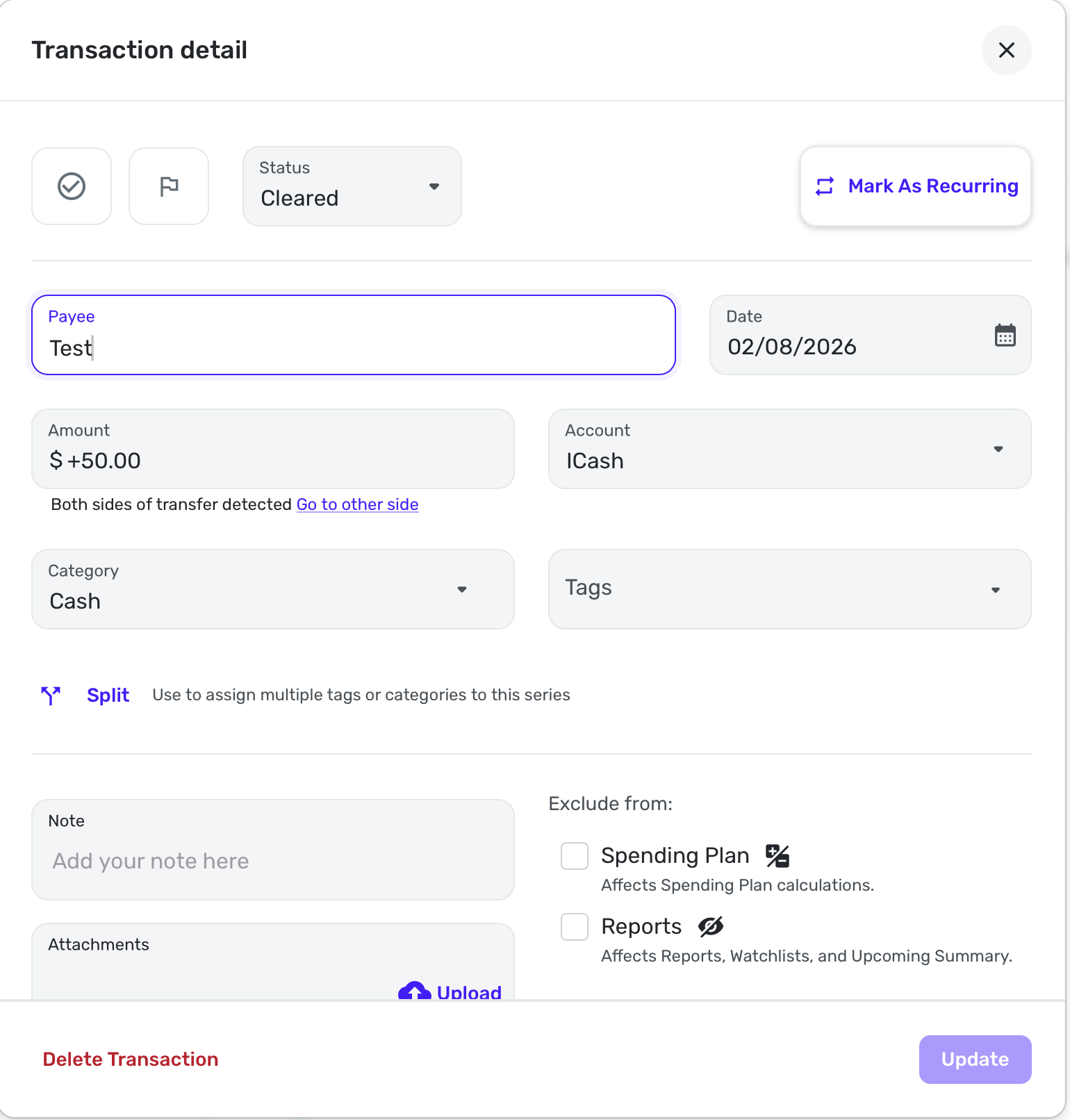
When I go to Apple Cash, the transaction shows me where I can go to the other side of the split, which takes me back to Cash (originating account) and shows everything there.
When I go to Apple Store, the transaction shows me where I can to the other side of the split, which takes me back to Cash and shows everything there.
Is that the behavior you see? This seems ok to me. You click on a transfer and it takes you back to the original account where you made it in order to edit it.
Steve
Quicken Simplifi (Safari & iOS) Since 2021
Quicken Classic (MacOS) Since 2009
MS Money (1991-2009) and Dollars & Sense (1987-1991)0 -
When you are looking at the cash transaction, in the split rows, do you see a link under each transfer split to navigate to the other side of that transfer?
That's the issue I am experiencing now (with a bank account, not a cash account).
0 -
In the Cash account, this is what it shows me:
And in the receiving accounts, I get this:
Steve
Quicken Simplifi (Safari & iOS) Since 2021
Quicken Classic (MacOS) Since 2009
MS Money (1991-2009) and Dollars & Sense (1987-1991)0 -
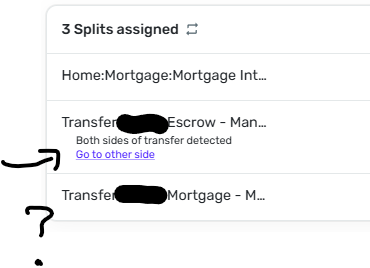
See screenshot above indicating what I mean
0 -
I just saw your post before mine: yours seems to be working properly. I debugged this with a coach today and she saw the same issue as me, and directed me to file a bug report here. I wonder what the difference is between yours and mine/the coach's.
Mine are both manual accounts, only the main one with the splits is linked. I wonder if yours are the same?
0 -
Are your transactions older transactions? I am still trying to find an old transaction to compare.
Oh, well if the Coach has confirmed it, I am sure it's a bug.
I'll keep searching anyhow just to see.
Steve
Quicken Simplifi (Safari & iOS) Since 2021
Quicken Classic (MacOS) Since 2009
MS Money (1991-2009) and Dollars & Sense (1987-1991)0 -
My transactions are new, from january and february. I actually redit the splits today (and yesterday) as part of debugging some misbehaving transfers.
Is yours also new?
0 -
Yes, this was a new transaction I did to test your problem. Weird. I thought the problem might have been with the new "See Splits" option.
I almost never do splits with transfers to another account. It caused problems in the Spending Plan. Because then the transfer got counted as an expense unless you excluded the entire thing, but of course, if it is only transfers, that would be no problem.
My main split with a transfer was in a paycheck when the transfer went to a retirement account.
Steve
Quicken Simplifi (Safari & iOS) Since 2021
Quicken Classic (MacOS) Since 2009
MS Money (1991-2009) and Dollars & Sense (1987-1991)0 -
FWIW, I have seen the "Go to other side" message disappear in non-split cases when the link between the two sides of the transaction has somehow become corrupted. In that case, the message is usually missing on both sides of the transaction (meaning in both accounts).
DryHeat
-Quicken Classic (1990-2020), CountAbout (2021-2024), Simplifi (2025-…)0 -
That would explain why I didn't see it last week :D
But now why it's not there now
0 -
Thanks for responding. Removing the splits and redoing them resolved the other issues I was having (I also had to delete the series and log out and back in) but it did not resolve this issue.
0 -
I was dealing with other issues where a split to a transfer was linking to a transaction that was already linked to a transfer from a month prior, and where a split to a transfer kept changing its date to the wrong date. While debugging that I noticed the issue I posted here, that it doesn't show you the link to more than one transfer in the splits. The steps I listed above (done with a coach) helped the other issues but didn't help the issue I mentioned here of not seeing the link to the other side for more than one split.
If you want to read up more you can look at ticket #s 12221113 and 12221249.
Thanks!
0 -
I only mentioned the other issues because I was explaining how I knew that a coach had the same issue on her end.
Regarding your other question: I see this issue with at least 2 transactions.
Looking at older ones… there are some that have one split which is a transfer (the others are other categories) and I don't see the link at all. And some with one split and I do see the link.
I do see one transaction from april 2025 with 2 splits and both show the link.
I didn't go back prior to 2025, should I?
0 -
In 2024 I see at least 3 transactions showing the link to view the other side for 2-3 splits, I also see a couple of transactions that are missing a link. I didn't check all the transactions, though, just a sampling.
0 -
Hello @EL1234,
Thanks for the response. Can you provide screenshots showing a few examples of this behavior from your side? We will need both sides of the transfer to be shown for comparison. Can you also verify if you see this issue within the mobile application as well? I was unable to reproduce this issue from my side for either application.
We will also need logs to be sent:
- Log in to the Quicken Simplifi Web App.
- Select Profile from the left-hand navigation bar.
- With the Profile menu open, hold down the Option key for Mac or the Alt key for Windows, and then click Send Feedback.
- Leave all boxes checked, add a brief description of the issue, and then click Send.
Thank you!
-Coach Jon
0 -
Sure @Coach Jon , can I DM you the screenshots?
I do not have a mobile device so I can't answer about that. I just sent the feedback.
0 -
DM sent
0 -
Hello @EL1234,
Thanks for the requested screenshots! After verifying, I can see that the missing "Go to the other side" link is for your mortgage account. Are all the other splits that are missing this link linked to your mortgage account? Is your mortgage account connected within Quicken Simplifi? If both are true, then the reason for this behavior would be that transactions are not supported in connected loan accounts in Quicken Simplifi. Let us know if this is the case for you!
-Coach Jon
0 -
Hi,
For the screenshots, yes it is my mortgage account, but it is a manual account, not linked. Some of the other missing links are for mortgage accounts but I don't remember if it's all of them. I do know that it did used to work for my (manual) mortgage account prior to 2026.
0 -
Hello @EL1234,
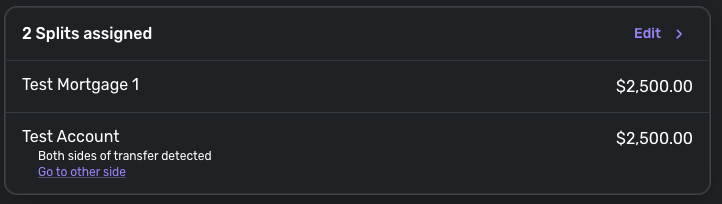
After additional testing from my side, it appears that I was able to reproduce the behavior reported here. But only when creating a split transfer to a mortgage account. Can you please confirm if any of the missing split transfer links are for any other accounts besides mortgage accounts on your side?
Thank you!
-Coach Jon
1 -
Hi @Coach Jon , thanks for working on this! I will look if I have any others that are missing the link.
1 -
Hi, that's correct. So far the only issues I see are with mortgage accounts. I am curious what type of account the support coach I was chatting with who was able to replicate it was using! It was @Coach Noe but I don't see them on the community here. Ticket # 12221249
0 -
Thanks @Coach Jon !
0 -
Just for fun I changed the account type to Personal Loan and it still doesn't show links to splits. I even created a new transaction to see if that changed anything.
0 -
I'll keep an eye out - thank you!
2