How do I apply electric and internet portions to a rental payment? (edited)

I prepare a monthly invoice for a rental property that includes rent, electric and internet. When the invoice is paid as a lump sum and I apply the payment to the invoice, how can I be sure that the non-rent income is applied to electric and internet to zero out the electric and internet I've paid seperately?
Best Answer
-
Hello @CCJ,
Thanks for reaching out! A good way to have the $1650 show up as rental income in your reports is to split the transaction you showed above that includes all invoiced items. Splitting a transaction allows you to assign multiple Categories and/or Tags to a single transaction, which would then show up in your reports this way.
Our support article goes into more detail on how this works and contains steps on how to do this here:
I hope this helps!
-Coach Jon
1

Answers
-
Here's how the invoice was written:
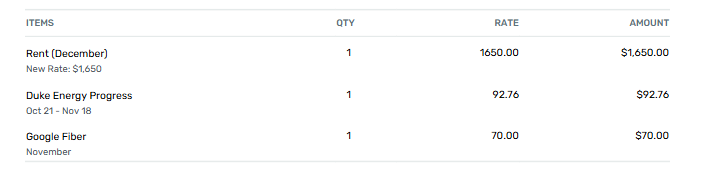
Here's how the deposit shows Up:

When I run a report the $1,650 needs to show up as Rental Income. How do I make that happen?
0