Transaction List Update: Share your feedback here!
Comments
-
My Transaction Activity register now has an available column for "Unpaid." (see image)

I can't find this field on the transaction editing form, or anywhere else except in the register.
What is it used for and how do we access it?
DryHeat
-Quicken Classic (1990-2020), CountAbout (2021-2024), Simplifi (2025-…)0 -
This must be in QBP because I don't have it. Could it refer to invoices? Probably a stupid question. But it is fun. Every few days we get a new feature.
Steve
Quicken Simplifi (Safari & iOS) Since 2021
Quicken Classic (MacOS) Since 2009
MS Money (1991-2009) and Dollars & Sense (1987-1991)1 -
I am having a lot of trouble with splits and transfers over the last couple of days. I have transfers where one transaction gets linked to two in the other account. Lots of messiness and it's too complicated to write up here. I did some debugging with the AI chat and it seemed to be all fixed but now it's messed up again. Just posting here that I hope that they are working on fixing things especially for when one transaction has split lines for transfers to more than one other account. In my setup, the main transaction before it's split up is a recurring reminder, I don't know if that's relevant to the issues though.
0 -
The search issue is now fixed!
-Coach Natalie
0 -
Awesome! Thank you for letting us know!
2 -
Some other items to note:
- The crash when using a before date in the date filter is fixed
- All months in the transaction register will be expanded by default to better locate searched-for items
- We have added 'Bank Payee' as an optional column, which adds the statement name to the register (this field is not yet searchable)
We appreciate everyone's continued feedback and suggestions here!
-Coach Natalie
1 -
Awesome, thanks for the updates! Looking forward to more :)
2 -
Re: Register Changes. A lot of these are very well done and needed, bravo. Thank you for thinking through the user experience, I am excited to implement them. That being said, how SPLIT TRANSACTIONS are handled in EXPORT is useless for those of us who export out for analysis.
Some thoughts:
>In the split edit screen there should be a note for each line item. This would solve a lot of problems. Thats easy for me to say though, I dont know how difficult that it to implement.
>Legacy notes in older split transactions. Legacy notes should auto-populate into any new split level note. That is, if there is a note from 1/1/25 on a split transaction with 5 splits, that same note should populate 5 notes in each field. Otherwise you are asking the user base to go back and re-enter notes line by line which could be hundreds of thousands of transactions.
Extra thought:
>Transaction Dates. It would be great to add transaction date as an option, right now the default is post/settlement date.
-1 -
Hi there, @Simpli_User_101, thanks so much for the feedback. There's surely a way to solve this - we'll think about it and get back to you with our plans.
1 -
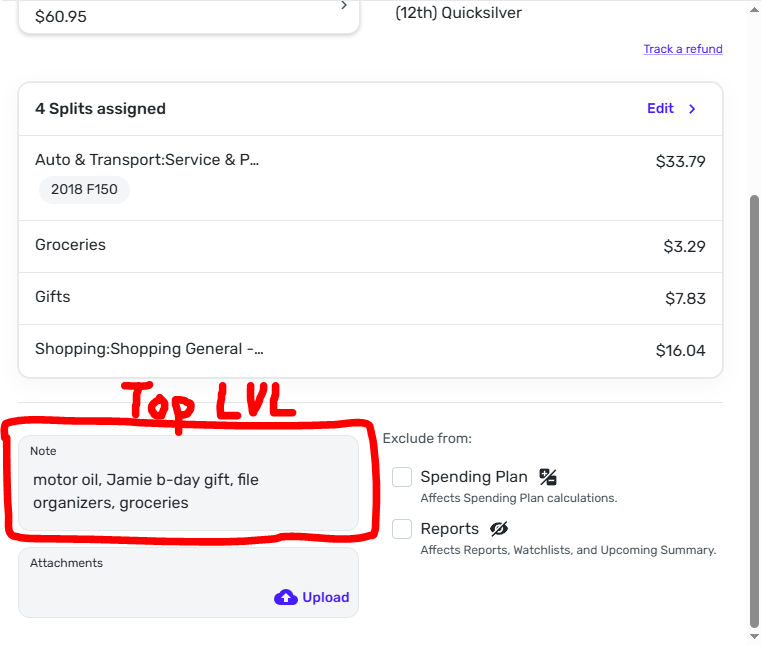
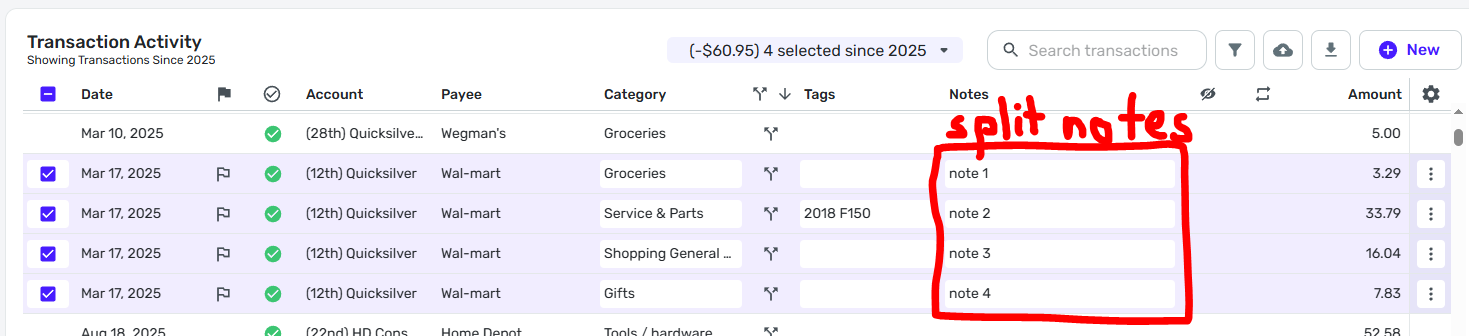
So, it looks like what they did is create different levels of notes. Your original note is still there, but it is a "top level" note when you select the transaction. The split sections have notes individual to their transactions, but it appears the only way to actually see and input these notes is through the transaction screen if you have the "notes" field visible.
I have an example of a transaction with 4 splits below. I just added the "Note 1, Note 2, etc" notes. I think the way they did this is the way I'd want it done personally, but they should still have the top level note output when you export transactions in my opinion. They should also make this a little more clear since it's not immediately noticeable and only able to be accessed through the transaction screen with the notes field visible.
 1
1 -
That is progress, people have been asking for split level notes for years. It also looks like splits are being treated as separate transactions which people started asking for after Mint shut down.
—
Rob Wilkens
2 -
@RobWilk Yep, but you can still view split transactions as a group so I am happy because I always thought Mint's way of doing it was clunky.
And @KDC1996 I noticed as well that you can have a note for the entire split and one for each item, which is nice.
Steve
Quicken Simplifi (Safari & iOS) Since 2021
Quicken Classic (MacOS) Since 2009
MS Money (1991-2009) and Dollars & Sense (1987-1991)1 -
Yes, big progress! And I think that when editing the transaction it should show us the notes for each split. And exporting definitely needs to support both.
1 -
Yes! I meant to say that. I think it will be added to transaction box as it seems a no-brainer. But adding my vote. 😀
Steve
Quicken Simplifi (Safari & iOS) Since 2021
Quicken Classic (MacOS) Since 2009
MS Money (1991-2009) and Dollars & Sense (1987-1991)2 -
Let's hope!
0 -
Hi everyone!
Short story:Yes, we are working on adding notes and excludes when you split a transaction!
And, a way to export parent notes.
3 -
Awesome!
And highest on my list would be the ability to connect a portion of a split transaction to a recurring reminder. Is that in the plans also?
1 -
The new Transaction List is now live for ALL users!
-Coach Natalie
0 -
Thanks for the update! Is that the same thing as the New Register, or separate?
0 -
Correct; the new account register is now officially called "Transaction List". Thanks!
-Coach Natalie
0 -
Got it, thanks for clarifying!
1 -
Now to see if I can remember to say Transaction List and not Register.
Steve
Quicken Simplifi (Safari & iOS) Since 2021
Quicken Classic (MacOS) Since 2009
MS Money (1991-2009) and Dollars & Sense (1987-1991)1 -
Yup same :)
1 -
Lol, same!
-Coach Natalie
1 -
This new update makes the Transactions Report completely unusable on Mac OS Chrome with a trackpad (at least).
After scrolling within the transactions table at all to the right, any attempts to scroll left result in navigating the browser back functionality to a previous page in the browser history. It's so frustrating.0 -
I'm also having difficulty with the new Transaction List using Mac OS Chrome with a trackpad. I appreciate the enhanced ability to customize the register but now if I size the columns appropriately for full screen (when the "Accounts" list on the left is minimized) then it does not resize itself when the Accounts list is brought back, making it cumbersome to scroll left and right to see the full register. I didn't have an issue like this before.
Also, before, I believe "pending" items had a blue "pending" box indication (like what's in the mobile app), which seems to be gone. I prefer having that.
0 -
Can't help with the trackball but you can add columns you want by hitting the cog wheel over to the right and choosing which ones you want to see. Status is the one you want. If it doesn't seem to work, reset columns to default and try again.
Steve
Quicken Simplifi (Safari & iOS) Since 2021
Quicken Classic (MacOS) Since 2009
MS Money (1991-2009) and Dollars & Sense (1987-1991)0




