Bilt Rewards - INSTITUTION_NOT_RESPONDING / No transactions (edited)

I was able to connect to BILT last night but no transactions showed up, this morning I am seeing this error:
Account needs attention(Care code: INSTITUTION_NOT_RESPONDING)We are unable to connect to Bilt Rewards at this time. Please try again later.
Comments
-
@ambronet, thanks for letting us know about this issue with Bilt Rewards!
From our end, I see some earlier attempts with an "INSTITUTION_NOT_RESPONDING" message, but it looks like your latest attempt was successful. Is this account updating properly now?
Let us know!
-Coach Natalie
0 -
I removed the integration and added again. It connects just fine but it doesn't download the transactions.
0 -
Now it is again failing with "INSTITUTION_NOT_RESPONDING" error.
0 -
-
@ambronet, thanks for the reply!
I haven't seen any other users report these issues with Bilt Rewards. To clarify, did transactions initially download when you connected the account for the first time after Bilt Rewards was added in Quicken Simplifi, or have they never shown up for the account? Have you tried resetting the connection or making the account manual and re-linking it to see if that clears up the INSTITUTION_NOT_RESPONDING error? If not, here are the steps to do so:
- Make all of the accounts with this bank manual by following the steps here.
- Once you see the account(s) listed in the Manual Accounts section under Settings > Accounts, go back through the Add Account flow to reconnect to the bank.
- If the connection is successful, carefully link the account(s) found to your existing Quicken Simplifi account(s) by following the steps here.
Please note that, since you are posting in the Community, you won't receive an immediate response. If you are looking for live support, our Chat/Phone Support Team would be happy to help as well:
-Coach Natalie
0 -
@Coach Natalie they have never shown up for the account.
Yes, I tried resetting the connection but not making it manual and re-linking.
0 -
@ambronet, please give the make manual/re-link steps a try and let us know how it goes!
For the missing transactions, please provide the following data so we can present a clear picture of what's going on:
- The name of the account the transactions are missing from, as it appears in Quicken Simplifi.
- The Date, Payee, and Amount of a few example transactions that are currently missing in Quicken Simplifi.
- A screenshot of the example transactions from the bank's website.
- A screenshot of the corresponding register in Quicken Simplifi showing that the transactions are missing.
- Confirm whether the missing transactions are impacting the balance in Quicken Simplifi or not.
- A screenshot of the Accounts Summary page from the bank's website that has a wide enough scope to show the full page URL. This is the landing page after signing in, and typically lists all accounts and balances. You will want to take this from a web browser and not a mobile browser, as well as redact any private info such as account numbers.
Please also submit your logs via the 'Send Feedback' option:
- Log in to the Quicken Simplifi Web App.
- Select Profile from the left-hand navigation bar.
- With the Profile menu open, hold down the Option key for Mac or the Alt key for Windows, and then click Send Feedback.
- Leave all boxes checked, add a brief description of the issue, and then click Send.
Much appreciated!
-Coach Natalie
0 -
Same exact issue. I've submitted logs via send feedback option.
1 -
I'm having the same issue
0 -
Hello @Jared,
Thank you for letting us know you're also seeing this issue. To help us investigate the issue, please provide the information @Coach Natalie requested earlier:
Thank you!
-Coach Kristina
0 -
Thanks, I added my logs via the instructions above.
For what it's worth, I tried to speak with support about this. They are saying it is expected behavior (so no bug report or error documentation) for new cards and to wait 1-2 billing cycles for the connector to start working.1 -
BILT support or Quicken?
According to Plaid:
>The financial institution is failing to respond to some of our requests. Your user may be successful if they retry another time.
0 -
Hello everyone,
If you've connected to the new Bilt Rewards bank option in Quicken Simplifi and did not have any transactions downloaded, please provide the following data here in the Community:
- The name of the account the transactions are missing from, as it appears in Quicken Simplifi.
- The Date, Payee, and Amount of a few example transactions that are currently missing in Quicken Simplifi.
- A screenshot of the example transactions from the bank's website.
- A screenshot of the corresponding register in Quicken Simplifi showing that the transactions are missing.
- Confirm whether the missing transactions are impacting the balance in Quicken Simplifi or not.
- A screenshot of the Accounts Summary page from the bank's website that has a wide enough scope to show the full page URL. This is the landing page after signing in, and typically lists all accounts and balances. You will want to take this from a web browser and not a mobile browser, as well as redact any private info such as account numbers.
Please also submit your logs via the 'Send Feedback' option:
- Log in to the Quicken Simplifi Web App.
- Select Profile from the left-hand navigation bar.
- With the Profile menu open, hold down the Option key for Mac or the Alt key for Windows, and then click Send Feedback.
- Leave all boxes checked, add a brief description of the issue, and then click Send.
Once this information is provided, we can review the issue for escalation.
Thanks!
-Coach Natalie
0 -
I use brave which has some tracking/ad-blockers enabled by default, I wonder if this could be blocking the web-requests.. but after using chrome without any extension or blocker it still doesn't connect to Bilt via Plaid.
0 -
I already provided that info to Quicken support.
it looks like it is affecting multiple users:
https://www.reddit.com/r/simplifimoney/comments/1r3cl8h/comment/o59d2fv/0 -
when I initially add bilt it shows the correct balance for my card but when it attempts to download transactions it fails.
0 -
@kmtougas, thanks for letting us know!
We'd like to escalate this issue. To do so, please provide the above-requested information:
Much appreciated!
-Coach Natalie
0 -
Same issue here… for 3 days now. Based on previous comments it doesn't seem to be an account specific issue, but an overall integration issue perhaps?
We are unable to connect to Bilt Rewards at this time. Please try again later. Care Code: INSTITUTION_NOT_RESPONDING
0 -
@masilv01, thanks for letting us know!
We'd like to escalate this issue. To do so, please provide the above-requested information:
-Coach Natalie
0 -
I connected successfully last week. Transactions synced to Simplifi and balance appeared correct. At some point over the next couple days, I started getting the same error as others (INSTITUTION NOT RESPONDING).
I reset the connection per Simplifi Support's instructions and the error is now gone, but I still don't have any recent transactions (posted in last four days). Oddly, the balance for the card was also zeroed out.
I submitted the Send Feedback option and will direct message screenshots of missing transactions.
0 -
@simpliuser14, thank you for the DM!
It looks like I forgot to ask for one piece of data — my apologies!
- A screenshot of the Accounts Summary page from the bank's website that has a wide enough scope to show the full page URL. This is the landing page after signing in, and typically lists all accounts and balances. You will want to take this from a web browser and not a mobile browser, as well as redact any private info such as account numbers.
Feel free to also DM this for privacy.
-Coach Natalie
0 -
@simpliuser14, thank you for that!
I have filed a ticket for this issue and will post updates here. It would be great to get some additional users added as well. If you'd like to participate, please provide the following data:
- The name of the account the transactions are missing from, as it appears in Quicken Simplifi.
- The Date, Payee, and Amount of a few example transactions that are currently missing in Quicken Simplifi.
- A screenshot of the example transactions from the bank's website.
- A screenshot of the corresponding register in Quicken Simplifi showing that the transactions are missing.
- The balance for the account on the bank's website.
- The balance for the account in Quicken Simplifi.
- A screenshot of the Accounts Summary page from the bank's website that has a wide enough scope to show the full page URL. This is the landing page after signing in, and typically lists all accounts and balances. You will want to take this from a web browser and not a mobile browser, as well as redact any private info such as account numbers.
Please also submit your logs via the 'Send Feedback' option:
- Log in to the Quicken Simplifi Web App.
- Select Profile from the left-hand navigation bar.
- With the Profile menu open, hold down the Option key for Mac or the Alt key for Windows, and then click Send Feedback.
- Leave all boxes checked, add a brief description of the issue, and then click Send.
This will allow our engineering team to see and show the user impact.
-Coach Natalie
0 -
Hi @Coach Natalie, adding my issue here as well for your updates to the team. Thank you for compiling!
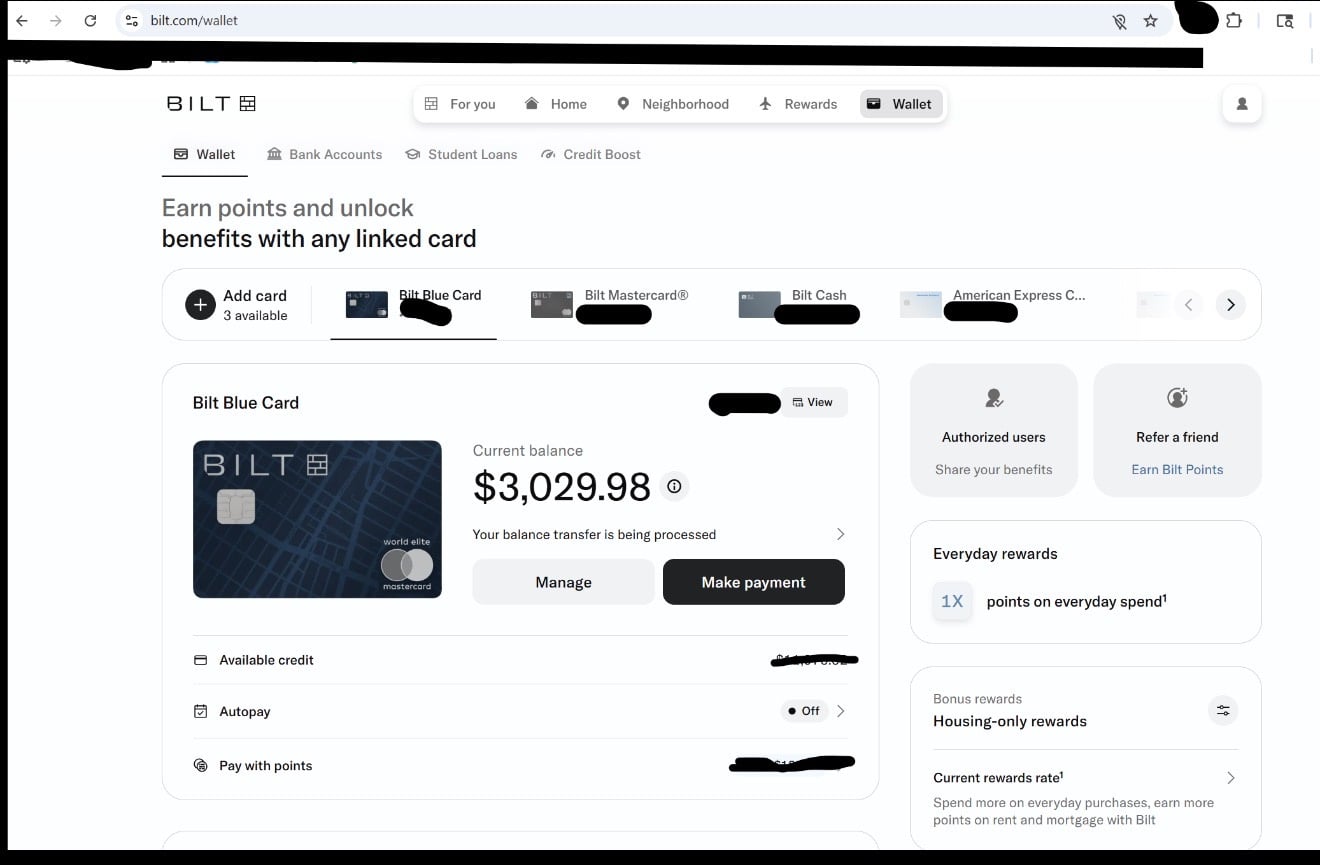
Account name in Simplifi: BILT Rewards (Bilt Blue Card)
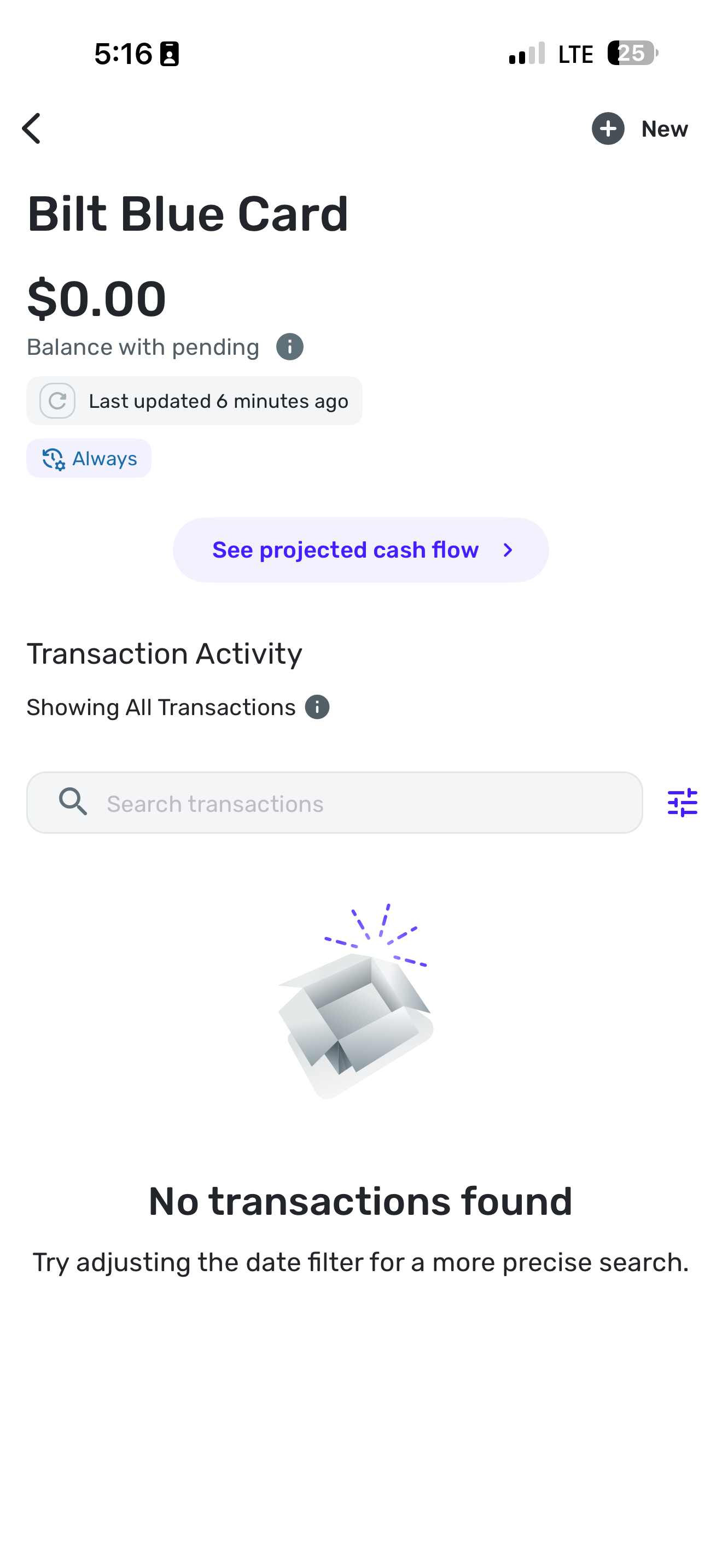
Issue description: All transactions are missing in Quicken Simplifi since the transition to BILT 2.0. The account balance updates correctly, but no transactions appear.
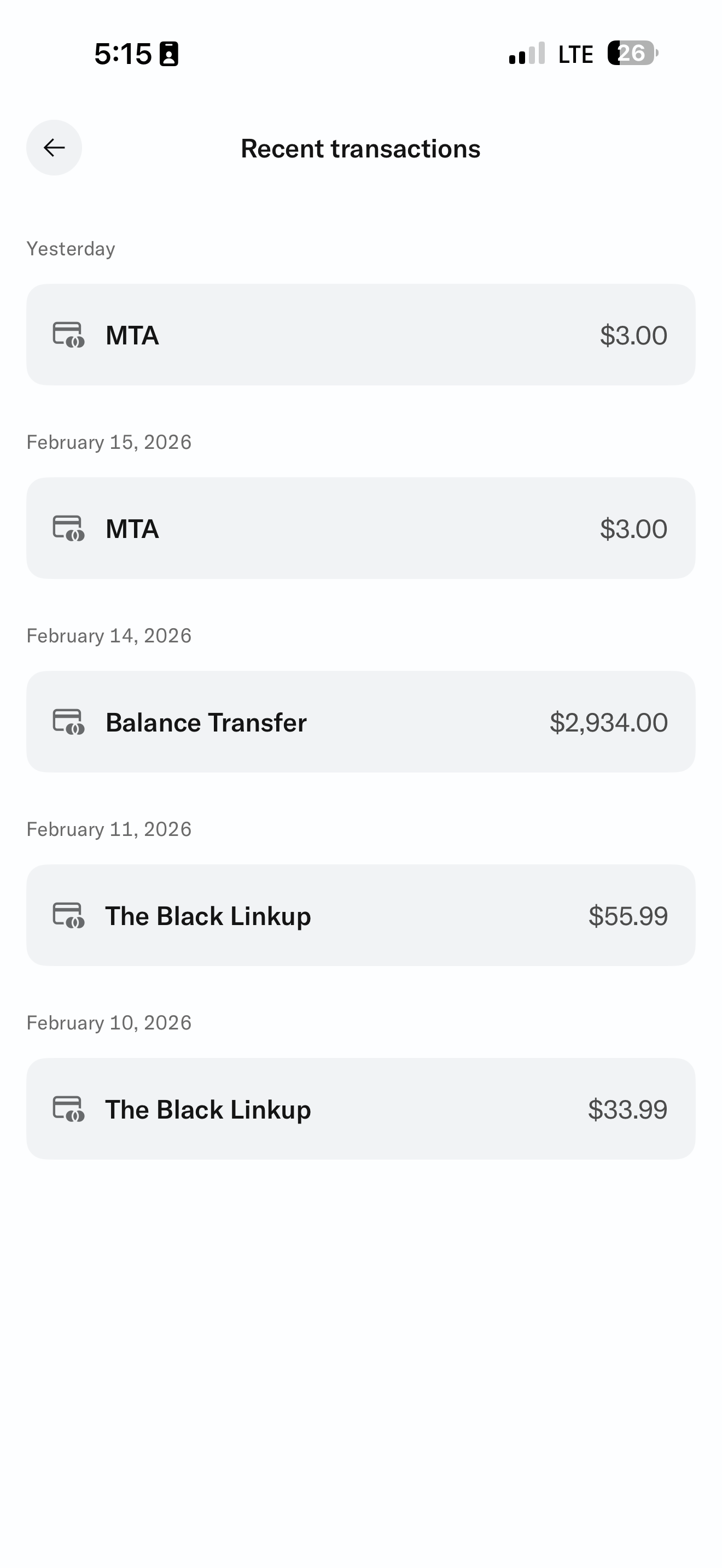
Example missing transactions (from BILT website):
• Feb 16, 2026 — MTA — $3.00
• Feb 15, 2026 — MTA — $3.00
• Feb 14, 2026 — Balance Transfer — $2,934.00
• Feb 11, 2026 — The Black Linkup — $55.99
• Feb 10, 2026 — The Black Linkup — $33.99
Balance on BILT website: $3,029.98
Balance in Simplifi: $0.00
I have attached screenshots showing the transactions on the BILT website, the missing transactions in Simplifi, the account summary page with the URL visible, and the balances. I will also submit logs via Send Feedback.
[edited images to reduce size]
1 -
@Coach Natalie Just wanted to follow up with positive news. Today I was able to connect AND download all transactions, no actions were done from my end. I just let it sit and rest, eventually it downloaded the transactions.
0 -
Same here
1 -
It’s working! Thank you so much @Coach Natalie and team!
0 -
That's great news, everyone! I have informed our engineering team and am awaiting their confirmation before closing the ticket.
However, if anyone is still experiencing this issue, we now have an Alert that can be followed for updates and a resolution:
-Coach Natalie
1

