Split Transactions Not Showing Up in Planned Spending or Other Spending

I have a reoccurring bill set up that is for rent. However, the rental agency adds in the water bill every month. Since I cannot create a split transaction for the bill (which should be allowed), I split it when the expense clears the checking account.
What I noticed is the water portion of the bill is not showing up under the Planned Spending Water transaction. This is messing up the accountability for the planned spending category.
How can I fix this?
Comments
-
My splits do show up in the relevant Planned Spend series, as expected. So something is definitely wrong.
I notice in your image that not only is this month's split Water payment not showing up, but also there is no monthly history of any Water payments. It's as if the Water category in your Spending Plan series isn't connected to the Water category you are using in your payment transaction.
Is it possible that you have two Water categories (perhaps a business and a personal, or under two different parent categories)?
DryHeat
-Quicken Classic (1990-2020), CountAbout (2021-2024), Simplifi (2025-…)0 -
@DryHeat I checked my categories and there is only one Water under Utilities.
I double checked both the split expense and the Planned Expense both which point to Utilities/Water.
0 -
Ok… so no luck on the dueling categories.
Another approach some people have had success with is to delete the Planned Spend expense, close and reopen the web page, and recreate the expense. If that works you should see your Water bill immediately.
DryHeat
-Quicken Classic (1990-2020), CountAbout (2021-2024), Simplifi (2025-…)0 -
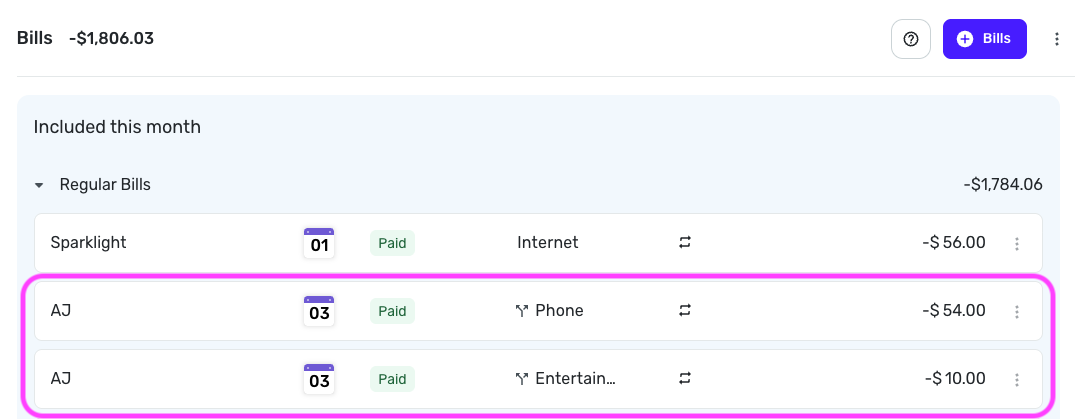
@pastchief8, is the transaction linked to a recurring series? If so, it will appear in the Bills section of the Spending Plan, not in Planned Spend, regardless of any splits added to the transaction.
For reference, here's how my split recurring bill shows in the Spending Plan:
Let us know!
-Coach Natalie
0 -
@Coach Natalie So I do have a $1700 reoccurring transaction for the rent ($1700) but since my water bill differs from month to month, I just edit the expense when it comes through to my bank. Is this why it doesn't show up?
I know there have been requests from split reoccurring transactions and this should be available.
0 -
@pastchief8, is the transaction linked to a recurring series? You can determine this by viewing the transaction itself:
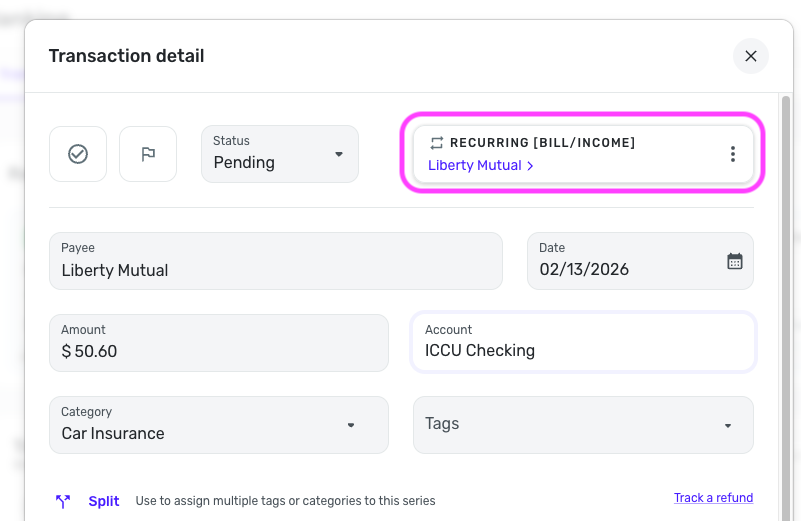
If so, it will only appear in the Bills section of the Spending Plan and will not be included in Planned Spend. The article I shared above has more details on this:
I hope this makes more sense!
-Coach Natalie
0 -
@Coach Natalie Yes it is. Ok. I guess as long as it's accounted for I will delete the Planned Spend entry. Thanks for your help.
1

