Options to show discretionary spending across categories in Planned Spend?

I've been trying for a while to find a solution to this:
We'd like to set aside a chunk of our planned spending for "discretionary", i.e. free for all, but track it like all the others. i.e. each month we set a limit for $1000 that we can spend on whatever that's not part of specific category.
We like the view that shows up in Planned Spend, with the bar and colors as we get close/go over the allotted amount, however these views are severely limited to a specific category only. If we could do an "expense" that showed "everything else" that's not in one of the other planned spends, or even if we could do a planned spend based on a tag, then we can manage it that way. But as it is, there doesn't seem to be a way to do what we want…
I realize that "Other Spend" can give us insight into this, but it doesn't display the info in the same way as the planned spend, which is helping our household process that kind of information better.
So, the solution we have right now is a specific category that we do put most everything else into, but this nerfs our ability to really know which other categories we're spending the money on.
Any thoughts?
Comments
-
So, the solution we have right now is a specific category that we do put most everything else into, but this nerfs our ability to really know which other categories we're spending the money on.
A possible (but somewhat unsightly) solution is to create a parent category for "Everything Else" (or whatever) and make specific categories under that so you can more finely categorize your spending. Then make an expense series in Planned Spend for the parent category. That should create a bar graph that includes all of your child category expenses.
DryHeat
-Quicken Classic (1990-2020), CountAbout (2021-2024), Simplifi (2025-…)0 -
DryHeat
-Quicken Classic (1990-2020), CountAbout (2021-2024), Simplifi (2025-…)0 -
Moving to another comment so it's not missed:
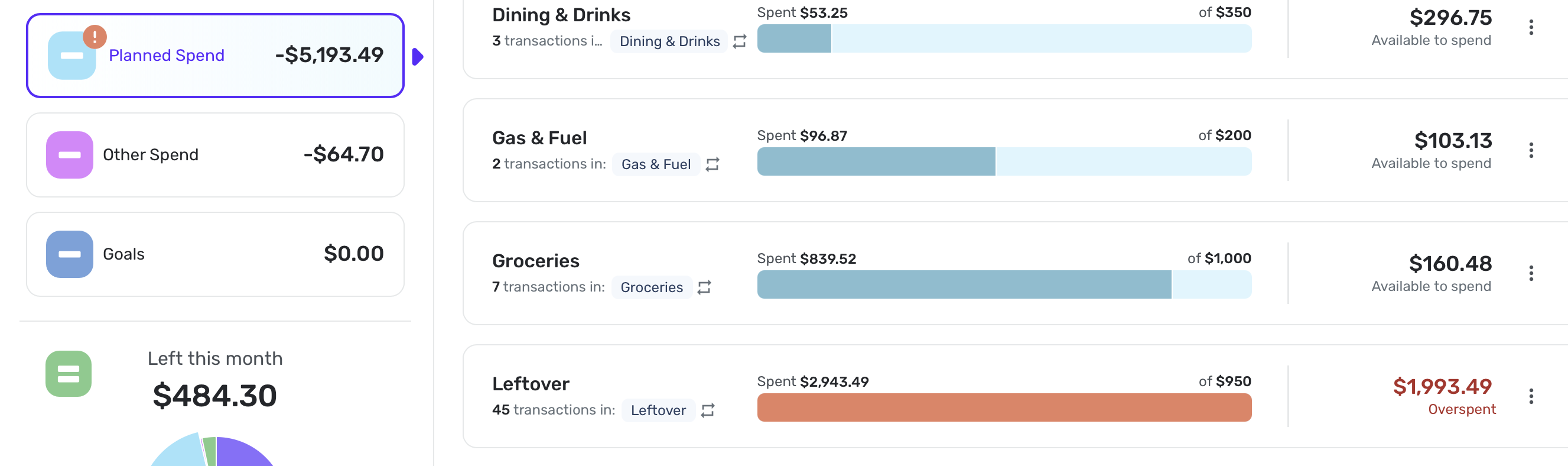
so I did find one bug with this: if you do a double nested, then it's not caught up in the planned spend, for example:If I've got a "Leftover" main category, whatever sub category I have in there, like "Travel" gets treated as you suggested, which is great. But if I have a sub to that, say "Travel > Ride Share & Taxi" it doesn't get included in the planned spend and just shows up in the main "Other Spend" section. It seems to happen no matter what the first or second child is…
Still this is a more workable solution than I've had before…
0 -
Hello @everydave,
Thanks for reaching out! I am glad you were able to find a solution regarding Planned Spend. I know you stated that your nested subcategory is not showing in Planned Spend. I wasn't able to reproduce the specific issue you mentioned on my end. Creating a subcategory under an existing subcategory still shows in Planned Spend for me. Can you provide a screenshot showing the parent category and its subcategory, as well as how it is appearing in Planned Spend?
-Coach Jon
0 -
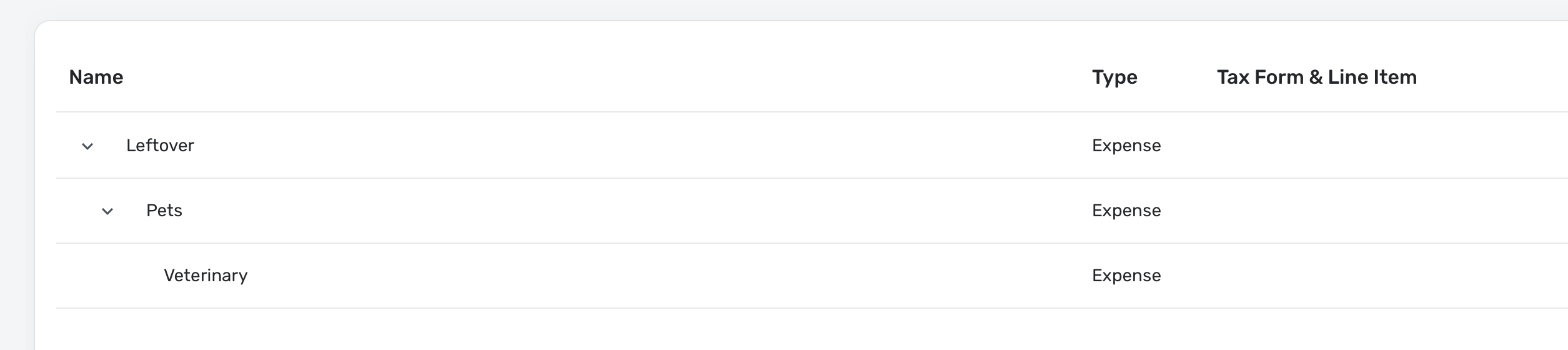
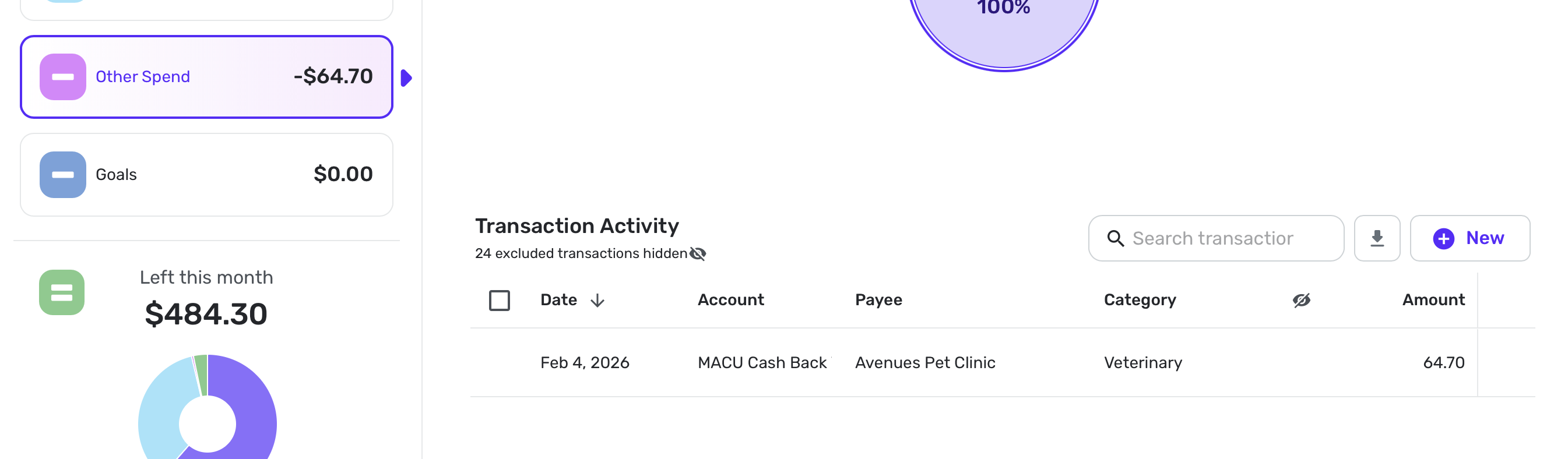
Quick example: I have "Leftover" category in the planned spend. I then have "Veterinary" under "Pets" under "Leftover" as shown. But you can see that the one vet transaction is showing up under other:
I will add, that I also just moved ride share/taxi back under travel (which is under leftover) and it IS showing correctly now. So I dunno if there's a parent/child linked list/association that's syncing out of band or what exactly is going on…
0 -
Hello @everydave,
Thanks for the information! Are you able to do the same thing you did with the "ride share/taxi" subcategory with the "Veterinary" subcategory to see if it also fixes the issue? I would also verify that there is no duplication of categories across different locations to avoid confusion. Let us know!
-Coach Jon
0 -
@Coach Jon
I just did some poking around a bit more, and was able to get it to work:- starting case: Leftover > Pets > Veterinary
- result: Veterinary is in Other Spend
- change: Veterinary parent to Leftover, refresh
- result: Veterinary moves to Planned Spend under Leftover
- change: Veterinary parent to Leftover > Pets, refresh
- result Veterinary stays in Planned Spend under Leftover
I'm not able to test more at this time, but I wonder if moving a parent of a parent, the child of the child doesn't get associated but moving the child up and then back down reconnects…or something.
EDIT: no duplications that I see
1 - starting case: Leftover > Pets > Veterinary
-

