Simplifi won't add an RSU account with Fidelity (edited)

I have several accounts at Fidelity Investments that include, retirement, investment, health savings and employee compensation.
When I add Fidelity accounts through Simplifi, the Fidelity interface displays and I'm able to select all of the accounts. However, after indicating that it successfully added the selected accounts, one account remains missing and hasn't been added despite everything I've tried, including deleting and readding the entire institution.
Has anyone else experienced anything similar? If so, has anyone identified a solution?
Thanks for any helpful input.
Comments
-
Hello @Mortimer Duke,
Thank you for letting us know you're encountering this issue. To help troubleshoot, please provide more information:
- Is it always the same account that you can't add?
- If it is always the same account, what type of account is it (HSA, brokerage, 401k, etc.)?
- Do all of the accounts connect using the same login credentials?
- Are you the primary account holder for the problem account?
- Are there recent transactions in the problem account?
I look forward to your response!
-Coach Kristina
0 - Is it always the same account that you can't add?
-
It's always the same account. It's an account for a form of long-term compensation - similar to other accounts that Simplifi recognizes just fine.
Yes, all accounts are accessed through a single login.
Yes, I am the primary/only account owner.
The only transaction is the creation and funding of the account whose contents vest and distribute in the future.
Thank you.
0 -
Thank you for your reply,
To clarify, is the problem account a RSU account?
-Coach Kristina
0 -
Functionally, yes. Though the compensation to vest is cash rather than stock shares.
Thank you.
0 -
Thank you for your response,
To help troubleshoot the issue, please provide more information:
- Are you routed to a different URL or website when you try to open the missing account on the financial institution's website?
- What is the account type and nickname as it appears on the financial institution's website?
- How many accounts you have have with this financial institution?
- Is the missing account a subtype of another type of account, like an investment account?
- Did the financial institution recently make any changes to their website?
Thank you!
-Coach Kristina
0 -
- Nope. It's accessible like any other.
- There's no nickname per se, but as RSU accounts are listed as Restricted Stock Units and Restricted Stock Awards, and a third account that Simplifi fully recognizes is listed as Performance Awards, the account in question is listed as Performance Cash.
- No subtypes are involved.
- Not that I'm aware of. The account in question has existed for almost 2 years.
Thank you.
0 -
@Mortimer Duke, thanks for the information!
To review this case for escalation, we will need the following additional data:
- Are you the owner of the account?
- A screenshot of the Accounts Summary page from the bank's website that has a wide enough scope to show the full page URL. This is the landing page after signing in, and typically lists all accounts and balances. You will want to take this from a web browser and not a mobile browser, as well as redact any private info such as account numbers.
- A screenshot of the Add Account screen in Quicken Simplifi showing that the account in question is missing at account discovery.
Please also submit your logs via the 'Send Feedback' option:
- Log in to the Quicken Simplifi Web App.
- Select Profile from the left-hand navigation bar.
- With the Profile menu open, hold down the Option key for Mac or the Alt key for Windows, and then click Send Feedback.
- Leave all boxes checked, add a brief description of the issue, and then click Send.
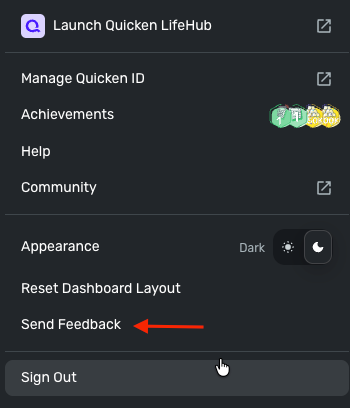
Additionally, we have a bank option for Fidelity that's under our Finicity aggregator. Whenever a user experiences an issue with the Intuit Fidelity bank option, we recommend trying the Finicity option. This information, and the steps to do so, can be found under the Fidelity section in our support article here:
Let us know if the Finicity bank option works for you!
-Coach Natalie
0 -
Thanks. I can't find any reference to Fincinity in the support article you referenced.
0 -
@Mortimer Duke, if you expand the section for Fidelity, you'll see the steps for switching your Fidelity accounts to Finicity. Here is a screenshot:
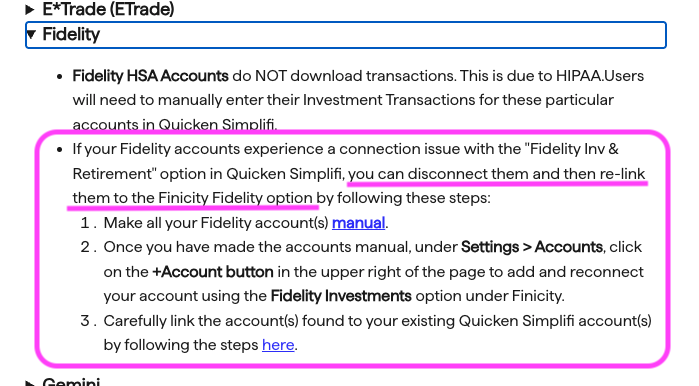
However, reviewing this section of the article yourself will let you click the links for each step so you know how to complete them. Let us know if you still need help accessing this information!
-Coach Natalie
0 -
Thank you for the further specificity.
I tried to add the Fidelity accounts through Finicity and, unfortunately, despite the account in question appearing in the list of accounts to link from the Fidelity side, it doesn't appear on the Simplifi side during the final step of the +Account procedure.
Given this account's relative infrequency of transactions, the best alterative may be just to manage it manually.
Thank you again for your help.
0 -
@Mortimer Duke, thanks for giving the Finicity option a try and posting back! I'm sorry to hear that it didn't work.
While you can certainly track the account manually moving forward, we can still review this issue for escalation as well. Let us know how you'd like to proceed!
-Coach Natalie
0

