Pending and cleared transaction showing as duplicates in Spending Plan

Not sure if this is expected behavior. I was seeing dupes of the same transaction being added into the Spending Plan. The pending credit card transaction has cleared but the corresponding pending item had not yet been removed. It was showing me as overspent in a few categories which felt incorrect.
I went in and manually excluded these pending transactions from Spending plan and it adjusted correctly. (I then noticed watchlist was also showing dupes so I excluded them in reports).
Suggestion: It would be more helpful to be able to hide pending transactions with one click once you know transactions are cleared. ie exclude from all projections
Comments
-
pending transactions should convert to cleared transactions automatically.. if that is not happening with a particular bank, it may be a bug in the bank connector function (aggregator service). They (a coach) may need to know which financial institution it happened with if only one.
—
Rob Wilkens
0 -
This was with Elan Fidelity credit card. Its likely that they are incredibly slow are updating transaction updates for Quicken products. Still not updated for last weekend as of this morning even though their web site is up to date.
0 -
Hello @RobI,
Thanks for letting us know! To clarify your issue, do the pending transactions appear only in your Spending Plan, or are they also reflected in your account register when the transaction clears on the bank's side?
If they do, you can verify if the following steps work to resolve the issue:
- Make all of the accounts with the bank manual by following the steps here.
- Once you see the account(s) listed in the Manual Accounts section under Settings > Accounts, go back through the Add Account flow to reconnect to the bank.
- If the connection is successful, carefully link the account(s) found to your existing Quicken Simplifi account(s) by following the steps here.
Let us know how this goes!
-Coach Jon
0 -
This is happening across the account register. Some but not all of the pending transactions were removed overnight but several dupes still exist.
I can see 5 pending transaction at the card web site but Simplifi is showing 9. In two instances the same vendor had one transaction clear but another still pending - both were transactions within minutes same day.
I tried going manual and resetting connection but the phantom pending transactions are still there. Fingers crossed for tomorrow's updates
0 -
Hello @RobI,
Thanks for the reply. Since doing the steps I provided, have there been any other transactions that have cleared that still show as pending within Quicken Simplifi? Are you able to provide a few examples of transactions that show both the pending and cleared transactions for us? This can be via a screenshot. You may feel free to send this to me via DM. Let us know!
-Coach Jon
1 -
Update as of 2/28/ the noted pending transactions have at last cleared themselves. This particular credit card is often slow to clear pending. But what this means is I have to exclude the pending so they don't mess up Spending plan and Reports view totals. My suggestion is for some easier way to manually mark pending as cleared so they don't get duplicated.
0 -
@RobI, we're glad to hear that things have resolved themselves!
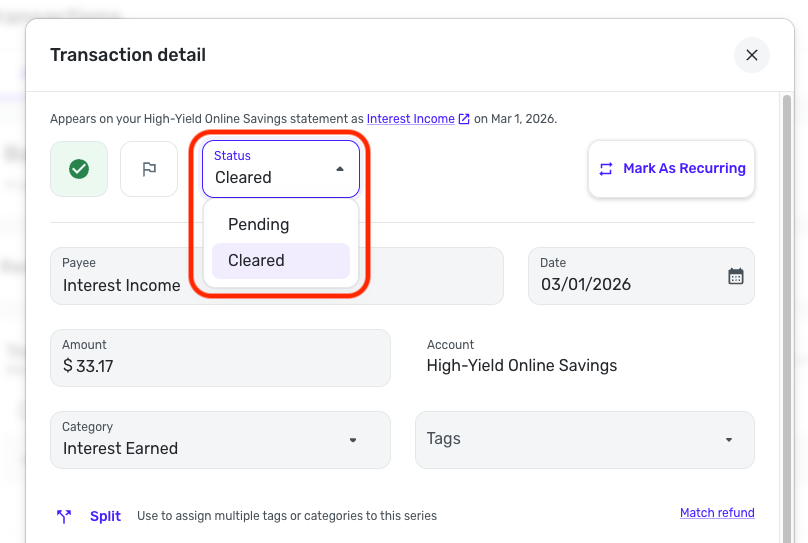
As for manually marking a pending transaction as "cleared", you can easily do this by editing the transaction in Quicken Simplifi. All you'd need to do is open the Transaction Detail view and edit the 'Status' field.
Here is the Status field on the Web App:
And here is the Status field on the Mobile App, which only comes up for downloaded transactions while they're pending:
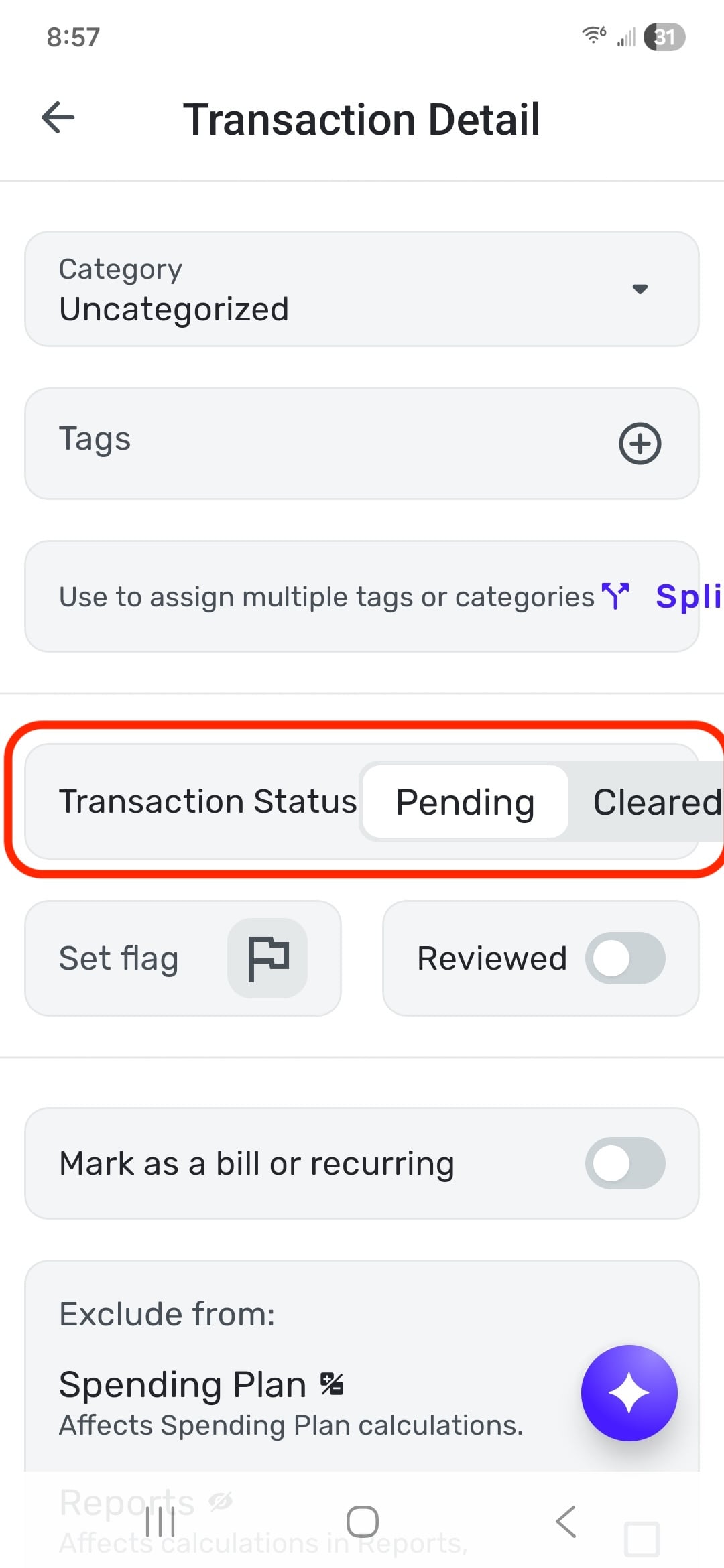
You can't change a downloaded cleared transaction to pending, but you can change it from pending to cleared. I hope this helps!
-Coach Natalie
0 -
Won't that result in 2 copies of the same cleared transaction?
0 -
Just jumping in to say, this situation sometimes happens to me when I end up with duplicate transactions because Simplifi didn't match the pending with a downloaded cleared transaction.
If you end up with a cleared transaction and a pending transaction, you should try to match them. If that doesn't work, then you should delete the extraneous pending transaction. It would be the extra pending transaction that would adversely affect your balance as well as your spending plan.
When glitches happen like the one you had, the user has to fix them.
Steve
Quicken Simplifi (Safari & iOS) Since 2021
Quicken Classic (MacOS) Since 2009
MS Money (1991-2009) and Dollars & Sense (1987-1991)1



