Specialized Loan Servicing FDP-102 error (edited)

Is anyone else having problems connecting to Specialized Loan Servicing? I had my mortgage connected and now it will not connect again.
Comments
-
@RScott, thanks for reaching out to the Community with this issue!
When viewing your connection attempts from our end, I see an FDP-102 error with Specialized Loan Servicing. Is this the same error you see on your end?
Since it sounds like the issue is happening on an existing account in Quicken Simplifi, I'd recommend first following these steps to establish a completely fresh connection with the bank:
- Make all of the accounts with this bank manual by following the steps here.
- Once you see the account(s) listed in the Manual Accounts section under Settings > Accounts, go back through the Add Account flow to reconnect to the bank.
- If the connection is successful, carefully link the account(s) found to your existing Quicken Simplifi account(s) by following the steps here.
We look forward to hearing back from you!
-Coach Natalie
0 -
This doesn’t work. I still keep getting the same message.
0 -
@RScott, thanks for giving those steps a try and posting back!
I have gotten this issue escalated to our service provider. I will let you know once we receive an update.
EWC-12259697
-Coach Natalie
0 -
@RScott, we heard back from our service provider, and they'd like us to schedule a debugging session with you and them so they can further research this issue.
To request the session from my end, I will need the following data:
- Confirm that the email address and phone number listed on your Quicken Simplifi Account are your best contact info.
- Provide your general availability over the next few weeks, and please also include your time zone with this.
I also need this piece of data:
- A screenshot of the Accounts Summary page from the bank's website that has a wide enough scope to show the full page URL. This is the landing page after signing in, and typically lists all accounts and balances. You will want to take this from a web browser and not a mobile browser, as well as redact any private info such as account numbers.
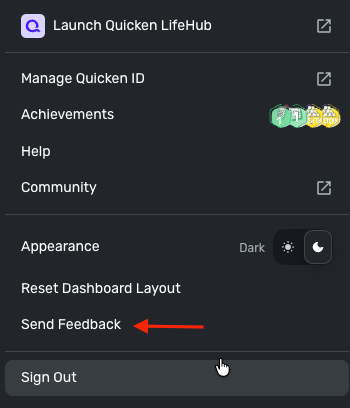
As well as your log files, which are submitted via the 'Send Feedback' option on the Quicken Simplifi Web App:
- Log in to the Quicken Simplifi Web App.
- Select Profile from the left-hand navigation bar.
- With the Profile menu open, hold down the Option key for Mac or the Alt key for Windows, and then click Send Feedback.
- Leave all boxes checked, add a brief description of the issue, and then click Send.
Thank you!
-Coach Natalie
0 -
@RScott, hello again!
I wanted to reach out again to see if you had a chance to look at my last message.
Let us know!
-Coach Natalie
0 -
I reached out to chat again today and they were no help.
0 -
@RScott, thanks for the reply!
You don’t need to reach out to Chat Support, though I do see that you did after the issue was already escalated from here in the Community. The issue was escalated again unnecessarily, and they received the same response I did—that our service provider would like us to schedule a debugging session with you.
Please provide the information I requested above directly in this thread so I can request the session on your behalf. If you prefer to work with Chat Support due to privacy concerns or for any other reason, I recommend reaching back out and letting them know the issue was already escalated and that a debugging session has been requested, so they can assist with moving that forward.
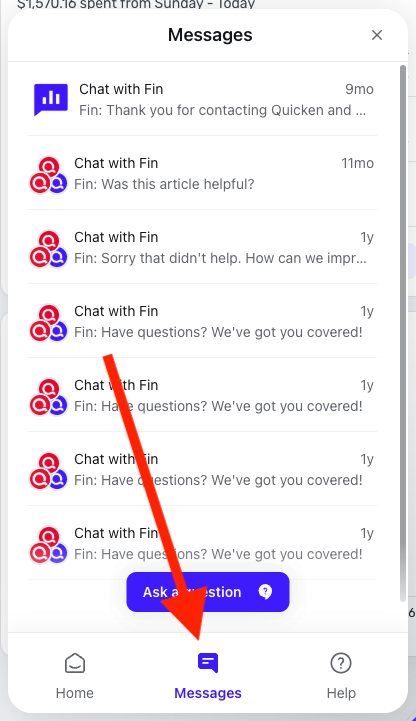
I apologize for the poor experience you had with the agent you spoke with today. That said, I do see that you were also emailed about scheduling the session, and that message should be available in your Messages in the Help Center. If you prefer, you may respond there regarding the session instead.
Just to clarify, for future reference, the Community is a separate support channel from Chat/Phone Support. If you report an issue in the Community, there’s no need to contact Chat/Phone Support as well, and vice versa.
I hope this helps clear up any confusion! Please let us know how you'd like to proceed.
-Coach Natalie
0 -
I don’t have a send feedback option on the web app. By this point I’m going to just track my mortgage manually.
0 -
