"Disconnected" Chase credit card account not offering existing acct when I try to Reset connection

One of my Chase card card accounts changed acct # in July 2025. The old account is only showing transactions up until then, and is showing as disconnected.
Looking for "Reset Connection" option under three dots in Accounts (settings).
But "Reset Connection" is not offered.
So, using this Help advice: "If it's still not showing up, the account might already be fully disconnected. In that case, you can add it as a new connection and link it to your existing account during setup."
I tried to add as a new one, but the existing account which is disconnected isn't showing...in fact a different credit card account and acct # is the only one showing(?)
It's showing an entry for HD x8678 which is a Home Depot credit card account!
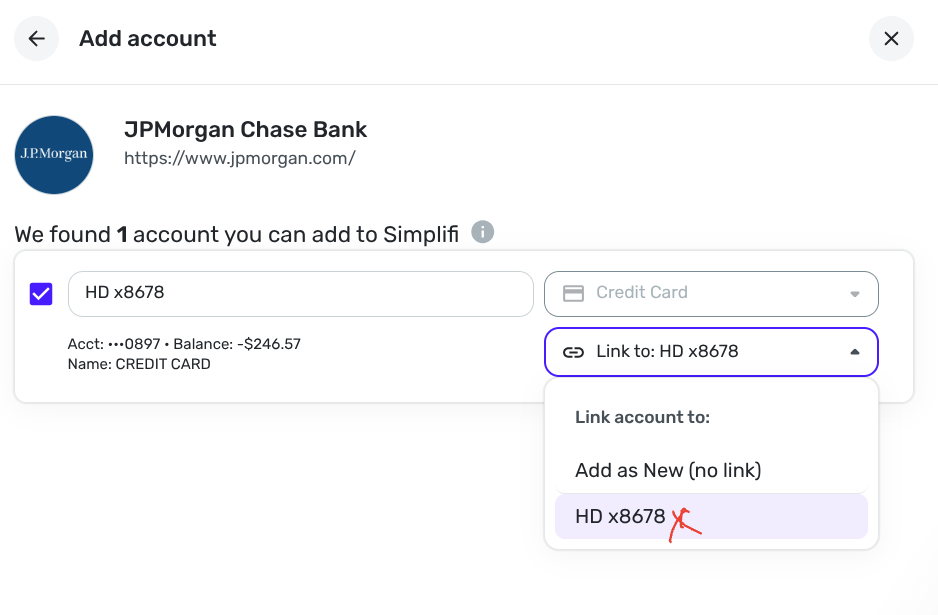
How can I fix this?
Thank you!
Comments
-
Just a couple of suggestions.
I would make sure my old account is now a manual account and then I would go through the process of adding it. See if it will find it then and you can then link it to your old account.
Also make sure you are using the correct link to add the account. I use the Chase.com for my Chase credit cards and not the jpmorgan.com.
Steve
Quicken Simplifi (Safari & iOS) Since 2021
Quicken Classic (MacOS) Since 2009
MS Money (1991-2009) and Dollars & Sense (1987-1991)0
