Transaction List Update: Share your feedback here!
Comments
-
Did something change when hovering over the Filter button? I may be dreaming but I seem to remember that hovering over it would show me a little window listing which filters were set up. Now it just says "Filter".
0 -
Just received the new column update this AM. I prefer auto-sizing vs. the new flexible column update. I now have to close my left-hand account list to see the same columns that I could before the update. In addition, I move back and forth between my desktop and laptop, so it is going to be a pain to constantly resize the columns.
0 -
I agree - I made the same comment in the thread about the Transactions List Update. It's annoying that the columns don't resize when switching between having the left-hand Accounts List viewable or hidden, and if you size them correctly for the full page view then it's annoying to have to scroll left and right to see all the columns when the Accounts List is viewable.
0 -
The Transaction List settings are not all sticking for me. I keep unchecking the "Account" column but it keeps coming back (not right away, but eventually).
1 -
Right, and since Amount is at the end of the list, it gets cut off all the time, and it's a pretty useful column to see!
1 -
Had some issues initially but figured out how to get what I need.
1 -
FYI you can edit the transaction by clicking on the Status column or the exclusions column
0 -
@Coach Natalie - just checking, is this thread still being monitored for feedback on the Transaction List, or should we be creating new bug reports for problems we encounter? For me, the selection to remove the "Account" column still isn't sticking.
0 -
@ejs I think it is still being monitored but it is now in Early Access for everyone. Coach Natalie is usually not around on weekends but @Coach Kristina usually is here on weekends.
It is hard for me to keep up with what is released and what isn't though. 😀
Steve
Quicken Simplifi (Safari & iOS) Since 2021
Quicken Classic (MacOS) Since 2009
MS Money (1991-2009) and Dollars & Sense (1987-1991)0 -
Actually, you can select and move the Amount column to the left, so you can see it. So, yay. There's plenty of other problems though.
0 -
True, though I do like it there where I'm used to it. The old register didn't have this issue, hopefully they can fix it here.
1 -
Yeah, I agree that it would be awkward some other place.
Steve
Quicken Simplifi (Safari & iOS) Since 2021
Quicken Classic (MacOS) Since 2009
MS Money (1991-2009) and Dollars & Sense (1987-1991)0 -
Team,
You can also Pin to Right, which I do with my Amount column - if you're on a smaller screen or have lots of columns.
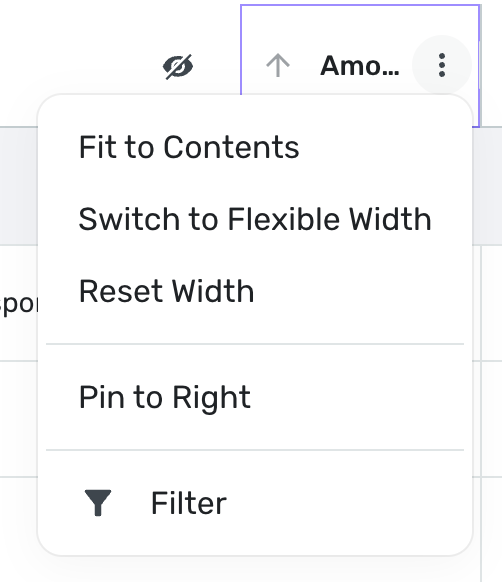
[edited image to reduce size]
1 -
I'm hating the latest upgrade that seems to make the transaction list wiggle and jump. Previously, it smoothly scrolled up and down and now it wiggles side to side and the list will jump up and down and stutter while you're trying to click into a line. Nothing on my end has changed - still accessing via same desktop, same OS as before. This is the opposite of efficient
0 -
@Quicken Kirby - does Pinning to Right have to insert a vertical line along the right-hand column? I would Pin to Right my Amount column but I don't like the appearance of the vertical line interrupting the flow of the rows.
0 -
I noticed this too for a while, but seems to have calmed down.
Steve
Quicken Simplifi (Safari & iOS) Since 2021
Quicken Classic (MacOS) Since 2009
MS Money (1991-2009) and Dollars & Sense (1987-1991)0 -
There is a new column available in my transaction lists … "Bank Payee." I think that's a big improvement for folks who want to see and search by the payee downloaded from the bank.
Although I can add it as a visible column, I cannot remove the usual Payee field. So it's either one or both. Given the limited space, it would be nice to be able to choose one.
It's possible to do a text search for that column, but it is not available as one of the items on which you can filter using the filter tools. That would also be a nice upgrade.
DryHeat
-Quicken Classic (1990-2020), CountAbout (2021-2024), Simplifi (2025-…)0 -
@Coach Natalie, can you please confirm whether we should be filing separate bug reports for the outright bugs that have been identified in this thread? Many of the issues described here have been user preferences, but some of them (such as Column viewability selections not sticking) are just clear bugs that need to be fixed.
0 -
My understanding is that the Transaction List Update is in Early Access. Therefore, any "bugs" or inconsistencies should be reported here. The developers and app directors monitor this conversation. So, in effect, we are beta testers if we turn on Early Access. But it gives us users a chance to help mold how it all gets implemented.
Once the feature goes live to everyone then we file bug reports and feature requests in the appropriate way in those specific Feedback categories.
I know it does get tricky when you have Early Access to distinguish between what is live and what is still in testing. It gets confusing sometimes. 😉
Edit: Coach Natalie commented below. The transaction list update is live to all users, which I didn't know —as I say, it is hard to keep up with. But we can continue to post here it seems.
Steve
Quicken Simplifi (Safari & iOS) Since 2021
Quicken Classic (MacOS) Since 2009
MS Money (1991-2009) and Dollars & Sense (1987-1991)0 -
Hello everyone,
Although the Transaction List is now live for all users (out of Early Access), this feedback thread is still being actively monitored by the product team. This is a significant change, so they’re keeping a close eye out for any issues that may arise.
That said, it’s absolutely okay to create separate posts as well—for example, to report bugs or submit Idea posts for feature requests. Either approach works, but this thread is still likely the best place to ensure your comments are seen by the team.
Thanks!
-Coach Natalie
1 -
@Coach Natalie Thanks for the clarification! So I'll keep posting here for the time being.
Actually, most everything is working fine for me, but I agree with most of the suggestions and know there will be further refinements. 😀
Steve
Quicken Simplifi (Safari & iOS) Since 2021
Quicken Classic (MacOS) Since 2009
MS Money (1991-2009) and Dollars & Sense (1987-1991)1 -
This has become a problem for me again. Payee showing up in the category column. Payee column is now either blank, or displaying information that I'm not sure where it's coming from.
0 -
I'm seeing this behavior again on the same account. Category is again showing what is the payee. Payee row is either blank or information I'm not sure where it is coming from. If I edit the transaction, everything shows up in the right spot.
Early access is not on.
This was originally an account that was setup as an investment account in Simplifi. A few weeks later, I set it to be a manual account, and then re-added as a checking account and associated the manual account with it.
0 -
In the transaction list, when I adjust the settings to show/hide a column, that preference does not persist across web sessions. The next time I login, the settings are reverted back to the defaults.
Browser: Chrome 144.0.7559.133 on MacOS 26.3
0 -
Noticed that when you exit transactions details, like to do a split or something, and you exit out, the transaction window resets to the top. This is new behavior. it is also wildly annoying. please fix.
0 -
I've noticed this also recently and would love it to be fixed.
0 -
Is it fixed yet?
0 -
It doesn't seem to happen all the time though just some of the time, which I haven't minded unlike Classic where you can find yourself buried deep down in the register and not know where you are.
Steve
Quicken Simplifi (Safari & iOS) Since 2021
Quicken Classic (MacOS) Since 2009
MS Money (1991-2009) and Dollars & Sense (1987-1991)0 -
@Simpli_User_101, your post has been merged with the official feedback thread for the new Transaction List so it can be reviewed by our product team.
Thank you for sharing your experience!
-Coach Natalie
0 -
KUDOS to the development team for showing both the parent note and the category notes when you are in Show Split Items. I like how you did it!
If there is only a parent note, it shows for all splits. If there is only category notes, it shows in category split.
If you have both, it shows both like this — Parent Note:Category Note.
Here is how my latest transaction looks in Web App 6.9.0
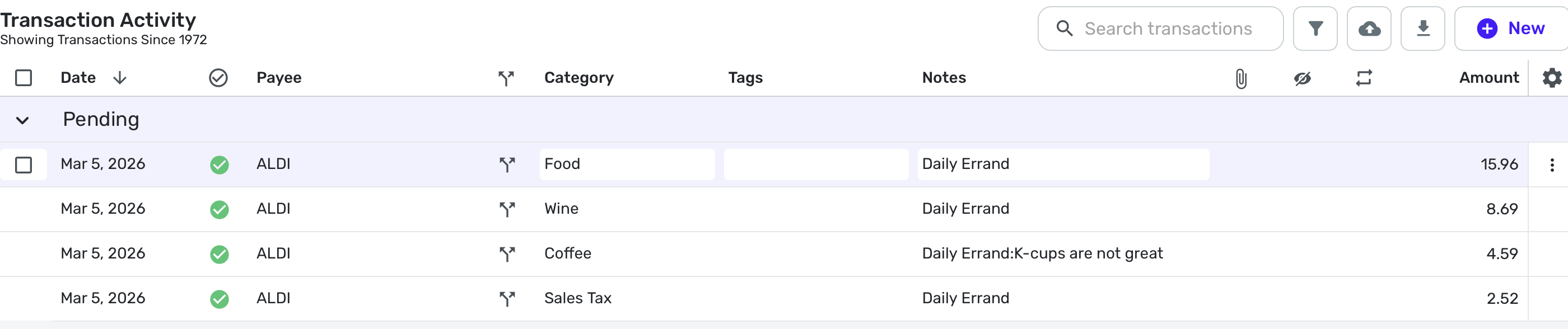
I admit I will rarely use both, so this Daily Errand note is somewhat contrived.
Also thanks to Coach Natalie for pointing this out in her post today regarding Web App 6.9 because I hadn't found anything new in my own testing until she alerted me to it.
Now to go play with Quicken Assist some more . . .
Steve
Quicken Simplifi (Safari & iOS) Since 2021
Quicken Classic (MacOS) Since 2009
MS Money (1991-2009) and Dollars & Sense (1987-1991)2



