Unable to split paycheck, adding split amounts only increases amount to split

When I try to split a paycheck entry for a net pay deposit, I was previously able to add splits for wages, federal withholdings, etc. and each split amount would reduce the amount left to split. Now it only adds to the amount left to split. For example, if you have a paycheck amount of $1,000 and try to add $200 for federal withholding, it just adds the $200 so now you have $1,200 to split. It does not recognize signs either, so entering a "-" or "+" has no effect. This worked before, so something has changed in the last few weeks.
Best Answer
-
That makes sense. Using an income category for gross wages, checking for a green entry, and using a "+" sign to create one is often the solution to this kind of problem.
I'm glad you finally got it working.
DryHeat
-Quicken Classic (1990-2020), CountAbout (2021-2024), Simplifi (2025-…)-1

Answers
-
It does not recognize signs either, so entering a "-" or "+" has no effect.
Some things to check:
(1) Were you able to create a for gross income, using an income category?
(2) Does the income amount show up in the Split Transaction window in green and formatted like this: $+1,000.00? (You will probably have to use a "+" sign to enter this amount.)
(2) Were you able to create a split for federal withholding, using an expense category?
(3) If so, does the amount show up in black and formatted like this: $200.00? (You can use a "-" sign to enter this amount, but it will probably disappear when you leave the field.)
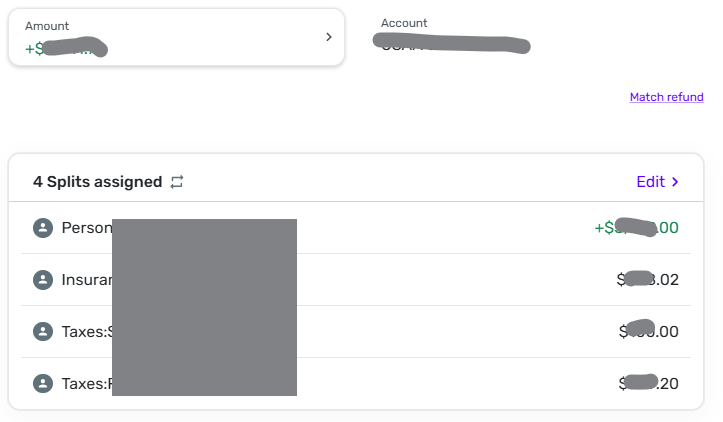
If you can't clear it up, you could post an image of the Split Transaction window. You can black out most of the amounts if you want to, but leave enough so we can see the dollar sign, +/- sign, and the first numeral.
DryHeat
-Quicken Classic (1990-2020), CountAbout (2021-2024), Simplifi (2025-…)0 -
- Yes, I am using an Income category for the gross wages. The amount in this example is $2,126.25.
- The net pay amount of $1,513.59 shows up as a green positive amount. and yes I am using a federal withholding category that is an expense type.
- Yes the amount shows up in black. If I try to change the sign using "+" or "-" it doesn't change anything, it stays as a positive number. You are correct, the sign disappears and the number is positive no matter what.
I have uploaded an image. The "left to split" total just adds every single number regardless of its category type of income or expense.
I have tested recreating a transaction from scratch and it does this same thing that the downloaded transaction does.
I have tested creating an expense type transaction for example of $100 total using 2 different split items for expense type categories of $60 and $40 each and the "left to split" total is zero, so that seems to work when all the categories are expense type categories.
0 -
The net pay amount in the attached example is $1,513.59. The gross pay is $2,126.25 and the sum of all the expense type category deductions is $612.66. The sum of all these numbers is added together to get the "left to split" total of $4,252.56.
I started using Quicken Simplifi effective 1/1/26 and this has worked up until the last week or so. Something has changed in the system.
0 -
I have tried to enter a new transaction from scratch, not modifying a downloaded transaction and I get the same results.
0 -
I have also tried doing this in a incognito page within Chrome and that also does not change anything. I am using Chrome by the way. I have not tried another browser yet.
0 -
I have just confirmed that trying to do all of the above in the Edge browser has the same effect.
0 -
Chat GPT says that you have to just enter a separate transaction for your gross income and then a separate transaction for your deductions and then net them together for clearing against your bank transactions. I guess this would work but I don't understand why I should have to do it this way when it worked fine the other way before where the income and expense categories netted out to get the net pay deposit.
0 -
I can see that the net pay in the Amount field at the top of the page is positive and green.
But in your image I can't see the gross amount in the splits. Apparently it has scrolled off the top of the split listing. Is the gross of $2126.25 entered as a split, with an income category, and green?
As an example, here's what one of my splits looks like. As you can see, the net amount at the top is green, the first split is the gross, with an income category, and is also green, and the rest of the splits are expense categories and are black. The net amount equals the gross minus all of the other splits.
FWIW, I do it exactly the way you do (not the ChatGPT way) and it works for me as it should.
DryHeat
-Quicken Classic (1990-2020), CountAbout (2021-2024), Simplifi (2025-…)0 -
The gross amount of $2,126.25 is entered in the split with an income category but it shows up as black. It is not green like the example you are showing.
Not sure why that is the case. I have confirmed that the category I am using is a wages category that is an income type category. I have tried to use other income categories to see if they worked differently and they are all showing up as black numbers.
0 -
The gross amount of $2,126.25 is entered in the split with an income category but it shows up as black. It is not green like the example you are showing.
Ok, that helps. This would be a lot easier if you posted an image of all the splits that didn't show up in the first one, but I'll hazard a guess anyway.
Can you try (or re-try) entering the gross amount using a "+" sign? You would have to delete the amount in the split (even if it is "0.00") and enter it exactly like this: "+2126.25" — without the quotes. If you do that, it should end up being in green type and should significantly change your "left to split" amount.
DryHeat
-Quicken Classic (1990-2020), CountAbout (2021-2024), Simplifi (2025-…)0 -
You have got to be kidding me. I entered the gross wages with a "+" and that fixed it. I am so happy right now. [removed offer for personal payment] Thank you so much!
1 -
Im having all the same issues as D_Oldham. This also just started happening a few weeks ago. If you enter your splits in the mobil app on your phone all works as it should.
0 -
Im having all the same issues as D_Oldham.
Did you try the fix that worked for @D_Oldham? Did it not work for you?
If it didn't work, please post an image of all of the splits so we can try to figure out what is going wrong.
DryHeat
-Quicken Classic (1990-2020), CountAbout (2021-2024), Simplifi (2025-…)0
