Net Worth Feature: Share your feedback here!
Comments
-
My mortgage was sold to a new company, so I replaced my previous lender with a new account in Simplifi this month. This displays as a sudden drop in my net worth this month, even though the debt originated when I purchased my home in 2021. It would be great if there was some way to reflect this in the chart, as it's misleading as-is.
0 -
@pterisaur, you can import account balance history to correct histroical net worth data:
-Coach Natalie
0 -
I really miss the old option to show the breakdown of my net worth by account over time, not just the breakdown at a single point in time. It would be even better if I could view the net worth over time graph with both the option to show the breakdown by account and by account type. All of this over time. I don't want a single color total net worth over time graph and single point in time breakdowns. The graph of net worth over time needs to be a colorful break down.
1 -
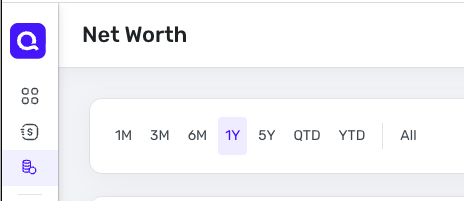
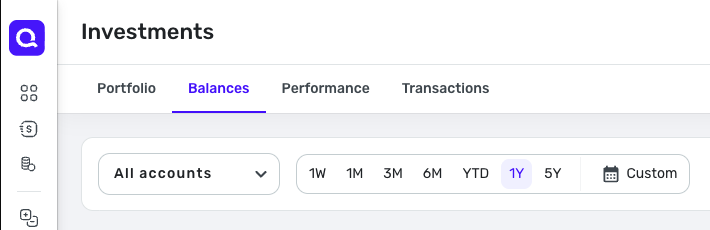
Small improvement request: can we get the option to set a custom date range in the new Net Worth module? It currently only offers pre-set timeframes & All.
Other modules (like Investments and the Net Worth Report) also offer "Custom" as an option. Thanks!
Net Worth:
Investments:
 1
1 -
Hi @Coach Natalie , happy Friday! Just checking back to see how the product team is progressing with the issue I reported and the materials I provided for them.
Thanks!
0 -
Hi @Coach Natalie , I hope you're having a good week! Just following up on my case to see if there's any update. Thanks!
0 -
I'd like to filter out closed accounts. I know I can pick which ones I want to see one-at-a-time but it would be nice if Simplifi could observe the "closed" status automatically.
0 -

I was in the new net worth feature, and I noticed apple card was "Excluded".
I went to Apple Card settings, but did not see anything obvious there. If I clicked the account on this screen (net worth page), it just took me to the account register. I cannot easily locate how to unexclude it — any advice?
-Rob
p.s. If Apple Card is excluded because it is handled differently, I understand.
—
Rob Wilkens
0 -
@RobWilk, your post has been merged with the official feedback thread for the Net Worth feature, which is currently in Early Access testing, so it can be reviewed and hopefully answered by our product team.
Thanks for the feedback!
-Coach Natalie
1 -
@Coach Natalie Expect more feedback. Now that I've escaped 'emergency pay down debt' mode today, I'm going to start being more strategic (planning) with my funds. I won't just be planning to send 100% of all available cash to paying down debt as I had been.
As I said, I understand Apple Card is "synced in the app," but the register is available on the web, so there may be reasons it's excluded. It also may be something somewhere where i just have to check a box to enable it, want to be sure if this is something i can fix.
—
Rob Wilkens
0 -
@RobWilk You manage the included/excluded accounts (on web) from the menu next to the +Account button. It's a three-dot menu. From there, pick View Included Accounts.
As a side note (and one of the reasons I know where that option is), I've noticed that when you close an account, it excludes it from the net worth even if it was included before. This is not expected behavior in my opinion, as I'd still want the account's historical balance to affect historical net worth. That doesn't change because the account is now closed.
0 -
Ok, something came up which i would consider a bug…
I posted - elsewhere (https://community.simplifimoney.com/discussion/comment/67629#Comment_67629) that my Apple Card (and it turns out, Apple Cash) were excluded from the Net Worth report. Another user showed me how to add it back.
Well, thinking about recent activity, the Apple Card (and Apple Cash) were added AFTER this new net worth feature appeared. If i had 'include credit cards' checked, you would expect newly added credit cards would be included as well.
Separately, while the default view of Net Worth has daily updates, i noticed if i change it to 3M or 6M (or change it from the original one at all) the daily granularity is lost.
-Rob
—
Rob Wilkens
0 -
Well, thinking about recent activity, the Apple Card (and Apple Cash) were added AFTER this new net worth feature appeared. If i had 'include credit cards' checked, you would expect newly added credit cards would be included as well.
@RobWilk That's probably the answer, because all my accounts are accurately included including the closed Savings account.
Steve
Quicken Simplifi (Safari & iOS) Since 2021
Quicken Classic (MacOS) Since 2009
MS Money (1991-2009) and Dollars & Sense (1987-1991)0 -
It looks like the Net Worth graph is now only showing month end balances. I liked it better when you had the option to set the interval the graph would display. I liked being able to see daily for the shorter intervals.
Was this a recent change?
0 -
Hey, thanks for your feedback! We're digging into the issue with granularity on the chart - it should always be displaying daily for 1M, 3M, 6M, 1Y, QTD, and YTD.
I've also recorded your feedback on new accounts automatically being included - that definitely feels like it should be happening.0