Converted PDF to CSV and unable to import into Quicken Simplifi [Edited]

Not only will Simplifi not connect to Walmart OnePay, but neither OnePay, nor Synchrony will allow CSV downloads of their transactions. After converting PDF statements into CSVs, Simplifi NOW won't upload transactions via CSV. The human chat assistant incompetently bumbled around for an hour, sending me 2 CSV files of XML code only to tell me that the upload process is backlogged. What a joke. Simplifi - get your stuff together.
Comments
-
Hello @freyal12,
Thank you for letting us know you're encountering this issue. To help troubleshoot, please provide more information:
- I see that Support recommended waiting a few hours. Have the transactions appeared?
- Were you trying to import data for multiple accounts using a single CSV?
- If you were, please try importing data for one account at a time.
- Did you see any error messages when you tried to import your CSV files?
- Note: To avoid duplicate transactions, Quicken Simplifi will allow you to import a CSV file into an account only once. Attempting to do so again will not generate an error message, but no transactions will import.
- Were all the fields in the CSV file filled in?
- Blank fields, especially for Date, Payee, and Amount, can cause import issues.
- Were the dates in the CSV file in MM/DD/YYYY format?
- If the dates were not, please reformat them and try again.
- Were there any commas or dollar signs in the amount field?
- If there were, please remove them and try again.
I look forward to your response!
-Coach Kristina
0 -
Hello @Coach Kristina ,
Thank you for the follow up. I appreciate the quick response.
- After 11 hours, the transactions have not appeared.
- I was trying to upload to a single account.
- No error messages appeared until I attempted to upload the CSV with the XML code from your customer service specialist. At this point, I have attempted 5+ times to upload the correctly formatted CSV. I receive a positive green check mark each time informing me that the transactions have been uploaded, though they are not visible in the transaction list.
- All relevant and applicable fields are filled in the CSV (Date, Payee, Amount). From previous experience, I don't add categories until they are imported due to potential typos.
- Following the "import_template," all dates are formatted to MM/DD/YYYY.
- No dollar signs, nor commas are in the amount field.
Thanks,
0 -
Thank you for your reply,
You mentioned the CSV was converted from a PDF. Have you tried copying and pasting the information to a different CSV file, just in case something about the converted file is causing the issue?
If you're willing, would you please share a sample of what you're trying to import?
Thank you!
-Coach Kristina
0 -
Thanks, yes the original conversion was into an .XSLX from which I transferred it into a CSV. I've since recreated 5 different CSVs in multiple attempts to reupload.
Sure; however, CSVs are apparently not allowed to be attached to Quicken comments…
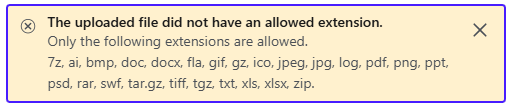
Any recommended next steps?
0 -
Thank you for your reply,
Since you mentioned converting from Excel, did you use Format Painter to apply the format from our template to the rows? Here are the steps:
- Select the cell with the formatting you want to copy.
- Next, select Home > Format Painter.
- Drag to select the cell or range you want to apply the formatting to.
- Release the mouse button, and the formatting should now be applied.
I attached the template in a zip file, just in case you need it.
You should be able to convert your CSV file to a ZIP file and attach it to a post or DM. If there is any information in the file that you prefer to keep private, please attach it to a DM rather than posting it directly in this discussion.
Thank you!
-Coach Kristina
0 -
Hey Kristina,
I believe that I may be miscommunicating.
- When I "converted" the data from the .XSLX to the CSV, I simply copied the values and pasted the values only into the downloaded "Import Template" from the Simplifi website (the same file you just shared).
- My issue is not that the data is receiving an error message when I upload transactions. My issue is that it has "successfully" uploaded 10+ times, though the data is not in the transaction dataset. I have attempted uploading to multiple different accounts and have searched by every relevant filter and search prompt, but the data doesn't appear to be accessible. I have also done this exact process for several previous months (since Simplifi has yet to connect to OnePay) and have not run across the issue.
I just DM'ed you the CSV file via a Zip file.
Thanks,
0 -
Thank you for your reply,
I replied to your DM.
I also observed that an additional step was needed after importing to get all the transactions to display. After importing, I clicked on the Spending tab, scrolled down to verify everything was showing, then clicked back to the All tab. Note: This feature is currently in Early Access.

That got all the transactions to show up.
I hope this helps!
-Coach Kristina
0 -
Hello @freyal12,
Did the transactions eventually show up? In addition to the steps provided by @Coach Kristina, are you able to verify if trying in another web browser/incognito mode works to resolve the issue reported here with importing the CSV file into Quicken Simplifi?
Let us know, thank you!
-Coach Jon
0 -
Hi @Coach Jon,
No, they have not. After messaging back and forth, @Coach Kristina requested I submit the Simplifi activity log.
I have not tried via another browser/incognito mode but will do that after close of business today.
Thanks!1 -
Hi @Coach Jon - can confirm that neither the alternative browser, nor incognito mode in Chrome resolved the issue. All attempts show a successful upload green check mark and then no visible transactions.
0 -
Hello @freyal12,
Thank you for the update! Can you verify whether this is the only CSV file you have encountered this issue for? If you upload a test CSV file using the template provided to you by @Coach Kristina, do you see those transactions?
Additionally, did you try the steps @Coach Kristina mentioned above to see if they work for you? Let us know!
-Coach Jon
0 -
Hi @Coach Jon
I'm not entirely sure what you are asking, but in sum:
Since Simplifi won't connect with OnePay (after months of requests from many users), for the past 7 months, on a monthly basis, I've been uploading the OnePay CSV data into Simplifi. This month, the upload process received a "Successful Upload" message, but none of the transaction data was visible. I have reconfigured the CSV, nearly 2 dozens times at this point, from the template provided online, from the useless files your original customer service rep provided, and from the various files @Coach Kristina have sent. If you're asking whether I have tried an alternative CSV file from the first one I attempted, the answer is yes. Many times.
Yes, of course I followed the all of the steps mentioned above, in chats with @Coach Kristina , and in chats with your other customer service reps - I'm trying to get this resolved as soon as possible.
Additionally, if there are any future recommended steps, can you compile them into a single list? This back and forth does not seem to be an efficient use of either of our time. To that point, since this doesn't appear to be a simple resolution, it is sounding like the most time effective solution is to manually enter each transaction in. Please let me know if that is not the case.
Thanks,
0 -
Hello @freyal12,
The solution you suggested would be the quickest way to resolve the issue. If you still wish to troubleshoot, I would suggest testing whether importing the CSV file into a newly created account works. If it does, you can import the rest of the transactions into the new account and remove the previous account that is not showing the imported transactions from the CSV file. You could then continue tracking the new account going forward. Let us know!
-Coach Jon
0 -
Hi @Coach Jon
Well, what do you know - creating a new account worked! It will take some leg work to move the previous 7 months of transactions and make sure the other-account transfers line up, but at least this resolved the immediate issue.
@Coach Jon thank you and @Coach Kristina for the assistance. While this is not ideal, it meets the need for now. I hope the underlying issue is resolved in the near future so that users won't have to re-create manual accounts each time they wish to import data.
Thanks,
1

