Neuberger Private Wealth FDP-103/FDP-187 error (edited)

I see that you FINALLY after 18 months of people bringing this up, added Neuberger Private Wealth. Unfortunately I get an error FDP-103. I am concurrently logged on to nbprivatewealth.com so the error message is useless.
Please don't provide the silly generic steps that you have provided to everyone else that complained about this. Please provide an actual solution.
Comments
-
Hello @sgreenstonenj,
Thank you for reaching out! I can see the FDP-103 issue you are experiencing with Neuberger from our side. If you can try the following steps, we can work on further troubleshooting.
- Verify the bank selected is the correct instance – You may see several different instances of your bank; check to see if you’re using the correct one.
- Verify that your login information is correct – Type your password/PIN into a text application to ensure you don’t have any typographical errors. Then, copy and paste your login information into Quicken Simplifi to ensure accuracy.
- Verify your login at the bank’s website – Try to sign in to your bank’s website using the same login credentials to ensure you've not locked yourself out of the account and that the credentials are still valid.
- Check for an app-specific password – Some banks require users to use a specific app password when connecting to a third party. Check with your bank to see if you need to use an app-specific password.
- Update your credentials – Try temporarily updating your password at your bank's website and then try again to connect in Quicken Simplifi. We recommend NOT using the following special characters: & < > / \.
If those steps do not work, please provide the following information to better assist us. You may DM me this information if you prefer:
- The name of the account(s), as it appears in Quicken Simplifi.
- The name of the account(s), as it appears on the bank's website.
- Have there been any recent changes made to the bank's website or its sign-in process?
- What is the exact URL you use to log in to your account on the bank's website?
- What type of account(s) are you attempting to connect in Quicken Simplifi?
- A screenshot of the Accounts Summary page from the bank's website that has a wide enough scope to show the full page URL. This is the landing page after signing in, and typically lists all accounts and balances. You will want to take this from a web browser and not a mobile browser, as well as redact any private info such as account numbers.
- The format of your password (DO NOT provide your actual password!). For example, "Quicken123$" would be coded as "Xxxxxxx###$", where a capital "X" indicates a capital letter, a lowercase "x" indicates a lowercase letter, and a "#" indicates numbers; the actual special characters used will need to be provided.
-Coach Jon
0 -
You clearly did not read my post. Everything works on the Neuberger side. I am not sharing screenshots. It used to work, they changed the URL 18 months ago, it stopped working. You finally recently added the new URL, yet the logon doesnt work on your site, but works fine on theirs.
This is the URL https://www.nbprivatewealth.com/en/client-portal1 -
Hello @sgreenstonenj,
Thank you for the reply! I certainly understand your frustration with this issue; however, we will not be able to do anything on our end unless the troubleshooting steps I shared can be completed and the information I requested can be provided.
Let us know how you would like to proceed!
-Coach Jon
0 -
I am not comfortable sharing screens shots of my accounts outside.
Verify the bank selected is the correct instance– VerifiedVerify that your login information is correct– DoneVerify your login at the bank’s website– ValidCheck for an app-specific password– Not relatedUpdate your credentials– Done - still an issue- The name of the account(s), as it appears in Quicken Simplifi. - no name cause it wont connect
- The name of the account(s), as it appears on the bank's website. - Greenstone FBO Scott
- Have there been any recent changes made to the bank's website or its sign-in process? - No
- What is the exact URL you use to log in to your account on the bank's website? nbprivatewealth.com
- What type of account(s) are you attempting to connect in Quicken Simplifi? - Investment account
- Format of password - XXXX####
1 -
Hello @sgreenstonenj,
Thank you for the requested information! Before we can escalate this issue, can you please try the following troubleshooting step? We need you to click the URL displayed for the bank in Quicken Simplifi when selecting to add the account, and see if you can sign in to the new page that opens to the bank's website.
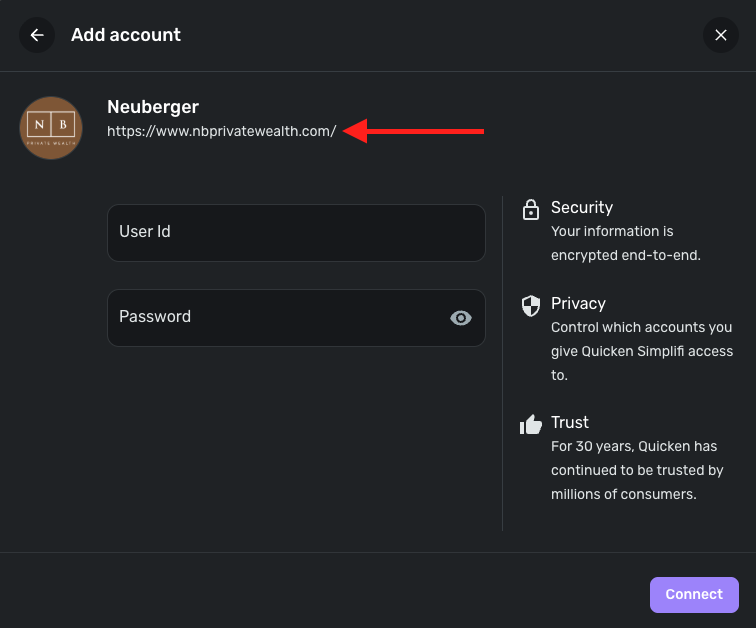
Let us know!
-Coach Jon
0 -
That doesn't bring me to the logon page. Just a landing page. I then have to go to the menu, choose Client Portal, then Client Logon (New Portal) which brings me to this
https://clientportal.nbprivatewealth.com/Membership/Apps/WhiteLogin_WF_App.aspx?ReturnURL=/#!/w/whiteloginwfapp?s=whiteloginholderapp0 -
An easier URL would be this one https://clientportal.nbprivatewealth.com/
0 -
Hello @sgreenstonenj,
Thank you for the reply! So just to confirm, you are able to sign in to the webpage at that URL, correct? We want to make sure this is the correct instance specifically for you.
-Coach Jon
0 -
That is correct. THe fields for logging in are here https://clientportal.nbprivatewealth.com/
0 -
Thank you @sgreenstonenj,
I reported this issue to our service provider and will follow up here with any status updates going forward!
In the meantime, you can track the account manually by adding manual transactions, which will keep your records up-to-date. Here are the steps to do so: Managing Transactions in Quicken Simplifi | Quicken Simplifi Help Center
If the account is an investment account, the manual tracking steps are a little different:
- Make the account manual so you can add and edit Holdings: How to Make an Account 'Manual' | Quicken Simplifi Help Center
- Add/edit your Holdings to keep accurate records: Tracking Investments in Quicken Simplifi | Quicken Simplifi Help Center and Tracking Investments in Quicken Simplifi | Quicken Simplifi Help Center
EWC-12288041
-Coach Jon
0 -
Hello @sgreenstonenj,
I am back with an update from our service provider for this issue! They state the issue has been resolved. Can you please try connecting once again in Quicken Simplifi and let us know if it is resolved on your side?
Thank you!
-Coach Jon
0 -
Thanks Coach Jon. I got further this time. but now I am getting this error even after entering the right multi factor authentication
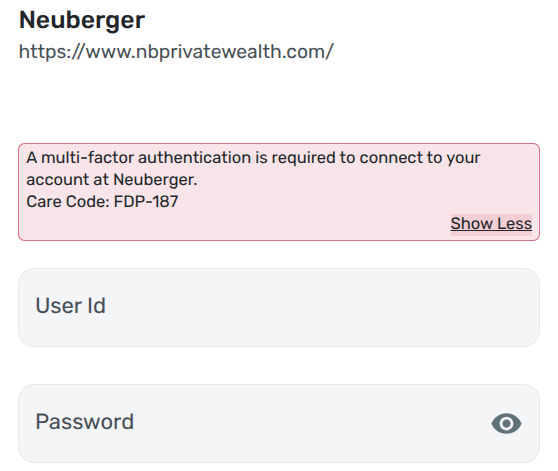 0
0 -
Hello @sgreenstonenj,
Thank you for the update! This error is usually received when an invalid MFA code has been entered. Since you are receiving the code as you mentioned, can you let us know what method you are using (SMS, call, etc.)? You will want to verify that you are entering the most current code. If you enter the code manually, try copying and pasting the MFA code.
If you are receiving the code as a text, see if you can select to receive it via email or phone call instead.
-Coach Jon
0 -
Its not a code I enter. There are questions that need to be answered and I am answering them 100% correctly. They work fine on the neuberger website.
0 -
Hello @sgreenstonenj,
Thanks for the information. Is this MFA option something you select, or is it the only option available? Can you share a screenshot showing the MFA question? Are you prompted to complete the MFA when signing into your bank's website? I would also check to see if copying and pasting your answers from the bank's website into the MFA field in Quicken Simplifi works here. Let us know!
-Coach Jon
0 -
Its what they had me set up when I created the account. There 3 or 4 different questions that rotate randomly. I am prompted periodically on the bank website. Copying doesn't copy the actual answer it only copies the asterisk that it changes to.
0 -
I even just changed the 2 factor questions and answers on the bank website and it still didn't work
0 -
Hello @sgreenstonenj,
Thank you for the reply. I did escalate this new error to our service provider and will follow up once I hear back with any status updates.
EWC - 12300078
-Coach Jon
0 -
Hello @sgreenstonenj,
I am back with an update from our service provider regarding this issue! They have implemented a fix! Please try signing into your bank's website and accessing your account. If successful, please try connecting to the account again in Quicken Simplifi and let us know if the issue has been resolved on your side!
-Coach Jon
0 -
Same issue. After asking for my multi factor and entering it correctly, it says
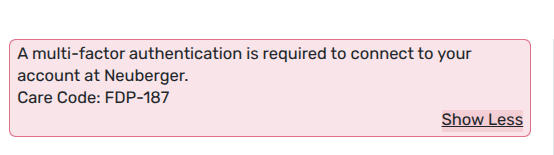 0
0 -
Hello @sgreenstonenj,
Thank you for the reply. Can you please provide a screenshot of the Accounts Summary page from the bank's website that has a wide enough scope to show the full page URL? This is the landing page after signing in, and typically lists all accounts and balances. You will want to take this from a web browser and not a mobile browser, as well as redact any private info such as account numbers.
Feel free to send this via DM!
-Coach Jon
0 -
This is the login URL where I enter username and password: https://clientportal.nbprivatewealth.com/Membership/Apps/WhiteLogin_WF_App.aspx#!/w/whiteloginwfapp?s=whiteloginholderapp
This is the URL that it lands on once logged in: https://clientportal.nbprivatewealth.com/Apps/NBClient_WF_App.aspx#!/w/nbclientwfapp?s=nbcdashboardholderapp0 -
Hello @sgreenstonenj,
Thank you for the response! However, we will need the screenshot itself that I mentioned above. Let us know if that can be provided!
-Coach Jon
0 -
Not sure how this helps anymore than the links but…
 0
0 -
Thank you @sgreenstonenj!
I have reported this information to our service provider and will follow up here once I receive any status updates!
-Coach Jon
0
