Cannot enter recurring or manual transaction that will be due over a year (365 days) from today

Either you try to enter a recurring expense or a manual transaction due over one year from, it is impossible. Simplifi is blocked for entries over one year. This is a nonsense. Why limit entries to one year. So if the recurring expense starts on May-13-2026 for monthly payments, the last month which happens on April-13-2027, is not created. You cannot create the last month entry manually either. Also you cannot enter the check number of ech payment because that field does not exit in recurring entries. All this is simple and possible in the FREE MS Money which I am trying to convert to Simplifi. Thank you
[edited title for clarity]
Comments
-
I've got recurring transactions that have been running for many years already. I wonder if it just doesn't show you the reminder when it's that far away?
0 -
Can you try to enter a simple test of an expense entry transaction today March 19, 2026 but payable in June 19, 2027 as an example. It doesn't let you to enter either manually 06/19/2027 or you cannot scroll the calendar to that date. The calendar stops one year later in March, 2027. Thank you
0 -
You and @EL1234 are talking about different things.
You can't enter a future transaction more than a year away.
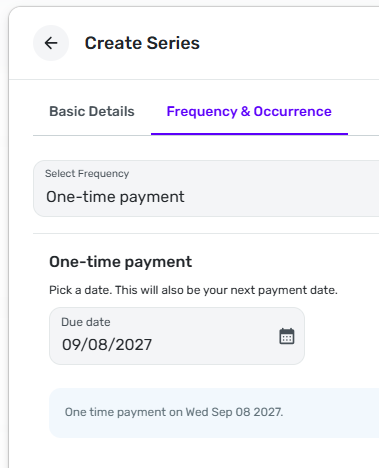
But you can enter a "one-time payment" recurring series more than a year away.
DryHeat
-Quicken Classic (1990-2020), CountAbout (2021-2024), Simplifi (2025-…)1 -
I was referring to this line from the original post which made me think that it was supposedly an issue with recurring transactions as well
"So if the recurring expense starts on May-13-2026 for monthly payments, the last month which happens on April-13-2027, is not created"
0 -
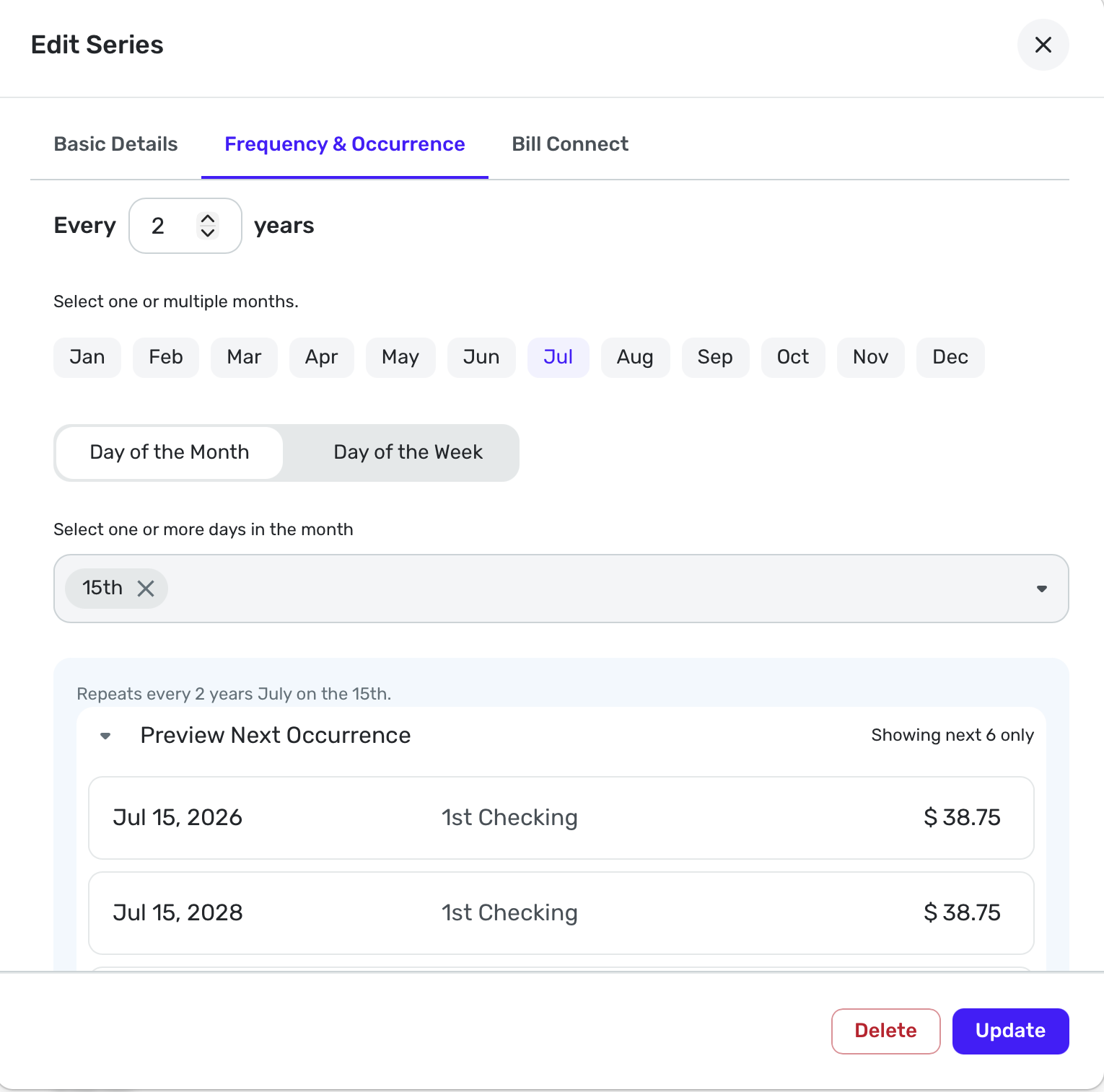
Interesting. I never have had much occasion to do it more than a year ahead. But I do have the Renew Driver's License for every two years (me in 2026, wife in 2028). And you can see the occurrences.
By the way, the Spending Plan only goes a year out too. You can look at the Spending Plan for March 2027 but it won't show any after that. The April 2027 Plan will become available on April 1.
It's great to be able to make a one-time reminder more than a year out. But could you view it afterwards? I guess you could find it in All Series, but once I was doing some testing, I accidentally made a future transaction more than a year out and I couldn't find it to view it or delete it.
I had to change the date on my Mac into the future to get Simplifi to show it. Then I deleted it.
So @Andre Cheply are you saying that now Simplifi just refuses to create a transaction dated more than 365 days out? if so, that is a change. I don't want to test it because I've been through that before. 😀
Steve
Quicken Simplifi (Safari & iOS) Since 2021
Quicken Classic (MacOS) Since 2009
MS Money (1991-2009) and Dollars & Sense (1987-1991)0 -
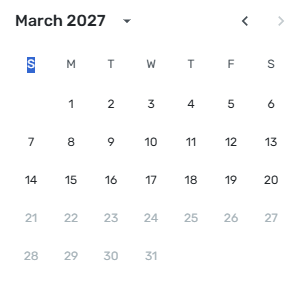
That is what I mean I cannot enter a date further than 1 year. It stops at March 20th 20027. The dates after today are greyed out and cannot be chosen.
The last of my recurring motorcycle licence registration (May-13-26 to April-13-2027) payment is April-13-2027 and it cannot be entered manually. Same thing, when I created the series I could not use the end date on April-13-2027. So my series end on March 13, 2027 with 11 payments instead of 12 and ending April-13-2027 over 1 year from today
Now, I will try the suggestion of creating a one time recurring payment as suggested by @DryHeat
Thank you all !
0 -
I use QBP, which should work the same as Quicken Simplifi but doesn't always.
I am able to enter the dates you described for the monthly payment series you wanted, starting May 13, 2026 and ending Apr 13, 2027. The End-Date calendar is not grayed-out and allows me to pick a date over a year away.
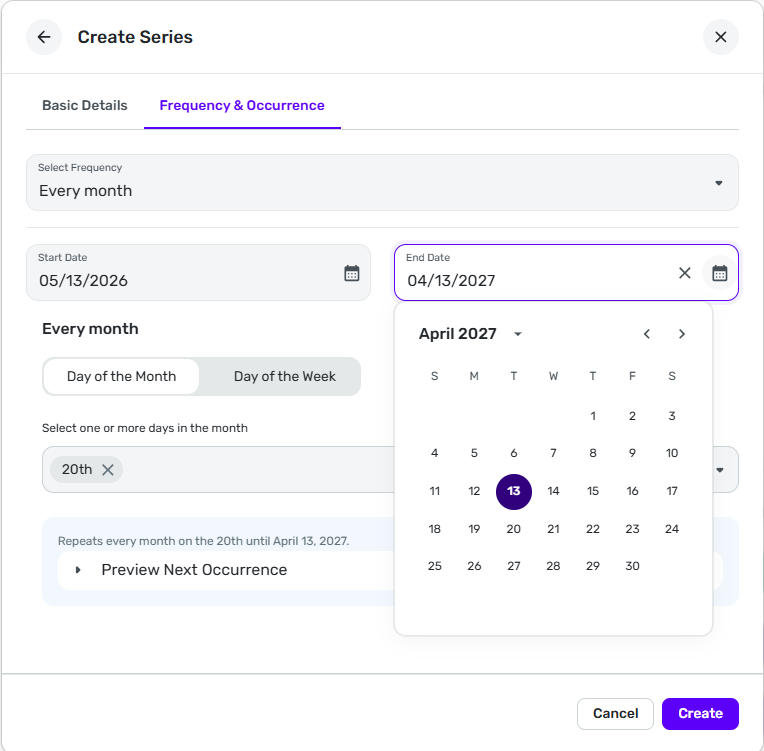
Can you post a full image similar to the one above showing the problem you see when you try to do this? That would make the issue clearer for the coaches if they need to escalate this.
DryHeat
-Quicken Classic (1990-2020), CountAbout (2021-2024), Simplifi (2025-…)0 -
Now, I will try the suggestion of creating a one time recurring payment as suggested by @DryHeat
Okay, I created a new series with the same name and called it "One time payment" and used the date of April-13-2027 (over a year from now). Now, I have the original series of 11 payments (May-13-2026 to March-13-2027) plus the new series of the same name with only a 1 time expense ending with a total of 12 payments.
Since the reminders only show expenses for 1 year I do not see that last expense in the Reminders list of transactions but at least it is registerd there so I should be seeing it after April-14-2026. If I ook in ALL SERIES, it is there now.
Thank you @Dry Heat for that wonderful suggestion and have a nice day !
1 -
Are you entering multiple individual dates? Maybe if you instead set it up as "monthly on the 13th" it would work.
0 -
Here's what I did to solve the problem :
Worked fine except for the 12th payment that was over one year.
So i needed to create a new series with one payment onlyI created ONE series with 11 recurring monthly payments on the 13th of each month plus one NEW series of the same name but as a "one payment".
So, I end up with a total of 12 recurring expense and the last one is over one year on April 13-2027
All is fine now. Thank you
0 -
Great Andre. I think it is there; it's just that Simplifi doesn't display anything over 1 year out.
Steve
Quicken Simplifi (Safari & iOS) Since 2021
Quicken Classic (MacOS) Since 2009
MS Money (1991-2009) and Dollars & Sense (1987-1991)0

