How to exclude part of a split from spending plan?

This discussion was created from comments split from:
Split transactions should be treated as separate transactions (2 Merged Votes).
Comments
-
How do I get one part of the split to not count in my spending plan? While I am spending the money… I am also getting reimbursed for it… so technically, it should not count as "my spending".
0 -
I think this capability will ultimately come.
However, what I would do is count it as spending because you did spend the money. Then I would enter a one time reminder for the reimbursement so that the Spending Plan will counter your spending with the negative spending. I would use the same category for both.
I thought about using a Refund Reminder but those as far as I can tell don't get counted in the Spending Plan.
Steve
Quicken Simplifi (Safari & iOS) Since 2021
Quicken Classic (MacOS) Since 2009
MS Money (1991-2009) and Dollars & Sense (1987-1991)0 -
Like you, I exclude reimbursable expenses from my spending plan. I don't view myself as "spending" that money. Instead, I am "loaning" it to the entity that will reimburse it.
In the rare case where such an expense is part of a split, you can always create a separate transaction for that part of the split. It's a kludge, but it allows me to exclude the expense.
But the way I personally handle it is with a cash account called "Reimbursable Exp." I make the spending on that split a transfer to that account. Then when I get the reimbursement, I make that a transfer back from that account. The balance on that account gives me insight into what I am owed.
DryHeat
-Quicken Classic (1990-2020), CountAbout (2021-2024), Simplifi (2025-…)0 -
But the way I personally handle it is with a cash account called "Reimbursable Exp." I make the spending on that split a transfer to that account. Then when I get the reimbursement, I make that a transfer back from that account. The balance on that account gives me insight into what I am owed.I do the same. It's a great way to keep track (I flag transactions that were reimbursed, so I can filter by unflagged to see which need to be taken care of). And since Transfers are automatically excluded from spending plan, it solves the original request very neatly.
The other way of categorizing the reimbursement with the same category as that portion of the spend also works fine as long as the reimbursement is within the same month. If not, it'll affect your spending plan, which may or may not matter to you (I suppose it depends on the volume).
0 -
thank you all …. I have a category "reimburse" … so if I am understanding correctly…. this should not be a "category" but an "account" instead….. and then when charges are made…. use the transfer to that "account" and then when the reimbursement comes in… use the transfer again to that "account" to offset.
Do I have that correct?
If so, the "reimbursed" payment would not matter that it is not in the same month, also correct? Sometimes it takes a month or more to get reimbursed….
0 -
Correct! In that case it won't matter which month it happens, since both transactions (when you lay money out and when you are paid back) are categorized as transfers, and transfers don't count in the spending plan. (Of course you'll need to make sure it doesn't ruin your cash flow but that's a separate discussion.)
It's also nice if you need to send a request for reimbursement, that you can keep track of what money is owed and send an itemized list if need be. I flag transactions that are reimbursed. When my reimbursement comes in and I categorize it, I then look at that account, at all transactions without flags, select the reimbursement and all the transactions it was for, make sure that the total is 0 (ie: they cancel each other out), and give them a flag.
It's really nice to see a list of money that's owed to you! You can even create a recurring reminder if you usually get reimbursed at a predictable rate (eg: once a month). I have one as a transfer from the manual account to the checking account where I get reimbursed via zelle. I can update the amount throughout the month when I want and then my checking account's cash flow projection includes the reimbursement.
0 -
How is this going to effect the pmt accounts?
For instance….. I charge the item via my credit card, then I pay off the credit card from my checking account. Then the reimbursement comes back into my checking account.
I am a bit confused on this part….. When the reimbursement comes in…it is going to come in to my checking account. If I then transfer the reimbursement to the "reimbursement" account…. my checking acct balance will be off.
0 -
There is a difference between where money is deposited or withdrawn in the real world and how those transactions are categorized. You have to keep in mind that the Reimbursement Acct is not a bank account. It is just a bookkeeping convenience for recording the debt you are owed. So here's a set of transactions:
(1) Charge $100 worth of office supplies to your credit card for your company and categorize it as a transfer to the Reimbursement Acct.
Result: you owe $100 more to CC and your balance in the Reimbursement Acct goes up $100.
(2) Pay $100 CC bill in the way you normally do.
Result: your bank account goes down $100 and your CC debt goes down $100.
(3) Get a $100 reimbursement deposited in your bank for office supplies and categorize it as a transfer from the :Reimbursement Acct.
Result: You have $100 more in the bank and your balance in the Reimbursement Acct goes down $100.
So if these are the only transactions, your bank balance will have gone down $100 when you paid the CC and back up $100 when you got the reimbursement. In the meantime, your Reimbursement Acct will have gone up to $100 while you were owed the money and gone down to zero after you were paid back.
You don't have to do it this way. It is just one of the ways to handle this issue.
DryHeat
-Quicken Classic (1990-2020), CountAbout (2021-2024), Simplifi (2025-…)0 -
Connected account balances aren't calculated by summing the existing transactions - Simplifi fetches the balance from your bank (and optionally incorporates pending transactions according to the settings for that account). So categorizing a transaction as a transfer to/from a manual account will only affect the balance of the manual account, not of the connected account(s).
0 -
thank you all…. I am going to try this.
0 -
Good luck! Report back if you have any questions :)
0 -
What type of "account" should the reimbursement be?
I tried it as a bank acct and also as a Liability account …. I moved a transaction just to see what it was going to do……
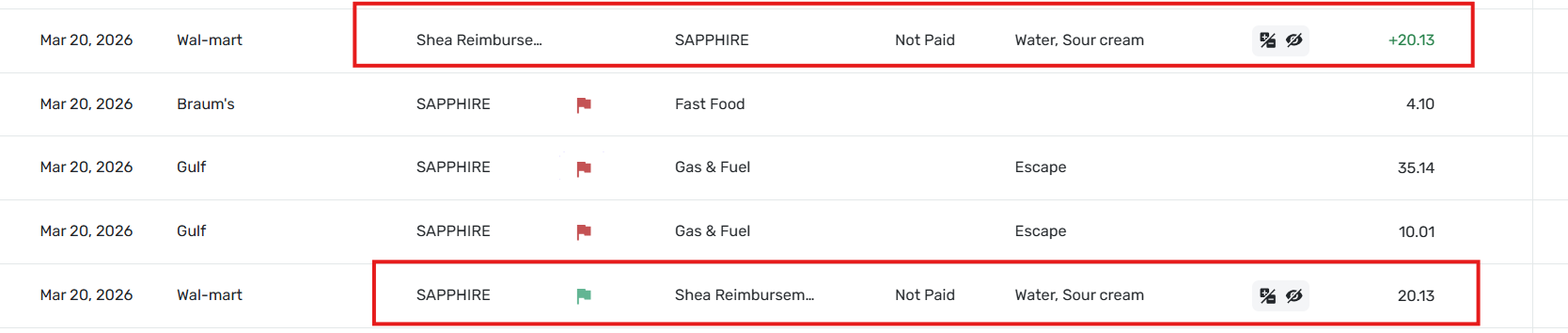
When I selected "transfer to reimbursement" acct…. it changed from a negative to a positive and now I have 2 transactions appearing in my transactions list. Is it supposed to be this way?
 0
0 -
I use a "Cash" account. That seems to work and keeps it up in the "Cash & Checking" area where I can see it.
I assume the transaction list you show in the image above is for multiple accounts and that the 3rd column is the account name (SAPPHIRE, Shea Reimbursement).
It all appears correct to me. The two $20.13 transactions are the two sides of the transfer:
- The one with black numbers represents $20.13 coming out of the SAPPHIRE account.
- The one with green numbers represents the same $20.13 going into the Shea Reimbursement account.
If you look at the list of accounts on the left hand side (on the web) you should see that Shea Reimbursement now shows a positive balance of $20.13. That represents the amount that you are owed, so it is positive.
Does that make sense to you?
DryHeat
-Quicken Classic (1990-2020), CountAbout (2021-2024), Simplifi (2025-…)1 -
I'm pretty sure that mine is set to Checking since I created it before Cash accounts were an option. Either one should work. You could also use Other Asset if you prefer it to be further down in the list, below credit cards (I didn't want it there).
And that's correct that the transactions in the manual account for purchases will be positive numbers, as DryHeat explained. It means that Shea has a balance with you and when they pay it back, the account will go back down to zero. The negative transaction is the purchase from your back/cc as money coming out of your real accounts, and the positive is the manual transaction that was created as the other side of the transfer, to indicate money owed to you. If you keep on top of things, you'll be able to look at the balance of your manual account to see what's owed to you at any time.
1 -
I moved all transactions to a “transfer” account instead of a “reimburse” category
I was going to delete the “reimburse” category so that I don’t use it by mistake.
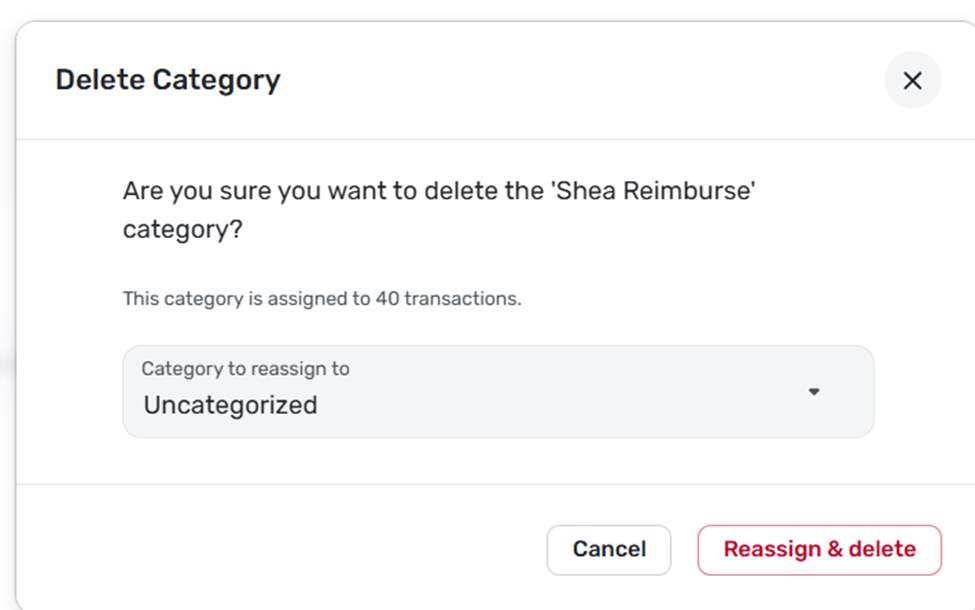
When I attempted to delete the category, I received this message:
But when I search the transactions list, I get this message:
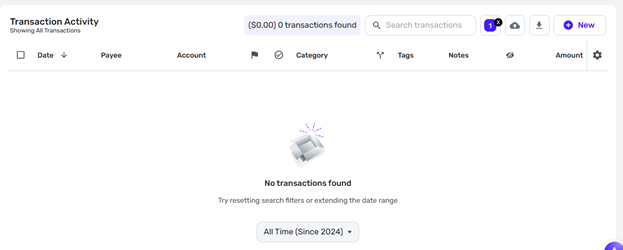
Why would the top message tell me there are 40 transactions but the bottom message tell me there are none?
0 -
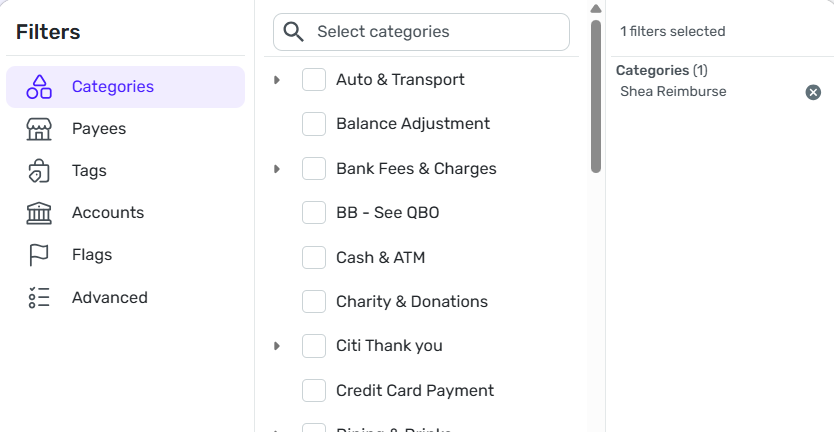
the bottom screenshot is filtered by "shea reimburse" category:
 0
0 -
Hmm the only thing I can think to check - is are you looking at just one account's transactions (by selecting an account in the left sidebar)? If yes, clicking All Accounts instead might show the missing ones.
0 -
I searched 'all' transactions and then filtered by category and it gives me 0 transactions.
However, when I go to delete the "category" since there should be nothing in it……. it says "39" transactions will be moved to "uncategorized" ……
Maybe I should let them be moved to "uncategorized" and then move them to the "transfer" account?
Seems strange to me.
0 -
That is strange! Why don't you create the new manual account first and then choose it as the place to move the 39 transactions? And then look at that account (click it in the sidebar) and see what's there?
0 -
Why don't you create the new manual account first and then choose it as the place to move the 39 transactions? And then look at that account (click it in the sidebar) and see what's there?
When Simplifi says it will "move" the transactions, what it really means is that it will recategorize them.
Right now these transactions are categorized under a regular category ("Shea Reimburse") so they only exist in one account (if they exist at all). There are no matching "transfer" transactions.
If you create a new manual account (let's call it "Fake Account") and recategorize these transactions as transfers to that account, what may happen is the transactions will remain where they are and new, matching "transfer" transactions will be created in Fake Account. It doesn't sound like that is what you want to do.
DryHeat
-Quicken Classic (1990-2020), CountAbout (2021-2024), Simplifi (2025-…)0 -
Right, but they'll be removed from the no-longer-needed category, which can then be deleted. Isn't that the goal?
We aren't even sure if these 39/40 transactions even exist or if it's a bug somewhere. But this is what I would try.
0 -
Right, but they'll be removed from the no-longer-needed category, which can then be deleted. Isn't that the goal?
I guess it's up to @shely6875 to figure out how they want to do it. Either re-categorize them as they originally suggested, or try to turn them into transfers as you suggested (and possibly create new matching transfers in another account).
I just wanted them to be aware of what might happen in that second case. If these are some kind of phantom transactions that don't show up anywhere, it could be weird to have "transfers" in another account that are somehow linked to them.
The real underlying problem is that they can't find these 40 transactions. Maybe one of the coaches can weigh in on that.
DryHeat
-Quicken Classic (1990-2020), CountAbout (2021-2024), Simplifi (2025-…)0 -
Exactly
0 -
Yes, the goal was to delete the "category" Shea reimburse (since I am using an "account" as suggested to keep track of reimbursable charges).
However, the system will not let me remove it until I do something with the 39/40 transactions that it says are there... But in the "all" transactions list.. they are not found ... ???
I don't want to create a "fake" account because that is essentially the same thing I already have created in the reimburse "account".
And it seems to me that moving them to an uncategorized "category" is the same group type that the missing items are already in but not found
Maybe I am missing something. Hopefully a coach can help.
0 -
(I've been assuming Uncategorized doesn't have any transactions now. Maybe that's wrong.)
It's a long shot, but the idea is that moving them to a new category might make them visible in the list. It might not, in which case nothing would be gained by doing this.
Another option would be to rename the Shea Reimburse category to something ("Phantom Transactions") that won't get confused with anything else and then wait for a coach to help out.
DryHeat
-Quicken Classic (1990-2020), CountAbout (2021-2024), Simplifi (2025-…)0 -
I think I like that last option actually. But they all should work.
0 -
Well….. I created the "phantom transactions" category….. reassigned the items and deleted the category. And now you can search "phantom Transactions" and there are no items listed…..
How long does it take for a coach to get involved in the conversation? Is there something I need to do?
0 -
Hello @shely6875,
Thanks for reaching out! I see that some of our users have given great suggestions for you to try! To confirm, it looks like the current issue is that you removed a category and can no longer locate the transactions you reassigned to a separate category, correct?
If you select Transactions > All Accounts, and then use the "Search transactions" box to search for transactions filtered by this "phantom transactions" category, are you able to locate them that way? Let us know!

-Coach Jon
0



