Spending Plan: Upcoming credit card payment showing in both Bills and Other Spend

As stated, one (and only one) of my credit card payment transfers is showing up not only in Bills but also in Other Spend. The other credit card payment transfers show up only in Bills.
My credit card payment transfers (and reminders of such) always show up in the "Excluded this month" section of Spending Plan | Bills as transfers like this:

The redacted information in the image above is as follows: For the negative transaction the first item is the name of the reminder and the second item is my main checking account; for the positive transaction the first item is the name of the reminder and the second item is the credit card account.
But just one of those credit card payment transfers, the one shown above, is also showing up (and is also as excluded) in Spending Plan | Other Spend like this:

The redacted information in the image above is as follows: Account = my main checking account, Payee = the name of the reminder, and the Category = my main checking account (same as Account).
The side of the transfer that is showing up in Other Spend is the positive side of the transfer (plus sign, in green), which would normally correspond to the transaction that appears in the credit card account. That transaction currently shows up as a reminder on the credit card reminder list, like this:
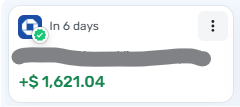
The only difference between this one and the other credit card payment transfers is that Simplifi erroneously matched this $1621.04 payment with a $10.32 refund on the card. Undoing the match resulted in there being no payment scheduled for April at all (which is a different problem discussed elsewhere). So I had to change the "Start Date" of the series back to Apr 8, 2026 and edit the amount to put things back like they were.
DryHeat
-Quicken Classic (1990-2020), CountAbout (2021-2024), Simplifi (2025-…)
Comments
-
Hello @DryHeat,
Thanks for reaching out! I can see the problem here, thanks to your screenshots. The same transaction definitely should not appear in both Bills and Other Spend at the same time. As you mentioned, I am wondering whether it was included in Other Spend because it was matched to another transaction.
Since it is just the one transaction with this issue, and the bill is still upcoming, I would see if deleting the erroneous transaction showing in Other Spend resolves the issue. If deleting the transaction does cause the upcoming bill to disappear, then you can edit the series to correct the next date, which should regenerate the reminder.
Let us know how this goes!
-Coach Jon
0 -
Here's what happened when I followed your instructions:
When I opened it in Transaction detail form in order to delete it, I found that it really does show the Account and Category as the same account (in RED). And it has a link to "Go to the other side" (in BLUE).
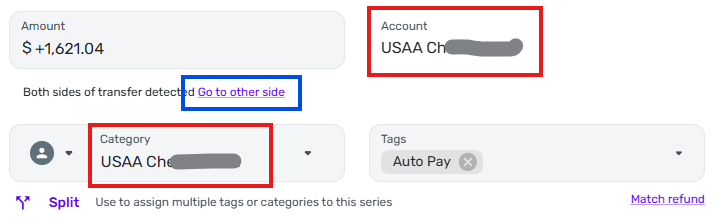
But when I click on "Go to the other side" nothing happens.
When I click on Delete Transaction it deletes as normal but the "Transaction deleted. Undo" message stays on the screen for about 30 seconds (which seems like a long time).
The transaction disappears from the Other Spend listing and the paired transfer transactions for April 8 remain in Bills (excluded) as before.
The reminders for the real Apr 8 transfer remain in place in the reminder carousel in both the checking and credit card account with the same amounts as before ($1621.04 or $+1621.04 respectively). But when I edit the series and look at Preview Next Occurrence, it shows a different amount for the payment of Apr 8 (the series default amount, not the amount as shown on the individual reminder).
So, in sum…
The immediate problem is remedied — the spurious transaction is gone. Thanks for that.
The functional problem remains — apparently trying to undo an erroneous match created a spurious transfer transaction where (1) the "from" and "to" sides of the transfer were the same account and (2) clicking "Go to the other side" does nothing. This does not seem like correct behavior.
There have been other reported problems with trying to undo erroneous matches and this should probably just be added to the pile as something to fix when they get around to that issue.
DryHeat
-Quicken Classic (1990-2020), CountAbout (2021-2024), Simplifi (2025-…)0
