Simplifi | Investment | Transaction Category & Reports

Q. I have been running Simplifi and Classic side by side for couple of months. I have had Classic for over 2 decades.
In Simplifi (web) it shows all investment transactions, with "Description/Category". If you try to update "Category" it defaults to Security/Payee.
It seems if Simplifi is going to show "Category" on the investment transactions, we should be able categorize to Income/Divide or what category end user may prefer.
I am trying to develop report to show Investment Dividends like I can on classic.
We can't even export to dump in excel for quick pivot table. Yes. I can go to institution, but sort of defeats purpose of pulling all in location.
Unless I am missing something, any idea when these features will available?
thanks for your assistance in advance.
Comments
-
Hi, I have been using Classic since 2009 and MS Money before that, so I know what you are saying.
Simplifi is mainly designed to show you the bottom line for your investments. The only transactions that are taken into account in the Spending Plan or Reports are those marked Payment/Deposit.
I spend my dividends in my brokerage account as regular income so when my dividends arrive at the end of the month, I change the Income Dividend part to Payment/Deposit and give it my own category. I set my IRAs in Settings:Accounts to Ignore in Spending Plan and Reports.
These are the categories I created to use with Payment/Deposit:
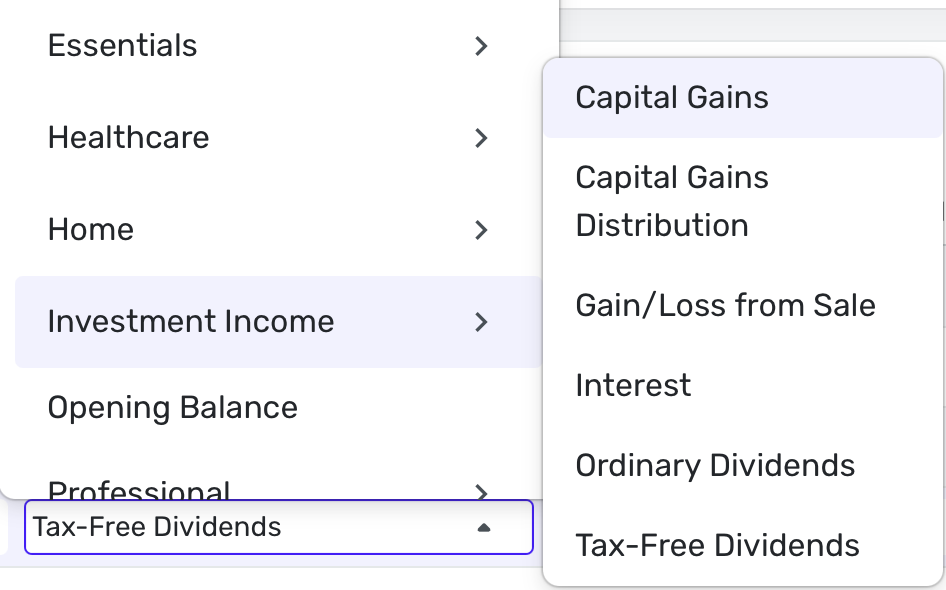
Now I can find them in reports and put them in the Spending Plan.
Steve
Quicken Simplifi (Safari & iOS) Since 2021
Quicken Classic (MacOS) Since 2009
MS Money (1991-2009) and Dollars & Sense (1987-1991)1 -
Thanks. I will give the work around a try. Assume you are referring to "Action"

Simplifi is good for the basics, but anything more, not yet ready to convert from Classic.
1 -
Yep, Actions is what I am referring to. Good luck.
Post any more questions or problems you run into.
Steve
Quicken Simplifi (Safari & iOS) Since 2021
Quicken Classic (MacOS) Since 2009
MS Money (1991-2009) and Dollars & Sense (1987-1991)1 -
Follow Up. It does work. Unlike Categories where you can edit multiple entries at once, seems Investment "Action" it does not. I will have to decide if I want to spend the time one by one and edit.
I get keeping it simple, but needs more refinement, at least some more control. The data is there.
I get it. It's why Classic product is offered, but…reporting function on investments is very limited - too limited.
0 -
Yes. It is limited. And we don’t get splits or recurring reminders either in Simplifi. So if you need or want extensive features in Investments, Classic is better. We keep pushing for more though.
Steve
Quicken Simplifi (Safari & iOS) Since 2021
Quicken Classic (MacOS) Since 2009
MS Money (1991-2009) and Dollars & Sense (1987-1991)0 -
The Investment side of QS is the obscure stepchild, I'm afraid.
I have been changing my securities and money market payments to Payment/Deposit from Action. With my battle plan I can change the payee and category with a few keystrokes and 6, or so, mouse clicks. That is a LOT of clicking with 8 accounts and monthly / quarterly dividends. It does work though. It's the way I get ready for tax season and track individual securities, over time.
It all worked great back in the free Mint days. All QS had to do was allow us to sort on Actions. It was so simple.
Also, be aware, that you can NOT export you Investment account in a CSV file. Why??? Good question. You can export your checking account, but not your Investment account. We could in Mint. So, basically, your data is held hostage.
If I'm not mistaken, you can't move your Investment data from QS to Quicken.
0 -
Concur. QS Investment seems to be at best a BETA version. I get QS is to keep it "simple". I have tried your method and other suggestion by others. It does work, but not worth my time my time to do one transaction at a time. I don't even have all my accounts in QS just for this reason.
Honestly, lack of investment reporting and control is a deal breaker for me switching to QS. I will give Q until end of the year to at least be able to export the Investment transactions to excel so I can at least dump in Pivot table for my own reporting function.
Otherwise, it will be time to move away from QS. I will keep with Quicken Classic. I will explore others as well.
I keep reading "coming soon" but tumbleweeds still rule QS platform for investment arena.
QS is at best for entry level. Works great for those individuals.
My one reason as I even explored QS. I travel 85% of my time for work.
Sync on Quicken Classic to cloud? Yeah. Not good. I honestly believe it's one of the main reasons why Q even did QS.
0 -
Can add category to "Actions" ? I assume you made all "Actions" Payment/Deposit than Category.
0 -
Yes, you have to change Action to Payment/Deposit in order to make a transfer or add a category. Once you do that, you can see the transactions in the Spending Plan or in Reports.
Here are two examples from my Cash Management Account:

Steve
Quicken Simplifi (Safari & iOS) Since 2021
Quicken Classic (MacOS) Since 2009
MS Money (1991-2009) and Dollars & Sense (1987-1991)0 -
Trying to make this approach work. I can now see the dividends correctly as income. However in my case I reinvest and hold the dividends in the Vanguard Brokerage money market account at higher interest rates and transfer this money to my cash account at later dates to payoff future large bills. Would you simply reassign these transactions as buy actions? (that is what QC does)
0 -
Hmm, this is an interesting conundrum. Because you are getting the taxable income now but spending it later, I would let QS download as usual. Then I would classify the dividend as a payment using my "Ordinary Dividends" category but keep the buy to show you bought more shares. Then when I decided to take some cash, QS should download it as a sell, and then do a payment/deposit transfer to your spending account so you can spend the money.
Of course, the above will mean that you will have the income earlier in your Spending Plan and with the spending later showing up later when you actually get the cash. Of course, that reflects reality. It is the same thing if you took the money from a Savings account to pay bills.
Steve
Quicken Simplifi (Safari & iOS) Since 2021
Quicken Classic (MacOS) Since 2009
MS Money (1991-2009) and Dollars & Sense (1987-1991)0 -
Thanks this should work for now. I'm hiding all these brokerage transactions from my day to day Spending Plan until the spend actually happens, mainly to keep my head sane! Its largely building up a fund for known quarterly one off expenses like Estimated Taxes. It is exactly like holding the money in a Savings account (I prefer Vanguard's higher money market int rates). I am also keeping the Dividend income showing in all reports so I can track the total income vs spending including tax payments.
1
