LPL Connection Accounts not updating (edited)

Is anyone else having a problem with LPL not updating all of their accounts. I have 4 accounts and only two are updating. I tried to reset the connection and it displays 16 accounts and I have tried a combination of which accounts to add and thought i was successful but only two have updated. The other two pulled in the balances but are not updating. Out of the 16 accounts some are listed twice and have a dollar amount associated with them, but some just display the account name with no dollar amount. This just started happening last week.
Comments
-
Hello @DomB,
Thanks for reaching out! Can you please provide a screenshot of the list of accounts that are showing up to be added in the Add Account flow you mentioned? This will help us better understand the specific issue here.
You can also try these steps to see if they work better in resolving the issue you are seeing:
- Make all of the accounts with the bank manual by following the steps here.
- Once you see the account(s) listed in the Manual Accounts section under Settings > Accounts, go back through the Add Account flow to reconnect to the bank.
- If the connection is successful, carefully link the account(s) found to your existing Quicken Simplifi account(s) by following the steps here.
Let us know!
-Coach Jon
0 -
Okay,
I got the 4 LPL accounts connected. I have no connection issues but only two of the four account balances are updating correctly. See attached. any help would be appreciated. I i upload images of my account balances will anyone else
be able to see them?
0 -
Hello @DomB,
Thanks for the information! You can send any other screenshots via DM to me if you prefer! Did you try the previous steps I listed to see if that works in getting the accounts updated? If you can also send the following information, it would be helpful:
- The name of the account in question, as it appears in Quicken Simplifi.
- The name of the account in question, as it appears on the bank's website.
- A fresh screenshot of the balance for the account in Quicken Simplifi.
- A screenshot of the balance displayed on the bank's website for comparison.
- A screenshot of the Accounts Summary page from the bank's website that has a wide enough scope to show the full page URL. This is the landing page after signing in, and typically lists all accounts and balances. You will want to take this from a web browser and not a mobile browser, as well as redact any private info such as account numbers.
We will also need logs to be sent:
- Log in to the Quicken Simplifi Web App.
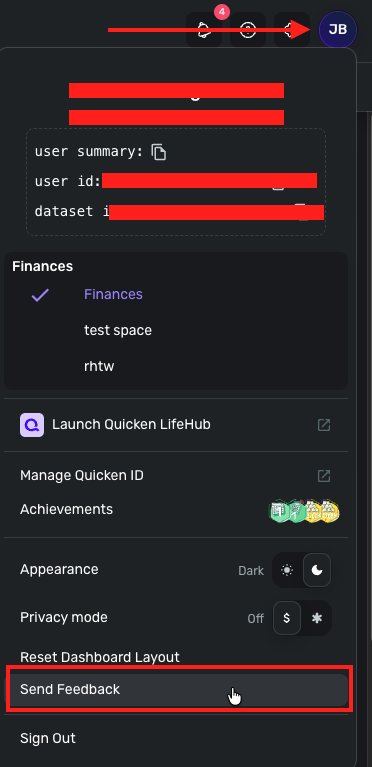
- Select the Profile icon in the upper-right corner of the screen.
- With the Profile menu open, hold down the Option key (Mac) or the Alt key (Windows), and then click Send Feedback.
- Leave all boxes checked, add a brief description of the issue, and then click Send.
-Coach Jon
0 -
How do I dm you. I have all of the screen shots which I was going to send but they show my balances which i don't want everyone to see. I just sent the profile logs
0 -
I sent you the screen shots
0 -
I have to run some errands but let me know what you think. I thought about making those two accounts manual again and trying to re add them. The problem I have is when Simpli connects to LPL it is showing each account 4 times. Some have balances and some don't. So it has been trial and error to see which ones it is connecting to. I pick the ones that have balances and pulls in the dollar amount at the time but does not update. So I can do the same thing and try a different account that has the balance tied to that account and see what happens. Just a thought.
0 -
Hello @DomB,
Thank you for the screenshots! Can you also send a screenshots showing the 16 accounts that show up during the Add Account Flow? This will help us better understand specifically what you see when you go to add them. You can send this via DM as well when you can.
-Coach Jon
1 -
In order for all 16 to show up I need to reset the connection.
I made the two that were incorrect Manual and added them again. The first time I tried it showed each account twice (total 4 accounts) but no values were pulled in. I tried again and only those two accounts showed and it pulled in the correct amount. I will wait until it refreshes in the morning and see if I get any errors or if the balances are incorrect.
If not we can try and reset the connection and I will get you screen shots of all 16 accounts.
Thanks for the help.
1 -
Hello @DomB,
Thanks for the DM! I viewed the screenshots. Can you let me know which of the four accounts is not updating specifically? We will still also need the following information. You can DM this as well!
- A fresh screenshot of the balance for the affected accounts in Quicken Simplifi.
- A screenshot of the balance displayed on the bank's website for comparison.
Let us know!
-Coach Jon
0