Adding new CD account with E*Trade Bank - "You have already added all your accounts at this bank."

I opened a new CD in the E*Trade bank and all's well. I opened a 2nd CD and have been trying to bring it over SQ. I'm doing exactly the same as I did for the first CD.
I get the following from the "NEW, Add Account" attempt:
E*Trade Bank
"You have already added all your accounts at this bank."
Both CD accounts have been funded and have their own Account numbers at E*Trade bank.
Suggestions?
[edited title for clarity]
Comments
-
Hello @neon45,
Thanks for reaching out! How recently did you open your 2nd CD account with E*Trade? I have seen that it can sometimes take a few days for newly opened accounts to be added to Quicken Simplifi.
If it has been some time since you opened the account, and it still is not populating, then I would try the following steps to see if they work to resolve the issue you are seeing:
- Make all of the accounts with the bank manual by following the steps here.
- Once you see the account(s) listed in the Manual Accounts section under Settings > Accounts, go back through the Add Account flow to reconnect to the bank.
- If the connection is successful, carefully link the account(s) found to your existing Quicken Simplifi account(s) by following the steps here.
Let us know how this goes!
-Coach Jon
0 -
Thanks for the effort. After making the 1st CD manual and reconnecting SQ only found the original. I've got it back to automatic.
E*Trade bank shows the both CDs. Both have a balance. The 2nd one has been open for a week and funded for 3 days or so. I guess I'll check back on it Monday.
Thanks.
1 -
QS still isn't seeing the 2nd CD. The deposit was received on 3-23-26.
Of interest, when I log into E*trade they send a text with the security code. QS doesn't seem to check for the code or ask for it. This was the same scenario for the first CD
QS asks: Do you have two-factor Authentication enabled for your E*Trade account. I answer yes, and it wants the following: Please enter six-digit code from VIP Access mobile app or hardware token. I have no VIP access or token.
Suggestions? The only thing I can come up with is delete the whole account and start from scratch. Maybe E*Trade will see both?
The CD is from the Morgan Stanley Private Bank account.
PS.. I've set E*trade to accept QS in their profile section.
0 -
Hello @neon45,
Thanks for the reply! Do you access the account from the same website as the first E*Trade account, or is it an external account? Are you rerouted to a different website or URL when you select the missing account’s details on the bank's website? If you are, can you let us know what the URL is that you are rerouted to?
If it is not an external account, and Quicken Simplifi is still not finding it upon connecting, please supply the following information:
- Has there been any activity in the account in the last 90 days?
- Is the account a subtype of a different account?
- Has the bank made any recent changes to its website or sign-in process?
- Are you the owner of the account?
- The name of the account, as it appears on the bank's website.
- A screenshot of the Accounts Summary page from the bank's website that has a wide enough scope to show the full page URL. This is the landing page after signing in, and typically lists all accounts and balances. You will want to take this from a web browser and not a mobile browser, as well as redact any private info such as account numbers.
- A screenshot of the Add Account screen in Quicken Simplifi showing that the account in question is missing at account discovery.
-Coach Jon
0 -
I totally deleted the CD and ETrade account from QS and tried adding if from a clean slate. QS refuses to see the 2nd CD account number. It's a "bank" account, just like an Ally account and should not be having a problem loading separate CD numbers.
The account is brand new. Nothing has changed in the last 2 weeks except for adding the 2nd CD. I can see both accounts after logging into E*Trade bank. There has been no activity in either account and both are fully funded.
btw, I called E*Trade support and the tech guy I talked to had never heard of Simplify; Quicken, yes.
0 -
Hello @neon45,
Thanks for letting us know! If you can, please supply the information I listed previously. This will help us with further troubleshooting on our side. You may feel free to send this information via DM:
Please also submit your logs via the 'Send Feedback' option:
- Log in to the Quicken Simplifi Web App.
- Select Profile from the left-hand navigation bar.
- If you have Early Access enabled, the Profile icon will be in the upper-right corner of the screen.
- With the Profile menu open, hold down the Option key for Mac or the Alt key for Windows, and then click Send Feedback.
- Leave all boxes checked, add a brief description of the issue, and then click Send
-Coach Jon
0 -
Thanks for the response coach… Unfortunately, the frivolity never ceases. After clicking on the circle with my initials (top right) there is no Profile menu, anywhere. There is no Profile menu on the left side navigation bar either.
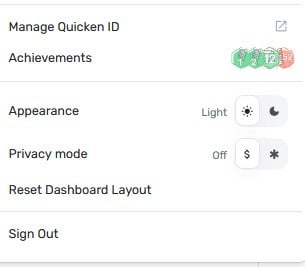
"Please also submit your logs via the 'Send Feedback' option:" Logs, what logs?
How many free months will I be credited with to improve SQ? The information that you are requesting is time-consuming and formidable for a computer rookie. This is fast turning into way too much work that shouldn't be.
Thanks coach
0 -
Hello @neon45,
From your screenshot you shared, it looks like you already have the Profile menu open. Now, you will just need to hold down the Option key for Mac or the Alt key for Windows, and then click Send Feedback.
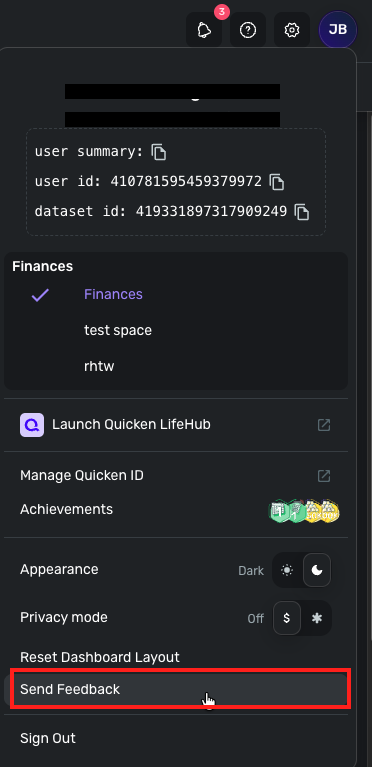
Let us know when those logs and the requested information have been sent over! Thank you!
-Coach Jon
1 -
Hello @neon45,
Thanks for the DM with the requested information! It does look like we are still missing the logs I requested, however. If you can send those over and let us know once that is done, that would be great!
As far as the MFA for E*Trade, that is not something we at Quicken Simplifi can control. That would be sent from your bank in this case. Hope that makes sense!
-Coach Jon
0 -
Coach Jon …. Again, WHAT LOGS ?? WHAT ARE LOGS ?? WHERE DO YOU FIND LOGS ??
0 -
Thank you for your reply,
To clarify, are you unable to find your profile, unable to find the Send Feedback option, or do you want more information about what log files are and why they're needed?
Thank you!
-Coach Kristina
0

